Jump to content


Photo
- - - - -

Mac's Galaxy (MAC 1986) VPX [Visual Pinball X]

Mac Galaxy VPX

  • Please log in to reply
52 replies to this topic

#41 arngrim

arngrim

    DJ Force Feedback

  • VIP
  • 2,188 posts
  • Location:Charleroi, Belgium

  • Flag: Belgium

  • Favorite Pinball: Monster bash


Posted 12 November 2017 - 05:10 PM

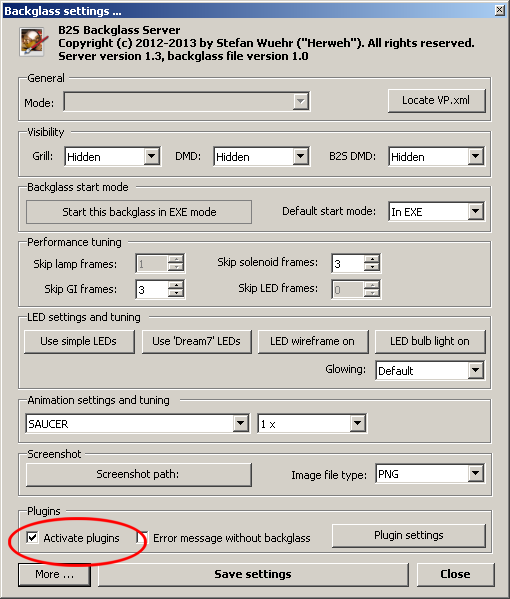
Ok i see, but if you uncheck error message without backglass in the directb2s options
https://directoutput...vatePlugins.png
You won't have any errors if you don't have a backglass installed to be running, if that was the reason why you needed to deactivate

Envoyé de mon SM-A320FL en utilisant Tapatalk

#42 Mustang1961

Mustang1961

    Pinball Fan

  • Members
  • PipPipPipPip
  • 721 posts
  • Location:Isernhagen

  • Flag: Germany

  • Favorite Pinball: All Loserman76 recreations

Posted 18 November 2017 - 08:48 AM

Hi Michael,


the table works fine, however the left slingshot is dead, no sound (the rubber-touch, only) no kicking the ball. I compared it with the right, ALL is same. Can you please have a look to that?


Thank you, Christian.


Edited by Mustang1961, 18 November 2017 - 08:58 AM.


#43 mfuegemann

mfuegemann

    Pinball Fan

  • VIP
  • 1,222 posts
  • Location:Cologne

  • Flag: Germany

  • Favorite Pinball: Medieval Madness, Fast Draw


Contributor

Posted 18 November 2017 - 05:02 PM

Hi Mustang,


the slingshot trigger is indeed a bit off, so that the ball hitting the rubber will not activate the switch. I will prepare an update. Thank You for finding this.


Michael 


#44 mfuegemann

mfuegemann

    Pinball Fan

  • VIP
  • 1,222 posts
  • Location:Cologne

  • Flag: Germany

  • Favorite Pinball: Medieval Madness, Fast Draw


Contributor

Posted 18 November 2017 - 05:15 PM

Version 1.2 is online


#45 HSM

HSM

    Hobbyist

  • Members
  • PipPip
  • 43 posts

  • Flag: United States of America

  • Favorite Pinball: Bride of Pinbot

Posted 19 November 2017 - 03:45 AM


For the error in line 110, this is "controller.run" - what does the error message say?


With 1.2 it's now line 118 (Controller .Run) Error:   Machine 'macgalxy' (MAC's Galaxy) terminated before initialized, check the rom path or rom file!

Roms are in the correct directory...


#46 Thalamus

Thalamus

    Pinball Wizard

  • Platinum Supporter
  • 4,975 posts

  • Flag: Norway

  • Favorite Pinball: GOT, Alien Star, LOTR, TOM

Posted 19 November 2017 - 04:39 AM

@HSM : Have you tried a crc check on the rom ? I believe I download mine from the other site. I haven't had the time to try 1.2, yet, but, I expect that your problem is either wrong rom or that you need to update your VP components.


From now on. I won't help anyone here at VPF. Please ask Noah why that is.


#47 batch

batch

    VPFroggie

  • Members
  • PipPipPipPipPip
  • 2,152 posts
  • Location:Center of France

  • Flag: France

  • Favorite Pinball: Anyone if gaming and appearence are great

Posted 19 November 2017 - 06:53 AM

Thanks for the update, Michael


HSM, did you download these files ? (vbs and rom)


And do you have the last VPX and VPinMAME versions ?


http://www.vpforums....showtopic=38974


17.jpg


Edited by batch, 19 November 2017 - 06:57 AM.

signature_11042026.jpg          DIRECT LINK TO MY TABLES http://www.vpforums....loads&mid=30858    

                                               LINK TO MY 204 BACKDROPS : Design Resources/ Main Resources/Table Templates/Table Resources/Backdrops for VPX Tables (DT 16/9)  2.0 


#48 HSM

HSM

    Hobbyist

  • Members
  • PipPip
  • 43 posts

  • Flag: United States of America

  • Favorite Pinball: Bride of Pinbot

Posted 19 November 2017 - 03:19 PM

vpinmame was looking for galaxy1 and 2 .bin.  That's not how they're named in the roms linked.  Got them from another site and working well.  Thanks for pointing me in the right direction!


#49 Mustang1961

Mustang1961

    Pinball Fan

  • Members
  • PipPipPipPip
  • 721 posts
  • Location:Isernhagen

  • Flag: Germany

  • Favorite Pinball: All Loserman76 recreations

Posted 21 November 2017 - 07:44 AM

Version 1.2 is online


Thank you Michael, now it works. I thought I cannot stand the time until you will publish Zira,... now Galaxy will help to bridge-over. It is fun to play!


my regards, Christian. 


#50 STAT

STAT

    Pinball and Arcade Freak

  • VIP
  • 4,980 posts
  • Location:Wels - Austria

  • Flag: Austria

  • Favorite Pinball: Twilight Zone

Posted 09 December 2017 - 11:58 AM

Thank you for the Update(s) :tup:


#51 Thalamus

Thalamus

    Pinball Wizard

  • Platinum Supporter
  • 4,975 posts

  • Flag: Norway

  • Favorite Pinball: GOT, Alien Star, LOTR, TOM

Posted 09 December 2017 - 12:39 PM

Thank you Michael for the update !


From now on. I won't help anyone here at VPF. Please ask Noah why that is.


#52 Rajo Joey

Rajo Joey

    Pinball Fan

  • Members
  • PipPipPipPip
  • 1,489 posts
  • Location:Niedersachsen

  • Flag: Germany

  • Favorite Pinball: Attack from Mars, Abra Ca Dabra and many old EM-Tables

Posted 10 December 2017 - 06:44 AM

Thanky you Michael. A good update.

Gesendet von meinem SGP511 mit Tapatalk

Rajo Joey - My front-end-files; Hundreds of Audio- and Videorecordings in high quality for Playfield (4k/60FPS) and Backglass (HD), Wheels & POV-Files: The Media-Post

https://www.facebook...02697096474910/

https://www.facebook...oups/VPAddicts/

https://www.facebook...oups/VPjunkies/


#53 bpjacobsen

bpjacobsen

    Pinball Fan

  • Members
  • PipPipPipPip
  • 1,092 posts

  • Flag: ---------

  • Favorite Pinball: all

Posted 29 December 2017 - 04:49 PM

Nice table. How do I prevent the DMD from jumping back to the default position? Everytime I start the table it shows in my BG monitor. I tried removing and commenting out the section with the DMD sizes. Usually that works, but not on this one.


Also tagged with one or more of these keywords: Mac Galaxy, VPX