there is always work to do.. 
but i guess at some point we have to tackle the multi-screen task to get rid of all the madness with b2s, vpm and vpx competing for screen display time..




VPF Veteran


Posted 02 January 2016 - 12:33 PM
there is always work to do..
but i guess at some point we have to tackle the multi-screen task to get rid of all the madness with b2s, vpm and vpx competing for screen display time..
Enthusiast


Posted 02 January 2016 - 12:51 PM
This is very interesting, but not game enough to test it on my rig just yet!I think upgrading to w10 here has solved all those problems, there is no aero and although I only run in DT mode. There is zero stutter at all and that is with 4xAA enabled, a solid 60fps, actually I even overclocked my monitor to 66fps and it still never dropped a frame, this is with a core i3 haswell @ 3.4 Ghz and a GTX660.
Pinball Fan



Posted 04 January 2016 - 12:26 AM
Not sure if this is the place to post this, but it seemed the best place to post and I haven't been able to find this info elsewhere. I thought I saw somewhere there is a way to rotate a desktop version of a vpx table for FS cabinet mode. If this is correct, how would I do this?
Also, where can I change the lighting on a vpx table?
Thanks in advance!
Pinball Wizard


Posted 04 January 2016 - 12:34 AM
See rotate for cabinet usage
http://www.vpforums....193#entry328749
 vp-10-day-night.jpg 467.52KB
34 downloads
vp-10-day-night.jpg 467.52KB
34 downloads
Edited by Outhere, 04 January 2016 - 12:40 AM.
Pinball Fan
Posted 04 January 2016 - 01:34 AM
I'm sure I'm missing something. I'm looking at all the options in the editor, but I don't see where to rotate for cabinet usage.
I'd be very grateful if you could show me where to do this.
A Faint Ghost Through the Raindrops


Posted 04 January 2016 - 01:40 AM
video preferences........underneath where you select your screen resolution
We come in peace.. shoot to kill.. shoot to kill.


Posted 04 January 2016 - 01:40 AM
In the Menu for Preferences, Video Options there is a checkbox for Rotate for Cabinet Use. This is a global setting for all tables. edit: fren beat me to it.
On each Table if you click on BackDrop on the left, and Options next to it, you will get Options with a check box for use DT for desktop use or uncheck for FS settings for Full Screen or cabinet use. edit and theoretically this part is not needed if the first is set.
Edited by BorgDog, 04 January 2016 - 01:41 AM.
Pinball Fan
Posted 04 January 2016 - 02:53 AM
Thanks for the replies. I have the global setting for Rotate for cabinet use checked and all the FS tables look good.
As for this table, I now see the option for the specific table (I'm using TKO for vpx), however this table was made for DT. The option to Use DT is unchecked and the backglass is on the second monitor, however the play field is still rotated as if in DT mode. If I check this box, it goes to full DT mode, with backglass on the play field.
Is it possible to change a vpx table that was made for DT mode and use it in full screen rotated for a cabinet?
I'm hoping this can be done in vpx. Can it?
We come in peace.. shoot to kill.. shoot to kill.
Posted 04 January 2016 - 02:57 AM
That's one of my tables, and it was definitely made for both desktop and cabinet. In the description of the download I mention you need to change the FS settings as my cab has the playfield in portrait orientation. Here is a good starting point for that, the primary change is in the XY Rotation for the FS settings. the FS settings are the ones you need to adjust.
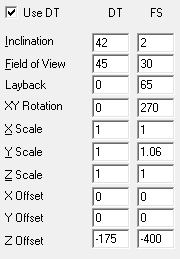
Edited by BorgDog, 04 January 2016 - 03:00 AM.
Pinball Fan
Posted 04 January 2016 - 05:35 AM
This is awesome, thanks BorgDog and Fren. This table now plays FS and is a lot of fun.
I'm really digging vpx, especially the Gottlieb tables from the 1970's. Still having stuttering issues with vpx tables such as America's most haunted and Pirates of the caribbean (when launched via PinballX), but most other vpx tables play great and the lighting is a big improvement over vp9.
Thanks!
DJ Force Feedback


Posted 04 January 2016 - 02:57 PM
fully agree, keep your orientation for yourselfBorgDog ... this is just my opinion, but you should release your tables with typical FS orientation, ... just to prevent this kind of "problems". Just a suggestion


Pinball Fan


Posted 04 January 2016 - 03:45 PM
fully agree, keep your orientation for yourselfBorgDog ... this is just my opinion, but you should release your tables with typical FS orientation, ... just to prevent this kind of "problems". Just a suggestion
lol!!!  I meant FS screen position.
We come in peace.. shoot to kill.. shoot to kill.
Posted 04 January 2016 - 03:58 PM
fully agree, keep your orientation for yourselfBorgDog ... this is just my opinion, but you should release your tables with typical FS orientation, ... just to prevent this kind of "problems". Just a suggestion
lol!!!
LOL well since my cabinet is the other way and that's how I make my tables I think you all should change your cabinet to portrait orientation, it makes much more sense and is a heck of lot easier to work on when standing at it. There is really no reason to run it the other way any more, that's just a very old legacy and that people are still saying the first thing you have do is set your monitor the other way is just crazy. It would also solve a lot of the table building issues people have with trying to fit 2 dimensional lights into 3 dimensional areas and work both orientations for desktop and cabinet mode, same with reel images and other items on the back drop with everything the same orientation it's a lot easier. I need to start a campaign to eliminate landscape orientation from being the "default", there is no reason for it.
That being said I can see all the questions getting old, I'll consider it.. maybe 
Enthusiast

Posted 04 January 2016 - 05:18 PM
Before the idea gets lost in another forum, I include it here too. I did not read every post, so I hope this idea is still fresh.
http://www.vpforums....e=2#entry329095
"There is also the possibility to integrate an own pinball frontend into VPX next. By this step I think a one time play button usage and an ask from VPX by that time to add it to VPX own favourites frontend list can make any other frontend obsolete."
Pinball Fan

Posted 04 January 2016 - 05:32 PM
fully agree, keep your orientation for yourselfBorgDog ... this is just my opinion, but you should release your tables with typical FS orientation, ... just to prevent this kind of "problems". Just a suggestion
lol!!!
LOL well since my cabinet is the other way and that's how I make my tables I think you all should change your cabinet to portrait orientation, it makes much more sense and is a heck of lot easier to work on when standing at it. There is really no reason to run it the other way any more, that's just a very old legacy and that people are still saying the first thing you have do is set your monitor the other way is just crazy. It would also solve a lot of the table building issues people have with trying to fit 2 dimensional lights into 3 dimensional areas and work both orientations for desktop and cabinet mode, same with reel images and other items on the back drop with everything the same orientation it's a lot easier. I need to start a campaign to eliminate landscape orientation from being the "default", there is no reason for it.
That being said I can see all the questions getting old, I'll consider it.. maybe
The questions are there because people can't seem to read. You gave a warning and a screenshot, that is enough hand holding.
It's never been easier to change the view and everyone I know always goes in to tweak the view to how they want it anyways. If they don't they really should as it will probably help the tables look best on their setup, it's very much a personal preference.
They are fine how they are and they are your tables, release them how you want.
-Mike
DJ Force Feedback
Posted 04 January 2016 - 06:16 PM

We come in peace.. shoot to kill.. shoot to kill.
Posted 04 January 2016 - 06:26 PM
my backglass screen is right oriented, i have vp, taskbar, everything there, table only runs normal on second rotated screen, i have 560 tables oriented like this, sorry it is a bit late to change that
That's cool, and I'm sure you are knowledgeable enough to change all the table settings to fit your setup (well I know you are because all my tables that come back with DOF are changed) and I'm sure everyone else is as well 560 is a lot of tables, I currently only have about 90 on the cab, if I don't really enjoy them I get rid of them (in fact I need to clean out a few that I never play).
DJ Force Feedback
Posted 04 January 2016 - 06:56 PM
it's fun to dof, not to rotate
ask randr to rotate his +1000 tables, without talking adapting the other emus


Visual Pinball →
Visual Pinball →
The VP 10.8 release thread ;)Started by toxie , 29 Jan 2025  VPX, VP, Visual Pinball, VP10 and 2 more... VPX, VP, Visual Pinball, VP10 and 2 more...
|
|
||
Visual Pinball →
Visual Pinball →
Plunger and Flipper IssueStarted by QuickSave80 , 07 Feb 2021 VP10, plunger, controls, support
|
|
||
Visual Pinball →
VP & VPM MODs - New Releases →
4 Queens (Bally 1970) Modbysing[Visual Pinball X MOD]Started by singinfool64 , 02 Jul 2020 4 queens, electromechanical, vp10 and 2 more...
|
|
||
Visual Pinball →
Visual Pinball →
Screenres per table?Started by qcol , 15 Mar 2019 b2s, Backglass, vp10
|
|
||
Visual Pinball →
VP Recreations - New Releases →
Ro Go (Bally 1974).zip[Visual Pinball X]Started by HSM , 18 Mar 2018 VP10, WPC, 1991, Terminator 2 and 2 more...
|
|

Community Forum Software by IP.Board
Licensed to: VPForums.org
 are all trademarks of VPFORUMS.
 Top
Top