Jump to content


Photo
- - - - -

JP Attack From Mars - How to tweak reflections

afm jp

  • Please log in to reply
2 replies to this topic

#1 coffeeisgood

coffeeisgood

    Neophyte

  • Members
  • Pip
  • 9 posts

  • Flag: United States of America

  • Favorite Pinball: 8 ball champ

Posted 21 October 2022 - 03:26 PM

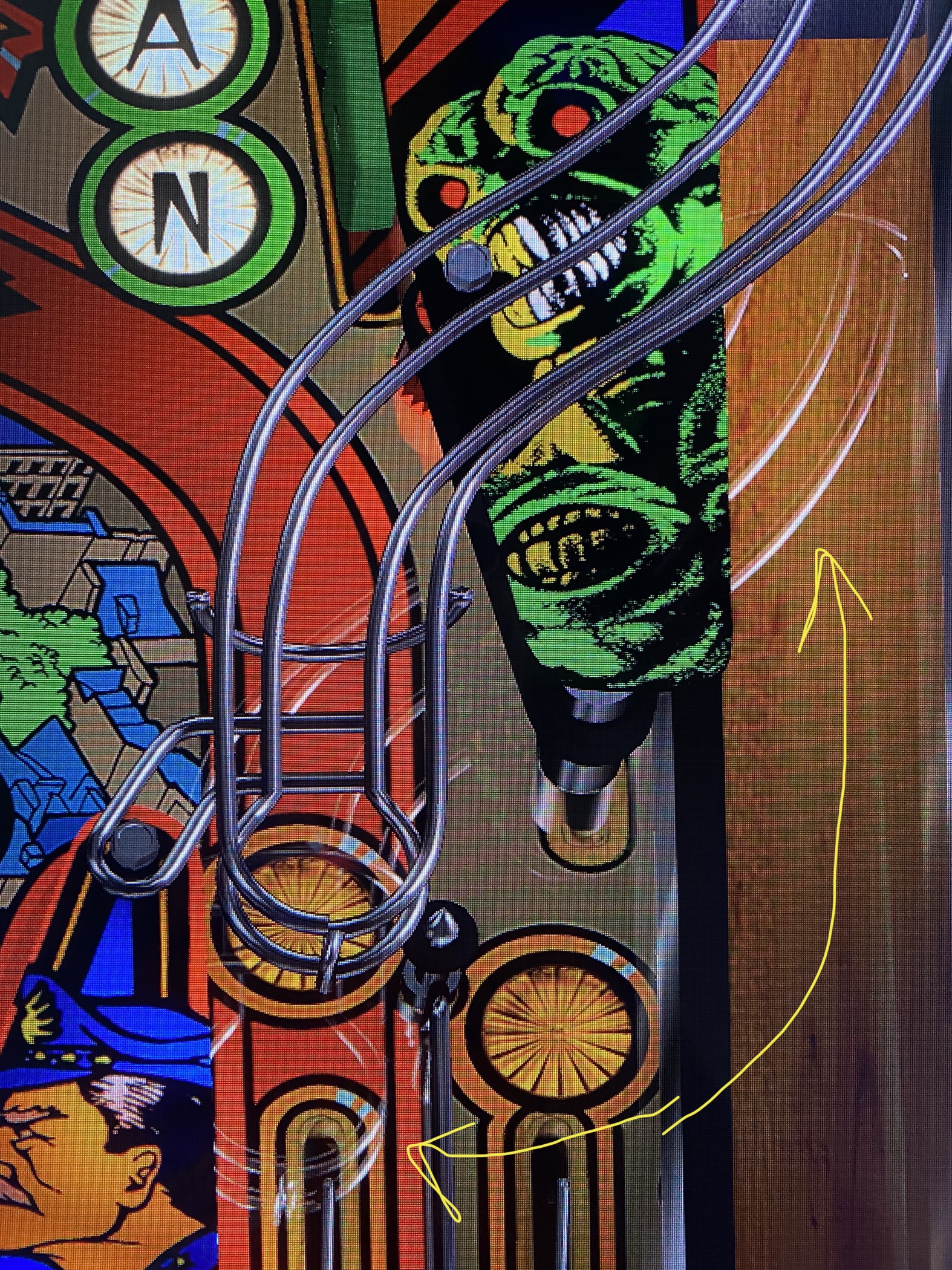
I'm enjoying the latest AFM version but one thing I've tried to customize is removing the "reflection" of the rails and plastics on the playfield. I'm not really sure what it is supposed to be - maybe simulating a reflection on the glass but I far prefer the table without it. It does not show up on preview but does when run table. Looking at playfield in image manager it's not baked in. I looked at the materials and tried turning off reflection but that didn't change it either. I'm pretty new but did some reading in the comments on table and google searches and didn't turn up anything. It's in the screenshot on the download page so it's supposed to be there, just looking for some ideas on where else to look to turn that off.


Thanks and sorry if dumb question :)


IMG_5706.jpg


#2 teisen

teisen

    Pinball Fan

  • Members
  • PipPipPipPip
  • 524 posts
  • Location:SP

  • Flag: Brazil

  • Favorite Pinball: Scared Stiff / Attack From Mars and many others...rsrsrs

Posted 21 October 2022 - 04:03 PM

Hello...
 
the simplest is in the editor you select the "visual" tab and uncheck the reflection of objects on the table... but in this case, all objects will not have reflection
 
 
hug

Edited by teisen, 21 October 2022 - 04:05 PM.

club-dorothee-premiers-baisers.gif


#3 coffeeisgood

coffeeisgood

    Neophyte

  • Members
  • Pip
  • 9 posts

  • Flag: United States of America

  • Favorite Pinball: 8 ball champ

Posted 21 October 2022 - 04:18 PM

thanks! just dialing it down worked great.


Also tagged with one or more of these keywords: afm, jp