Jump to content


Photo
- - - - -

VPX 10.5 vsync to wrong FPS in some tables

vsync wrong fps 416 nvidia 416

  • Please log in to reply
9 replies to this topic

#1 sniiki

sniiki

    Enthusiast

  • Members
  • PipPipPip
  • 80 posts

  • Flag: Finland

  • Favorite Pinball: Attack from Mars

Posted 04 November 2018 - 11:10 AM

Adding to my increasing list of odd problems, I'm suddenly having problems getting The Simpsons Pinball Party table to run smoothly. So far this issue only occurs in this table.

Reason for stutter is that vsync locks to incorrect Hz. TV is 60 Hz but it want's to lock to 50. In other tables so far it's 60.0. This table was working without problems with same software versions, same GPU, same OS and same TV earlier, but now suddenly decided to give me hard time.

1. VPX 10.5 in FS Exclusive mode, 3840x2160@60Hz

2. B2S 1.3.0.3 in exe mode + 4G patch

3. Sambuild 3.1 r4607

4. W10 x64 GTX 970 +416.34 drivers

5. Tried Vsync 1, 2, 60 and also Nvidia driver level forced Vsync and Adaptive Vsync. No luck.


What gives??


Edited by sniiki, 04 November 2018 - 12:51 PM.


#2 sniiki

sniiki

    Enthusiast

  • Members
  • PipPipPip
  • 80 posts

  • Flag: Finland

  • Favorite Pinball: Attack from Mars

Posted 04 November 2018 - 12:28 PM

Sigh. Did complete Nvidia cleanup in safe mode with DDU and reverted to some random old Nvidia driver (388.71) and now Simpsons PP syncs to 60.0  :hanged:


Edited by sniiki, 04 November 2018 - 12:29 PM.


#3 sniiki

sniiki

    Enthusiast

  • Members
  • PipPipPip
  • 80 posts

  • Flag: Finland

  • Favorite Pinball: Attack from Mars

Posted 05 December 2018 - 07:58 PM

Well the good life lasted quite long this time. Then I tried this new version of Time Machine and got the same problem again. Syncs to avg. 50 FPS. Same 388.71 drivers and every other table worked just fine. Am I really again the only one with this problem?

There's nothing out of ordinary with my current setup. 3 monitors run with GTX970, fresh Windows 10 x64 etc.


#4 jpsalas

jpsalas

    Grand Schtroumpf

  • VIP
  • 7,315 posts
  • Location:I'm Spanish, but I live in Oslo (Norway)

  • Flag: Norway

  • Favorite Pinball: I like both new and old, but I guess I prefer modern tables with some rules and goals to achieve.


Posted 06 December 2018 - 02:17 AM

It's nothing wrong with your setup, the problem is the table itself eating your cpu with their timers. It uses a very old routine for checking the ball collision, with a lot of math involved, and running at an interval of 1, and that's killing your fps. It is not that it "locks" your vsync, it is that the table is using all your cpu doing maths that are not needed anymore running at insane speed. That script and timers should be revised/edited for a better experience.


If you want to check my latest uploads then click on the image below:


vp.jpg


Next table? A tribute table to Stern's Foo Fighters


#5 TT11

TT11

    Pinball Fan

  • Members
  • PipPipPipPip
  • 643 posts
  • Location:Maitland AUSTRALIA

  • Flag: Australia

  • Favorite Pinball: Bally Kiss & Playboy, Stern Kiss & Playboy

  • 360 Gamer Tag: PoundedElliepup

Posted 06 December 2018 - 04:54 AM

Is it possible to improve your FPS by using a setting of -1 thus turning off V-Sync or as JP has said the table needs optimising?


#6 Brer Frog

Brer Frog

    Pinball Fan

  • Members
  • PipPipPipPip
  • 1,095 posts
  • Location:Illinois

  • Flag: United States of America

  • Favorite Pinball: Funhouse, Attack From Mars, Medieval Madness

Posted 06 December 2018 - 09:42 AM

I know very little about timers & have not experienced this problem. But if I do, are there some guidelines on how to edit the timers that are affecting this? Or is it a lot more complicated than just changing a single value in the script?


#7 Slydog43

Slydog43

    Pinball Wizard

  • Platinum Supporter
  • 3,008 posts
  • Location:Hackettstown, NJ

  • Flag: United States of America

  • Favorite Pinball: Addams Family, All Williams 90's Games

Posted 06 December 2018 - 04:08 PM

I checked out TimeMachine 1.2 and found 2 timers with interval of 1.  WOW never saw that before.  You could try and change that to 10 or 50 and see if there is any change.  Table runs fine on my rig, but its a total beast.  good luck.   Hell you can disable the ball collision timer if you don't care about the collision sounds, that might actually be your best bet.


#8 jpsalas

jpsalas

    Grand Schtroumpf

  • VIP
  • 7,315 posts
  • Location:I'm Spanish, but I live in Oslo (Norway)

  • Flag: Norway

  • Favorite Pinball: I like both new and old, but I guess I prefer modern tables with some rules and goals to achieve.


Posted 06 December 2018 - 04:16 PM

You may change the CollisionTimer interval from 1 to 20 or higher, and the table will behave better. Still that collission routine is very old and should be changed with the built inn VPX routine.


If you want to check my latest uploads then click on the image below:


vp.jpg


Next table? A tribute table to Stern's Foo Fighters


#9 sniiki

sniiki

    Enthusiast

  • Members
  • PipPipPip
  • 80 posts

  • Flag: Finland

  • Favorite Pinball: Attack from Mars

Posted 06 December 2018 - 04:20 PM

It's nothing wrong with your setup, the problem is the table itself eating your cpu with their timers. It uses a very old routine for checking the ball collision, with a lot of math involved, and running at an interval of 1, and that's killing your fps. It is not that it "locks" your vsync, it is that the table is using all your cpu doing maths that are not needed anymore running at insane speed. That script and timers should be revised/edited for a better experience.


But if the table runs at around 70 fps without vsync, why wouldn't it be able to sustain 60 fps with vsync? With vsync it remains steady 50-52 fps.

Have to add that these were with Quality SMA active. Without it the table runs over 70 fps without vsync and seems to stay close to 60 fps even with vsync but still with a lot of hiccups and stuttering.

My setup is i7-4770 (non K-version so runs at 3,9 GHz), 16gb ram, and GTX970 slightly overclocked. I run tables in 4K yes, but having read these forums few months now it seems most people are doing fine even with a lot older setups than mine.

Also, my previous similar problem occurred even when tables were running over 100fps without vsync so it must be driver/software compatibility issue somehow.


Is it possible to improve your FPS by using a setting of -1 thus turning off V-Sync or as JP has said the table needs optimising?


-1 in table settings means default settings (which is 1 in my case) and like said it's running ~70fps without vsync so it should be able to maintain 60fps but really seems to "lock" to way lower rate.
I had exactly same problem with several other tables with Nvidia 416.xx drivers and problem for other ~50 tables was fixed with old 388 drivers, but now this table reproduced it.


You may change the CollisionTimer interval from 1 to 20 or higher, and the table will behave better. Still that collission routine is very old and should be changed with the built inn VPX routine.


Thanks. I'll try to play with timer intervals.

Still, all you who don't have problems, what kind of CPU are you using? Like said, my i7 is old, but it's not that sluggish compared to say current date i5s.


Edited by sniiki, 06 December 2018 - 04:24 PM.


#10 sniiki

sniiki

    Enthusiast

  • Members
  • PipPipPip
  • 80 posts

  • Flag: Finland

  • Favorite Pinball: Attack from Mars

Posted 06 December 2018 - 04:53 PM

Well that was quickly verified. Tried slowing down those two 1 ms timers. pinmame timer to 10ms and collision to 50ms. No effect. Then set those back to 1 ms, enabled QSMA but dropper resolution to 1080p and it's silky smooth. 

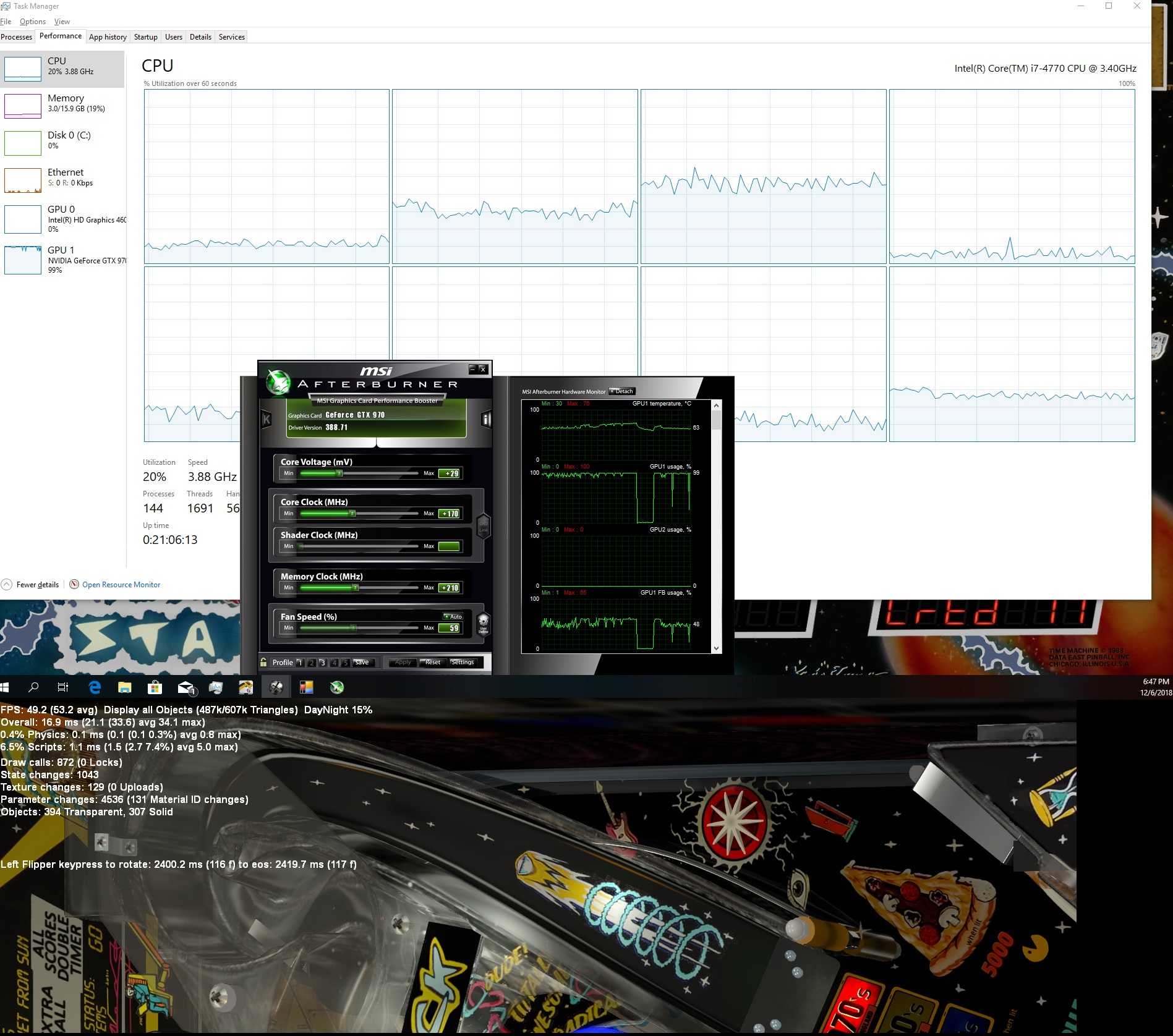
Also checked that with timers in defaults running in 4K my CPU total load stays at ~20% and highest single logical core runs at steady 50% Nothing is peaking over 50% at any point.

But GPU... well that's 100% all the time with this table. So I guess everyone else is playing this table with better GPU's than 4gb 970?

Untitled4b.jpg

Edited by sniiki, 06 December 2018 - 04:57 PM.


Also tagged with one or more of these keywords: vsync, wrong fps, 416, nvidia 416