




@imgema:
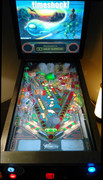
This is interesting, let's investigate what is going wrong. This is a comparison between the old screenshot and the one I made yesterday when releasing (right side is the new one):
So on my cab the quality is the same. At first glance it looks like you are using an older beta of 10.6 or before, since the playfield is quite dark.
Potential issues:
- did you change anything after downloading? Like day/night, environment emission image, LUT settings, etc? If so: please redownload and try again the table unchanged.
- Are you using the latest 10.6 beta, at least version 3751? If not, please download and unzip whole file on your visual pinball directory.
- Are you using SweetFX or something? Switch it off to try.
- Are you using tweaked color settings in the nvidia or AMD control panel? With gamma or something? please return to default to try.
I do see graphics issues on the genie which I have not yet seen before. Could you give some information, like:
- What is your graphics card?
- What settings do you have in the visual pinball video/graphics options? (screenshot)
- what is the "output dynamic range" in the nvidia settings (or equivalent for AMD)? IT should be "full" and not "limited"

Thanks a lot for the response.
Of all the questions in your post, the one where i was doing it wrong was the Visual Pinball version. I had 10.6 beta so i thought it was the latest but apparently i had an older build of that.
I updated it and the table now looks brighter, which is good. Table still looks somewhat red-ish/orange-y for my liking and a bit washed out and when the lights dim but using the LUTTotan3 preset somewhat improves the contrast so it's the best default IMO so far.
For the record, i have a GTX 1060, using "full" dynamic range always and didn't change anything on the table.
Again, thanks for the help.
 Top
Top



 Contributor


 I can also relate to what Imgema mentioned regarding the grayish blacks, especially evident during GI on/off transitions. I think this is very much dependent on everyone's hardware and software configuration and varies greatly from user to user. There is a huge difference in how my Samsung playfield TV looks versus my desktop Asus monitor. As such I took your LUTtotan0 and darkened it further 10% to help my Samsung monitor get rid of that washed out grayish-black effect. I'm very happy with the result. If anyone is interested here is the darkened LUT:










 are all trademarks of VPFORUMS.