Jump to content


Photo
* * * * * 1 votes

RocketPin / CyberPin 42"-28"-18" Cab Build + JUKEBOX


  • Please log in to reply
52 replies to this topic

#21 settingsons

settingsons

    Pinball Fan

  • VIP
  • 959 posts
  • Location:Switzerland

  • Flag: Switzerland

  • Favorite Pinball: Terminator 2 and many EM machines


Posted 29 March 2011 - 08:15 PM

QUOTE (zebulon @ Mar 29 2011, 02:04 AM) <{POST_SNAPBACK}>
QUOTE (settingsons @ Mar 28 2011, 12:24 PM) <{POST_SNAPBACK}>
QUOTE (maceman @ Mar 28 2011, 12:26 AM) <{POST_SNAPBACK}>
?????

Ahh man.That is the pits. Are you sayng you just noticed that,as in, it is something that happened after you bought the monitor?

If so, The only thing i can think of is if you somehow twisted the screen when carrying after the plastic was removed and it had a weak point there that tore. I am surprised it would be cracked like that. Any weight put on the screen I don't think would do that.....

I think that will drive you nuts in the long run..............

Maceman

Hey maceman thanks for the sympathy.  Although I do have a crack on the screen I had a typo in post above - missed out 'not'!  I meant to say it doesn't seem to affect the display!  I was exhausted when I wrote that post.

Anyway I have had the screen for about two months.  Maybe I stressed it the first time I decased it although I was so careful.  Oh well fingers crossed it won't get worse.


Is that a crack or a scratch?

Either way, if you want to fill it (I assume it's not going back under warranty), I found that my missus' clear nail polish worked wonders (good thing she doesn't come on here and read any of this). I scratched mine by getting clumsy with all the back and forth putting it in the cab and then removing it, filled the scratch with the nail polish and it leveled it out great. I have to really search to find it.

Cab looks great, it's really coming along.


Good question - I am not sure if it is a crack or a scratch - it can be felt so if it is a scratch it is deep. I have never knocked it but we did have visitors a few weeks ago with kids who were playing pinball a fair bit (I had it laid on a desk on a slope with a Pinball Wizard controller), so maybe it did get a whack of some kind. I got 3 pinball-converts out of it, so a small price to pay I guess smile.gif

Now the nail varish sounds interesting! I will monitor the monitor crack/scratch and if it looks like it is spreading, I will see what I can rustle up out of the wife's makeup bag angel.gif

#22 zebulon

zebulon

    Cantankerous old B****D

  • Platinum Supporter
  • 1,179 posts
  • Location:Whitby, Ontario, Canada

  • Flag: Canada

  • Favorite Pinball: xenon, Medieval Madness, Royal Flush, Silverball Mania

Posted 29 March 2011 - 10:21 PM

Just dab it on...no acetone remover!!!!!!

 ZB%20%20Storefront1%20.png               [email protected]

Don't pm or expect an answer from me here ... the links above are my contacts.

I know so much about so little that I could teach you all there is to know about nothing......


#23 settingsons

settingsons

    Pinball Fan

  • VIP
  • 959 posts
  • Location:Switzerland

  • Flag: Switzerland

  • Favorite Pinball: Terminator 2 and many EM machines


Posted 02 April 2011 - 08:45 PM

Another update!

We had a lovely sunny day today (around 24c) and managed to get cab sanded and painted one more time.

I had a stab at fitting the legs Ias well - Th e first was really easy and I was wondering why people are always saying they are a real pain to get right, but then the next three took about 2.5 hours!!! I guess I just got lucky with the first one smile.gif

Anyway I put everything in the cab tonight - computer board, 42" playfield, 18" DMD display and a temporary 22" backglass - and then I fired it up. It really is feeling like a real cab now, and finally all the hard work and planning has paid off.

I am going to order a Hanns G 27.5" display for the backglass as there is a good deal on them now. Anyone got any experience/opinions with/on this monitor? I am pretty sure I saw it in one of the forums but can't find it now.

I will try to have a go at wiring the buttons tomorrow - playing with buttons is something I can't wait to try! Still have a few more button holes to drillyet - not sure about the placement yet.

I have the coin door, lockdown, and Bally rails and will also try to do a test fit of those.

I can't wait to load up the new JPSalas updates that seemed to be flooding in almost daily!

Any feedback/suggestions as always greatly appreciated. Many thanks for looking!


Edited by settingsons, 02 April 2011 - 08:48 PM.


#24 zebulon

zebulon

    Cantankerous old B****D

  • Platinum Supporter
  • 1,179 posts
  • Location:Whitby, Ontario, Canada

  • Flag: Canada

  • Favorite Pinball: xenon, Medieval Madness, Royal Flush, Silverball Mania

Posted 02 April 2011 - 10:26 PM

Wow....that's looking great. Awesome progress on it. good.gif

Kinda satisfying to see it come together isn't it?

 ZB%20%20Storefront1%20.png               [email protected]

Don't pm or expect an answer from me here ... the links above are my contacts.

I know so much about so little that I could teach you all there is to know about nothing......


#25 maceman

maceman

    Home Pinball Machine Collector/ Restorer

  • VIP
  • 2,271 posts
  • Location:Canada, Eh!

  • Flag: Canada

  • Favorite Pinball: ....**Haunted House**....


Posted 03 April 2011 - 01:36 AM

I sure think we will get ssome great fun out of these cab!! People don't know what they are missing!!

Looks great!

I just awaiting my metal pieces(lockdown/rails)... can't wait!!
________________________________________________________________________________
Canada Eh!
hm_avatar.pngss_avatar.jpg MODS ys_avatar5.jpggenie_avatar.pngj2o_avatar.png

#26 settingsons

settingsons

    Pinball Fan

  • VIP
  • 959 posts
  • Location:Switzerland

  • Flag: Switzerland

  • Favorite Pinball: Terminator 2 and many EM machines


Posted 03 April 2011 - 10:20 AM

QUOTE (zebulon @ Apr 2 2011, 10:26 PM) <{POST_SNAPBACK}>
Wow....that's looking great. Awesome progress on it. good.gif

Kinda satisfying to see it come together isn't it?

It sure is - a lot of work but well worth it. Cheers

QUOTE (maceman @ Apr 3 2011, 01:36 AM) <{POST_SNAPBACK}>
I sure think we will get ssome great fun out of these cab!! People don't know what they are missing!!

Looks great!

I just awaiting my metal pieces(lockdown/rails)... can't wait!!


Thanks. I did slot in the lockdown, coindoor and rails to get a peek at what it will look like and can tell you it really looks the part.


#27 settingsons

settingsons

    Pinball Fan

  • VIP
  • 959 posts
  • Location:Switzerland

  • Flag: Switzerland

  • Favorite Pinball: Terminator 2 and many EM machines


Posted 17 April 2011 - 07:28 PM

Been quite busy lately so have been doing bits and pieces here and there.

Since the last update I now have now wired the buttons and fitted the coindoor. I also fitted a new 27.5 HannsG Monitor, and the lockdown bar. Only one button is illuminated at the moment as I need to get some more cable.

I have cut out a cardboard bezel for the speakers and DMD which will serve as a template for the monitor.

Having been setting up and playing some of the new JPSalas releases and all I can say is they are mindblowing!

Here are some photos and videos - any feedback appreciated - thanks for looking.


and the videos (done with Ipod Touch):

CyberPin - Scared Stiff with Working UVP:


CyberPin - Cue Ball Wizard:


CyberPin - Indianna Jones:


Edited by settingsons, 17 April 2011 - 07:47 PM.


#28 zebulon

zebulon

    Cantankerous old B****D

  • Platinum Supporter
  • 1,179 posts
  • Location:Whitby, Ontario, Canada

  • Flag: Canada

  • Favorite Pinball: xenon, Medieval Madness, Royal Flush, Silverball Mania

Posted 17 April 2011 - 09:55 PM

Lookin' good!!!!

 ZB%20%20Storefront1%20.png               [email protected]

Don't pm or expect an answer from me here ... the links above are my contacts.

I know so much about so little that I could teach you all there is to know about nothing......


#29 settingsons

settingsons

    Pinball Fan

  • VIP
  • 959 posts
  • Location:Switzerland

  • Flag: Switzerland

  • Favorite Pinball: Terminator 2 and many EM machines


Posted 01 May 2011 - 09:40 PM

I managed a few hours today after getting back from a one week holiday.

Yesterday I ordered a 5mm tempored playfield glass. It was damn expensive and a 3-week wait - 105 euros!

Today I made a couple cardboard templates for the DMD and backbox speaker bezel to make sure the positioning was correct. I then made the actual 3 to 4mm plywood bezel, painted it twice, and fitted the Pioneer car speakers. I still need to wire them tapping.gif

Also I fitted the backbox hinges, but forgot to photograph them.


I will try to get some plexiglass cut for the backbox, and use the method Rawd suggested and paint a bezel on the underside.

Edited by settingsons, 01 May 2011 - 09:49 PM.


#30 Flying Dutchman

Flying Dutchman

    Pinball Wizard

  • VIP
  • 3,212 posts

  • Flag: ---------

  • Favorite Pinball: Medieval Madness / Champion Pub


Posted 02 May 2011 - 07:27 PM

Don't I just LOVE to see a 3 screen setup project! smile.gif settingsons brilliantly done! wink.gif

Thanks for sharing!

Cheers,
FD.

'Flying Dutchman'

In need for a Backglass or 'Active Backglass / UVP' please 'click' on below and visit the complete revised website at:
Posted Image

#31 settingsons

settingsons

    Pinball Fan

  • VIP
  • 959 posts
  • Location:Switzerland

  • Flag: Switzerland

  • Favorite Pinball: Terminator 2 and many EM machines


Posted 12 May 2011 - 07:39 PM

QUOTE (Flying Dutchman @ May 2 2011, 07:27 PM) <{POST_SNAPBACK}>
Don't I just LOVE to see a 3 screen setup project! smile.gif settingsons brilliantly done! wink.gif

Thanks for sharing!

Thanks Dutch!

First post updated with full TV/Monitor specs, PC specs and Config setup.
First post with specs

Edited by settingsons, 12 May 2011 - 07:43 PM.


#32 settingsons

settingsons

    Pinball Fan

  • VIP
  • 959 posts
  • Location:Switzerland

  • Flag: Switzerland

  • Favorite Pinball: Terminator 2 and many EM machines


Posted 29 May 2011 - 07:01 PM

I have been waiting 4 weeks now for the tempored glass, and it still isn't ready!

In the meantime I have been doing a few bits and pieces....

- I put a bezel around the 42" playfield plus fitted the side rails to see what it looks like.

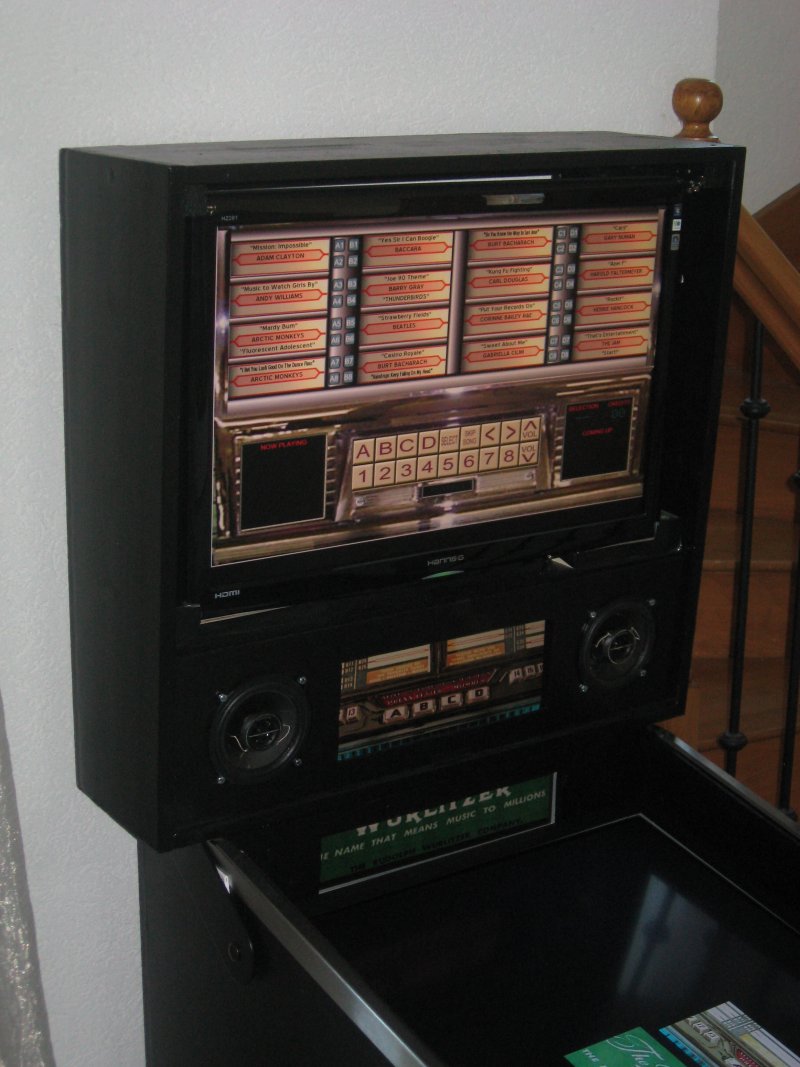
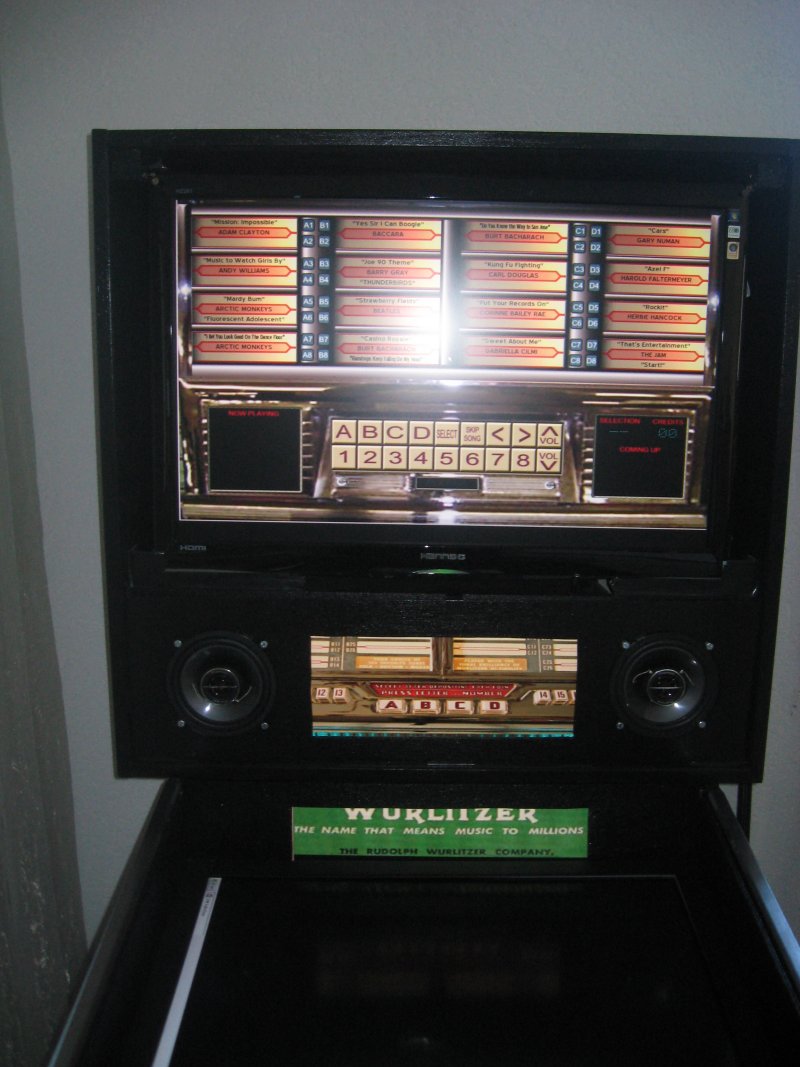
- I also decided to keep the bottom half of the 18" DMD monitor to display a logo - Bally at the moment when playing pinball. This is possible because my playfield is sunken down into the cabinet to add to the illusion of depth. I cut a rectangle out of a piece of plywood to frame/bezel the bottom half of the DMD monitor.

- Added a Logitech speakers and sub-woofer to improve sound for the pincab and Jukebox.

- I also installed the great retro feeling DWJukebox, displaying it on the 28" backglass monitor. I configured the flippers and magna save buttons to allow scrolling left/right/up/down for track selection, launch ball to select a track, and coin insert for credits. This software has different skins, adds a vinyl record crackle between tracks which really adds to the realism of it.

- I can switch between Hyperpin and DWJukeBox using a two button combination (IPAC Shift options), so no keyboard use is necessary. Switching between the two also changes the windows wallpaper from pinball themed 'Bally' wallpaper to a Jukebox 'Wurlitzer' themed wallpaper. See photos.

- All the buttons are now illuminated now including the coin slots of the Bally/Williams coin door.

- As well as a coin credit button, the coin slot can now be used to add credits by inserting real coins - the kids love it!


Cheers


#33 zebulon

zebulon

    Cantankerous old B****D

  • Platinum Supporter
  • 1,179 posts
  • Location:Whitby, Ontario, Canada

  • Flag: Canada

  • Favorite Pinball: xenon, Medieval Madness, Royal Flush, Silverball Mania

Posted 29 May 2011 - 07:13 PM

Awesome idea!!! Great job. Have you been able to get the kids away from it long enough to play it yourself? cool.gif

Edited by zebulon, 29 May 2011 - 07:13 PM.

 ZB%20%20Storefront1%20.png               [email protected]

Don't pm or expect an answer from me here ... the links above are my contacts.

I know so much about so little that I could teach you all there is to know about nothing......


#34 Zablon

Zablon

    Pinball Fan

  • Members
  • PipPipPipPip
  • 642 posts

  • Flag: United States of America

  • Favorite Pinball: Funhouse

Posted 29 May 2011 - 08:26 PM

Very cool use of the extra space on the DMD screen! And very cool idea for the Jukebox. Do you have it automated to where you can select which you go into?(Juke or Hyperpin)

#35 settingsons

settingsons

    Pinball Fan

  • VIP
  • 959 posts
  • Location:Switzerland

  • Flag: Switzerland

  • Favorite Pinball: Terminator 2 and many EM machines


Posted 29 May 2011 - 08:59 PM

QUOTE (Zablon @ May 29 2011, 08:26 PM) <{POST_SNAPBACK}>
Very cool use of the extra space on the DMD screen! And very cool idea for the Jukebox. Do you have it automated to where you can select which you go into?(Juke or Hyperpin)


Thanks man. I had to think how to achieve the switching. Basically on the desktop I have a shortcut to Hyperpin to which I assigned a hotkey (CTRL-ALT-H) - right click on the shortcut and define a 3-key hotkey. You can then create a macro in the IPAC programming software for this sequence of 3 keys, and assign it to a single button or like I did to a shifted button press (eg: Hold Start PLUS Insert Coin Button, etc). You then can do the same for your Jukebox software - I used CTRL-ALT-J. Although in theory I could leave Hyperpin running and launch the Jukebox I would normally use the HP menu to exist HP, and then press the two buttons to get the Jukebox. And then when finished with the Jukebox, hit the usual exit button and then the two buttons to launch Hyperpin again.

I took it a step further and actually switch the wallpaper from a Jukebox theme to a Pinball theme, which is how in the photo you can see the DMD window and the extra window below it showing Jukebox and Pinball related stuff. I am actually thinking of later enhancing the FPLaunch to show a logo in the extra window below the dmd of the manufacturer of THE table being played.... Bally, Williams, Gottilieb, etc. It could read this from the XML - That will be for later though smile.gif.

As well as owning a pinball I have always wanted a jukebox. This really came as an after thought and I am really pleased with the Jukebox as well - and it has cost nothing to add! In fact on Saturday night we played a few tracks on it and it really is a different experience than just putting a CD in the HiFi. Even my wife had a go!

If you need more info then please let me know, and I will try and write more detailed instructions.

Edited by settingsons, 29 May 2011 - 09:06 PM.


#36 numiah

numiah

    Pinball Fan

  • Validating
  • PipPipPipPip
  • 984 posts
  • Location:Netherlands

  • Flag: Netherlands

  • Favorite Pinball: TOTAN

Posted 04 June 2011 - 06:39 AM

Love that Jukebox idea !
I never thought of it to make my cab multi functional.
Sure I would love to have a go at it to see if I like it, so if you have any detailed instructions I'd be glad to read them.

PS : I wonder how that scratch/crack turned out with the nail polish solution smile.gif

Edited by numiah, 04 June 2011 - 06:39 AM.

**Each pinball machine is a tiny universe... that we control.**


#37 maxxsinner

maxxsinner

    Enthusiast

  • Platinum Supporter
  • 319 posts
  • Location:Australia

  • Flag: Australia

  • Favorite Pinball: F14 Tomcat

Posted 04 June 2011 - 10:03 AM

That jukebox idea looks brilliant! Love seeing these original ideas.

#38 settingsons

settingsons

    Pinball Fan

  • VIP
  • 959 posts
  • Location:Switzerland

  • Flag: Switzerland

  • Favorite Pinball: Terminator 2 and many EM machines


Posted 05 June 2011 - 06:04 PM

QUOTE (numiah @ Jun 4 2011, 06:39 AM) <{POST_SNAPBACK}>
Love that Jukebox idea !
I never thought of it to make my cab multi functional.
Sure I would love to have a go at it to see if I like it, so if you have any detailed instructions I'd be glad to read them.

PS : I wonder how that scratch/crack turned out with the nail polish solution smile.gif


Thanks! In the end I am pretty sure if was a scratch - I have the nail polish ready, but haven't applied any so far smile.gif

I actually did a simple AHK script to flip the wallpaper for the Jukebox and back again, so I will write up some instructions on setting up DWJUkebox on a cab so that it appears on the backglass.

I have also upgraded from a GTX260 896mb to a GTX480 1.5gb which runs both the playfield and UVP Backglass for VP (270 drivers). I am really impressed with the increase in FPS and also all tables so far run really smooth even those borderline before. One interesting observation is for tables NOT using Alpha-trans the FPS goes up to anything from 1500-5000 all with UVP backglass. For the alpha tables however there is very little change, although the table play is definitely better smile.gif.

#39 settingsons

settingsons

    Pinball Fan

  • VIP
  • 959 posts
  • Location:Switzerland

  • Flag: Switzerland

  • Favorite Pinball: Terminator 2 and many EM machines


Posted 06 April 2012 - 01:45 PM

Ages since I did an update: Updated first page with updated info, plus a later picture.


Since the above photo I have fitted a plexiglass with black border around the backglass.
Also flipper force-feedback added smile.gif

#40 GeorgeT

GeorgeT

    Enthusiast

  • Members
  • PipPipPip
  • 76 posts
  • Favorite Pinball: Funhouse

Posted 08 April 2012 - 04:54 AM

Beautiful work. I want one so bad!