- View New Content
-
Getting Started
-
Tutorials
Tutorial Categories
Tutorials Main Page Installation and Setup Downloadable TutorialsROM Adjustments
Number of Balls Adjustments Volume Adjustments
-
Visual Pinball Tables
VP 8 Desktop Tables
All VPM Recreations VP Recreations VP/VPM MODs VP Originals ROMsVP 9 Desktop Tables
All VPM Recreations VP Recreations VP/VPM MODs VP Originals ROMsVP9 Cabinet Tables
All Full Screen Cabinet Full Screen B2S Cabinet Spanned Cabinet Tables Media Packs ROMsVPX Tables
All VPinMAME Recreations VPX- - /VPinMAME - MOD Tables VPX Recreations VPX Originals Media Packs ROMs VR
-
Frontend Media & Backglass
Media Packs
Complete Media Packs Wheel Logos VideosBackglasses
dB2S Animated Backglasses UVP Animated Backglasses Topper Images
- Future Pinball Tables
-
Design Resources
Main Resources
Table Templates Playfield Images Image Library Sound Library Key CodesVP Guides
VP8 Guide - English VP8 Guide - Deutsch VP9 Guide - English VP9.1.x Guide - English VP Object Guide VPM DocumentationFuture Pinball Resources
Playfield Images 3D Model LibraryFuture Pinball Guides
FP Script Guide Big Draco Script Guide FP Table Design Guide FP DMD Guide
- Other Features
- Bug Tracker
- Image Gallery
- Blogs
-
More
Translite with black font
Started By
fabry892
, Jan 28 2024 03:31 PM
7 replies to this topic
#1
Posted 28 January 2024 - 03:31 PM
Hi,
I've installed Batocera on HP ProDesk 405 G6 Desktop Mini PC with AMD Ryzen 7 PRO 4750GE and integrated Radeon Graphics card Radeon Vega.
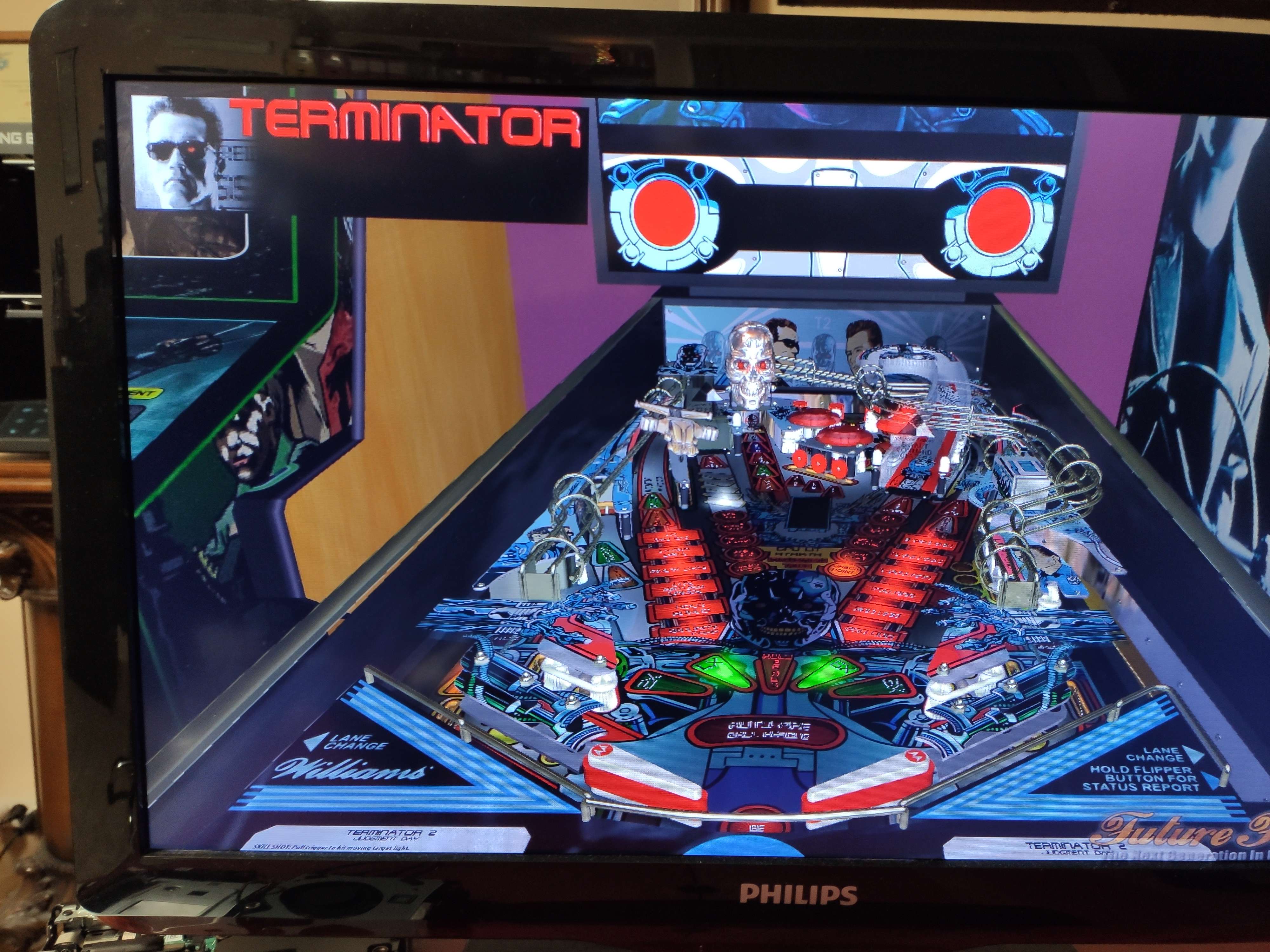
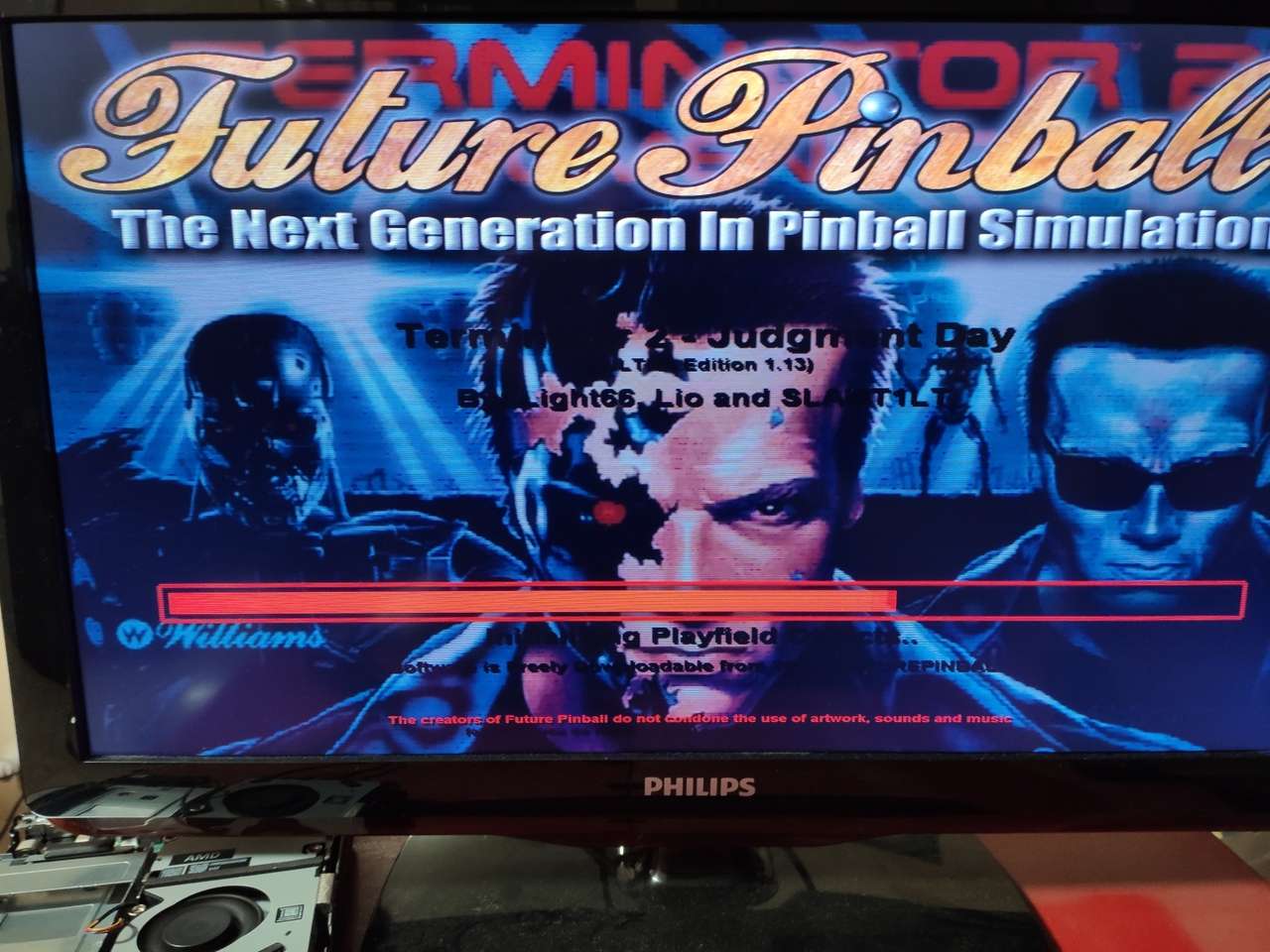
It work very well, but in Future pinball, there is a litte issue, during loading table and the texts of traslite are black font, like attached image. Text is presents but non visible.
Same pc with same table on windows 11 its ok, color ok font traslite are orange.
Probably the problem is due bad driver on batocera or wine, but I don't now how can I change it.
Someone could you help me?
Thank
#2
Posted 28 January 2024 - 11:26 PM
From what I have read, FP tends to work best with a NVIDIA card.
Do you have BAM installed? The table loading screen looks like the result of a very old bug on FP that was fixed with BAM. Whenever you used to make any change on the "Table" pull down menu > "Table Info" screen, the font on the loading screen would turn black. I never saw it happen with the DMD font before so I am not sure what causes that problem. You can open the translite in the editor and click on the DMD. The Matrix Color is the color of the DMD that should display.
Confused about FP? Read "George's Installation and Setup Guide for Future Pinball and BAM"
#3
Posted 29 January 2024 - 10:20 PM
From what I have read, FP tends to work best with a NVIDIA card.
Do you have BAM installed? The table loading screen looks like the result of a very old bug on FP that was fixed with BAM. Whenever you used to make any change on the "Table" pull down menu > "Table Info" screen, the font on the loading screen would turn black. I never saw it happen with the DMD font before so I am not sure what causes that problem. You can open the translite in the editor and click on the DMD. The Matrix Color is the color of the DMD that should display. Hi
Hi GeorgeH, thanks for your reply.
BAM is installed, but it is an old version 1.4-267 from 9/11/2019 and I don't know how I can update it.
If I open the table in editor mode, on translite the color of the dmd matrix is orange.
It's very frustrating to have a small problem and not get it resolved because you can't update FP.
#4
Posted 29 January 2024 - 10:32 PM
From what I have read, FP tends to work best with a NVIDIA card.
Do you have BAM installed? The table loading screen looks like the result of a very old bug on FP that was fixed with BAM. Whenever you used to make any change on the "Table" pull down menu > "Table Info" screen, the font on the loading screen would turn black. I never saw it happen with the DMD font before so I am not sure what causes that problem. You can open the translite in the editor and click on the DMD. The Matrix Color is the color of the DMD that should display. Hi
Hi GeorgeH, thanks for your reply.BAM is installed, but it is an old version 1.4-267 from 9/11/2019 and I don't know how I can update it.If I open the table in editor mode, on translite the color of the dmd matrix is orange.It's very frustrating to have a small problem and not get it resolved because you can't update FP.
You can find new version of BAM just uploaded yesterday.
Find here,,,
https://pinballnirva...787/post-149459
Here is GeorgeH's tips and tricks on Updating BAM Tutorial...(Part of his Installation and Setup Guide for Beginners.)
https://pinballnirva...d-tricks.20841/
His guide steps you through the process of updating BAM from the ZIP file so that you can keep your settings.
CHECK OUT THIS TUTORIAL http://www.vpforums....howtopic=32515
TO USE DB2S BACKGLASS PROGRAM WITH DESKTOP TABLES ON 1 MONITOR
#5
Posted 29 January 2024 - 10:41 PM
I wrote a guide on how to update BAM from the zip file at this link:
https://pinballnirva...d-tricks.20841/
I am not sure but it seems like the bug was fixed before 2019. I don't have any other suggestions. Maybe some of the other guys might have some ideas on how to make FP work with your AMD set up. FP works best with Itel processors and an NVIDIA card.
Confused about FP? Read "George's Installation and Setup Guide for Future Pinball and BAM"
#6
Posted 29 January 2024 - 10:49 PM
FP works best with Itel processors and an NVIDIA card.
Never had any issues with it on AMD GPU's including old ones like HD4850 series
If you feel the need to empty your wallet in my direction, i don't have any way to receive it anyways
Spend it on Hookers and Blow
#7
Posted 30 January 2024 - 09:37 PM
Hi,
on same pc HP AMD Ryzen 7 PRO 4750GE with windows 11:
FP+BAM lastest release works very well, fonts of translite are orange.
FP+BAM same old release installed on Batocera 1.4-267 (11/9/2019) fonts of translite are black.
Therefore latest release helps me to resolve this issue.
I found the folders of BAM in Batocera, overwrite with latest release of BAM, but FP not run, If I restart pc, automatic reinstall the old release of BAM. It's very strange. I must disable this "auto restore".
How can I do it?
#8
Posted 31 January 2024 - 08:10 PM
I didn't know what Batocera was on my last post. I have since learned that Batocera is a version of Linux that I am positive FP has trouble with. I'm glad you got it working.
Edited by GeorgeH, 31 January 2024 - 08:10 PM.
Confused about FP? Read "George's Installation and Setup Guide for Future Pinball and BAM"


Top
Contributor


are all trademarks of VPFORUMS.