Jump to content


Photo
- - - - -

Judder on AMD cards


  • Please log in to reply
18 replies to this topic

#1 stereodanny

stereodanny

    Hobbyist

  • Members
  • PipPip
  • 25 posts

  • Flag: ---------

  • Favorite Pinball: Star Trek TNG

Posted 07 July 2021 - 01:33 AM

I am running into an issue where frames drop 2-3 times every second.


It seems to be the exact same issue here, and I am on an AMD Vega card:

https://sourceforge....pvr/tickets/50/


Is anyone else on an AMD card and found a solution to this?


Clearly, some issue with AMD and VPVR. But what exactly? Is there anything at all I can try to get this resolved or minimized?

I am so close to getting it all to work, it makes me want to cry. I can see the tables in VR and they look beautiful, but this intermittent judder makes it just about unplayable.


Edited by stereodanny, 07 July 2021 - 01:37 AM.


#2 Rawd

Rawd

    Pinball Wizard

  • VIP
  • 4,313 posts
  • Location:Edmonton, Canada

  • Flag: Canada

  • Favorite Pinball: Triple Strike


Posted 07 July 2021 - 07:11 AM

I am running into an issue where frames drop 2-3 times every second.


It seems to be the exact same issue here, and I am on an AMD Vega card:

https://sourceforge....pvr/tickets/50/


Is anyone else on an AMD card and found a solution to this?


Clearly, some issue with AMD and VPVR. But what exactly? Is there anything at all I can try to get this resolved or minimized?

I am so close to getting it all to work, it makes me want to cry. I can see the tables in VR and they look beautiful, but this intermittent judder makes it just about unplayable.


Try switching from RGBA 8 To RGBA 16F in the VPVR video settings.   Im not sure if this will help or not, but it is worth a try.   Try turning down your Supersampling as well.   Make sure nothing else is running on your system (close all windows, even internet browsers).   You may need to disable your Antivirus.


Edited by Rawd, 07 July 2021 - 07:12 AM.


#3 stereodanny

stereodanny

    Hobbyist

  • Members
  • PipPip
  • 25 posts

  • Flag: ---------

  • Favorite Pinball: Star Trek TNG

Posted 07 July 2021 - 10:54 AM

I am running into an issue where frames drop 2-3 times every second.
 
It seems to be the exact same issue here, and I am on an AMD Vega card:
https://sourceforge....pvr/tickets/50/
 
Is anyone else on an AMD card and found a solution to this?
 
Clearly, some issue with AMD and VPVR. But what exactly? Is there anything at all I can try to get this resolved or minimized?

I am so close to getting it all to work, it makes me want to cry. I can see the tables in VR and they look beautiful, but this intermittent judder makes it just about unplayable.

 
Try switching from RGBA 8 To RGBA 16F in the VPVR video settings.   Im not sure if this will help or not, but it is worth a try.   Try turning down your Supersampling as well.   Make sure nothing else is running on your system (close all windows, even internet browsers).   You may need to disable your Antivirus.
I’ve tried all these things, no change :(

#4 Rawd

Rawd

    Pinball Wizard

  • VIP
  • 4,313 posts
  • Location:Edmonton, Canada

  • Flag: Canada

  • Favorite Pinball: Triple Strike


Posted 07 July 2021 - 10:22 PM


I am running into an issue where frames drop 2-3 times every second.
 
It seems to be the exact same issue here, and I am on an AMD Vega card:
https://sourceforge....pvr/tickets/50/
 
Is anyone else on an AMD card and found a solution to this?
 
Clearly, some issue with AMD and VPVR. But what exactly? Is there anything at all I can try to get this resolved or minimized?

I am so close to getting it all to work, it makes me want to cry. I can see the tables in VR and they look beautiful, but this intermittent judder makes it just about unplayable.

 
Try switching from RGBA 8 To RGBA 16F in the VPVR video settings.   Im not sure if this will help or not, but it is worth a try.   Try turning down your Supersampling as well.   Make sure nothing else is running on your system (close all windows, even internet browsers).   You may need to disable your Antivirus.
I’ve tried all these things, no change :(


If you have Supersampling down, and you are still getting stutter... in 2-3 second increments..  It sounds to me that it is more likely an outside influence other than VP itself.   Thats really all I can offer.   I hope you figure it out.


#5 stereodanny

stereodanny

    Hobbyist

  • Members
  • PipPip
  • 25 posts

  • Flag: ---------

  • Favorite Pinball: Star Trek TNG

Posted 08 July 2021 - 01:16 AM

Indeed, it's absolutely an interaction between VP and the AMD drivers...if it were solely an AMD problem, I'd be seeing this problem in other OpenGL games. So I'm hoping someone with development experience can point me towards the culprit.


Edited by stereodanny, 08 July 2021 - 06:48 PM.


#6 stereodanny

stereodanny

    Hobbyist

  • Members
  • PipPip
  • 25 posts

  • Flag: ---------

  • Favorite Pinball: Star Trek TNG

Posted 08 July 2021 - 09:57 PM

This really sucks. I would gladly buy an nVidia card to make this work but prices are through the roof right now.


Please, please if anyone knows any solution or even who to contact about this, I would really appreciate it. I am desperate to make this work.


#7 wiesshund

wiesshund

    VPF Legend

  • Members
  • PipPipPipPipPipPipPip
  • 11,871 posts

  • Flag: United States of America

  • Favorite Pinball: How many can i have?

Posted 08 July 2021 - 10:17 PM

I dont have VR but i know others do, and have AMD and play it without issue, so doubting the issue is the card itself.


As far as prices go, all prices suck right now


I sold a couple older AMD cards that i had no use for any more, and got stupid prices for them.

I mean who pays $200 for a HD3850 AGP card?

I got offered almost 600 for an RX 580x but yea i kinda want them so, not selling those.


Great time to get of old unwanted video cards, terrible time to buy anything unless you want to be scalped
for over a grand for a 400 dollar card


If you feel the need to empty your wallet in my direction, i don't have any way to receive it anyways

Spend it on Hookers and Blow


#8 stereodanny

stereodanny

    Hobbyist

  • Members
  • PipPip
  • 25 posts

  • Flag: ---------

  • Favorite Pinball: Star Trek TNG

Posted 09 July 2021 - 01:29 AM

I wonder what cards your friends are using. My issue is identical to the one in the bug report on sourceforge from another user I linked in my original post, so it's definitely an AMD issue, but I wonder what the other common denominator is here, if your friends aren't having any issues.


I have to say I was tempted to shell out the money for an overpriced card. But the prices are just astronomical. 


Edited by stereodanny, 09 July 2021 - 01:30 AM.


#9 Rawd

Rawd

    Pinball Wizard

  • VIP
  • 4,313 posts
  • Location:Edmonton, Canada

  • Flag: Canada

  • Favorite Pinball: Triple Strike


Posted 09 July 2021 - 01:52 AM

My friend is running an RX 580, with driver 20.11.1.  He is using a 10.6 VPVR build with the exe dated 12/28/2020  (I believe this was one of Rob's builds).


Edited by Rawd, 09 July 2021 - 02:02 AM.


#10 stereodanny

stereodanny

    Hobbyist

  • Members
  • PipPip
  • 25 posts

  • Flag: ---------

  • Favorite Pinball: Star Trek TNG

Posted 09 July 2021 - 02:26 AM

I think I found the issue!

It's because I'm using a Pimax headset. I switched back to my original Vive headset, and the issue seems to have gone away (or been minimized, I'm still getting a little judder, but it's playable now.)


Whew!


With a little more tweaking I think I can get it smooth.


#11 stereodanny

stereodanny

    Hobbyist

  • Members
  • PipPip
  • 25 posts

  • Flag: ---------

  • Favorite Pinball: Star Trek TNG

Posted 09 July 2021 - 02:57 AM

Well, unfortunately...the issue is still there. 


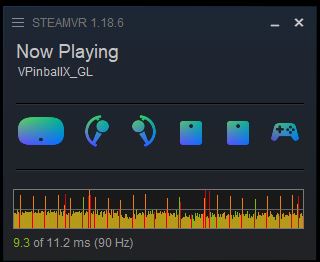
viveheadset.jpg


But, despite this nasty looking graph, it's mostly playable. You can see in the screenshots I'm getting those nasty spikes in lag. I bet your friends are getting the spikes too and just not noticing it.


The end result is that the performance is abysmal. The AMD cards are just not nearly as capable as nVidia for running OpenGL, and the internet is littered with people complaining about the terrible OpenGL performance on AMD cards. So I think the only solution is to wait until the prices die down and buy an nVidia.


#12 wiesshund

wiesshund

    VPF Legend

  • Members
  • PipPipPipPipPipPipPip
  • 11,871 posts

  • Flag: United States of America

  • Favorite Pinball: How many can i have?

Posted 09 July 2021 - 03:10 AM

If they say it runs great for them, then it does.

I highly doubt they simply are not noticing something, cause the people running vpxvr tend to be very picky about the performance

and they dont tend to be dummies.


Not sure what is causing your issue, but you may want to dig into it more, because regardless of what brand you want
you probably have quite a wait in store unfortunately


which AMD card are you running?


If you feel the need to empty your wallet in my direction, i don't have any way to receive it anyways

Spend it on Hookers and Blow


#13 stereodanny

stereodanny

    Hobbyist

  • Members
  • PipPip
  • 25 posts

  • Flag: ---------

  • Favorite Pinball: Star Trek TNG

Posted 09 July 2021 - 10:08 PM

wiesshund, thank you for this. I was inspired by your friends having no issues with AMD and bit the bullet, did a complete wipe and reinstall of Windows 10, AMD drivers, SteamVR, everything...


It works !!!


I could cry. Seems it was just a corrupted install of something (AMD drivers perhaps)


Onto building a pinsim.


Thank you!


I will note for future users that the latest build of VPVR on Sourceforge does not work with the latest all-in-one install of VP (VPinstall6.exe) available on this website. It throws up a "GL Error: 0xFFFFFFFF" and quits. I had to download the previous compilation from 2020-12-28 (https://mega.nz/fold...qBmORSRmKElta6Q)


Edited by stereodanny, 09 July 2021 - 10:09 PM.


#14 wiesshund

wiesshund

    VPF Legend

  • Members
  • PipPipPipPipPipPipPip
  • 11,871 posts

  • Flag: United States of America

  • Favorite Pinball: How many can i have?

Posted 09 July 2021 - 10:09 PM

Have you tried disabling windows 10 game mode?


There are a lot of games it tends not to work very well on.
It tries to boost what it thinks is the game, many times to the detriment of other things

Which are sometimes things related to the game


And VPX is not exactly a one process affair, vpxvr even more so


EDIT

Nevermind, you got it fixed, but still might look at disabling win 10 game mode
and see if it boosts performance any


Edited by wiesshund, 09 July 2021 - 10:10 PM.

If you feel the need to empty your wallet in my direction, i don't have any way to receive it anyways

Spend it on Hookers and Blow


#15 Rawd

Rawd

    Pinball Wizard

  • VIP
  • 4,313 posts
  • Location:Edmonton, Canada

  • Flag: Canada

  • Favorite Pinball: Triple Strike


Posted 10 July 2021 - 12:20 AM

My friend is running an RX 580, with driver 20.11.1.  He is using a 10.6 VPVR build with the exe dated 12/28/2020  (I believe this was one of Rob's builds).

Stereodanny - May I ask what AMD card and driver you ended up being successful with?


#16 stereodanny

stereodanny

    Hobbyist

  • Members
  • PipPip
  • 25 posts

  • Flag: ---------

  • Favorite Pinball: Star Trek TNG

Posted 10 July 2021 - 12:32 AM


Stereodanny - May I ask what AMD card and driver you ended up being successful with?


I am actually on a Mac Pro running Boot Camp, the card is a Vega II Duo. The drivers are the latest boot camp drivers from AMD.


Edited by stereodanny, 10 July 2021 - 12:32 AM.


#17 wiesshund

wiesshund

    VPF Legend

  • Members
  • PipPipPipPipPipPipPip
  • 11,871 posts

  • Flag: United States of America

  • Favorite Pinball: How many can i have?

Posted 10 July 2021 - 02:20 AM


Stereodanny - May I ask what AMD card and driver you ended up being successful with?


I am actually on a Mac Pro running Boot Camp, the card is a Vega II Duo. The drivers are the latest boot camp drivers from AMD.


Ahh...

Now that is a combo that probably is not going to be seen a lot, vpx wise.


And my mac will definitely not run VPX.
It's a Mac Power Pro, with a dual G3 450 and 512mb of ram

and usually runs an old distro of redhat linux, but occasionally visits system 8 so i can save dinosaur eggs


If you feel the need to empty your wallet in my direction, i don't have any way to receive it anyways

Spend it on Hookers and Blow


#18 stereodanny

stereodanny

    Hobbyist

  • Members
  • PipPip
  • 25 posts

  • Flag: ---------

  • Favorite Pinball: Star Trek TNG

Posted 10 July 2021 - 03:12 AM

Mac power Pro? Do you mean PowerMac G3?

What a classic. I had a G3 back in the day, beige model. I thought the G4 was the coolest thing ever.


Yea, it probably won't run VPX.


But boy, am I having a blast over here. the VR is just incredible. The tables are beautiful and it's like they're right in front of me. I feel spoiled. Can't wait to have a pinsim controller built.


#19 wiesshund

wiesshund

    VPF Legend

  • Members
  • PipPipPipPipPipPipPip
  • 11,871 posts

  • Flag: United States of America

  • Favorite Pinball: How many can i have?

Posted 10 July 2021 - 03:56 AM

Mac power Pro? Do you mean PowerMac G3?

What a classic. I had a G3 back in the day, beige model. I thought the G4 was the coolest thing ever.


Yea, it probably won't run VPX.


But boy, am I having a blast over here. the VR is just incredible. The tables are beautiful and it's like they're right in front of me. I feel spoiled. Can't wait to have a pinsim controller built.

No Mac Power Pro

Back from once upon a time when you could Actually build your own Mac and none of the parts came from Apple

It's a power computing 275 motherboard, and a g3 450 dual cpu daughterboard, which i forget who made

Video is ATI rage pro

SCSI controller is adaptec

It does not look like a Mac, it looks like a beige PC, like everything else from 1999

except my blueberry iMac, which looks like Stanley Kubrick invented a PC :)


If you feel the need to empty your wallet in my direction, i don't have any way to receive it anyways

Spend it on Hookers and Blow