Jump to content


Photo
* * * * * 1 votes

DIY DMD and Backglass VR KIT (how to edit for dummies)


  • Please log in to reply
40 replies to this topic

#1 Karlor

Karlor

    Goon Squad

  • Platinum Supporter
  • 397 posts

  • Flag: United States of America

  • Favorite Pinball: The Machine Bride, Freddy, TOTAN, Twister, Batman, TZ, Ghostbusters

Posted 17 April 2021 - 01:09 AM

Been working and trying different things to get NON VR tables looking and playing well inside of VR.. EASILY..


Well now its here :D

A simple kit anyone can quickly use to throw into a non VR table and make them look better ASAP with little trouble..

NOT A FULL VR ROOM.. just a quick kit to make non VR tables look better.


You'll want freezy installed. You can maybe skip the DMD parts if you use freezy DMDs and just place them over the b2s your using and let the VR capture it all in one shot.


https://mega.nz/file...dYmq8IbgmwvjTnA


BEFORE and AFTER:
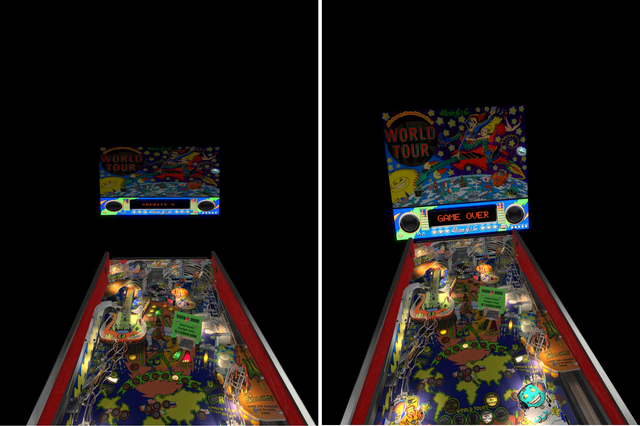
Garage.png

Aaron-Spelling.png

Johny.png

NFL.png


HOW TO INSTALL:


1) Open Table you want to add DMD and Backglass to.


2) First import the material file and the image file into the table where appropriate.
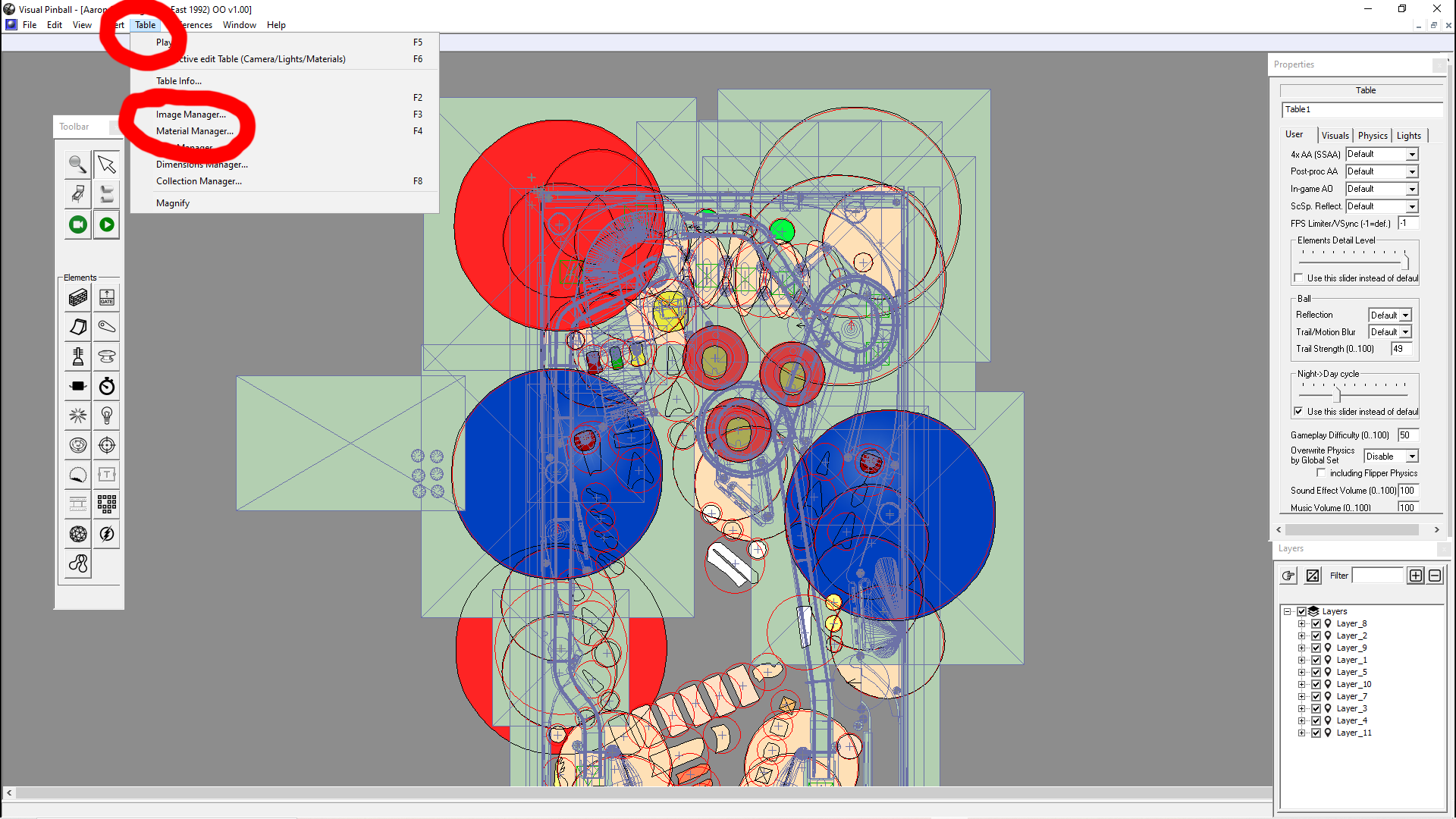
 

1.png


Cick the last blank listing then over to import (for images and materials) and import the included image and material in the same ways.
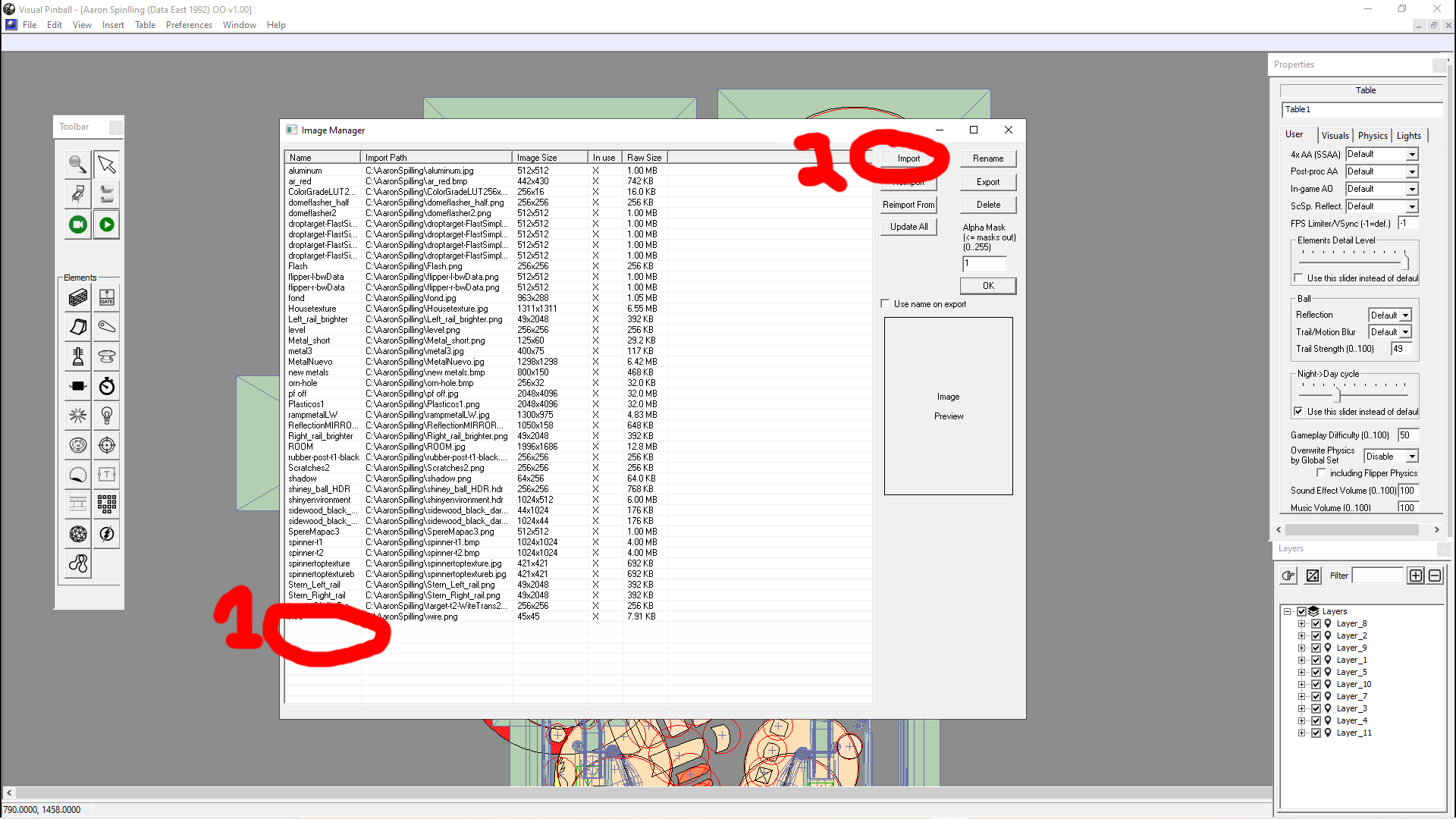
 

2.png


3) Go to file - open - and open the included parts table..


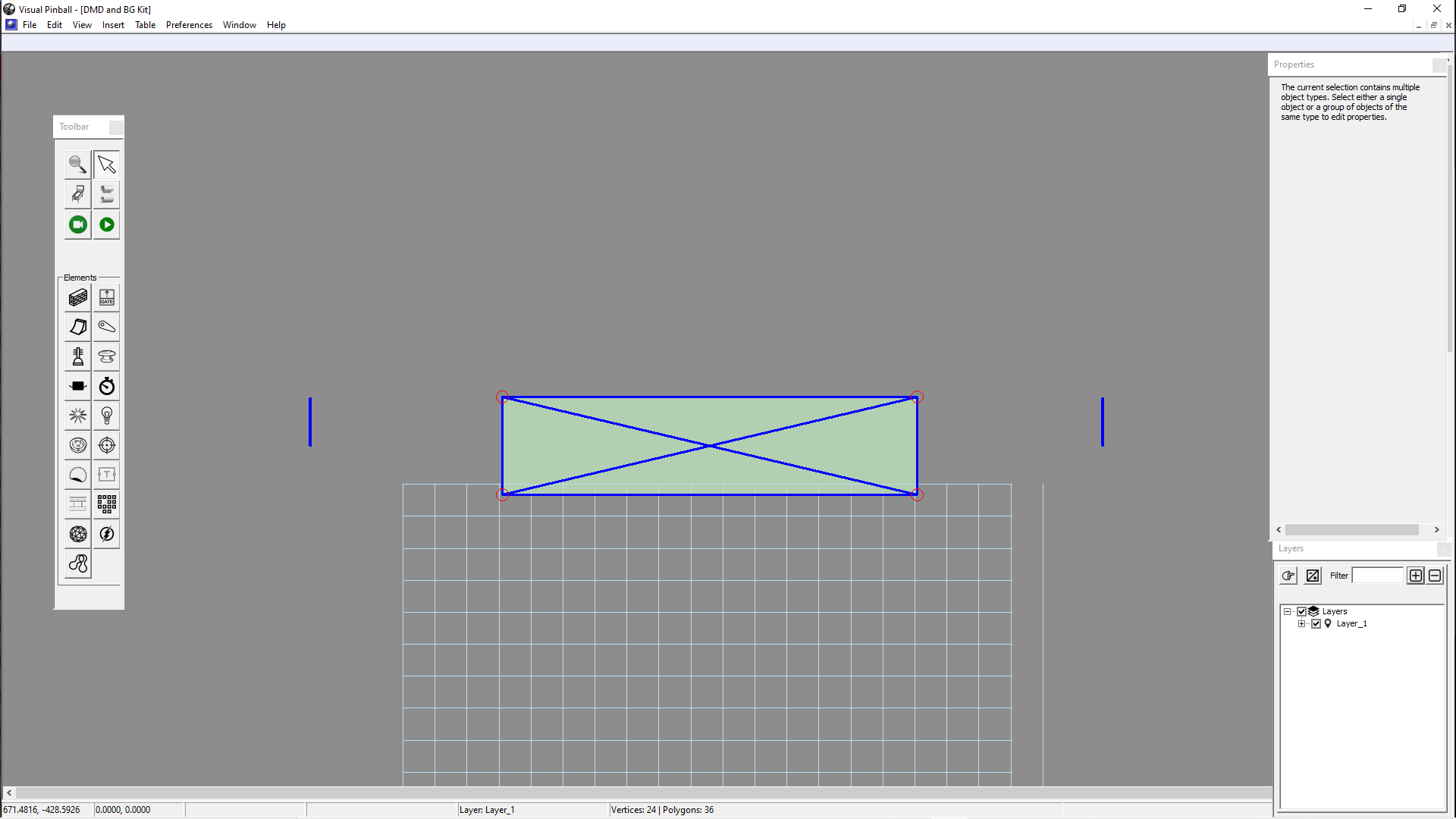
4) Click the rectangle, press shift, click one side of the "brackets", they should be selected and highlighted.
4.png


5) Copy slected parts.


6) Minimize that window, NOT the main VPX window, just the current working window.


7) Select the table you had open (the one you want to add DMD & backglass too) and maximize window.


8) Go over to layers and add New layer and name it whatever - DMD/Backglass


5.png

8) Paste in what you copied.


9) Then right click and assigned to selected layer.


Now your new DMD or backglass should be in the VR space and on their own new layer!!


ADJUSTING:


The rectangle is the DMD. If you want the DMD to be closer to the backglass just move the rectangle "UP" in the editor. Just drag it "UP" a little.. "DOWN" makes it further away.. GET IT? :)..

To adjust DMD height, select the DMD then over to the right you'll see height adjustment. Increase to raise, decrease to lower..

You can also adjust the shape of the DMD by clicking the dots in its corners. Press SHIFT to select more then one dot for adjusting.


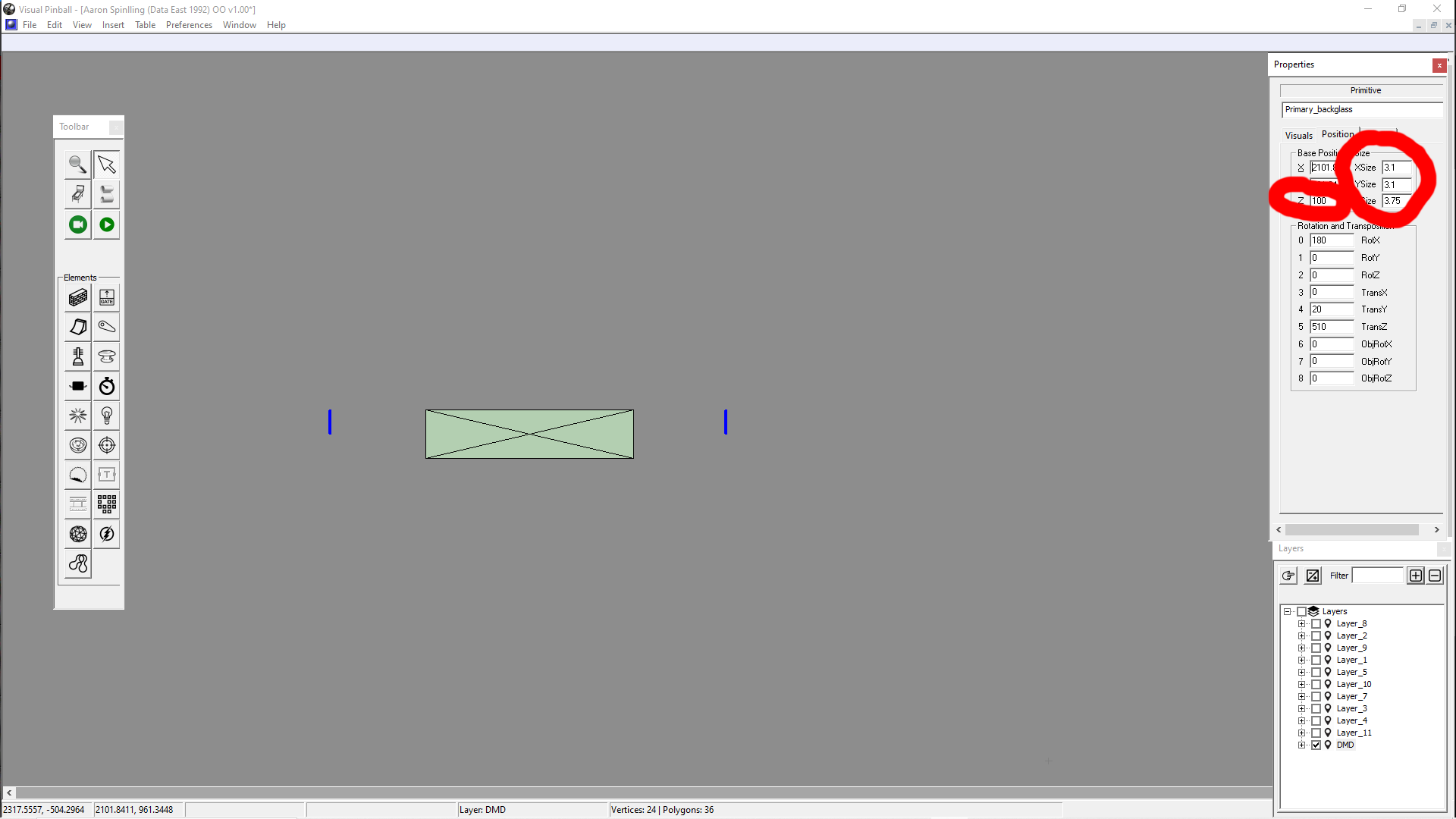
Adjusting the back glass is basically the same. To the right you'll see adjustments.. Main one for height of BG is Base Position  Z...  Or TransZ- Increase to lower, decrease to raise...

To adjust "the shape" of the Backglass panel, mess with the SIZE options... Shrink or increase the sides as need be.
8.png


That should get you 90% of the way there

You need capture backglass ON and b2s disabled OFF in nudge options.
---------------------------------------------------------------------------------------------------------------

Both in VR settings:
Set BG source to directb2s File (auto only)
Set DMD source to internal text/flasher (via vbscript)

---------------------------------------------------------------------------------------------------------------

DONT FORGET TO SAVE ;)


Ask any questions or post results :)


HAVE FUN!!!


Edited by Karlor, 17 April 2021 - 01:48 AM.

 I'm just going to set this here and go get a cup of coffee.. DONT TOUCH ANYTHING!! :pardon:  NOT MY LINKS BUT ENJOY  :crazy:

:love39:  *** https://archive.org/details/pinmame31 *** :twiddling:


#2 Karlor

Karlor

    Goon Squad

  • Platinum Supporter
  • 397 posts

  • Flag: United States of America

  • Favorite Pinball: The Machine Bride, Freddy, TOTAN, Twister, Batman, TZ, Ghostbusters

Posted 17 April 2021 - 07:03 AM

Did some more:

20210416234626-1.jpg20210416233411-1.jpg

20210416232937-1.jpg20210417000021-1.jpg

20210416232324-1.jpg20210416231214-1.jpg


Edited by Karlor, 18 April 2021 - 06:29 AM.

 I'm just going to set this here and go get a cup of coffee.. DONT TOUCH ANYTHING!! :pardon:  NOT MY LINKS BUT ENJOY  :crazy:

:love39:  *** https://archive.org/details/pinmame31 *** :twiddling:


#3 studlygoorite

studlygoorite

    Enthusiast

  • Silver Supporter
  • 402 posts
  • Location:Stoney Creek, Ontario

  • Flag: Canada

  • Favorite Pinball: Any VR table

  • 360 Gamer Tag: King JJ

Posted 17 April 2021 - 02:30 PM

Thanks Karlor, it looks like you are using 10.7, are you having any issues using 10.7 with VPVR?


#4 Rajo Joey

Rajo Joey

    Pinball Fan

  • Members
  • PipPipPipPip
  • 1,489 posts
  • Location:Niedersachsen

  • Flag: Germany

  • Favorite Pinball: Attack from Mars, Abra Ca Dabra and many old EM-Tables

Posted 17 April 2021 - 06:17 PM

Hi Karlor, if you don't want this black background, you can also easily import the minimal room template from sixtoe. It's done in a few minutes.
If you don't want it, you can delete the cabinet from the room. With cabinet it takes a little longer. But sixtoe has templates for some manufacturer.

Gesendet von meinem CMR-W09 mit Tapatalk

Rajo Joey - My front-end-files; Hundreds of Audio- and Videorecordings in high quality for Playfield (4k/60FPS) and Backglass (HD), Wheels & POV-Files: The Media-Post

https://www.facebook...02697096474910/

https://www.facebook...oups/VPAddicts/

https://www.facebook...oups/VPjunkies/


#5 Karlor

Karlor

    Goon Squad

  • Platinum Supporter
  • 397 posts

  • Flag: United States of America

  • Favorite Pinball: The Machine Bride, Freddy, TOTAN, Twister, Batman, TZ, Ghostbusters

Posted 17 April 2021 - 07:01 PM

Thanks Karlor, it looks like you are using 10.7, are you having any issues using 10.7 with VPVR?

I did a reinstall a month or so ago and was having AMD issues so I went with 10.7 to try out the newer AMD stuff. It works great :) I did have a minor issue but it was fixed the next day with a 10.7 'hot fix'.. I just happened to download the new new 10.7 at that time and it had an issue where it would crash when exiting a table.. not a big deal but its gone now anyway :).. Id try it out, I did notice a small performance boost, not a lot but enough I could 'feel' it and things looked a bit clearer..


Hi Karlor, if you don't want this black background, you can also easily import the minimal room template from sixtoe. It's done in a few minutes.
If you don't want it, you can delete the cabinet from the room. With cabinet it takes a little longer. But sixtoe has templates for some manufacturer.

Gesendet von meinem CMR-W09 mit Tapatalk

Thats true I just never actually thought of it.. Ive been trying to get non-VR tables figured out for like near 2 years lol I'm just sooo glad to have finally figured out a repeatable easy to use method that I had to try to explain it to others having the same issues :D


I also wanted to keep it as dead easy as I could to not overwhelm newcomers or people scared of the editor.. hopefully if they try this out they'll see its not so bad and get a little acquainted with the editor. Creating a VR cab/room is basically the same steps just A LOT more.. so this is like a gateway drug to getting people using the editor ;)


Plus Ive been trying to get back into playing and getting good, more then modding, so keeping it simple and fast was top priority lol


 I'm just going to set this here and go get a cup of coffee.. DONT TOUCH ANYTHING!! :pardon:  NOT MY LINKS BUT ENJOY  :crazy:

:love39:  *** https://archive.org/details/pinmame31 *** :twiddling:


#6 Madonion

Madonion

    Hobbyist

  • Members
  • PipPip
  • 33 posts
  • Location:Cape Town

  • Flag: South Africa

  • Favorite Pinball: Ghostbusters LE (Stern 2016)

Posted 17 April 2021 - 08:46 PM

Sweet now this is a work of art tutorial haha. budd will try this tomorrow! Btw i love world cup soccer but the table is so small on my VR! its the only table that is like this in vr. But stunning on LCD. Do you know why? 


Edited by Madonion, 17 April 2021 - 08:49 PM.


#7 Karlor

Karlor

    Goon Squad

  • Platinum Supporter
  • 397 posts

  • Flag: United States of America

  • Favorite Pinball: The Machine Bride, Freddy, TOTAN, Twister, Batman, TZ, Ghostbusters

Posted 17 April 2021 - 10:12 PM

Sweet now this is a work of art tutorial haha. budd will try this tomorrow! Btw i love world cup soccer but the table is so small on my VR! its the only table that is like this in vr. But stunning on LCD. Do you know why? 

I thought I remembered a shrunk table.. just un-check "Being John Malcovich" setting in VR options.. just kidding :D I'm not sure how to fix it. I messed around a little and couldn't find a setting that would make a difference. Its the only mini table Iv seen. Maybe a POV setting but i dont know how to alter that successfully.


Has anyone found a solution? I couldn't find a post for the table.. If anyone knows let us know I'd like to play it too :)


 I'm just going to set this here and go get a cup of coffee.. DONT TOUCH ANYTHING!! :pardon:  NOT MY LINKS BUT ENJOY  :crazy:

:love39:  *** https://archive.org/details/pinmame31 *** :twiddling:


#8 wiesshund

wiesshund

    VPF Legend

  • Members
  • PipPipPipPipPipPipPip
  • 11,871 posts

  • Flag: United States of America

  • Favorite Pinball: How many can i have?

Posted 18 April 2021 - 02:22 AM

does VR not respond to Z offset?

negative Z offset brings table closer to camera, but i dont know if that has any bearing on VR


If you feel the need to empty your wallet in my direction, i don't have any way to receive it anyways

Spend it on Hookers and Blow


#9 Karlor

Karlor

    Goon Squad

  • Platinum Supporter
  • 397 posts

  • Flag: United States of America

  • Favorite Pinball: The Machine Bride, Freddy, TOTAN, Twister, Batman, TZ, Ghostbusters

Posted 18 April 2021 - 03:08 AM

does VR not respond to Z offset?

negative Z offset brings table closer to camera, but i dont know if that has any bearing on VR

Thanks for the idea, I went and tried that but it didn't seem to effect it, I did get some effect with messing with the scales but only so much.. so it might be in those cam settings area. I looked at a few VR tabels and their cam settings seem to be all over the place as far as I can tell so I dont know if theres a way to gleam anything from their settings or not.. but so far those are the settings that had the most effect. Just not sure if you could tune it in that way but maybe with enough trial and error.

Its just weird because even non VR tabels you dont have to mess with cam settings or pov stuff. The VR seems to ignore that stuff but maybe on this one its not. Other then not being able to play it really it is kinda cool to see a mini shrunk pinball machine lol


Did some more:

20210417182151-1.jpg20210417192352-1.jpg

20210417182809-1.jpg20210417183342-1.jpg

sd.jpg20210417190353-1.jpg

20210417190046-1.jpg


Edited by Karlor, 18 April 2021 - 06:28 AM.

 I'm just going to set this here and go get a cup of coffee.. DONT TOUCH ANYTHING!! :pardon:  NOT MY LINKS BUT ENJOY  :crazy:

:love39:  *** https://archive.org/details/pinmame31 *** :twiddling:


#10 wiesshund

wiesshund

    VPF Legend

  • Members
  • PipPipPipPipPipPipPip
  • 11,871 posts

  • Flag: United States of America

  • Favorite Pinball: How many can i have?

Posted 18 April 2021 - 03:34 AM

Not sure, even if i installed VR, with out a VR headset, it wouldnt do anything, so i wouldnt see anything to mess with

but i guess it has its own table camera settings someplace


I mean the table isnt a mini table in the vpx editor right?


If you feel the need to empty your wallet in my direction, i don't have any way to receive it anyways

Spend it on Hookers and Blow


#11 Karlor

Karlor

    Goon Squad

  • Platinum Supporter
  • 397 posts

  • Flag: United States of America

  • Favorite Pinball: The Machine Bride, Freddy, TOTAN, Twister, Batman, TZ, Ghostbusters

Posted 18 April 2021 - 06:54 AM

Not sure, even if i installed VR, with out a VR headset, it wouldnt do anything, so i wouldnt see anything to mess with

but i guess it has its own table camera settings someplace


I mean the table isnt a mini table in the vpx editor right?

It looks normal in the editor. It's a puzzler for sure. Maybe should start a support thread if the table isnt up anymore?

Another VR person has to of figured it out I'd think but maybe not. I never made it to the support page to check I always forgot about it :/


I'm sorting and setting up the hoard of tables I've been neglecting because they're non-VR.

It's nice to use the kit when needed and get these babies in action:

20210417231315-1.jpg20210417230047-1.jpg

20210417225441-1.jpg20210417222802-1.jpg

20210417221812-1.jpg20210417220650-1.jpg

20210417232443-1.jpg


 I'm just going to set this here and go get a cup of coffee.. DONT TOUCH ANYTHING!! :pardon:  NOT MY LINKS BUT ENJOY  :crazy:

:love39:  *** https://archive.org/details/pinmame31 *** :twiddling:


#12 Rajo Joey

Rajo Joey

    Pinball Fan

  • Members
  • PipPipPipPip
  • 1,489 posts
  • Location:Niedersachsen

  • Flag: Germany

  • Favorite Pinball: Attack from Mars, Abra Ca Dabra and many old EM-Tables

Posted 18 April 2021 - 08:15 AM

Sweet now this is a work of art tutorial haha. budd will try this tomorrow! Btw i love world cup soccer but the table is so small on my VR! its the only table that is like this in vr. But stunning on LCD. Do you know why? 

Yes, Knorr had done the table in a different way; also his new table for 10.7. It has nothing to do with the Z-factor.

What works for me, is to set the scaling to 1.8. Then the table looks correct. But you have to reset it for other tables.

I haven't test it, but i read that the vr-launcher set it automatically.

And if you want to see funny things, set the scaling to a big size like 10 and try to play. :dblthumb:


Attached File  2021-04-18 10_10_33-VR Options.jpg   16.94KB   25 downloads


Rajo Joey - My front-end-files; Hundreds of Audio- and Videorecordings in high quality for Playfield (4k/60FPS) and Backglass (HD), Wheels & POV-Files: The Media-Post

https://www.facebook...02697096474910/

https://www.facebook...oups/VPAddicts/

https://www.facebook...oups/VPjunkies/


#13 Karlor

Karlor

    Goon Squad

  • Platinum Supporter
  • 397 posts

  • Flag: United States of America

  • Favorite Pinball: The Machine Bride, Freddy, TOTAN, Twister, Batman, TZ, Ghostbusters

Posted 18 April 2021 - 08:24 AM


Sweet now this is a work of art tutorial haha. budd will try this tomorrow! Btw i love world cup soccer but the table is so small on my VR! its the only table that is like this in vr. But stunning on LCD. Do you know why? 

Yes, Knorr had done the table in a different way; also his new table for 10.7. It has nothing to do with the Z-factor.

What works for me, is to set the scaling to 1.8. Then the table looks correct. But you have to reset it for other tables.

I haven't test it, but i read that the vr-launcher set it automatically.

And if you want to see funny things, set the scaling to a big size like 10 and try to play. :dblthumb:


attachicon.gif 2021-04-18 10_10_33-VR Options.jpg


I'll give that a try. I wonder what was different about it..  Is that something that could maybe be added to its script so you don't have to change it back and forth? Did you ever stop by its page, anyone say anything about it?


 I'm just going to set this here and go get a cup of coffee.. DONT TOUCH ANYTHING!! :pardon:  NOT MY LINKS BUT ENJOY  :crazy:

:love39:  *** https://archive.org/details/pinmame31 *** :twiddling:


#14 Rajo Joey

Rajo Joey

    Pinball Fan

  • Members
  • PipPipPipPip
  • 1,489 posts
  • Location:Niedersachsen

  • Flag: Germany

  • Favorite Pinball: Attack from Mars, Abra Ca Dabra and many old EM-Tables

Posted 18 April 2021 - 08:35 AM


Sweet now this is a work of art tutorial haha. budd will try this tomorrow! Btw i love world cup soccer but the table is so small on my VR! its the only table that is like this in vr. But stunning on LCD. Do you know why? 

Yes, Knorr had done the table in a different way; also his new table for 10.7. It has nothing to do with the Z-factor.

What works for me, is to set the scaling to 1.8. Then the table looks correct. But you have to reset it for other tables.

I haven't test it, but i read that the vr-launcher set it automatically.

And if you want to see funny things, set the scaling to a big size like 10 and try to play. :dblthumb:


attachicon.gif 2021-04-18 10_10_33-VR Options.jpg


I'll give that a try. I wonder what was different about it..  Is that something that could maybe be added to its script so you don't have to change it back and forth? Did you ever stop by its page, anyone say anything about it?


There was a thread at Vpinball about this and Knorr told, why he do it in this way. He also wrote, that it was to timeintensiv to change all his setting in the table, so that they are like other authors do. Can't remember exactly, what was his reason.

You can ask @basbi, what he did in his program vr-launcher in this case. Maybe he know, if this can be set in the script also.


Rajo Joey - My front-end-files; Hundreds of Audio- and Videorecordings in high quality for Playfield (4k/60FPS) and Backglass (HD), Wheels & POV-Files: The Media-Post

https://www.facebook...02697096474910/

https://www.facebook...oups/VPAddicts/

https://www.facebook...oups/VPjunkies/


#15 Karlor

Karlor

    Goon Squad

  • Platinum Supporter
  • 397 posts

  • Flag: United States of America

  • Favorite Pinball: The Machine Bride, Freddy, TOTAN, Twister, Batman, TZ, Ghostbusters

Posted 18 April 2021 - 09:21 AM


What works for me, is to set the scaling to 1.8. Then the table looks correct. But you have to reset it for other tables.

That worked great! Thanks for the tip.


Now.. anyone have a soccer ball texture for it :D


 I'm just going to set this here and go get a cup of coffee.. DONT TOUCH ANYTHING!! :pardon:  NOT MY LINKS BUT ENJOY  :crazy:

:love39:  *** https://archive.org/details/pinmame31 *** :twiddling:


#16 Rajo Joey

Rajo Joey

    Pinball Fan

  • Members
  • PipPipPipPip
  • 1,489 posts
  • Location:Niedersachsen

  • Flag: Germany

  • Favorite Pinball: Attack from Mars, Abra Ca Dabra and many old EM-Tables

Posted 18 April 2021 - 09:34 AM


What works for me, is to set the scaling to 1.8. Then the table looks correct. But you have to reset it for other tables.

That worked great! Thanks for the tip.


Now.. anyone have a soccer ball texture for it :D


You mean something like that? :dblthumb:

https://www.pngwing..../free-png-depab


Rajo Joey - My front-end-files; Hundreds of Audio- and Videorecordings in high quality for Playfield (4k/60FPS) and Backglass (HD), Wheels & POV-Files: The Media-Post

https://www.facebook...02697096474910/

https://www.facebook...oups/VPAddicts/

https://www.facebook...oups/VPjunkies/


#17 kiwi

kiwi

    Pinball Fan

  • VIP
  • 2,683 posts

  • Flag: Italy

  • Favorite Pinball: Star Trek 25th Anniversary


Posted 18 April 2021 - 09:35 AM

Knorr used the VP units as if they were millimeters,

because it was convenient for him to measure the real table and reproduce the various parts with the same real measurements,

instead of converting them into VP units,

a standard table is 952 VP units wide, and converted to metric unit is about 514mm, it is about 1.85 smaller than normal.


#18 wiesshund

wiesshund

    VPF Legend

  • Members
  • PipPipPipPipPipPipPip
  • 11,871 posts

  • Flag: United States of America

  • Favorite Pinball: How many can i have?

Posted 18 April 2021 - 10:15 AM

Knorr used the VP units as if they were millimeters,

because it was convenient for him to measure the real table and reproduce the various parts with the same real measurements,

instead of converting them into VP units,

a standard table is 952 VP units wide, and converted to metric unit is about 514mm, it is about 1.85 smaller than normal.

that is interesting, so the table is actually around 514 x 1157?


If you feel the need to empty your wallet in my direction, i don't have any way to receive it anyways

Spend it on Hookers and Blow


#19 kiwi

kiwi

    Pinball Fan

  • VIP
  • 2,683 posts

  • Flag: Italy

  • Favorite Pinball: Star Trek 25th Anniversary


Posted 18 April 2021 - 03:57 PM


Knorr used the VP units as if they were millimeters,

because it was convenient for him to measure the real table and reproduce the various parts with the same real measurements,

instead of converting them into VP units,

a standard table is 952 VP units wide, and converted to metric unit is about 514mm, it is about 1.85 smaller than normal.

that is interesting, so the table is actually around 514 x 1157?


The dimensions of the playfields are in the Dimension Manager.


#20 Karlor

Karlor

    Goon Squad

  • Platinum Supporter
  • 397 posts

  • Flag: United States of America

  • Favorite Pinball: The Machine Bride, Freddy, TOTAN, Twister, Batman, TZ, Ghostbusters

Posted 28 April 2021 - 07:25 AM


What works for me, is to set the scaling to 1.8. Then the table looks correct. But you have to reset it for other tables.

That worked great! Thanks for the tip.


Now.. anyone have a soccer ball texture for it :D


You mean something like that? :dblthumb:

https://www.pngwing..../free-png-depab


I tried several things but ended up seeing how the ball texture was done in NBA... Import the image (SoccerTest) then add the lines to the script: Its not perfect but if you get it looking better post the texture for us to use as well :) also the other script options wont work but good enough lol


Soccer-Test.png


Add to custom options:

Dim BallType
    BallType = 1


and add to before table init:


'****************************************************
'********************************************************
'--Ball decals write up - thx to JPJ for teaching me-----
'********************************************************
If BallType = 1 then
        Table1.BallFrontDecal = "SoccerTest"
        Table1.BallDecalMode = True
        Table1.Ballimage="black"
        Table1.DefaultBulbIntensityScale=0.1                'if you dont like reflection on the ball, make it 0.0 here to make it look unrealistic imo
        Table1.BallPlayfieldReflectionScale=0
    Else
        Table1.BallFrontDecal = "ScratchesEnhanced"            'if you dont like reflection on the ball, make it 0.0 here to make it look unrealistic imo
        Table1.BallDecalMode = True
        Table1.BallImage = "ball3"
        Table1.DefaultBulbIntensityScale = 0.1
        Table1.BallPlayfieldReflectionScale=0
End If


 I'm just going to set this here and go get a cup of coffee.. DONT TOUCH ANYTHING!! :pardon:  NOT MY LINKS BUT ENJOY  :crazy:

:love39:  *** https://archive.org/details/pinmame31 *** :twiddling: