Jump to content


Photo
- - - - -

Only flippers working in FX3.


  • Please log in to reply
30 replies to this topic

#1 webdiddy

webdiddy

    Enthusiast

  • Members
  • PipPipPip
  • 70 posts

  • Flag: Sweden

  • Favorite Pinball: Twilight Zone

Posted 29 October 2019 - 01:01 PM

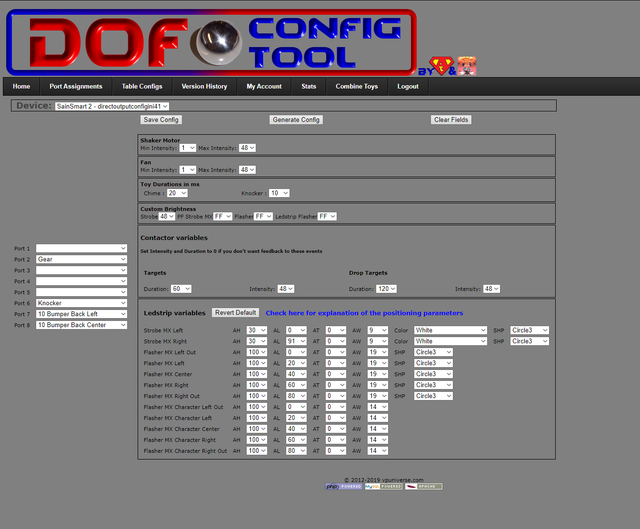
As the title say, only the flipper are working in Pinball fx3.

Please see attached screenshots of my DOF config.
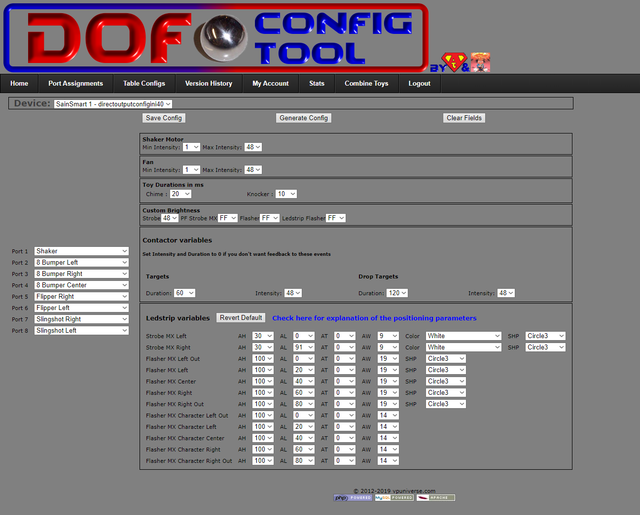
 

dof-1.png
dof-2.png
 
Here's my DOFLinx ini.

####
# The config file for DOFLinx with most of the available settings as a sample
#
# Note - this works with LEDWiz, PacLed64, Pinscape, Ultimate I/O and Sainsmart (FTDI devices)
# Edit this file as you see fit, lines that start with a hash (#) or are blank are not processed.  This blurb and comments can be cut out if you want.
#
# Output devices outputs are entered in the format of
# device (D) and output number (#) in the format D##, so controller device 1 and output 3 is "103" without the quotes, controller board 2 output 23 is "223" without quotes
#
# The keyboard hex code for the key that is used for each flipper from https://msdn.microsoft.com/en-us/library/windows/desktop/dd375731(v=vs.85).aspx
#
####

# 0 = OFF (normal operation), 1 = ON - When ON a window will appear and a log file will be created in the EXE directory.
DEBUG=0

# Point to your directoutputconfig.ini file.  Your file may have a number, ie directoutputconfig20.ini
# You can point to any of your directoutputconfig.ini files, but only one
# Keep this as the first pararameter (other than DEBUG if you need it) to process in your INI file.  The order past ths point is not relevant

DIRECTOUTPUTCONFIG=c:\DirectOutput\config\directoutputconfig40.ini

# The location of the .FX3 game specific files included with the DOFLinx release package
# Ensure your path has a \ on the end of it

PATH_FX3=C:\DirectOutput\FX3\

# The path to where you keep all of the .directb2s files that you've downloaded for use with FX3
# Ensure your path has a \ on the end of it

PATH_FX3_B2S=C:\DirectOutput\DOFLinx_FX3_B2S\

# This is the folder where B2SServer.exe can be found on your system

PATH_B2S_SERVER=C:\Visual Pinball\Tables\

# If you have a PinControl2 device then uncomment the lines below.  The values provided will work unless you've got something unique

#PINCONTROL2_UNIVERSE=0
#PINCONTROL2_BROADCAST=192.168.178.50

# The list of processes that can activate DOFLinx, in this case, Pinball FX3, Future Pinball VP 9.91 and VP Physics Mod
# Activating for VP assumes the use of Flag Files to control which VP games have added "fake" force feedback

PROCESSES=Pinball FX3,Future Pinball,VPinball_9_9_1,VPPhysMod5

# An over-ride to the default setting given this is just being used with Pinball FX3, not FX2, FP or other systems that may require the default delay

PROCESS_TO_ACTIVE_TIME=1

# Set the key code for the keys being used as Left and Right flippers
# Used for the default fll back if a full link cannot be established
# Left Shift = A0, Right Shift = A1

L_FLIPPER_KEY=A0
R_FLIPPER_KEY=A1

# Just in case things go wrong (ie no keyup signal is detected, flipper held down for a long time), what is the maximum time a flipper solenoid / contactor can be in in milliseconds
MAX_FLIPPER_ON=5000

# Use random colour order for the RGB undercabinet lighting
#RGB_STYLE=RANDOM

# Use the flipper key press to to cause undercabinet lighting to change
#RGB_TRIGGER=FLIPPER

# The minimum time for change between flipper flips, 1000mS or 1 second
#RGB_MIN_TIME=1000

# The red device / port for undercabinet lighting, device #1, port 29
# RGB_OUTPUT=129

# Turn on the attempt to make a full connection to Future Pinball when it is detected as running
# FP_ATTEMPT_LINK=1

# Set to 1 to output the game name to the log regardless of the DEBUG flag setting.  Set to 0 to simply follow the DEBUG flag.
# Quite useful when you trying to get the FX3 window game name for setting game specific colours, matching B2S names, etc
OUTPUT_GAME_NAME=0

# The device / port for the left and right flippers, set to output device 1, left flipper solenoid on port 1 and right flipper solenoid on port 2
L_FLIPPER_OUTPUT=206
R_FLIPPER_OUTPUT=205
LINK_LF=206,50,10000,255
LINK_RF=205,50,10000,255

# The other 8 solenoid of a 10 solenoid setup using ports 4 to 11 inclusive
LINK_LS=208,30,500,255
LINK_RS=207,30,500,255
LINK_ML=204,40,500,255
LINK_MC=203,40,500,255
LINK_MR=202,20,500,255
LINK_BL=202,15,500,255
LINK_BC=204,15,500,255
LINK_BR=203,50,500,255

# Ports for the shaker, gear motor, knocker, beacon and strobe using ports 12 - 16 inclusive
LINK_SH=201,1000,5000,255
LINK_GR=102,750,10000,255
LINK_KN=206,18,500,255
#LINK_BK=115,FLASH,200,255
#LINK_SR=116,ON,0,255

# Ports for the lights inside the various buttons being Start, Extra Ball, Coin, Exit, Launch Ball and Fire for ports 17 to 22 inclusive
#LINK_ST=117
#LINK_EB=118
#LINK_CN=119
#LINK_EX=120
#LINK_LB=121
#LINK_FR=122

# The device and red ports for five flashers, these have been set in the example below as on the second output device, ie LEDWiz #2
#LINK_FLOL=201
#LINK_FLIL=204
#LINK_FLCN=207
#LINK_FLIR=210
#LINK_FLOR=213

# Turn on the Exit Button when DOFLinx is activated
#BUTTONS_ON=120

# Make the "4" key (key code 34) to pulse controller/output 119
#KEY_TO_OUTPUT=34 119

# Set the left and right control keys to turn on a specific colour (red) for RGB.
# In Pinball FX3 this means when nudge keys are used it all goes red.
#KEY_TO_COLOUR=A2 109 Red A3 109 Red

# Set the joystick settings for nudge with Pinscape and FX3
#JOY_PORT=1
#JOY_X_OFFSET=32767
#JOY_Y_OFFSET=32767
#FX_LEFT_NUDGE_POINT=-2500
#FX_RIGHT_NUDGE_POINT=2500
#FX_FORWARD_NUDGE_POINT=2500
#FX_LEFT_NUDGE_KEY=4C
#FX_RIGHT_NUDGE_KEY=52
#FX_FORWARD_NUDGE_KEY=20
#FX_LEFT_NUDGE_INPUT=A2
#FX_RIGHT_NUDGE_INPUT=A3

# Configure the analogue plunger, such a Pinscape Z axis, to work with FX3
#PLUNGER_AXIS=Z
#PLUNGER_JOYSTICK_NUMBER=1
#PLUNGER_KEY=0D
#PLUNGER_PULL_POINT=40000
#PLUNGER_RELEASE_POINT=20000

# Configure the DOFLinx generated settings screen to activate when 4 keys are pressed, left shift, right shift, left ctl and right ctl (both flippers and magna saves)
# Set the Left flipper for UP, right flipper for DOWN, Start button for CHANGE and Extra Ball for EXIT
SETTING_ACTIVATE=A0,A1,A2,A3
SETTING_UP=A0
SETTING_DOWN=A1
SETTING_CHANGE=31
SETTING_EXIT=32
SETTING_MESSAGE=L Flipper = Up, R Flipper = Down, Start = Change, EB = Exit
#SETTING=UnderCab,115,Under cabinet lighting disabled,Off,Y,114,150
#SETTING=Addressable,119,Addressable LEDs Enabled,On,Y,118,50
SETTING=NIGHT,,Night Mode,Off,Y

#####
# Game specific colours in the formnat of a CSV of Game Name,Colour#1,Colour#2 - colours as they appear in your directoutputconfig
# Thanks to Vizzini here is a great starting list for Pinball FX2
# Extended for FX3 games by DDH69
#####
GAME_COLOUR=AlienIsolationPinball,Medium_Blue,Lime,Dodger_Blue,Lime_Green
GAME_COLOUR=AlienvsPredatorPinball,Medium_Blue,Lime_Green,Dodger_Blue,Yellow_Green
GAME_COLOUR=AliensPinball,Medium_Blue,Dark_Golden_Rod,Dodger_Blue
GAME_COLOUR=AmericanDadPinball,Medium_Blue,Lime_Green,Dodger_Blue,Yellow_Green
GAME_COLOUR=ArcherPinball,Medium_Blue,Yellow,Dodger_Blue,Blue_Violet
GAME_COLOUR=Biolab,Dark_Red,Lime,Blue,Cyan,Blue_Violet,Yellow
GAME_COLOUR=Blade,Blue,Blue_Violet,Salmon
GAME_COLOUR=BobaFett,Lime,Golden_Rod,Blue_Violet
GAME_COLOUR=BobsBurgersPinball,Medium_Blue,Lime_Green,Dark_Red,Dodger_Blue,Yellow_Green
GAME_COLOUR=CaptainAmerica,Blue,Dark_Red,Dodger_Blue,Gold
GAME_COLOUR=CastleStorm,Blue,Gold,Lime,Dodger_Blue,Orange,Lime_Green
GAME_COLOUR=CivilWar,Blue,Dark_Red,Dodger_Blue,Light_Salmon
GAME_COLOUR=Deadpool,Dark_Red,Blue,Medium_slate_blue,Dodger_Blue
GAME_COLOUR=DoomPinball,Yellow,Silver,Gray,Dark_Orange,Dim_Gray,Orange_Red,Peru,Crimson
GAME_COLOUR=DoctorStrange,Dark_Red,Blue,Gold,Lime_Green,Dark_Violet,Orange,Dodger_Blue,Lime,Medium_Slate_Blue
GAME_COLOUR=EarthDefense,Dark_Red,Blue,Gold,Dark_Violet,Orange,Dodger_Blue,Lime
GAME_COLOUR=ElDorado,Orange,Lime_Green,Yellow,Coral,Lime,Yellow_Green,Cyan
GAME_COLOUR=EpicQuest,Lime_Green,Dodger_Blue,Yellow_Green,Cyan
GAME_COLOUR=Excalibur,Dark_Red,Blue,Lime,Dodger_Blue,Cyan
GAME_COLOUR=FalloutPinball,Crimson,White,Red,Brown,Light_Steel_Blue,Slate_Blue
GAME_COLOUR=FamilyGuyPinball,Dodger_Blue,Lime_Green,Salmon,Dark_Violet,Yellow_Green
GAME_COLOUR=FantasticFour,Blue,Yellow,Dodger_Blue,Orange_Red
GAME_COLOUR=FearItself,Dark_Red,Blue,Yellow,Lime,Dark_Violet,Orange
GAME_COLOUR=GhostRider,Dodger_Blue,White,Yellow,Light_Salmon,Orange_Red
GAME_COLOUR=GuardiansoftheGalaxy,Dodger_Blue,Orange,Medium_Purple
GAME_COLOUR=IRONMAN,Blue,Dark_Red,Dodger_Blue,Gold
GAME_COLOUR=Mars,Blue,Yellow,Deep_sky_blue,Gold
GAME_COLOUR=MarvelsAntMan,Medium_Blue,Dark_Red,Dodger_Blue
GAME_COLOUR=MarvelsAvengersAgeofUltron,Dark_Red,Dodger_Blue,Lime_Green,Light_Salmon,Cyan
GAME_COLOUR=MarvelsTheAvengers,Blue,Dark_Red,Dodger_Blue,Gold
GAME_COLOUR=MarvelsWomenofPowerAForce,Red,Lime,Gold,Slate_Blue,Tomato,Silver,Dark_Orchid,Spring_Green
GAME_COLOUR=MarvelsWomenofPowerChampions,Dodger_Blue,Yellow,Red,Gray,Golden_Rod,Crimson,Orange
GAME_COLOUR=MoonKnight,Dodger_Blue,Blue,Cyan,Royal_Blue
GAME_COLOUR=MsSplosionMan,Dodger_Blue,Pink,Medium_Blue,Purple,Royal_Blue
GAME_COLOUR=Paranormal,Lime_Green,Dodger_Blue,Yellow_Green
GAME_COLOUR=Pasha,Dark_Violet,Golden_Rod,Dodger_Blue
GAME_COLOUR=PlantsVSZombies,Lime_Green,Yellow_Green,Dodger_Blue
GAME_COLOUR=Portal,Dodger_Blue,Yellow_Green,Medium_Blue,Yellow
GAME_COLOUR=Rome,Dark_Red,Gold,Dodger_Blue,Light_Salmon,Yellow_Green,Orange
GAME_COLOUR=SecretsoftheDeep,Blue,Yellow,Dodger_Blue
GAME_COLOUR=Shaman,Dark_Red,Blue,Gold,Dark_Violet,Orange,Dodger_Blue,Lime
GAME_COLOUR=SorcerersLair,Blue,Blue_Violet,Dodger_Blue,Slate_Blue
GAME_COLOUR=SouthParkButtersVeryOwnPinballGame,Dark_Red,Blue,Gold,Dark_Violet,Orange,Dodger_Blue,Lime_Green
GAME_COLOUR=SouthParkSuperSweetPinball,Dark_Red,Lime,Blue,Gold,Dark_Violet,Orange,Dodger_Blue,Lime_Green,Yellow_Green
GAME_COLOUR=SpiderMan,Dark_Red,Lime,Blue,Gold,Dark_Violet,Orange
GAME_COLOUR=STARWARSDARTHVADER,Light_sky_blue,Dark_Red,Cyan
GAME_COLOUR=StarWarsEpisodeVTheEmpireStrikesBack,Medium_Blue,Yellow,Dark_Red,Dodger_Blue
GAME_COLOUR=StarWarsEpisodeVIReturnoftheJedi,Slate_Blue,Golden_Rod,Medium_Blue,Lime_Green,Dodger_Blue,Yellow
GAME_COLOUR=StarWarsPinballDroids,Medium_Blue,Yellow,Orange,Navy,Gold,Orange_Red
GAME_COLOUR=StarWarsPinballEpisodeIVANewHope,Cyan,Golden_Rod,Dodger_Blue,Yellow
GAME_COLOUR=StarWarsPinballHanSolo,Dodger_Blue,Royal_Blue,Antique_White
GAME_COLOUR=StarWarsPinballMastersoftheForce,Medium_Blue,Salmon,Dodger_Blue,Purple,Cyan,Dark_Red
GAME_COLOUR=StarWarsPinballMightoftheFirstOrder,Light_sky_blue,Dodger_Blue,Dark_Red,Cyan
GAME_COLOUR=StarWarsPinballStarWarsRebels,Medium_Blue,Yellow,Royal_Blue,Orange_Red,Purple,Lime_Green
GAME_COLOUR=StarWarsPinballTheForceAwakens,Dark_Red,Medium_Blue,Blue_Violet
GAME_COLOUR=StarWarsPinballRogueOne,Gray,Silver,Light_Sky_Blue,Teal,Beige,Bisque,Aqua_Marine,Slate_Gray,Dark_Orange
GAME_COLOUR=StarWarsStarfighterAssault,Medium_Blue,Dodger_Blue,Dark_Red
GAME_COLOUR=StarWarsTheCloneWars,Dark_Red,Pink,Medium_Blue,Medium_Turquoise,Lime,Lime_Green
GAME_COLOUR=SuperLeagueASRoma,Lime_Green,Orange,Lime,Yellow,Red
GAME_COLOUR=SuperLeagueZenStudiosFC,Lime_Green,Orange,Lime,Yellow,Red
GAME_COLOUR=SuperLeagueArsenalFC,Lime_Green,Orange,Lime,Yellow,Red
GAME_COLOUR=SuperLeagueLiverpoolFC,Lime_Green,Orange,Lime,Yellow,Red
GAME_COLOUR=SuperLeagueJuventus,Lime_Green,Orange,Lime,Yellow,Red
GAME_COLOUR=SuperLeagueACMilan,Lime_Green,Orange,Lime,Yellow,Red
GAME_COLOUR=SuperLeagueRealMadridCF,Lime_Green,Medium_Blue,Lime,Yellow,Red
GAME_COLOUR=SuperLeagueFCBarcelona,Slate_Blue,Lime_Green,Yellow,Blue_Violet,Lime,Red
GAME_COLOUR=Tesla,Lime_Green,Yellow_Green,Dodger_Blue,Golden_Rod
GAME_COLOUR=TheElderScrollsVSkyrimPinball,Light_Slate_Gray,Gold,Golden_Rod,Dark_Sea_Green,Peru,Tan
GAME_COLOUR=TheInfinity Gauntlet,Dark_Red,Blue,Gold,Dark_Violet,Orange,Dodger_Blue,Lime
GAME_COLOUR=TheWalkingDead,Lime_Green,Royal_Blue,Yellow_Green
GAME_COLOUR=Thor,Dark_Red,Blue,Gold,Dark_Violet,Orange,Dodger_Blue,Lime
GAME_COLOUR=V12,Dark_Red,Blue,Gold,Dark_Violet,Orange,Dodger_Blue
GAME_COLOUR=Venom,Dark_Red,Blue,Dark_Violet,Dodger_Blue
GAME_COLOUR=WildWestRampage,Yellow_Green,Dodger_Blue,Royal_Blue
GAME_COLOUR=Wolverine,Dark_Red,Medium_Blue,Yellow,Dark_Violet
GAME_COLOUR=WorldWarHulk,Lime_Green,Yellow_Green,Dodger_Blue,Lime,Yellow
GAME_COLOUR=XMen,Blue,Blue_Violet,Gold,Dodger_Blue,Slate_Blue,Orange
GAME_COLOUR=ET,Yellow,Amber,Sky_blue,Sienna,Aqua_marine,Slate_gray,Dark_olive_green
GAME_COLOUR=BacktotheFuture,Light_steel_blue,White,Crimson,Gray,Teal,Yellow,Dodger_blue
GAME_COLOUR=Jaws,Dark_turquoise,Gray,White,Salmon,Light_coral,Tan,Papaya_whip,Peru
GAME_COLOUR=SonofZeus,Dark_orange,Silver,Dark_salmon,Amber,Sienna,Light_steel_blue,Firebrick
GAME_COLOUR=AdventureLand,Red,Cyan,Yellow,White,Medium_orchid,Aqua,Dark_turquoise,Medium_purple
GAME_COLOUR=JurassicPark,Lawn_green,Amber,Yellow,Light_slate_gray,Cadet_blue,Black,Rosy_brown,Light_steel_blue,Medium_sea_green,Silver
GAME_COLOUR=JurassicWorld,Light_steel_blue,Silver,Tan,Forest_green,Gray,Cadet_blue,Yellow_green,Teal,Bisque
GAME_COLOUR=JurassicMayhem,Sandy_brown,Forest_green,Dark_green,Dark_olive_green,Dark_khaki,Peru,Tan,Navajo_white,Beige,Dark_golden_rod,Corn_silk
GAME_COLOUR=StarWarsLastJedi,Gold,Orange_Red,Aqua,Coral,Dark_Khaki,Light_Steel_Blue,Yellow_Green,Steel_Blue
GAME_COLOUR=StarWarsAhchToIsland,Peru,Tan,Light_Slate_Gray,Light_Golden_Rod,Turquoise,Deep_Sky_Blue,Spring_Green,Steel_Blue
GAME_COLOUR=WMSFishTales,Forest_green,Medium_spring_green,Pale_green,Aqua,Blue,Golden_Rod,Dark_turquoise,Gold,Deep_sky_blue,Sandy_brown,Green
GAME_COLOUR=WMSGetaway,Red,Steel_blue,Dim_gray,Navy,Dark_red,Teal
GAME_COLOUR=WMSJunkyard,Amber,Lawn_green,Burly_wood,Orange,Peru,Dark_turquoise
GAME_COLOUR=WMSMedievalMadness,Yellow,Amber,Rosy_brown,Firebrick,Forest_green,Gray,Dark_salmon,Dark_orange
GAME_COLOUR=WMSAFM,White,Red,Lime,Amber,Sea_green,Forest_green,Turquoise,Corn_silk
GAME_COLOUR=WMSBlackRose,Khaki,Sky_blue,Orange_red,Gold,Aqua_marine,Tomato,Yellow_green
GAME_COLOUR=WMSPartyZone,Lime,Blue_violet,Orange,Purple,Aqua,Red,Medium_blue,Amber,Yellow,Sandy_brown,Deep_pink
GAME_COLOUR=StarWarsSolo,Burly_Wood,Medium_Sea_Green,Light_Salmon,Silver,Golden_Rod,Dark_Turquoise
GAME_COLOUR=StarWarsCalrissianChronicles,Yellow,Silver,Light_Blue,Gold,White,Amber,Dark_Salmon,Navajo_White
GAME_COLOUR=StarWarsBattleOfMimban,Coral,Gray,Dark_Orange,Salmon,Slate_Gray,Light_Steel_Blue,Peru,Tan
GAME_COLOUR=BallySafeCracker,Orange,Gold,Yellow,Orange_Red,Turquoise,Antique_White,Dim_Gray,Golden_Rod,Crimson
GAME_COLOUR=BallyTheatreOfMagic,Gold,Medium_Slate_Blue,Tomato,Light_Yellow,Plum,Orchid,Golden_Rod,Crimson,Silver
GAME_COLOUR=BallyTheChampionPub,Forest_Green,Gold,Orange_Red,Dark_Blue,Green,Red,Light_Green
GAME_COLOUR=WMSHurricane,Gray,Lawn_Green,Slate_Gray,Dark_Orange,Dark_Blue,Medium_Blue,Cyan,Orange_Red,Papaya_Whip
GAME_COLOUR=WMSRedAndTedRoadShow,Yellow,Orange,Orange_Red,Forest_Green,Yellow_Green,Blue,Navy,Magenta,White
GAME_COLOUR=WMSWhiteWater,Peru,Blue,Royal_Blue,Light_Steel_Blue,Sienna,Aqua,Turquoise,Yellow,Beige


#2 Outhere

Outhere

    Pinball Wizard

  • Platinum Supporter
  • 4,807 posts

  • Flag: United States of America

  • Favorite Pinball: M M

Posted 29 October 2019 - 02:26 PM

Does everything work in VP

Are you running DOFLinx  as admin?

Add this line  --> DIRECTOUTPUTGLOBAL=c:\DirectOutput\config\GlobalConfig_b2sServer.xml

If still not working then

Set to one -  DEBUG=1

Clear log

Start FX3 game

Post DOFLinx.log


#3 webdiddy

webdiddy

    Enthusiast

  • Members
  • PipPipPip
  • 70 posts

  • Flag: Sweden

  • Favorite Pinball: Twilight Zone

Posted 29 October 2019 - 02:58 PM

Yes, everything works in VPX.

Yes running DOFLinx as admin.


I added "GlobalConfig_B2SServer.xml" under "DIRECTOUTPUTCONFIG=c:\DirectOutput\config\directoutputconfig40.ini"


It did not work.


Here's the LOG.

---------------------------------------------------------------------------------
DirectOutput Version 3.1.7011.27968, built 2019.03.13 15:32
MJR Grander Unified DOF R3++ edition feat. Djrobx, Rambo3, and Freezy
DOF created by SwissLizard | https://github.com/mjrgh/DirectOutput
2019.10.29 15:56:36.171	DirectOutput Logger initialized
2019.10.29 15:56:36.153	Finishing framework
2019.10.29 15:56:36.154	Finishing cabinet
2019.10.29 15:56:36.155	Debug: Finishing output controllers
2019.10.29 15:56:36.155	Debug: Output controllers finished
2019.10.29 15:56:36.155	Cabinet finished
2019.10.29 15:56:36.155	DirectOutput framework finished.
2019.10.29 15:56:36.155	Bye and thanks for using!
2019.10.29 15:56:36.157	Global config filename is "c:\DirectOutput\config\GlobalConfig_B2SServer.xml"
2019.10.29 15:56:36.171	Global config loaded from: c:\DirectOutput\config\GlobalConfig_B2SServer.xml
2019.10.29 15:56:36.171	Loading Pinball parts
2019.10.29 15:56:36.171	Loading cabinet
2019.10.29 15:56:36.172	Will load cabinet config file: C:\DirectOutput\config\Cabinet.xml
2019.10.29 15:56:36.235	2 output controller defnitions and 18 toy definitions loaded from cabinet config.
2019.10.29 15:56:36.235	Cabinet config file has AutoConfig feature enabled. Calling AutoConfig.
2019.10.29 15:56:36.235	Cabinet auto configuration started
2019.10.29 15:56:36.258	PhilipsHueAutoConfigurator.AutoConfig started...note, actual connection detection will happen asynchronously, and device disabled if not succesfull (check further down in the log)
2019.10.29 15:56:36.265	LedWiz-like device at VID=1118, PID=2048, product string=Microsoft® Nano Transceiver v2.0, manufacturer string=Microsoft
2019.10.29 15:56:36.267	LedWiz-like device at VID=1118, PID=2048, product string=Microsoft® Nano Transceiver v2.0, manufacturer string=Microsoft
2019.10.29 15:56:36.270	LedWiz-like device at VID=1118, PID=2048, product string=Microsoft® Nano Transceiver v2.0, manufacturer string=Microsoft
2019.10.29 15:56:36.271	LedWiz-like device at VID=1118, PID=2048, product string=Microsoft® Nano Transceiver v2.0, manufacturer string=Microsoft
2019.10.29 15:56:36.274	LedWiz-like device at VID=1118, PID=2048, product string=Microsoft® Nano Transceiver v2.0, manufacturer string=Microsoft
2019.10.29 15:56:36.275	LedWiz-like device at VID=53769, PID=1056, product string=I-PAC 2, manufacturer string=Ultimarc IPAC 2
2019.10.29 15:56:36.277	LedWiz-like device at VID=53769, PID=1056, product string=I-PAC 2, manufacturer string=Ultimarc IPAC 2
2019.10.29 15:56:36.278	LedWiz-like device at VID=53769, PID=1056, product string=I-PAC 2, manufacturer string=Ultimarc IPAC 2
2019.10.29 15:56:36.783	FT245RBitbangControllerAutoConfigurator.AutoConfig.. Detected FT245RBitbangController[0], name=FT245RBitbangController 0, description: FT245R USB FIFO, serial #A907QJBK
2019.10.29 15:56:36.784	Detected and added FT245RBitbangController Id 0 with name FT245RBitbangController 0
2019.10.29 15:56:36.784	FT245RBitbangControllerAutoConfigurator.AutoConfig.. Detected FT245RBitbangController[1], name=FT245RBitbangController 1, description: FT245R USB FIFO, serial #AC01X1GJ
2019.10.29 15:56:36.784	Detected and added FT245RBitbangController Id 1 with name FT245RBitbangController 1
2019.10.29 15:56:36.784	Cabinet auto configuration finished
2019.10.29 15:56:36.784	Autoconfig complete.
2019.10.29 15:56:36.784	Cabinet config loaded successfully from C:\DirectOutput\config\Cabinet.xml
2019.10.29 15:56:36.784	Cabinet loaded
2019.10.29 15:56:36.784	Loading table config
2019.10.29 15:56:36.784	No TableFilename specified, will use empty tableconfig
2019.10.29 15:56:36.784	Will try to load configs from DirectOutput.ini or LedControl.ini file(s) for RomName doflinx
2019.10.29 15:56:36.788	Loading LedControl file C:\DirectOutput\config\directoutputconfig40.ini
2019.10.29 15:56:36.802	Min DOF Version is 0.8 for file directoutputconfig40.ini
2019.10.29 15:56:36.978	Loading LedControl file C:\DirectOutput\config\directoutputconfig41.ini
2019.10.29 15:56:36.979	Min DOF Version is 0.8 for file directoutputconfig41.ini
2019.10.29 15:56:37.077	2 directoutputconfig.ini or ledcontrol.ini files loaded.
2019.10.29 15:56:37.078	Config for RomName doflinx exists in LedControl data. Updating cabinet and config.
2019.10.29 15:56:37.087	Table config loading finished: romname=doflinx, tablename=doflinx
2019.10.29 15:56:37.088	Pinball parts loaded
2019.10.29 15:56:37.089	Starting processes
2019.10.29 15:56:37.089	Initializing cabinet
2019.10.29 15:56:37.089	Debug: Initializing output controllers
2019.10.29 15:56:37.090	FT245RBitbangController Sainsmart 1 with serial number AC01X1GJ has been initialized and the updater thread has been started.
2019.10.29 15:56:37.090	FT245RBitbangController Sainsmart 2 with serial number A907QJBK has been initialized and the updater thread has been started.
2019.10.29 15:56:37.091	FT245RBitbangController FT245RBitbangController 0 with serial number A907QJBK has been initialized and the updater thread has been started.
2019.10.29 15:56:37.091	FT245RBitbangController FT245RBitbangController 1 with serial number AC01X1GJ has been initialized and the updater thread has been started.
2019.10.29 15:56:37.091	Debug: Output controllers initialized
2019.10.29 15:56:37.093	Cabinet initialized
2019.10.29 15:56:37.096	Loading shape definition file: C:\DirectOutput\config\DirectOutputShapes.xml
2019.10.29 15:56:37.134	Framework initialized.
2019.10.29 15:56:37.134	Have fun! :)
2019.10.29 15:56:37.146	Initializing cabinet
2019.10.29 15:56:37.146	Debug: Initializing output controllers
2019.10.29 15:56:37.146	Debug: Output controllers initialized
2019.10.29 15:56:37.146	Cabinet initialized
2019.10.29 15:56:37.228	Connection to FTDI chip AC01X1GJ established.
2019.10.29 15:56:37.350	Connection to FTDI chip A907QJBK established.
2019.10.29 15:56:37.353	EXCEPTION: Could not open the connection to FTDI chip with serial number A907QJBK.
2019.10.29 15:56:37.353	EXCEPTION: Thread: FT245RBitbangController A907QJBK named Sainsmart 2 updater thread 
2019.10.29 15:56:37.353	EXCEPTION: Message: FT_EXCEPTION --> FTDI device not opened.
2019.10.29 15:56:37.356	EXCEPTION: Stacktrace:    vid DirectOutput.Cab.Out.FTDIChip.FTDI.ErrorHandler(FT_STATUS ftStatus, FT_ERROR ftErrorCondition)
2019.10.29 15:56:37.356	EXCEPTION: Stacktrace:    vid DirectOutput.Cab.Out.FTDIChip.FTDI.ErrorHandler(FT_STATUS ftStatus)
2019.10.29 15:56:37.356	EXCEPTION: Stacktrace:    vid DirectOutput.Cab.Out.FTDIChip.FT245RBitbangController.Connect()
2019.10.29 15:56:37.356	EXCEPTION: Targetsite: Void ErrorHandler(FT_STATUS, FT_ERROR)
2019.10.29 15:56:37.356	EXCEPTION: Could not open the connection to FTDI chip with serial number AC01X1GJ.
2019.10.29 15:56:37.356	EXCEPTION: Thread: FT245RBitbangController AC01X1GJ named FT245RBitbangController 1 updater thread 
2019.10.29 15:56:37.356	EXCEPTION: Message: FT_EXCEPTION --> FTDI device not opened.
2019.10.29 15:56:37.356	EXCEPTION: Stacktrace:    vid DirectOutput.Cab.Out.FTDIChip.FTDI.ErrorHandler(FT_STATUS ftStatus, FT_ERROR ftErrorCondition)
2019.10.29 15:56:37.356	EXCEPTION: Stacktrace:    vid DirectOutput.Cab.Out.FTDIChip.FTDI.ErrorHandler(FT_STATUS ftStatus)
2019.10.29 15:56:37.356	EXCEPTION: Stacktrace:    vid DirectOutput.Cab.Out.FTDIChip.FT245RBitbangController.Connect()
2019.10.29 15:56:37.356	EXCEPTION: Targetsite: Void ErrorHandler(FT_STATUS, FT_ERROR)
2019.10.29 15:56:37.356	Warning: No connection to FTDI chip A907QJBK. Updater thread will terminate.
2019.10.29 15:56:37.357	Warning: No connection to FTDI chip AC01X1GJ. Updater thread will terminate.
2019.10.29 15:56:37.388	FT245RBitbangController  with serial number A907QJBK has been initialized and the updater thread has been started.
2019.10.29 15:56:37.389	EXCEPTION: Could not open the connection to FTDI chip with serial number A907QJBK.
2019.10.29 15:56:37.389	EXCEPTION: Thread: FT245RBitbangController A907QJBK named  updater thread 
2019.10.29 15:56:37.389	EXCEPTION: Message: FT_EXCEPTION --> FTDI device not opened.
2019.10.29 15:56:37.389	EXCEPTION: Stacktrace:    vid DirectOutput.Cab.Out.FTDIChip.FTDI.ErrorHandler(FT_STATUS ftStatus, FT_ERROR ftErrorCondition)
2019.10.29 15:56:37.389	EXCEPTION: Stacktrace:    vid DirectOutput.Cab.Out.FTDIChip.FTDI.ErrorHandler(FT_STATUS ftStatus)
2019.10.29 15:56:37.389	EXCEPTION: Stacktrace:    vid DirectOutput.Cab.Out.FTDIChip.FT245RBitbangController.Connect()
2019.10.29 15:56:37.389	EXCEPTION: Targetsite: Void ErrorHandler(FT_STATUS, FT_ERROR)
2019.10.29 15:56:37.389	Warning: No connection to FTDI chip A907QJBK. Updater thread will terminate.
2019.10.29 15:56:37.409	FT245RBitbangController  with serial number AC01X1GJ has been initialized and the updater thread has been started.
2019.10.29 15:56:37.410	EXCEPTION: Could not open the connection to FTDI chip with serial number AC01X1GJ.
2019.10.29 15:56:37.410	EXCEPTION: Thread: FT245RBitbangController AC01X1GJ named  updater thread 
2019.10.29 15:56:37.410	EXCEPTION: Message: FT_EXCEPTION --> FTDI device not opened.
2019.10.29 15:56:37.410	EXCEPTION: Stacktrace:    vid DirectOutput.Cab.Out.FTDIChip.FTDI.ErrorHandler(FT_STATUS ftStatus, FT_ERROR ftErrorCondition)
2019.10.29 15:56:37.410	EXCEPTION: Stacktrace:    vid DirectOutput.Cab.Out.FTDIChip.FTDI.ErrorHandler(FT_STATUS ftStatus)
2019.10.29 15:56:37.410	EXCEPTION: Stacktrace:    vid DirectOutput.Cab.Out.FTDIChip.FT245RBitbangController.Connect()
2019.10.29 15:56:37.410	EXCEPTION: Targetsite: Void ErrorHandler(FT_STATUS, FT_ERROR)
2019.10.29 15:56:37.410	Warning: No connection to FTDI chip AC01X1GJ. Updater thread will terminate.
2019.10.29 15:56:37.493	ArtNet  finished and updater thread stopped.
2019.10.29 15:56:37.493	PinControl  finished and updater thread stopped.
2019.10.29 15:56:37.493	FT245RBitbangController  with serial number A907QJBK has been finished and the updater thread has been terminated.
2019.10.29 15:56:37.493	ArtNet  finished and updater thread stopped.
2019.10.29 15:56:37.493	PinControl  finished and updater thread stopped.
2019.10.29 15:56:37.493	FT245RBitbangController  with serial number AC01X1GJ has been finished and the updater thread has been terminated.
2019.10.29 15:56:37.493	ArtNet  finished and updater thread stopped.
2019.10.29 15:56:37.493	PinControl  finished and updater thread stopped.
2019.10.29 15:56:37.493	Finishing cabinet
2019.10.29 15:56:37.493	Debug: Finishing output controllers
2019.10.29 15:56:37.493	Debug: Output controllers finished
2019.10.29 15:56:37.493	Cabinet finished
2019.10.29 15:56:39.131	Finishing framework
2019.10.29 15:56:39.131	Finishing cabinet
2019.10.29 15:56:39.132	Debug: Finishing output controllers
2019.10.29 15:56:39.241	Connection to FTDI chip AC01X1GJ closed.
2019.10.29 15:56:39.241	FT245RBitbangController Sainsmart 1 with serial number AC01X1GJ has been finished and the updater thread has been terminated.
2019.10.29 15:56:39.241	FT245RBitbangController Sainsmart 2 with serial number A907QJBK has been finished and the updater thread has been terminated.
2019.10.29 15:56:39.348	Connection to FTDI chip A907QJBK closed.
2019.10.29 15:56:39.348	FT245RBitbangController FT245RBitbangController 0 with serial number A907QJBK has been finished and the updater thread has been terminated.
2019.10.29 15:56:39.348	FT245RBitbangController FT245RBitbangController 1 with serial number AC01X1GJ has been finished and the updater thread has been terminated.
2019.10.29 15:56:39.348	Debug: Output controllers finished
2019.10.29 15:56:39.348	Cabinet finished
2019.10.29 15:56:39.348	DirectOutput framework finished.
2019.10.29 15:56:39.348	Bye and thanks for using!
2019.10.29 15:56:58.900	Initializing cabinet
2019.10.29 15:56:58.900	Debug: Initializing output controllers
2019.10.29 15:56:58.900	Debug: Output controllers initialized
2019.10.29 15:56:58.900	Cabinet initialized
2019.10.29 15:56:59.444	FT245RBitbangController  with serial number A907QJBK has been initialized and the updater thread has been started.
2019.10.29 15:56:59.461	Connection to FTDI chip A907QJBK established.
2019.10.29 15:56:59.479	FT245RBitbangController  with serial number AC01X1GJ has been initialized and the updater thread has been started.
2019.10.29 15:56:59.485	Connection to FTDI chip AC01X1GJ established.
2019.10.29 15:57:56.627	Finishing framework
2019.10.29 15:57:56.627	Finishing cabinet
2019.10.29 15:57:56.627	Debug: Finishing output controllers
2019.10.29 15:57:56.627	FT245RBitbangController Sainsmart 1 with serial number AC01X1GJ has been finished and the updater thread has been terminated.
2019.10.29 15:57:56.627	FT245RBitbangController Sainsmart 2 with serial number A907QJBK has been finished and the updater thread has been terminated.
2019.10.29 15:57:56.627	FT245RBitbangController FT245RBitbangController 0 with serial number A907QJBK has been finished and the updater thread has been terminated.
2019.10.29 15:57:56.627	FT245RBitbangController FT245RBitbangController 1 with serial number AC01X1GJ has been finished and the updater thread has been terminated.
2019.10.29 15:57:56.627	Debug: Output controllers finished
2019.10.29 15:57:56.627	Cabinet finished
2019.10.29 15:57:56.627	DirectOutput framework finished.
2019.10.29 15:57:56.627	Bye and thanks for using!
2019.10.29 15:57:56.640	ArtNet  finished and updater thread stopped.
2019.10.29 15:57:56.640	PinControl  finished and updater thread stopped.
2019.10.29 15:57:56.750	Connection to FTDI chip A907QJBK closed.
2019.10.29 15:57:56.750	FT245RBitbangController  with serial number A907QJBK has been finished and the updater thread has been terminated.
2019.10.29 15:57:56.750	ArtNet  finished and updater thread stopped.
2019.10.29 15:57:56.750	PinControl  finished and updater thread stopped.
2019.10.29 15:57:56.855	Connection to FTDI chip AC01X1GJ closed.
2019.10.29 15:57:56.855	FT245RBitbangController  with serial number AC01X1GJ has been finished and the updater thread has been terminated.
2019.10.29 15:57:56.855	ArtNet  finished and updater thread stopped.
2019.10.29 15:57:56.855	PinControl  finished and updater thread stopped.
2019.10.29 15:57:56.855	Finishing cabinet
2019.10.29 15:57:56.855	Debug: Finishing output controllers
2019.10.29 15:57:56.855	Debug: Output controllers finished
2019.10.29 15:57:56.855	Cabinet finished


#4 Outhere

Outhere

    Pinball Wizard

  • Platinum Supporter
  • 4,807 posts

  • Flag: United States of America

  • Favorite Pinball: M M

Posted 29 October 2019 - 03:22 PM

That is the log for DirectOutput not DOFLinx


I just read about this

It may have something to do with this


new Halloween pack from Zen


Update from FX3 can cause it not to work until DDH69 fixes it


#5 webdiddy

webdiddy

    Enthusiast

  • Members
  • PipPipPip
  • 70 posts

  • Flag: Sweden

  • Favorite Pinball: Twilight Zone

Posted 29 October 2019 - 03:38 PM

I see,


Here's the correct LOG.

29-okt-19 16:37:08.125 - DOF Linx for Pinball Emulators - DOFLinx by DDH69
29-okt-19 16:37:08.135 - Starting up - version 6.84
29-okt-19 16:37:08.141 - For support come and visit the community here http://www.vpforums.org/index.php?showforum=104
29-okt-19 16:37:08.148 - Pre-Reading DOFLinx.INI startup config file details
29-okt-19 16:37:08.219 - DEBUG enabled with showing of window True
29-okt-19 16:37:09.195 - 0 Pinscape device(s) found
29-okt-19 16:37:09.202 - 0 LEDWiz device(s) found
29-okt-19 16:37:09.399 - 2 FTDI (Sainsmart) device(s) found
29-okt-19 16:37:09.407 - DOFLinx Device: 1 Initializing as FTDI (Sainsmart) #1 serial # A907QJBK
29-okt-19 16:37:09.413 - DOFLinx device:1 FTDI (Sainsmart) setup with 8 outputs
29-okt-19 16:37:09.419 - DOFLinx Device: 2 Initializing as FTDI (Sainsmart) #2 serial # AC01X1GJ
29-okt-19 16:37:09.425 - DOFLinx device:2 FTDI (Sainsmart) setup with 8 outputs
29-okt-19 16:37:09.432 - 0 PacLED64 device(s) found
29-okt-19 16:37:09.440 - 0 Ultimate IO device(s) found
29-okt-19 16:37:09.447 - Reading DOFLinx.INI startup config file details
29-okt-19 16:37:09.455 - Turning DEBUG off
29-okt-19 16:37:09.474 - DEBUG enabled with showing of window True
29-okt-19 16:37:09.484 - Reading DirectOutputConfig file named c:\DirectOutput\config\directoutputconfig40.ini
29-okt-19 16:37:29.619 - Found valid process name of 'Pinball FX3'
29-okt-19 16:37:29.655 - Setting FX3 process ID to :8892
29-okt-19 16:37:29.695 - Activated by process name : 'Pinball FX3'
29-okt-19 16:37:29.710 - Named process detected and startup commenced
29-okt-19 16:37:29.724 - 0 Pinscape device(s) found
29-okt-19 16:37:29.740 - 0 LEDWiz device(s) found
29-okt-19 16:37:30.000 - 2 FTDI (Sainsmart) device(s) found
29-okt-19 16:37:30.256 - DOFLinx Device: 1 Initializing as FTDI (Sainsmart) #1 serial # A907QJBK
29-okt-19 16:37:30.269 - DOFLinx device:1 FTDI (Sainsmart) setup with 8 outputs
29-okt-19 16:37:30.286 - DOFLinx Device: 2 Initializing as FTDI (Sainsmart) #2 serial # AC01X1GJ
29-okt-19 16:37:30.304 - DOFLinx device:2 FTDI (Sainsmart) setup with 8 outputs
29-okt-19 16:37:30.317 - 0 PacLED64 device(s) found
29-okt-19 16:37:30.333 - 0 Ultimate IO device(s) found
29-okt-19 16:37:30.358 - Process has administration rights
29-okt-19 16:37:30.901 - FX3 EXE name=C:\Program Files (x86)\Steam\steamapps\common\Pinball FX3\Pinball FX3.exe Size=10986128 bytes, Dated 2019-10-29 12:38:54
29-okt-19 16:37:30.918 - No matching size profile for FX3.EXE found - prepare to panic pinball may be broken
29-okt-19 16:37:30.936 - FX3 information process failed to recognise the EXE, it may be a new FX3.EXE ..... now disabling the link
29-okt-19 16:37:30.956 - Using full colour palette
29-okt-19 16:37:30.971 - 122 colours added to the palette
29-okt-19 16:37:41.051 - Right flipper pressed
29-okt-19 16:37:41.139 - Right flipper lifted
29-okt-19 16:37:41.864 - Right flipper pressed
29-okt-19 16:37:41.923 - Right flipper lifted
29-okt-19 16:37:49.361 - Right flipper pressed
29-okt-19 16:37:49.428 - Right flipper lifted
29-okt-19 16:37:55.959 - Right flipper pressed
29-okt-19 16:37:56.522 - Right flipper lifted
29-okt-19 16:37:56.896 - Left flipper pressed
29-okt-19 16:37:57.318 - Left flipper lifted
29-okt-19 16:37:57.832 - Left flipper pressed
29-okt-19 16:37:58.414 - Left flipper lifted
29-okt-19 16:37:58.707 - Right flipper pressed
29-okt-19 16:37:59.083 - Left flipper pressed
29-okt-19 16:37:59.108 - Right flipper lifted
29-okt-19 16:37:59.270 - Left flipper lifted
29-okt-19 16:38:00.256 - Left flipper pressed
29-okt-19 16:38:00.850 - Left flipper lifted
29-okt-19 16:38:01.181 - Right flipper pressed
29-okt-19 16:38:01.551 - Right flipper lifted
29-okt-19 16:38:02.781 - Left flipper pressed
29-okt-19 16:38:03.416 - Left flipper lifted
29-okt-19 16:38:03.662 - Right flipper pressed
29-okt-19 16:38:03.811 - Left flipper pressed
29-okt-19 16:38:03.842 - Right flipper lifted
29-okt-19 16:38:04.958 - Left flipper lifted
29-okt-19 16:38:05.428 - Left flipper pressed
29-okt-19 16:38:06.050 - Left flipper lifted
29-okt-19 16:38:06.507 - Left flipper pressed
29-okt-19 16:38:06.742 - Right flipper pressed
29-okt-19 16:38:06.868 - Left flipper lifted
29-okt-19 16:38:06.920 - Right flipper lifted
29-okt-19 16:38:15.904 - Activating process disappeared so stopping things
29-okt-19 16:38:15.921 - Stopping DOF controllers due to 'Start Each Time' flag
29-okt-19 16:38:21.776 - Shutting down
29-okt-19 16:38:21.791 - Program close


#6 webdiddy

webdiddy

    Enthusiast

  • Members
  • PipPipPip
  • 70 posts

  • Flag: Sweden

  • Favorite Pinball: Twilight Zone

Posted 29 October 2019 - 08:48 PM

So after @DDH69 havre issued an update all should be working?


#7 Outhere

Outhere

    Pinball Wizard

  • Platinum Supporter
  • 4,807 posts

  • Flag: United States of America

  • Favorite Pinball: M M

Posted 29 October 2019 - 09:21 PM

If this is a previous working set up then that should take care of it


#8 DDH69

DDH69

    Pinball Wizard

  • Platinum Supporter
  • 3,603 posts
  • Location:DOFLinx HQ, Adelaide

  • Flag: Australia

  • Favorite Pinball: Monster Bash

Posted 29 October 2019 - 09:45 PM

Here is the give away in the log ....

29-okt-19 16:37:30.901 - FX3 EXE name=C:\Program Files (x86)\Steam\steamapps\common\Pinball FX3\Pinball FX3.exe Size=10986128 bytes, Dated 2019-10-29 12:38:54
29-okt-19 16:37:30.918 - No matching size profile for FX3.EXE found - prepare to panic pinball may be broken
29-okt-19 16:37:30.936 - FX3 information process failed to recognise the EXE, it may be a new FX3.EXE ..... now disabling the link

A new FX3.EXE from our friends at Zen.  Stick with me, pinball will return shortly ......


DOFLinx
Contributions for equipment to help with ongoing DOFLinx development can be made here

#9 barto107

barto107

    Neophyte

  • Members
  • Pip
  • 5 posts

  • Flag: France

  • Favorite Pinball: simpsons

Posted 31 October 2019 - 11:52 PM

Same issue for me after downloaded the Pinball FX3  William Pinball Universal Monsters Pack :(

"... information process failed to recognise the EXE, it may be a new FX3.EXE ..... now disabling the link" 

Any chance to get a new version of DOFLinx ?


#10 DDH69

DDH69

    Pinball Wizard

  • Platinum Supporter
  • 3,603 posts
  • Location:DOFLinx HQ, Adelaide

  • Flag: Australia

  • Favorite Pinball: Monster Bash

Posted 01 November 2019 - 01:52 AM

Yes, working on it currently.  There is a thread detailing the progress (I struggle with cut & paste at work otherwise I'd put the link in for you)


DOFLinx
Contributions for equipment to help with ongoing DOFLinx development can be made here

#11 barto107

barto107

    Neophyte

  • Members
  • Pip
  • 5 posts

  • Flag: France

  • Favorite Pinball: simpsons

Posted 01 November 2019 - 09:25 AM

good news DDH69, are you talking about this post ? https://www.vpforums...074#entry437473


#12 webdiddy

webdiddy

    Enthusiast

  • Members
  • PipPipPip
  • 70 posts

  • Flag: Sweden

  • Favorite Pinball: Twilight Zone

Posted 01 November 2019 - 02:28 PM

Everything seams to be working fine now since @DDH69 released DOFLinx 7 (good job)


But I must have something configured incorrectly in my doflinx.ini.

Take Pinbal FX3's MM table for example, when hittiing the castle the shaker should be shaking, and when lowering the draw bridge the gearnmotor should be activated, or does this only work in VPX?


#13 DDH69

DDH69

    Pinball Wizard

  • Platinum Supporter
  • 3,603 posts
  • Location:DOFLinx HQ, Adelaide

  • Flag: Australia

  • Favorite Pinball: Monster Bash

Posted 01 November 2019 - 08:59 PM

Everything seams to be working fine now since @DDH69 released DOFLinx 7 (good job)


But I must have something configured incorrectly in my doflinx.ini.

Take Pinbal FX3's MM table for example, when hittiing the castle the shaker should be shaking, and when lowering the draw bridge the gearnmotor should be activated, or does this only work in VPX?


FX3 games with DOFLinx do not have the same triggers as the real tables or VPX tables.  VPX tables are a real recreation, FX3 is fantasy.  Of course, ignore all of that if it used to work and let me know.


There are other triggers that I have not placed in the FX3 file.  You could try adding:

castle_bridge_mechanics|ON|FF_DEV FF_GR,1000
sensor_37_castle_gate|ON| FF_DEV DV_SH,1000

to the base of your WMSMedievalMadness.FX3 file.  Add it in plain text.


Let me know if it works.  If so I'll add it to the base


DOFLinx
Contributions for equipment to help with ongoing DOFLinx development can be made here

#14 webdiddy

webdiddy

    Enthusiast

  • Members
  • PipPipPip
  • 70 posts

  • Flag: Sweden

  • Favorite Pinball: Twilight Zone

Posted 02 November 2019 - 09:29 AM

@DDH69
I tried adding the code under [COMMANDS] in the WMSMedievalMadness.FX3 file, sadly it didn't work.


#15 DDH69

DDH69

    Pinball Wizard

  • Platinum Supporter
  • 3,603 posts
  • Location:DOFLinx HQ, Adelaide

  • Flag: Australia

  • Favorite Pinball: Monster Bash

Posted 02 November 2019 - 10:03 AM

So, not ideal, but more things to try if you want.


Firstly I made a typo on the first line - sorry.  The lines are independent, so clearly the second didn't work.  The first should be:

castle_bridge_mechanics|ON|FF_DEV DV_GR,1000

If you are prepared to, you can try these other triggers one at a time ...


castle_gate_mechanics
castle_towers_mechanics

just substitute them into the line as above.


DOFLinx
Contributions for equipment to help with ongoing DOFLinx development can be made here

#16 webdiddy

webdiddy

    Enthusiast

  • Members
  • PipPipPip
  • 70 posts

  • Flag: Sweden

  • Favorite Pinball: Twilight Zone

Posted 02 November 2019 - 02:28 PM

@DDH69

I get a couple of smaller reactions from using the 


castle_gate_mechanics
castle_towers_mechanics

commands, however they are not timed right.
Could you get me all of the castle related triggers and I will try them out.


#17 DDH69

DDH69

    Pinball Wizard

  • Platinum Supporter
  • 3,603 posts
  • Location:DOFLinx HQ, Adelaide

  • Flag: Australia

  • Favorite Pinball: Monster Bash

Posted 02 November 2019 - 08:45 PM


commands, however they are not timed right.
Could you get me all of the castle related triggers and I will try them out.


That was the remaining two that seem to relate to castles.  If between those listed you can't get the effect you are looking for then its not possible.  I will PM you the entire list just in case you want to play around.


DOFLinx
Contributions for equipment to help with ongoing DOFLinx development can be made here

#18 webdiddy

webdiddy

    Enthusiast

  • Members
  • PipPipPip
  • 70 posts

  • Flag: Sweden

  • Favorite Pinball: Twilight Zone

Posted 02 November 2019 - 09:47 PM

Thanks! :)


#19 MrChucky

MrChucky

    Hobbyist

  • Members
  • PipPip
  • 11 posts

  • Flag: Netherlands

  • Favorite Pinball: Indiana Jones Pinball adventure

Posted 15 November 2019 - 01:27 PM

I also have the error "No matching size profile for FX3.EXE found - prepare to panic pinball may be broken" , but I have installed DOFLINX 7.0A. Should I wait for a newer version so that it recognizes the FX3.EXE  ?


#20 DDH69

DDH69

    Pinball Wizard

  • Platinum Supporter
  • 3,603 posts
  • Location:DOFLinx HQ, Adelaide

  • Flag: Australia

  • Favorite Pinball: Monster Bash

Posted 16 November 2019 - 06:17 AM

I also have the error "No matching size profile for FX3.EXE found - prepare to panic pinball may be broken" , but I have installed DOFLINX 7.0A. Should I wait for a newer version so that it recognizes the FX3.EXE  ?


If you've got the current Stream FX3 version and DOFLinx V7.0 you should be fine.  I don't think Steam have release a new EXE over the last day or so, certainly not that I've seen.


If you are still not working after checking these things, then with DEBUG=1 grab a log and post it, all the details I need to help you will be in there.


DOFLinx
Contributions for equipment to help with ongoing DOFLinx development can be made here