Jump to content


Photo
* - - - - 2 votes

Pinball FX-like in-game pop up scores?


  • Please log in to reply
35 replies to this topic

#1 toxie

toxie

    VPF Veteran

  • VP Dev Team
  • PipPipPipPipPipPip
  • 5,734 posts
  • Location:berlin, germany

  • Flag: Germany

  • Favorite Pinball: AFM

Posted 22 December 2017 - 05:06 PM

As i'm currently going through some of the tables that i missed since i played it on my X360, i wondered:

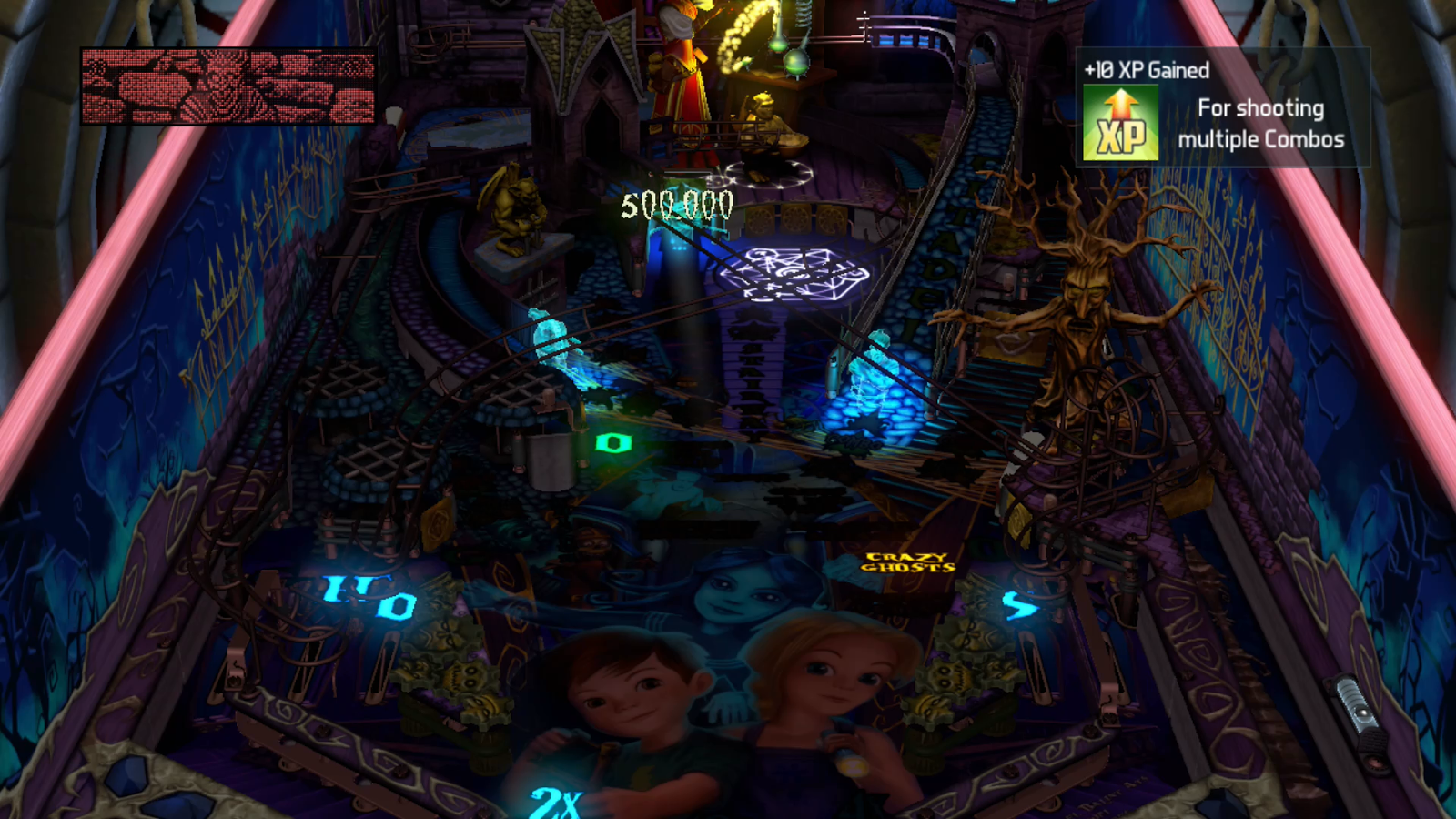
Could we also pull of something vaguely similar for the in-game/table scoring display (like the 500.000 text in here: https://3.bp.blogspo...14+05-29-34.png), so that we get pop-up scores when hitting ramps, toys (e.g. switches), etc?


And i think yes: By using the NVRAM reading functionality of PinMAME (at least for the WPC machines)..


Example for Demolition Man:


Const UseVPMNVRAM = true


Function ConvertBCD(v)
  ConvertBCD = "" & ((v AND &hF0) / 16) & (v AND &hF)
End Function

Dim NVRAM
NVRAM = Controller.NVRAM
TextBox.text = "Score: "& ConvertBCD(NVRAM(CInt("&h16A0"))) & ConvertBCD(NVRAM(CInt("&h16A1"))) & ConvertBCD(NVRAM(CInt("&h16A2"))) & ConvertBCD(NVRAM(CInt("&h16A3"))) & ConvertBCD(NVRAM(CInt("&h16A4"))) & ConvertBCD(NVRAM(CInt("&h16A5")))


will show the score of the last (or if in play potentially also the current(!!!)) game.. (these weird hex-adresses are extracted from: https://github.com/t...ame-nvram-maps)


Optionally this can also be done in a callback to be dynamic:

Set NVRAMCallback = GetRef("Score")

which then would provide the function Score() with a 2D array of changed locations and their values, which can then be done dynamically/during play, and at low perf cost..


So now we can get the score and get a callback when it changed. If we then also track the last switch that was triggered -> WIN! As we can then display the score difference
at the location of that switch (as each VP element has x,y properties)!


Somebody feels like giving this one a try?? Would be cool to see how it works (it won't be perfect of course, but reasonably close)..


Edited by toxie, 22 December 2017 - 05:11 PM.


#2 nFozzy

nFozzy

    Pinball Fan

  • Members
  • PipPipPipPip
  • 553 posts

  • Flag: ---------

  • Favorite Pinball: Pinbot

Posted 22 December 2017 - 06:29 PM

It's a good idea. Having to use flasher or primitives for the floating text would be kind of a pain though


#3 Rajo Joey

Rajo Joey

    Pinball Fan

  • Members
  • PipPipPipPip
  • 1,489 posts
  • Location:Niedersachsen

  • Flag: Germany

  • Favorite Pinball: Attack from Mars, Abra Ca Dabra and many old EM-Tables

Posted 22 December 2017 - 06:42 PM

I don't like this. It's more lika a videogame and not a pinball. If there's an option to turn it on or off, it's OK.

Gesendet von meinem SGP511 mit Tapatalk

Rajo Joey - My front-end-files; Hundreds of Audio- and Videorecordings in high quality for Playfield (4k/60FPS) and Backglass (HD), Wheels & POV-Files: The Media-Post

https://www.facebook...02697096474910/

https://www.facebook...oups/VPAddicts/

https://www.facebook...oups/VPjunkies/


#4 chepas

chepas

    t.me/horsepin

  • Members
  • PipPipPipPip
  • 1,966 posts

  • Flag: ---------

  • Favorite Pinball: BSD, Tr0n, SW:Stern

Posted 23 December 2017 - 01:45 AM

Lol.


Bump maps are the new auto-tune :BDH:
VPX - RSS Updates ---- blog.flippingflips.xyz/en/ -- Visual Pinball No.1 (2021) . Est.2000


#5 toxie

toxie

    VPF Veteran

  • VP Dev Team
  • PipPipPipPipPipPip
  • 5,734 posts
  • Location:berlin, germany

  • Flag: Germany

  • Favorite Pinball: AFM

Posted 23 December 2017 - 06:48 AM

I don't like this. It's more lika a videogame and not a pinball. If there's an option to turn it on or off, it's OK.

Gesendet von meinem SGP511 mit Tapatalk


Obviously.. I just like the idea, for example as you can see very quickly which actions you do bring how much points.. And that's not always feasible during gameplay, especially for beginners..


It's a good idea. Having to use flasher or primitives for the floating text would be kind of a pain though


Couldn't it be done with textboxes/reels/etc instead?


#6 STAT

STAT

    Pinball and Arcade Freak

  • VIP
  • 4,981 posts
  • Location:Wels - Austria

  • Flag: Austria

  • Favorite Pinball: Twilight Zone

Posted 23 December 2017 - 06:58 AM

Sounds good :tup: not for all Tables of Course, but i am sure, this will be great for some Originals too.

And for sure, not on EM Tables ;) ( hm neah maybe yes, on some ... )

What about a new VP Element, with some Parameters (On/Off, Color, Font, Name, ...) ?

Attached File  inGameScores_VPX.png   5.75KB   11 downloads


Edited by STAT, 23 December 2017 - 07:08 AM.


#7 toxie

toxie

    VPF Veteran

  • VP Dev Team
  • PipPipPipPipPipPip
  • 5,734 posts
  • Location:berlin, germany

  • Flag: Germany

  • Favorite Pinball: AFM

Posted 23 December 2017 - 07:10 AM

It can only be a script-only solution, as it needs VPM interaction..


#8 STAT

STAT

    Pinball and Arcade Freak

  • VIP
  • 4,981 posts
  • Location:Wels - Austria

  • Flag: Austria

  • Favorite Pinball: Twilight Zone

Posted 23 December 2017 - 07:14 AM

Why Script only ?

Why can't the "Pop Up Scores" get Data from any Variables and/or VPM ?

And this with one VP Element ... just a small Idea, but would be great , i think


Ok maybe there are too much Things with VPM, then Scripting is needed


Edited by STAT, 23 December 2017 - 07:21 AM.


#9 toxie

toxie

    VPF Veteran

  • VP Dev Team
  • PipPipPipPipPipPip
  • 5,734 posts
  • Location:berlin, germany

  • Flag: Germany

  • Favorite Pinball: AFM

Posted 23 December 2017 - 07:56 AM

But then one already has reels and text, so would it really make sense to have yet another element? Need more input.. nFozzy?!


#10 nFozzy

nFozzy

    Pinball Fan

  • Members
  • PipPipPipPip
  • 553 posts

  • Flag: ---------

  • Favorite Pinball: Pinbot

Posted 24 December 2017 - 02:04 PM

Textboxes and reels can't be moved in script. FX3 uses like a sprite that can take text? So something like that would be ideal


#11 toxie

toxie

    VPF Veteran

  • VP Dev Team
  • PipPipPipPipPipPip
  • 5,734 posts
  • Location:berlin, germany

  • Flag: Germany

  • Favorite Pinball: AFM

Posted 24 December 2017 - 09:26 PM

What?? They cannot be moved? That sounds like this should be changed!


#12 DJRobX

DJRobX

    Pinball Fan

  • VP Dev Team
  • PipPipPipPip
  • 941 posts
  • Location:Valencia, CA

  • Flag: United States of America

  • Favorite Pinball: F14 Tomcat

Posted 25 December 2017 - 02:12 AM

Yeah Toxie - We need an awesome VP dev to give us a useful text object first.  

You can't currently even write text horizontally on a cab table with the common landscape setup.   :)


Edited by DJRobX, 25 December 2017 - 02:12 AM.


#13 toxie

toxie

    VPF Veteran

  • VP Dev Team
  • PipPipPipPipPipPip
  • 5,734 posts
  • Location:berlin, germany

  • Flag: Germany

  • Favorite Pinball: AFM

Posted 30 December 2017 - 09:39 AM

What?? They cannot be moved? That sounds like this should be changed!


At least this part will now be possible in 10.5 (beta).


#14 STAT

STAT

    Pinball and Arcade Freak

  • VIP
  • 4,981 posts
  • Location:Wels - Austria

  • Flag: Austria

  • Favorite Pinball: Twilight Zone

Posted 31 December 2017 - 09:08 AM

Please, can you Change a Click on [Script] like for [Options] (open/Close Window) ... i always click first on Script - Button, when i want to close this.

Edited by STAT, 31 December 2017 - 09:10 AM.


#15 toxie

toxie

    VPF Veteran

  • VP Dev Team
  • PipPipPipPipPipPip
  • 5,734 posts
  • Location:berlin, germany

  • Flag: Germany

  • Favorite Pinball: AFM

Posted 31 December 2017 - 10:05 AM

??? don't understand exactly..


#16 STAT

STAT

    Pinball and Arcade Freak

  • VIP
  • 4,981 posts
  • Location:Wels - Austria

  • Flag: Austria

  • Favorite Pinball: Twilight Zone

Posted 31 December 2017 - 10:12 AM

If i Click on Options, i can open and Close the Options - Window
If i Click on Script, of Course Window open, but if i click again, it doesn't Close ( i have to Click on [x] )


#17 Fusionwerks

Fusionwerks

    Poorly recovering pinball addict

  • Platinum Supporter
  • 417 posts

  • Flag: United States of America

  • Favorite Pinball: JP (DE), Deadpool, James Bond 007

Posted 31 December 2017 - 03:55 PM

I like this idea. Especially for an original. I am currently working on one that I would love to display where the next shot is. My table will count # of ramp hits for an EOB bonus and it would be cool to display how many you have as soon as the ball hits the trigger on the ramp, rather than having to display it on the DMD or even having to look up and try to see it while keeping a ball in play. Especially good during a multi ball to display jackpots. Take Scared Stuff for example when the jackpot locations change. It would be nice to use something like this to display the next shot. It could even cut down on the number of play field target lights you would need, and leave more room for artwork.

#18 toxie

toxie

    VPF Veteran

  • VP Dev Team
  • PipPipPipPipPipPip
  • 5,734 posts
  • Location:berlin, germany

  • Flag: Germany

  • Favorite Pinball: AFM

Posted 10 January 2018 - 12:51 PM

Moving Textboxes and EMReels is now possible and also at full X,Y floating point precision, too (before it were just integers): http://www.vpforums....=39428&p=397433


Anybody gifted with good scripting skills feels like trying my idea in practice?


#19 toxie

toxie

    VPF Veteran

  • VP Dev Team
  • PipPipPipPipPipPip
  • 5,734 posts
  • Location:berlin, germany

  • Flag: Germany

  • Favorite Pinball: AFM

Posted 11 January 2018 - 10:07 PM

If i Click on Options, i can open and Close the Options - Window
If i Click on Script, of Course Window open, but if i click again, it doesn't Close ( i have to Click on [x] )


Fixed.. Next 10.5 build will have it..


#20 nFozzy

nFozzy

    Pinball Fan

  • Members
  • PipPipPipPip
  • 553 posts

  • Flag: ---------

  • Favorite Pinball: Pinbot

Posted 12 January 2018 - 09:37 PM

I'm going to give this a shot. Any chance this works with System 11s?