Jump to content


Photo
* * * * * 1 votes

4x4 Atari[Visual Pinball X]

Fireball Classic Bally

  • Please log in to reply
15 replies to this topic

#1 theGhost787

theGhost787

    incredible

  • Members
  • PipPipPip
  • 399 posts

  • Flag: Canada

  • Favorite Pinball: Twilight Zone

Posted 15 January 2017 - 06:00 AM

Posted Image


File Name: 4x4 Atari

File Submitter: theGhost787

File Submitted: 13 Jan 2017

File Category: VPX Recreations

Author(s): ghost
Manufacturer: Atari
Year: 1983
Permission to MOD?: Yes, without approval


Here is 4x4 pinball 1.0 for Visual Pinball 10.0. 
Game has sound effects and has been tested.
 
Game is for slower PC's If you want to enable all 8 playfield knock balls open scripts and remove the '
Line 1093, 1094,1095,1096. the color should change from green to dark. Then Save the file. If your pc stutters you will have to remove
the 4 top balls by putting back the ' in the front of the script lines.
Having all the balls on the playfield caused my pc to stutter and run slow. 
 
 
Posted Image


Click here to download this file


           logo_Ghost_Games.jpg        55cfb82.gif     http://ghostgames.tripod.com


#2 Slydog43

Slydog43

    Pinball Wizard

  • Platinum Supporter
  • 3,008 posts
  • Location:Hackettstown, NJ

  • Flag: United States of America

  • Favorite Pinball: Addams Family, All Williams 90's Games

Posted 16 January 2017 - 06:13 PM

thanks for the upload, hopefully someone will make a b2s


#3 STAT

STAT

    Pinball and Arcade Freak

  • VIP
  • 4,985 posts
  • Location:Wels - Austria

  • Flag: Austria

  • Favorite Pinball: Twilight Zone

Posted 16 January 2017 - 07:05 PM

Here is a Quick directb2s Edition, just Change the Script in the Table.

Also FS Settings are inside the File below.
 
Ghost, if you want to add a 2 Player Function, look at the Lines with "B2SOn",
you can find Comands like:
 
if B2SOn Then Controller.B2SSetScorePlayer 1, Score 'that Show the Scores to the directb2s
 
One of this is with 0 at GameStart to delete Scores to ... yes, 0 ;)
 
Also theres a Credits Command.
 
So if you want to add 2 Player Score, just do this:

if B2SOn Then Controller.B2SSetScorePlayer 2, Score2 'that Show the Scores 2 to the directb2s, if you have a Score2 Variable
 
And i dont know, what is the "HEAT" at the Backglass, you can Count Numbers to this with "Player 3", example:

if B2SOn Then Controller.B2SSetScorePlayer 3, HeatPoints 'that Show Variable HeatPoints to the 2 Digits Field below Credits


ToDo:

maybe 2 Player

What is "Heat" ?

better Backglass Image

Attached Files


Edited by STAT, 16 January 2017 - 07:49 PM.


#4 Scorpion

Scorpion

    Enthusiast

  • Members
  • PipPipPip
  • 205 posts
  • Location:italy

  • Flag: Italy

  • Favorite Pinball: eight ball deluxe

Posted 16 January 2017 - 10:23 PM

I found rom of it...no one want make pinmame version?

#5 ta2686

ta2686

    Retired ROM Settings Guru

  • VIP
  • 2,324 posts
  • Location:USA

  • Flag: United States of America

  • Favorite Pinball: ONE THAT WORKS!


Contributor

Posted 16 January 2017 - 10:41 PM

I found rom of it...no one want make pinmame version?

Unfortunately the ROM can't be started at this time.  The PinMAME team was working on getting it functional but has not been successful.  I don't know if they are still working on it.


Need to set or reset replay levels on a particular table? These guides will help you:

For Non-DMD tables: Guide to reset replay levels on non-DMD tables

For DMD tables: Guide to set replay levels on DMD tables

Need to change the number of balls per game on a particular table? These guides will help you:

For Non-DMD tables: Guide to set number of balls per game on non-DMD tables

For DMD tables: Guide to set number of balls per game on DMD tables

Need to adjust the volume on DMD based tables? This guide will help you:

Guide to adjust volume on DMD tables

An alphabetical listing of VPM emulated tables with their MPU and links to their specific replay level, balls per game and volume adjustment procedures can be downloaded as an Excel spreadsheet from this link:

Excel Spreadsheet of VPM emulated tables

#6 theGhost787

theGhost787

    incredible

  • Members
  • PipPipPip
  • 399 posts

  • Flag: Canada

  • Favorite Pinball: Twilight Zone

Posted 17 January 2017 - 04:10 AM


I found rom of it...no one want make pinmame version?

Unfortunately the ROM can't be started at this time.  The PinMAME team was working on getting it functional but has not been successful.  I don't know if they are still working on it.


The rom on ipdb  is 10kb. That is a very small file. It may just contain extra script and functions. DMD support. 

http://www.ipdb.org/...ine.cgi?id=3111


STAT - if you visit the link it says " Game is played in three "heats". Each heat puts three balls into play from the shooter lane automatically. A heat ends after all three balls drain. After three heats, the game ends."


so maybe the game shoots 3 balls out at a time. Then the game ends. 

Production: 2 units

           logo_Ghost_Games.jpg        55cfb82.gif     http://ghostgames.tripod.com


#7 ta2686

ta2686

    Retired ROM Settings Guru

  • VIP
  • 2,324 posts
  • Location:USA

  • Flag: United States of America

  • Favorite Pinball: ONE THAT WORKS!


Contributor

Posted 17 January 2017 - 07:39 AM

<<The rom on ipdb  is 10kb. That is a very small file. It may just contain extra script and functions. DMD support. 

http://www.ipdb.org/...ine.cgi?id=3111>>


Most of the early roms are small in size to begin with.  All of the Atari roms for example are around 10K in size.


Edited by ta2686, 17 January 2017 - 07:40 AM.

Need to set or reset replay levels on a particular table? These guides will help you:

For Non-DMD tables: Guide to reset replay levels on non-DMD tables

For DMD tables: Guide to set replay levels on DMD tables

Need to change the number of balls per game on a particular table? These guides will help you:

For Non-DMD tables: Guide to set number of balls per game on non-DMD tables

For DMD tables: Guide to set number of balls per game on DMD tables

Need to adjust the volume on DMD based tables? This guide will help you:

Guide to adjust volume on DMD tables

An alphabetical listing of VPM emulated tables with their MPU and links to their specific replay level, balls per game and volume adjustment procedures can be downloaded as an Excel spreadsheet from this link:

Excel Spreadsheet of VPM emulated tables

#8 STAT

STAT

    Pinball and Arcade Freak

  • VIP
  • 4,985 posts
  • Location:Wels - Austria

  • Flag: Austria

  • Favorite Pinball: Twilight Zone

Posted 17 January 2017 - 08:51 AM

i remember, there was a missing .bin File in some Atari Roms ...

Edit: ok, the 82s130.bin is already inside, isnt the reason.


Edited by STAT, 17 January 2017 - 08:57 AM.


#9 STAT

STAT

    Pinball and Arcade Freak

  • VIP
  • 4,985 posts
  • Location:Wels - Austria

  • Flag: Austria

  • Favorite Pinball: Twilight Zone

Posted 17 July 2017 - 07:27 AM

Any News about this ROM FILE (fix) ?


#10 hauntfreaks

hauntfreaks

    Real 4K Tables Since 2013

  • VIP
  • 2,523 posts
  • Location:South Jersey

  • Flag: United States of America

  • Favorite Pinball: -<3<3<3 All Real Pins


Posted 17 July 2017 - 11:36 AM

Any News about this ROM FILE (fix) ?

 Stat you really going to waste your time on this??..... we all know how these end...... lol


 26794541816_30ca1cca80_o.gif 43109635392_fc11af1a57_o.gif


#11 STAT

STAT

    Pinball and Arcade Freak

  • VIP
  • 4,985 posts
  • Location:Wels - Austria

  • Flag: Austria

  • Favorite Pinball: Twilight Zone

Posted 17 July 2017 - 11:46 AM

Not really ;) but theres a new directb2s out now ... would be nice to have this one complete.


#12 hauntfreaks

hauntfreaks

    Real 4K Tables Since 2013

  • VIP
  • 2,523 posts
  • Location:South Jersey

  • Flag: United States of America

  • Favorite Pinball: -<3<3<3 All Real Pins


Posted 17 July 2017 - 08:31 PM

Not really ;) but theres a new directb2s out now ... would be nice to have this one complete.


LOL.... you crack me up.... 


 26794541816_30ca1cca80_o.gif 43109635392_fc11af1a57_o.gif


#13 ilveropaolone

ilveropaolone

    Hobbyist

  • Members
  • PipPip
  • 25 posts
  • Location:VIGEVANO (ITALY PV)

  • Flag: Italy

  • Favorite Pinball: the Addams Family

Posted 11 September 2018 - 03:13 PM

sorry i cant find the script to any backglass! i dont find any B2S script or similar.....
how can i view the db2s? tks

Edited by ilveropaolone, 11 September 2018 - 03:14 PM.


#14 BlackPredator72

BlackPredator72

    I ❤ Pinball

  • Members
  • PipPipPip
  • 372 posts
  • Location:Haarlem, The Netherlands

  • Flag: Netherlands

  • Favorite Pinball: Demolition Man

  • PS3 Gamer Tag: BlackPredator72
  • 360 Gamer Tag: BlackPredator72

Posted 01 January 2019 - 08:30 PM

ToDo:

maybe 2 Player

What is "Heat" ?

better Backglass Image


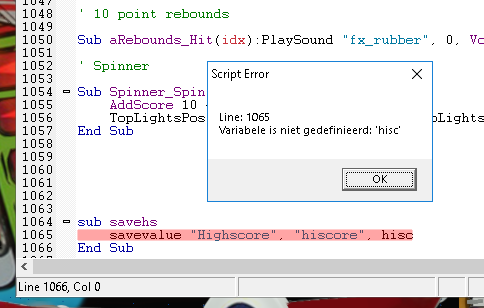
Is this table actually working? I've replaced your script file, but when I press Add Coin I've got the following error:


script-error.png


43327.png?1581090420


#15 roccodimarco

roccodimarco

    Pinball Fan

  • Members
  • PipPipPipPip
  • 572 posts
  • Location:NEPA

  • Flag: United States of America

  • Favorite Pinball: Hollywood Heat, Street Fighter II, Gold ball, Grand Lizard

Posted 01 January 2019 - 09:50 PM

Don’t bother with this table. It’s incomplete a mess and non working.

#16 STAT

STAT

    Pinball and Arcade Freak

  • VIP
  • 4,985 posts
  • Location:Wels - Austria

  • Flag: Austria

  • Favorite Pinball: Twilight Zone

Posted 04 January 2022 - 10:18 AM

new directb2s available ... 4x4 (Atari 1983) - Backglass Downloads - Virtual Pinball Universe (vpuniverse.com)


but only with a not-complete VPX ... too bad


Also tagged with one or more of these keywords: Fireball, Classic, Bally