Jump to content


Photo
* * * * * 1 votes

DIY DMD and Backglass VR KIT (how to edit for dummies)


  • Please log in to reply
40 replies to this topic

#21 Rajo Joey

Rajo Joey

    Pinball Fan

  • Members
  • PipPipPipPip
  • 1,489 posts
  • Location:Niedersachsen

  • Flag: Germany

  • Favorite Pinball: Attack from Mars, Abra Ca Dabra and many old EM-Tables

Posted 28 April 2021 - 07:31 AM

Not sure, even if i installed VR, with out a VR headset, it wouldnt do anything, so i wouldnt see anything to mess with

but i guess it has its own table camera settings someplace


I mean the table isnt a mini table in the vpx editor right?

You can install VPE and load the table. So you can see, what a VR-table looks like.


Rajo Joey - My front-end-files; Hundreds of Audio- and Videorecordings in high quality for Playfield (4k/60FPS) and Backglass (HD), Wheels & POV-Files: The Media-Post

https://www.facebook...02697096474910/

https://www.facebook...oups/VPAddicts/

https://www.facebook...oups/VPjunkies/


#22 Elwood89

Elwood89

    Neophyte

  • Members
  • Pip
  • 2 posts

  • Flag: Poland

  • Favorite Pinball: Bride of Pinbot

Posted 05 May 2021 - 03:37 PM

Hello!

I'm new to Visual Pinball, the promise of VR pinball brought me here ;)

I got everything running (VP 10.7, VPVR 0.7), but the DMD's and backglass were not OK in VR like the "before" pictures in this thread.

I tried following this tutorial, but only managed to get the rectangle to display the DMD contents (although very dim, barely readable). The problem is the backglass, it is only displaying the "test" bitmap.

I'm not sure if I installed Freezy correctly, I used the dmdext-v1.8.2-x86.msi (my VP setup is x86). How can I check if it works? Is that for the DMD, or the backglass?

Also there is no "capture backglass ON in nudge settings", there is only "Capture external DMD" and "Capture PUP player". Which is the one to turn on?


BTW maybe you could upload the tables you've already converted, as it is not easy at all for a beginner ;)



#23 Karlor

Karlor

    Goon Squad

  • Platinum Supporter
  • 397 posts

  • Flag: United States of America

  • Favorite Pinball: The Machine Bride, Freddy, TOTAN, Twister, Batman, TZ, Ghostbusters

Posted 06 May 2021 - 05:52 AM

Hello!

I'm new to Visual Pinball, the promise of VR pinball brought me here ;)

I got everything running (VP 10.7, VPVR 0.7), but the DMD's and backglass were not OK in VR like the "before" pictures in this thread.

I tried following this tutorial, but only managed to get the rectangle to display the DMD contents (although very dim, barely readable). The problem is the backglass, it is only displaying the "test" bitmap.

I'm not sure if I installed Freezy correctly, I used the dmdext-v1.8.2-x86.msi (my VP setup is x86). How can I check if it works? Is that for the DMD, or the backglass?

Also there is no "capture backglass ON in nudge settings", there is only "Capture external DMD" and "Capture PUP player". Which is the one to turn on?


BTW maybe you could upload the tables you've already converted, as it is not easy at all for a beginner ;)

There is no setting for backglass ON, that just means make sure it is not disabled. Is the back glass displaying on your main screen/monitor/TV?

If your seeing the Test image in VR then your on the right track.

Do you have a b2s for the table? What table are you messing with?


Cant upload the tables for lots of reasons (not mine, not worth it, dont want to, hillbilly internet)...

and would defeat the purpose. Id say keep at it. It's easy and sounds like your close.


There are 1000s of tables floating around so knowing how to do it yourself is the only way to go.

The hits will/have gotten VR rooms but many many wont so just use this and get them running good enough after adjusting to have fun in VR :D


 I'm just going to set this here and go get a cup of coffee.. DONT TOUCH ANYTHING!! :pardon:  NOT MY LINKS BUT ENJOY  :crazy:

:love39:  *** https://archive.org/details/pinmame31 *** :twiddling:


#24 studlygoorite

studlygoorite

    Enthusiast

  • Silver Supporter
  • 402 posts
  • Location:Stoney Creek, Ontario

  • Flag: Canada

  • Favorite Pinball: Any VR table

  • 360 Gamer Tag: King JJ

Posted 06 May 2021 - 02:49 PM


Hello!

I'm new to Visual Pinball, the promise of VR pinball brought me here ;)

I got everything running (VP 10.7, VPVR 0.7), but the DMD's and backglass were not OK in VR like the "before" pictures in this thread.

I tried following this tutorial, but only managed to get the rectangle to display the DMD contents (although very dim, barely readable). The problem is the backglass, it is only displaying the "test" bitmap.

I'm not sure if I installed Freezy correctly, I used the dmdext-v1.8.2-x86.msi (my VP setup is x86). How can I check if it works? Is that for the DMD, or the backglass?

Also there is no "capture backglass ON in nudge settings", there is only "Capture external DMD" and "Capture PUP player". Which is the one to turn on?


BTW maybe you could upload the tables you've already converted, as it is not easy at all for a beginner ;)

There is no setting for backglass ON, that just means make sure it is not disabled. Is the back glass displaying on your main screen/monitor/TV?

If your seeing the Test image in VR then your on the right track.

Do you have a b2s for the table? What table are you messing with?


Cant upload the tables for lots of reasons (not mine, not worth it, dont want to, hillbilly internet)...

and would defeat the purpose. Id say keep at it. It's easy and sounds like your close.


There are 1000s of tables floating around so knowing how to do it yourself is the only way to go.

The hits will/have gotten VR rooms but many many wont so just use this and get them running good enough after adjusting to have fun in VR :D


lol, your reasons for not uploading almost made me spit my coffee out.


Edited by studlygoorite, 06 May 2021 - 02:50 PM.


#25 Karlor

Karlor

    Goon Squad

  • Platinum Supporter
  • 397 posts

  • Flag: United States of America

  • Favorite Pinball: The Machine Bride, Freddy, TOTAN, Twister, Batman, TZ, Ghostbusters

Posted 07 May 2021 - 06:08 AM


Cant upload the tables for lots of reasons (not mine, not worth it, dont want to, hillbilly internet)...

lol, your reasons for not uploading almost made me spit my coffee out.


Well its all true lol it would be 1000x longer to wait on me then doing it yourself :D


Like all these I did in about 1 or 2 min each. Now I can enjoy these lil honeys in VR with full backglass :)

No stretching or skewing.

Just did the image, material and pasted in the BG panel and slid it up or down in the editor for fit..

You could always fine tune of course but just to show how easy it is:

20210506224727-1.jpg20210506225056-1.jpg

20210506224842-1.jpg20210506224437-1.jpg

20210506223924-1.jpg20210506225143-1.jpg


 I'm just going to set this here and go get a cup of coffee.. DONT TOUCH ANYTHING!! :pardon:  NOT MY LINKS BUT ENJOY  :crazy:

:love39:  *** https://archive.org/details/pinmame31 *** :twiddling:


#26 Elwood89

Elwood89

    Neophyte

  • Members
  • Pip
  • 2 posts

  • Flag: Poland

  • Favorite Pinball: Bride of Pinbot

Posted 07 May 2021 - 06:50 AM


Do you have a b2s for the table? What table are you messing with?


This was the info that was missing in the tutorial! A b2s backglass is a separate download :) Everything works now. Well almost, because on some tables the DMD is quite dim. Is there a setting for that?


#27 Karlor

Karlor

    Goon Squad

  • Platinum Supporter
  • 397 posts

  • Flag: United States of America

  • Favorite Pinball: The Machine Bride, Freddy, TOTAN, Twister, Batman, TZ, Ghostbusters

Posted 07 May 2021 - 06:57 AM


Do you have a b2s for the table? What table are you messing with?


This was the info that was missing in the tutorial! A b2s backglass is a separate download :) Everything works now. Well almost, because on some tables the DMD is quite dim. Is there a setting for that?


Sweet! I figured it was that or maybe b2s was disabled. Sometimes if you move the DMD closer to the back glass panel it  can help. What I started doing (if the table will allow it) is I use freezy DMD and place it over the displaying back glass and let the VR capture it all in one go.


TO do this:

Run the table.

Press F1.

Then select use external DMD and uncheck show DMD.

Restart table.

Then move the freezy DMD into the DMD spot on the displaying back glass on your desktop.

You can stretch and skew the freezy DMD to fit just set ignore aspect ratio by right clicking the right bottom of the DMD.

Then save location for the game the same way.

Restart Table.

Now the freezy should be on your back glass and being captured and displayed nicely in VR for you :)


 I'm just going to set this here and go get a cup of coffee.. DONT TOUCH ANYTHING!! :pardon:  NOT MY LINKS BUT ENJOY  :crazy:

:love39:  *** https://archive.org/details/pinmame31 *** :twiddling:


#28 Madonion

Madonion

    Hobbyist

  • Members
  • PipPip
  • 33 posts
  • Location:Cape Town

  • Flag: South Africa

  • Favorite Pinball: Ghostbusters LE (Stern 2016)

Posted 25 May 2021 - 06:45 PM


Sweet now this is a work of art tutorial haha. budd will try this tomorrow! Btw i love world cup soccer but the table is so small on my VR! its the only table that is like this in vr. But stunning on LCD. Do you know why? 

I thought I remembered a shrunk table.. just un-check "Being John Malcovich" setting in VR options.. just kidding :D I'm not sure how to fix it. I messed around a little and couldn't find a setting that would make a difference. Its the only mini table Iv seen. Maybe a POV setting but i dont know how to alter that successfully.


Has anyone found a solution? I couldn't find a post for the table.. If anyone knows let us know I'd like to play it too :)


i figured out how to fix that world cup soccer table in vr! Select VR settings and make sure scale table in width is select 

Mine is on

scaling 55.0

slope 6.50

orientation 0.0

X  -25.0

Y  140.0

height 83.0


Actually all tables looks better like this its bigger! but iv noticed some dont work with this setting on.


#29 Rajo Joey

Rajo Joey

    Pinball Fan

  • Members
  • PipPipPipPip
  • 1,489 posts
  • Location:Niedersachsen

  • Flag: Germany

  • Favorite Pinball: Attack from Mars, Abra Ca Dabra and many old EM-Tables

Posted 25 May 2021 - 08:19 PM

Sweet now this is a work of art tutorial haha. budd will try this tomorrow! Btw i love world cup soccer but the table is so small on my VR! its the only table that is like this in vr. But stunning on LCD. Do you know why?

I thought I remembered a shrunk table.. just un-check "Being John Malcovich" setting in VR options.. just kidding :D I'm not sure how to fix it. I messed around a little and couldn't find a setting that would make a difference. Its the only mini table Iv seen. Maybe a POV setting but i dont know how to alter that successfully.
 
Has anyone found a solution? I couldn't find a post for the table.. If anyone knows let us know I'd like to play it too :)
 
i figured out how to fix that world cup soccer table in vr! Select VR settings and make sure scale table in width is select 
Mine is on
scaling 55.0
slope 6.50
orientation 0.0
X  -25.0
Y  140.0
height 83.0
 
Actually all tables looks better like this its bigger! but iv noticed some dont work with this setting on.
You have to scale the Knorr table in the VR-sertings. I've set it to 1.8 and it looks perfect.

Rajo Joey - My front-end-files; Hundreds of Audio- and Videorecordings in high quality for Playfield (4k/60FPS) and Backglass (HD), Wheels & POV-Files: The Media-Post

https://www.facebook...02697096474910/

https://www.facebook...oups/VPAddicts/

https://www.facebook...oups/VPjunkies/


#30 stereodanny

stereodanny

    Hobbyist

  • Members
  • PipPip
  • 25 posts

  • Flag: ---------

  • Favorite Pinball: Star Trek TNG

Posted 10 July 2021 - 06:32 AM

Sorry, I'm having a lot of trouble following this tutorial. I must be a super dummy.


My editor looks completely different--no layer panel, can't add a new layer, just 11 layers that I can toggle on/off.


Secondly, what are we supposed to import as a "material" and "image" exactly? The backglass is a png, I can understand importing as an image, but what do we do with it then? What is the point of a material?


Thirdly, VPX will not allow me to cut/paste anything from one table to another. It just does nothing.


Any help would be appreciated here.


Edited by stereodanny, 10 July 2021 - 06:33 AM.


#31 wiesshund

wiesshund

    VPF Legend

  • Members
  • PipPipPipPipPipPipPip
  • 11,871 posts

  • Flag: United States of America

  • Favorite Pinball: How many can i have?

Posted 10 July 2021 - 07:46 AM

Sorry, I'm having a lot of trouble following this tutorial. I must be a super dummy.


My editor looks completely different--no layer panel, can't add a new layer, just 11 layers that I can toggle on/off.


Secondly, what are we supposed to import as a "material" and "image" exactly? The backglass is a png, I can understand importing as an image, but what do we do with it then? What is the point of a material?


Thirdly, VPX will not allow me to cut/paste anything from one table to another. It just does nothing.


Any help would be appreciated here.


VPX 10.6 you can not add layers, only use the 11 existing ones

10.7 is the version that lets you create unlimited layers

I would imagine that VR version is the same


To cut and paste between tables, you have to open them in the same session of vpx

so open a table, then click file and open and pick a 2nd table

then you can click Window, to switch between the tables and you can copy from one and paste to the other


The object copy/paste buffer is private to the vpx session, so it wont work between separate sessions


If you feel the need to empty your wallet in my direction, i don't have any way to receive it anyways

Spend it on Hookers and Blow


#32 stereodanny

stereodanny

    Hobbyist

  • Members
  • PipPip
  • 25 posts

  • Flag: ---------

  • Favorite Pinball: Star Trek TNG

Posted 10 July 2021 - 06:41 PM

OK. I think that makes sense.


I managed to get the backglass installed (I'm doing Simpsons Pinball Party as a trial) but the DMD is still not showing up. I've tried playing with the position in case it's hidden behind the backglass object, but still no dice. It displays fine on my main monitor but isn't transferring to VR. I've double-checked all my settings in the VR and nudge preferences, they're correct.


Is there something I need to add to the script? I'm using a directb2s file for the table. Is that what we're supposed to do?


Also, the backglass has an odd reddish hue. Why would that be?


Edited by stereodanny, 10 July 2021 - 07:31 PM.


#33 wiesshund

wiesshund

    VPF Legend

  • Members
  • PipPipPipPipPipPipPip
  • 11,871 posts

  • Flag: United States of America

  • Favorite Pinball: How many can i have?

Posted 11 July 2021 - 05:57 AM

If the DMD works in non VR mode, that i dont think you need to touch the table etc

I am not sure what is needed in VR to capture the DMD

DO you have DMD set to use external DLL and uncheck show DMD?

I think VR relies on freezys for the DMD?


can not answer on the backglass, is that only in VR or outside as well?


If you feel the need to empty your wallet in my direction, i don't have any way to receive it anyways

Spend it on Hookers and Blow


#34 stereodanny

stereodanny

    Hobbyist

  • Members
  • PipPip
  • 25 posts

  • Flag: ---------

  • Favorite Pinball: Star Trek TNG

Posted 11 July 2021 - 08:15 PM


DO you have DMD set to use external DLL and uncheck show DMD?

Bingo. This fixed it. Thank you!!


As for the backglass, it works better for me if I just add the texture to the actual backglass and not use the virtual bg element.


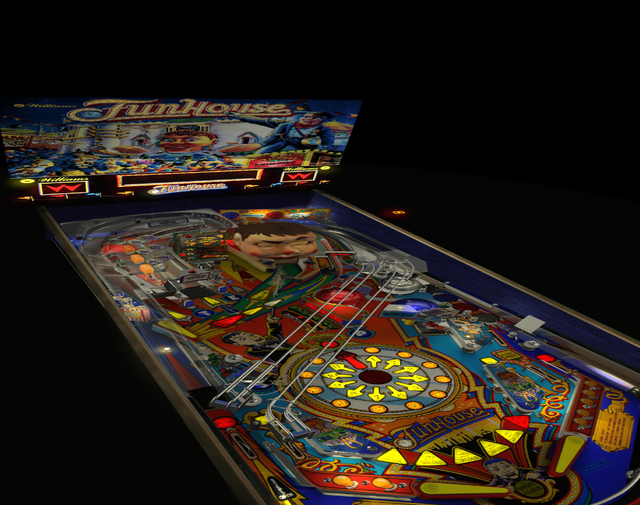
On older SS tables like Funhouse with the segment display, the DMD appears to the right of the playfield, facing upwards, floating in space. It does not respond to me repositioning the flasher element.


Not sure why that is??


funhouse.png


Edited by stereodanny, 11 July 2021 - 08:33 PM.


#35 bonesjustice08

bonesjustice08

    Neophyte

  • Members
  • Pip
  • 1 posts
  • Location:Outside Da Lou

  • Flag: United States of America

  • Favorite Pinball: Robocop

Posted 19 September 2021 - 06:47 PM

Spent about 2 hours trying to get Robocop DMD to work in VR. Tried following the instructions, but I am unable to get working. Need dumbed down specific step by step instructions. I'm very new with VPX, I tried the steps in both 6 and 7 version. If you cant provide more detailed instructions, any chance you can upload a VR Room version of Robocop? :)  I apologize for being a stupid dummy. 


#36 lshachar

lshachar

    Neophyte

  • Members
  • Pip
  • 6 posts

  • Flag: Israel

  • Favorite Pinball: twilight zone

Posted 17 April 2022 - 01:35 PM

Here's one little issue I had, and how I fixed it.
Go to
\Visual Pinball\VPinMAME\DmdDevice.ini 
 
and set up
; a DMD that renders with nice dots on a computer monitor
[virtualdmd]
enabled = true 
 
 
if its set to false!

Edited by lshachar, 21 April 2022 - 03:11 PM.


#37 Ekar

Ekar

    Neophyte

  • Members
  • Pip
  • 2 posts

  • Flag: Australia

  • Favorite Pinball: Monster Bash

Posted 24 July 2022 - 07:14 AM

Thanks very much for the tutorial! 

I have everything setup properly in my test table, the only thing is that I still have a second smaller dmd in the bottom left corner (this was present in the original table). Excuse my ignorance but how would I go about removing this extra dmd? There seem to be many tables which look like this in VR. 

I searched for 'dmd' in the layers filter and only the new one is found. Not really sure what I'm looking for here.

Thanks again :)


EDIT:  sorry, I see I missed the 'uncheck b2s disabled' instruction. Turning that off has solved the issue   (I don't see a 'capture backglass' checkbox in these settings though).


Edited by Ekar, 24 July 2022 - 12:29 PM.


#38 Cfirote

Cfirote

    Neophyte

  • Members
  • Pip
  • 1 posts

  • Flag: France

  • Favorite Pinball: street fighter II

Posted 08 November 2022 - 03:14 PM

thanks for the tuto :),


Everything works fine except that my DMD display is so dark, any way to make it brighter?


#39 Klaus72

Klaus72

    Neophyte

  • Members
  • Pip
  • 1 posts

  • Flag: Germany

  • Favorite Pinball: Elektra

Posted 15 November 2023 - 08:47 PM

thanks for the tuto :),


Everything works fine except that my DMD display is so dark, any way to make it brighter?

My backglass also often looks like it has less than 50% light. Can anyone help with simple instructions?


#40 becausereasons

becausereasons

    Hobbyist

  • Members
  • PipPip
  • 13 posts

  • Flag: ---------

  • Favorite Pinball: Tales from the crypt

Posted 16 October 2024 - 10:43 PM

This is awesome thanks, any advice on what to add to the vb script. Also, is there a way to capture the Color DMD on the back glass instead of the traditional DMD?