
Sound fix for Deadpool
https://www.vpforums...=47242&p=482699
Edited by Outhere, 17 July 2021 - 05:17 AM.


 40 votes

Pinball Wizard



Posted 17 July 2021 - 03:18 AM
Sound fix for Deadpool
https://www.vpforums...=47242&p=482699
Edited by Outhere, 17 July 2021 - 05:17 AM.
Grand Schtroumpf




Posted 17 July 2021 - 03:57 AM
editor BUGS still in revision 264:
- as cyberpez wrote: copying and pasting text in the properties window does not work, and it copies instead the object. You can enter text manually, but copy/paste doesn't work.
- also in the properties of an object, TAB does not work anymore to move from one field to the next one. TAB should commit the changes and move to the next field.
I think these errors have been introduced lately.
Keep the good work 
If you want to check my latest uploads then click on the image below:

Next table? A tribute table to Stern's Foo Fighters
VPF Legend


Posted 17 July 2021 - 04:14 AM
editor BUGS still in revision 264:
- as cyberpez wrote: copying and pasting text in the properties window does not work, and it copies instead the object. You can enter text manually, but copy/paste doesn't work.
- also in the properties of an object, TAB does not work anymore to move from one field to the next one. TAB should commit the changes and move to the next field.
I think these errors have been introduced lately.
Keep the good work
Also, if you copy the name of an object, then go to the script and try to look for said object by doing ctrl F and then pasting the name in
Nothing pastes, which i assume is because it put the object itself in the paste buffer instead of the text
THis happened i think within the last 4 versions?
Edited by wiesshund, 17 July 2021 - 04:15 AM.
If you feel the need to empty your wallet in my direction, i don't have any way to receive it anyways
Spend it on Hookers and Blow
VPF Veteran


Posted 17 July 2021 - 08:50 AM
The "TailLength" is not used, perhaps with a value of 1 the sequence normally starts by turning on the lights,
and instead with a value of 0 it starts first by turning off the lights, or what is more convenient.
Indeed, good idea, any value > than 0 would do it. Edit: In theory though......
This should be updated anyway, if you do add any tail then I think that gets stuck.
..and thanks for that fix!!
VPX_7_beta_rev249_rc crashed when trying to open X-Files tables, here are the messages
X-Files (Sega 1997) v1.1 from Sliderpoint
Crash report VPX rev249 (3d786cf)
============
Process: vpinballx.exe
Reason: 0xC0000005 - EXCEPTION_ACCESS_VIOLATION at 0023:0057A551
Attempt to read from 0x00000000
Thread ID: 0x25AC [9644]
Call stack
==========
0057A551 vpinballx.exe (0x222E9E80 0x22245B20 0x0019E32C 0x00000000)
004DC272 vpinballx.exe (0x00000000 0x00000009 0x22245B20 0x0019e3c0)
004E14F5 vpinballx.exe (0x22245B20 0x0BD6A450 0x0019E548 0x158021a8)
004E686D vpinballx.exe (0x22245B20 0x003405DE 0x00000000 0x00000007)
004DB93D vpinballx.exe (0x00428AC0 0x004D75B1 0x0000C266 0x22245b20)
004D75B1 vpinballx.exe (0x0000C266 0x22245B20 0x00428AC0 0x761f07fb)
004293E3 vpinballx.exe (0x0000C266 0x00000000 0x00000000 0x003405de)
004EA124 vpinballx.exe (0x0000C266 0x00000000 0x00000000 0x0000c266)
00428B17 vpinballx.exe (0x00428AC0 0x003405DE 0x0000C266 0x00000000)
76205E7A user32.dll GetClassLongW + 0x7AA (0x00428AC0 0x00000000 0x0000C266 0x00000000)
76203BEA user32.dll DispatchMessageW + 0x24A (0x761EDE80 0x005CA126 0x0019F22C 0x00000000)
761F5D70 user32.dll DispatchMessageA + 0x10 (0x0019F22C 0x00000000 0x00000001 0x0019f248)
005CA126 vpinballx.exe (0x00000000 0x00000001 0x002C7000 0x00753940)
005B65D0 vpinballx.exe (0x00400000 0x00000000 0x03113FC3 0x00000001)
005E36F1 vpinballx.exe (0x002C7000 0x767CFA10 0x0019FFDC 0x776e7a7e)
767CFA29 KERNEL32.DLL BaseThreadInitThunk + 0x19 (0x002C7000 0x1166BF75 0x00000000 0x00000000)
776E7A7E ntdll.dll RtlGetAppContainerNamedObjectPath + 0x11E (0xFFFFFFFFFFFFFFFF 0x77708A19 0x00000000 0x00000000)
776E7A4E ntdll.dll RtlGetAppContainerNamedObjectPath + 0xEE (0x02F893D0 0x002C7000 0x00000000 0x78746341)
Environment
===========
Date/time: 16/7/2021, 11:04:46:302
Number of CPUs: 8
Processor type: 586
System: Windows 10 (10.0 19042)
Memory status
=============
Total Reserved: 135724K (132M) bytes
Total Commited: 740508K (723M) bytes
Total Free: 3318008K (3240M) bytes
Largest Free: 2095436K (2046M) bytes
Registers
=========
EAX=21F8AE50 EBX=00000002 ECX=0019E27C EDX=21F8AE98
ESI=21F8AD18 EDI=00000000 EBP=0019FFEC ESP=0019FFE4 EIP=776E7A4E
FLG=00210207 CS=0023 DS=002B SS=002B ES=002B FS=0053 GS=002B
Mini dump saved successfully.
X-Files (Sega 1997)_Bigus(MOD)1.0 from Bigus1 (the DMD appears before VPinball crashes)
Crash report VPX rev249 (3d786cf)
============
Process: vpinballx.exe
Reason: 0xC0000005 - EXCEPTION_ACCESS_VIOLATION at 0023:0057A4EC
Attempt to read from 0x00000000
Thread ID: 0x18A8 [6312]
Call stack
==========
Environment
===========
Date/time: 16/7/2021, 11:06:01:307
Number of CPUs: 8
Processor type: 586
System: Windows 10 (10.0 19042)
Memory status
=============
Total Reserved: 132240K (129M) bytes
Total Commited: 681836K (665M) bytes
Total Free: 3380164K (3300M) bytes
Largest Free: 2095436K (2046M) bytes
Registers
=========
EAX=00000000 EBX=00000001 ECX=00000000 EDX=00000000
ESI=0C683E88 EDI=00000020 EBP=00000000 ESP=0019E260 EIP=0057A4EC
FLG=00010202 CS=0023 DS=002B SS=002B ES=002B FS=0053 GS=002B
Mini dump saved successfully.
already fixed
VPFroggie


Posted 17 July 2021 - 08:58 AM
Fixed with next version if I understand ?
 DIRECT LINK TO MY TABLES : http://www.vpforums....loads&mid=30858
LINK TO MY 204 BACKDROPS : Design Resources/ Main Resources/Table Templates/Table Resources/Backdrops for VPX Tables (DT 16/9) 2.0
DJ Force Feedback


Posted 17 July 2021 - 09:18 AM
So the latest version available is 249 it i'm correct?

VPF Legend
Posted 17 July 2021 - 09:35 AM
So the latest version available is 249 it i'm correct?
264 is what i have
If you feel the need to empty your wallet in my direction, i don't have any way to receive it anyways
Spend it on Hookers and Blow
VPF Veteran
Posted 17 July 2021 - 09:35 AM
For the ones that want to test the changes quickly that happened since fuzzels last beta post, try: https://github.com/v...77e-win-x86.zip
t.me/horsepin


Posted 17 July 2021 - 12:48 PM
For the ones that want to test the changes quickly that happened since fuzzels last beta post, try: https://github.com/v...77e-win-x86.zip
Can you specify in the update that you can Reverse blinking. I went to add reverse but found it got stuck if you added a TailLength, so you have an update and a fix.
- fix an issue where the light sequencer could become stuck
- any TailLength value higher than 0 will `Reverse`, where the lights will turn `off/on` instead of default `on/off`.
---------------------------------
Really need to get in and try and fix this really, tried twice now . When I come to continue work from last night I'm greeted with 5 versions I'm working on, but no idea what is what when they get clipped like this. 10.6 will expand across the main window but gets clipped in new UI 80 chars.
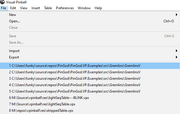
Edited by chepas, 17 July 2021 - 01:33 PM.
Bump maps are the new auto-tune 
VPX - RSS Updates ---- blog.flippingflips.xyz/en/ -- Visual Pinball No.1 (2021) . Est.2000
t.me/horsepin
Posted 17 July 2021 - 04:02 PM
I know, i also tried to fix this, but no clue how.. :/
K I'll have another look. I think it's the parent clipping it so I would start around there.
Bump maps are the new auto-tune
VPX - RSS Updates ---- blog.flippingflips.xyz/en/ -- Visual Pinball No.1 (2021) . Est.2000
spaghetti code
Posted 17 July 2021 - 05:55 PM
rev270 is up (Release Candidate):
t.me/horsepin
Posted 17 July 2021 - 09:21 PM
Got a bit closer, full paths now but errors when it VERIFYs the menu in after clicking it (this will still load the table), I'm sure this just a warning as running debug build.
menuInfo.fMask = MIIM_ID | MIIM_DATA | MIIM_TYPE | MIIM_STATE; // Add the MIIM_DATA flag
menuInfo.cch = strlen(recentMenuname); //set string length, works without...
menuInfo.dwItemData = reinterpret_cast<unsigned long>(recentMenuname); // this will full path
`OnUnInitMenuPopup` wxx_frame.h
Maybe that helps a bit, can't get past that as that pop up menu is setting the `mii.dwItemData` to 0
Edited by chepas, 17 July 2021 - 09:23 PM.
Bump maps are the new auto-tune
VPX - RSS Updates ---- blog.flippingflips.xyz/en/ -- Visual Pinball No.1 (2021) . Est.2000
Pinball Fan

 Contributor
Posted 18 July 2021 - 12:07 AM
OGG bug in 270
Using an OGG file for my flipper up/down sound effect. Spamming the flipper I've noticed two things:
1) Spamming both flippers causes the firing of the sound to not happen, or if I'm fast enough, I can get the sound to not play using one flipper; I'm guessing it can't play the sound if the sound is already playing?
2) The speed of the sound file playing increases each time (so the effect goes quicker and increases in pitch).
Went from version 169 to 270 (that's not a typo), saw this behavior in 169, came here to grab the most recent version, still seeing it.
It doesn't appear to be happening to every ogg file being used. In the tiny bit of testing I've done, it might only affect sound using the PlaySoundAt sub, which just calls:
PlaySound soundname, 0, 1, Pan(tableobj), 0.06, 0, 0, 0, AudioFade(tableobj)
After doing some testing before posting this, I think it's the random pitch and pitch variables of the playsound command. If I change it from 0.06 and set it to 0 in the sub, it doesn't misbehave. I was also having issues with the rolling sound effect that's become fairly standard in tables, from JP, and I had to change the pitch variable of the playsound command to fix that.
Is it just not a good idea to use OGG for all sounds? Stick to wave files for sound effects? What about callouts, those would be getting played through a DMD, and typically the Playsound command is nothing more than the string of the sound, would it be a good idea to use OGG/MP3 there?
Pinball Wizard

Posted 18 July 2021 - 12:17 AM
@shoopity : Yes, using *.mp3 or *.ogg for table elements is currently not a good idea - at least yet.
Keep *.ogg and *.mp3 for backglass only. Might even be a good idea to push them using front/read to the very rear to be honest.
From now on. I won't help anyone here at VPF. Please ask Noah why that is.
VPF Legend
Posted 18 July 2021 - 02:21 AM
OGG bug in 270
Using an OGG file for my flipper up/down sound effect. Spamming the flipper I've noticed two things:
1) Spamming both flippers causes the firing of the sound to not happen, or if I'm fast enough, I can get the sound to not play using one flipper; I'm guessing it can't play the sound if the sound is already playing?
2) The speed of the sound file playing increases each time (so the effect goes quicker and increases in pitch).
Went from version 169 to 270 (that's not a typo), saw this behavior in 169, came here to grab the most recent version, still seeing it.
It doesn't appear to be happening to every ogg file being used. In the tiny bit of testing I've done, it might only affect sound using the PlaySoundAt sub, which just calls:
PlaySound soundname, 0, 1, Pan(tableobj), 0.06, 0, 0, 0, AudioFade(tableobj)
After doing some testing before posting this, I think it's the random pitch and pitch variables of the playsound command. If I change it from 0.06 and set it to 0 in the sub, it doesn't misbehave. I was also having issues with the rolling sound effect that's become fairly standard in tables, from JP, and I had to change the pitch variable of the playsound command to fix that.
Is it just not a good idea to use OGG for all sounds? Stick to wave files for sound effects? What about callouts, those would be getting played through a DMD, and typically the Playsound command is nothing more than the string of the sound, would it be a good idea to use OGG/MP3 there?
You wont get ogg to take random pitch manipulation etc, they will spaz out
like thalamus said, for table effect, best to use wav format
If you feel the need to empty your wallet in my direction, i don't have any way to receive it anyways
Spend it on Hookers and Blow
VPF Veteran
Posted 18 July 2021 - 05:43 AM
Got a bit closer, full paths now but errors when it VERIFYs the menu in after clicking it (this will still load the table), I'm sure this just a warning as running debug build.
menuInfo.fMask = MIIM_ID | MIIM_DATA | MIIM_TYPE | MIIM_STATE; // Add the MIIM_DATA flag
menuInfo.cch = strlen(recentMenuname); //set string length, works without...
menuInfo.dwItemData = reinterpret_cast<unsigned long>(recentMenuname); // this will full path
`OnUnInitMenuPopup` wxx_frame.h
Maybe that helps a bit, can't get past that as that pop up menu is setting the `mii.dwItemData` to 0
??? I don't fully get what you're describing here..
t.me/horsepin
Posted 18 July 2021 - 05:49 AM
Got a bit closer, full paths now but errors when it VERIFYs the menu in after clicking it (this will still load the table), I'm sure this just a warning as running debug build.
menuInfo.fMask = MIIM_ID | MIIM_DATA | MIIM_TYPE | MIIM_STATE; // Add the MIIM_DATA flag
menuInfo.cch = strlen(recentMenuname); //set string length, works without...
menuInfo.dwItemData = reinterpret_cast<unsigned long>(recentMenuname); // this will full path
`OnUnInitMenuPopup` wxx_frame.h
Maybe that helps a bit, can't get past that as that pop up menu is setting the `mii.dwItemData` to 0
??? I don't fully get what you're describing here..
https://github.com/v...nball.cpp#L1222
Bump maps are the new auto-tune
VPX - RSS Updates ---- blog.flippingflips.xyz/en/ -- Visual Pinball No.1 (2021) . Est.2000
Pinball Fan


Posted 18 July 2021 - 11:01 AM
That's a known behavior and is the same in every version of VPX. The mouse pointer has a higher precision than the drawings in the editor. If you place a wall with a corner point at 0/0 and zoom into that point you will see that the coordinates of the mouse pointer is somewhat near to 0/0 but not 100% 0/0. This behavior wasn't changed I 10.7 at all.The mouse pointer is not printed in the screenshot, but I can guarantee that the tip is in the center of the highlighted primitive (more or less),
the position indicated in the bar is 6-7 units of difference compared to the real position, this difference decreases if you zoom in more.
The elements pointer also does not put objects where it indicates the +.
Thanks.
German we are yes my young padawanI want to give back, any devs live near NJ (I have some extra bartop cabs I have build during lockdown) I think toxie and fuzzel are both german? anyone in need in NJ?

I only wrote 6-7-units, but in reality they are 16-17 units.
In previous VP versions the position of the pointer is correct, also the pointer of the elements,with the exception of the elements that were added later, such as primitives, flashers and rubbers.
Sorry for that again, can this be fixed?
Enthusiast


Posted 19 July 2021 - 07:13 PM
Can you update a specific material setting and leave the rest alone?
Something like this.. the 0 settings are the ones that would not be updated/changed.
UpdateMaterial "SideWallFlasher" & nr,0,0,0,0,0,0,ObjLevel(nr),0,0,0,0,0,0,0,0,0


Community Forum Software by IP.Board
Licensed to: VPForums.org
 are all trademarks of VPFORUMS.
 Top
Top
