
Hi,
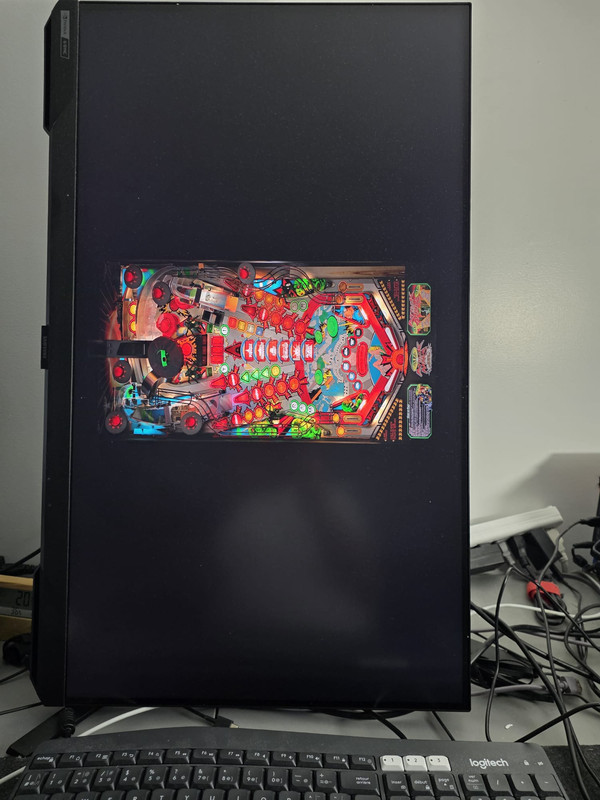
I have recently install the latest version of Pin up Popper on my PC and I have tried to run AFM.
I try to look around and I do no see how I can rotate the playfield,
what I need to do to fix this
many thanks




Neophyte


Posted 12 June 2026 - 09:47 AM
Hi,
I have recently install the latest version of Pin up Popper on my PC and I have tried to run AFM.
I try to look around and I do no see how I can rotate the playfield,
what I need to do to fix this
many thanks
Pinball Fan



Posted 12 June 2026 - 01:53 PM
Since you have rotated your screen, you switch to Portrait in Windows Settings/Displays
And remember that your Windows Scaling needs to be at 100% (aka none-or-off)
If you have a second monitor, you can leave it landscape and use it for the Backglass-and-DMD
I also use this when coding on my desktop:
https://www.vpforums...showtopic=56504


Visual Pinball →
Visual Pinball →
F12 Menu too small to see in the VPX 10.8.1Started by gamerplayer861 , Yesterday, 05:00 PM  10.8.1, vpx, resolution, sbs 10.8.1, vpx, resolution, sbs
|
|
||
Welcome to VPForums →
Pinball Discussion Forum →
Pincab Toolbox is evolving!Started by Flipsync , 07 Aug 2026 tool, scanner, free, vpx and 2 more...
|
|
||
Visual Pinball →
Visual Pinball →
F-14 Tomcat (Williams 1987) - Wrd1972's versionStarted by Tesla , 01 Aug 2026 F-14 Tomcat, VPX, wrd1972
|
|
||
Visual Pinball Development →
General Chat →
[FREE TOOL] Pincab Toolbox — scan your VPX/Popper install and find what's brokenStarted by Flipsync , 29 Jul 2026 Pincab, tool, window, vpx, popper
|
|
||
Welcome to VPForums →
Pinball Discussion Forum →
Whimsical Tables?Started by Hipcat , 14 Jul 2026 pinball tables, vpx
|
|

Community Forum Software by IP.Board
Licensed to: VPForums.org
 are all trademarks of VPFORUMS.
 Top
Top