Jump to content


Photo
* * * * - 1 votes

Alien Poker Multiball


  • Please log in to reply
19 replies to this topic

#1 unclewilly

unclewilly

    sofa king.....

  • VIP
  • 5,202 posts
  • Location:Baltimore, Maryland

  • Flag: United States of America

  • Favorite Pinball: tz, tom, big hurt, who dunnit


Posted 20 December 2009 - 06:28 AM

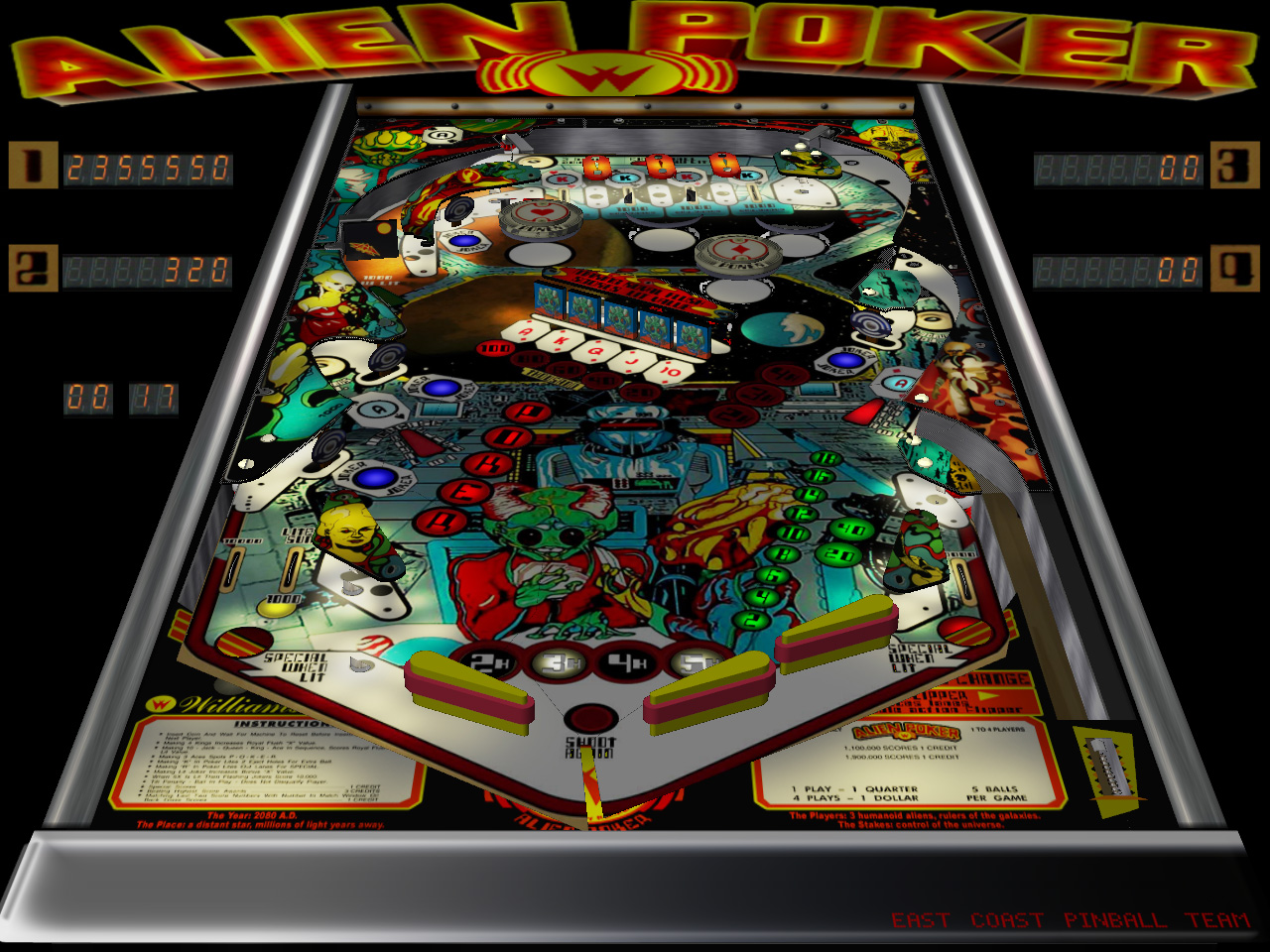
Alien Poker Multiball


Version: 1.0.0
Category: VPinMAME 9.x Recreations

Author(s): unclewilly

Description:
Alien Poker (Williams 1980) Multiball Mod


Alien Poker (Williams 1980) Multiball Mod
Table built and scripted by unclewilly. Graphics and textures by Ace9567

Thanks to kristian for the previous version

View File

Submitted by unclewilly, on Dec 20 2009, 02:28 AM

"it will all be ok in the end, if it's not ok, it's not the end"
 
Monster Bash VP10 WIP https://dl.dropboxus... (vpx)WIP15.vpx

uw2.gif


#2 marv75

marv75

    Master of Nothing

  • Silver Supporter
  • 1,092 posts
  • Location:Ohio

  • Flag: United States of America

  • Favorite Pinball: Addams Family

Posted 20 December 2009 - 06:33 AM

Thanks so much UW awesome job all the way around! smile.gif
VPF The Premiere Pinball Site


#3 Noah Fentz

Noah Fentz

    'Rasslin' Fan

  • VPF Administrator
  • 12,282 posts
  • Location:South Lyon, MI

  • Flag: United States of America

  • Favorite Pinball: Whitewater

  • PS3 Gamer Tag: noahfentz


Contributor

Posted 20 December 2009 - 06:42 AM

Not sure what's going on, UW, but half the table isn't rendering for me...


IdleReel.gif RumbleDMD.jpg HS2-DMD.jpg SBM.jpg ww_logo.jpg EK.jpg

 
T2.jpg Sorcerer.jpg Breakshot.jpg Firepower.jpg GorGar.jpg StarTrek.jpg


My Photobucket Resources
Whether You Believe You Can, Or You Can't, You Are Right." - Henry Ford
The future of pinball lives, it just needs to be nurtured!
If you're here to stab me in the back, you're going to have to get in line.


#4 unclewilly

unclewilly

    sofa king.....

  • VIP
  • 5,202 posts
  • Location:Baltimore, Maryland

  • Flag: United States of America

  • Favorite Pinball: tz, tom, big hurt, who dunnit


Posted 20 December 2009 - 03:29 PM

QUOTE (Noah Fentz @ Dec 20 2009, 06:42 AM) <{POST_SNAPBACK}>
Not sure what's going on, UW, but half the table isn't rendering for me...


I'm not really sure what is going on there noah. I can't reproduce that on my pc. I haven't used anything out of the ordinary. The majority of the stuff not rendering are the pegs and rubbers which are primarily made from ramps. It was built in vp9.04. I'm not really sure what to tell you. Is anyone else having this issue?

"it will all be ok in the end, if it's not ok, it's not the end"
 
Monster Bash VP10 WIP https://dl.dropboxus... (vpx)WIP15.vpx

uw2.gif


#5 hogger42

hogger42

    Hobbyist

  • Platinum Supporter
  • 39 posts
  • Favorite Pinball: Cirqus Voltaire

Posted 20 December 2009 - 04:33 PM

QUOTE (unclewilly @ Dec 20 2009, 08:29 AM) <{POST_SNAPBACK}>
QUOTE (Noah Fentz @ Dec 20 2009, 06:42 AM) <{POST_SNAPBACK}>
Not sure what's going on, UW, but half the table isn't rendering for me...


I'm not really sure what is going on there noah. I can't reproduce that on my pc. I haven't used anything out of the ordinary. The majority of the stuff not rendering are the pegs and rubbers which are primarily made from ramps. It was built in vp9.04. I'm not really sure what to tell you. Is anyone else having this issue?


Nope...Works fine here!! drinks.gif

#6 kruge99

kruge99

    Pinball Wizard

  • VPF Staff
  • 3,901 posts
  • Location:Markham, Ont.

  • Flag: Canada

  • Favorite Pinball: Black Knight, High Speed and Pin*Bot


Posted 20 December 2009 - 04:48 PM

QUOTE (Noah Fentz @ Dec 20 2009, 01:42 AM) <{POST_SNAPBACK}>
Not sure what's going on, UW, but half the table isn't rendering for me...


Try re-downloading the table maybe? One time I accidentally "rolled" my mouse wheel on the playfield picture selector and I didn't notice it had changed. Similar graphics glitch occurred and some how I manged to save it with the wrong image. Took me a while to figure out what the heck I did wrong.


Best Regards,
Todd.

[proud owner of a Williams Solar Fire]

- It's called "The American Dream" because you have to be asleep to believe it.
George Carlin
- Truly great madness cannot be achieved without significant intelligence.
Henrik Tikkanen
- "Reality check, Michelle, Talk about composure, Total lack of. He's a man-- About-- 12 Feet Tall--"
Carrie Kelly
Posted Image

#7 Noah Fentz

Noah Fentz

    'Rasslin' Fan

  • VPF Administrator
  • 12,282 posts
  • Location:South Lyon, MI

  • Flag: United States of America

  • Favorite Pinball: Whitewater

  • PS3 Gamer Tag: noahfentz


Contributor

Posted 20 December 2009 - 06:01 PM

Nah, it happens on both versions.

I don't get it...

I've never had to uncheck HR before. I'll have to dissect this baby and see what is giving me this problem.

IdleReel.gif RumbleDMD.jpg HS2-DMD.jpg SBM.jpg ww_logo.jpg EK.jpg

 
T2.jpg Sorcerer.jpg Breakshot.jpg Firepower.jpg GorGar.jpg StarTrek.jpg


My Photobucket Resources
Whether You Believe You Can, Or You Can't, You Are Right." - Henry Ford
The future of pinball lives, it just needs to be nurtured!
If you're here to stab me in the back, you're going to have to get in line.


#8 The Loafer

The Loafer

    Pinball Wizard

  • VIP
  • 3,472 posts
  • Location:Embrun, Ontario, Canada

  • Flag: ---------

  • Favorite Pinball: Superman, Firepower & Tron


Posted 20 December 2009 - 06:22 PM

Betcha you try an older driver and poof! problem goes away.

#9 Noah Fentz

Noah Fentz

    'Rasslin' Fan

  • VPF Administrator
  • 12,282 posts
  • Location:South Lyon, MI

  • Flag: United States of America

  • Favorite Pinball: Whitewater

  • PS3 Gamer Tag: noahfentz


Contributor

Posted 20 December 2009 - 06:24 PM

Probably not.

This is the first time I've ever had this problem. It's happened with our Whirlwind WIP once or twice, but it was easily rectified.

IdleReel.gif RumbleDMD.jpg HS2-DMD.jpg SBM.jpg ww_logo.jpg EK.jpg

 
T2.jpg Sorcerer.jpg Breakshot.jpg Firepower.jpg GorGar.jpg StarTrek.jpg


My Photobucket Resources
Whether You Believe You Can, Or You Can't, You Are Right." - Henry Ford
The future of pinball lives, it just needs to be nurtured!
If you're here to stab me in the back, you're going to have to get in line.


#10 manavis

manavis

    Neophyte

  • Members
  • Pip
  • 1 posts

  • Flag: ---------

  • Favorite Pinball: harlem

Posted 21 December 2009 - 09:57 AM

Thanks

#11 bha19

bha19

    Pinball Fan

  • Platinum Supporter
  • 1,248 posts
  • Location:South Jersey

  • Flag: United States of America

  • Favorite Pinball: Theatre Of Magic

Posted 24 December 2009 - 12:21 PM

My question is how do you get multiball

bha19

#12 marv75

marv75

    Master of Nothing

  • Silver Supporter
  • 1,092 posts
  • Location:Ohio

  • Flag: United States of America

  • Favorite Pinball: Addams Family

Posted 24 December 2009 - 12:30 PM

Works fine here in SF mode! smile.gif
VPF The Premiere Pinball Site


#13 marv75

marv75

    Master of Nothing

  • Silver Supporter
  • 1,092 posts
  • Location:Ohio

  • Flag: United States of America

  • Favorite Pinball: Addams Family

Posted 24 December 2009 - 07:30 PM

QUOTE (bha19 @ Dec 24 2009, 07:21 AM) <{POST_SNAPBACK}>
My question is how do you get multiball

bha19

Here ya go! smile.gif http://www.pinball4y...alienmulti.html
VPF The Premiere Pinball Site


#14 bha19

bha19

    Pinball Fan

  • Platinum Supporter
  • 1,248 posts
  • Location:South Jersey

  • Flag: United States of America

  • Favorite Pinball: Theatre Of Magic

Posted 26 December 2009 - 01:50 PM

QUOTE (marv75 @ Dec 24 2009, 02:30 PM) <{POST_SNAPBACK}>
QUOTE (bha19 @ Dec 24 2009, 07:21 AM) <{POST_SNAPBACK}>
My question is how do you get multiball

bha19

Here ya go! smile.gif http://www.pinball4y...alienmulti.html

Tried the link and I says an error occured and I can't access the page. I am logged in.

bha19

#15 marv75

marv75

    Master of Nothing

  • Silver Supporter
  • 1,092 posts
  • Location:Ohio

  • Flag: United States of America

  • Favorite Pinball: Addams Family

Posted 26 December 2009 - 04:11 PM

I know you have to light up POK and have one ball locked to the left and then shot the ball to the right all the way up above the bumpers where the ball gets caught.... (Sorry I am not good with pinball technical terms.) smile.gif
VPF The Premiere Pinball Site


#16 bha19

bha19

    Pinball Fan

  • Platinum Supporter
  • 1,248 posts
  • Location:South Jersey

  • Flag: United States of America

  • Favorite Pinball: Theatre Of Magic

Posted 27 December 2009 - 01:13 PM

QUOTE (marv75 @ Dec 26 2009, 11:11 AM) <{POST_SNAPBACK}>
I know you have to light up POK and have one ball locked to the left and then shot the ball to the right all the way up above the bumpers where the ball gets caught.... (Sorry I am not good with pinball technical terms.) smile.gif

It was good enough. I will try it. O.K. I finally got multiball and you were right. Here is the full scoop.
1) Light P-O-K
2) Lock ball in the upper kickout hole
3) Lock new ball in right kickout hole
4) Lock another new ball in left kickout hole.
This will start multiball. I don't know if the order of the kickout holes is random or not.

bha19

Edited by bha19, 27 December 2009 - 03:32 PM.


#17 FDSystems

FDSystems

    Eclectic end-user

  • Charter Member
  • 2,477 posts
  • Location:Bahia

  • Flag: Brazil

  • Favorite Pinball: I will have to find out again.............

Posted 24 July 2011 - 06:53 PM

Great !
I knew Kristian VP8 version, a long time favorite.

Same table, same enjoyment from another galaxy in a parallel space/time.

cool.gif otvclap.gif

Edited by 1234fd, 24 July 2011 - 06:54 PM.

From Brasil. Updated version of 1234fd


#18 xenonph

xenonph

    I have Pinball Fever!

  • VIP
  • 4,157 posts
  • Location:Castle Rock, WA.

  • Flag: United States of America

  • Favorite Pinball: TRON Classic-Congo-Xenon-PINBOT-BOP-LOTR-A Real American Hero OPERATION PINBALL-Millionaire-Whirlwind-Krull-NFL-BlackKnight-FishTales


Contributor

Posted 06 March 2021 - 04:45 AM

This tables playfield is off the screen, (It is off the left side of screen as you can see in editor pic.)

capture169_t.png


Amazingly, nobody has said a word here in the support topic about it, and it has been here since 2009?


For those who want to adjust this...

CLICK THE BACKDROP BUTTON ON THE LEFT-SIDE OF VISUAL PINBALL EDITOR.
ALSO CLICK THE OPTIONS BUTTON DIRECTLY ABOVE THE BACKDROP BUTTON.
AFTER THESE 2 BUTTONS ARE PRESSED DOWN,
ON RIGHT-SIDE OF EDITOR, CLICK COLORS & FORMATTING.

CHANGE X SCALE TO 1  (You can set this to 0.7 but you will have to move the plunger decal to line it up)
CHANGE Y SCALE TO 1
CHANGE X OFFSET TO 0
CHANGE Y OFFSET TO 0

You can adjust these numbers to your specific liking, but this will put the playfield back on the screen at least.


Great table, and thanks for sharing your work!!! It is appreciated.

Carry on.


CHECK OUT THIS TUTORIAL http://www.vpforums....howtopic=32515
TO USE DB2S BACKGLASS PROGRAM WITH DESKTOP TABLES ON 1 MONITOR


#19 wiesshund

wiesshund

    VPF Legend

  • Members
  • PipPipPipPipPipPipPip
  • 11,871 posts

  • Flag: United States of America

  • Favorite Pinball: How many can i have?

Posted 06 March 2021 - 04:49 AM

This tables playfield is off the screen, (It is off the left side of screen as you can see in editor pic.)

capture169_t.png


Amazingly, nobody has said a word here in the support topic about it, and it has been here since 2009?


Well to be honest, my autopov.pov will adjust any table that loads, regardless of how it arrived
and then if that does not quite suit a given table, i will adjust it and export a table name.pov just for that table


So, i kind of never noticed


EDIT
And i just realized, this is the VP9 version, thought we were in the VPX version's thread
ignore me (I wish vp9 used pov's)


Edited by wiesshund, 06 March 2021 - 04:51 AM.

If you feel the need to empty your wallet in my direction, i don't have any way to receive it anyways

Spend it on Hookers and Blow


#20 xenonph

xenonph

    I have Pinball Fever!

  • VIP
  • 4,157 posts
  • Location:Castle Rock, WA.

  • Flag: United States of America

  • Favorite Pinball: TRON Classic-Congo-Xenon-PINBOT-BOP-LOTR-A Real American Hero OPERATION PINBALL-Millionaire-Whirlwind-Krull-NFL-BlackKnight-FishTales


Contributor

Posted 06 March 2021 - 05:07 AM

I actually posted a fix for this in my ScreenRes Settings for DESKTOP TABLES.txt attachment posted at the bottom of the tutorial here..

https://www.vpforums.org/index.php?showtopic=32515#entry319562


Tutorial here..

https://www.vpforums...showtopic=32515


The text file attachment is to help people set up tables to use dB2S backglass on same screen as Desktop table.


************
Alien Poker (Williams 1980 4p) VPM9 4x3 v1.0MULTIBALL MOD unclewilly
in VPinMAME 9.x Recreations

IF TABLE PLAYFIELD IS PARTIALLY OFF THE SCREEN,
CLICK THE BACKDROP BUTTON ON THE LEFT-SIDE OF VISUAL PINBALL EDITOR.
ALSO CLICK THE OPTIONS BUTTON DIRECTLY ABOVE THE BACKDROP BUTTON.
AFTER THESE 2 BUTTONS ARE PRESSED DOWN,
ON RIGHT-SIDE OF EDITOR, CLICK COLORS & FORMATTING.

CHANGE X SCALE TO 1
CHANGE Y SCALE TO 1
CHANGE X OFFSET TO 0
CHANGE Y OFFSET TO 0

TABLE PLAYFIELD WILL NOW LOOK NORMAL WHEN PLAYED

LINE 18 CHANGE VPINMAME.CONTROLLER TO B2S.SERVER

1024
768
280
260
1
0
508

************


That was 6 years ago!! lol


I should have wrote this info here in support topic back then!!

My bad.


Edited by xenonph, 06 March 2021 - 05:11 AM.

CHECK OUT THIS TUTORIAL http://www.vpforums....howtopic=32515
TO USE DB2S BACKGLASS PROGRAM WITH DESKTOP TABLES ON 1 MONITOR