Jump to content


Photo
- - - - -

Followed tutorials but can't get DofLinx working


  • Please log in to reply
197 replies to this topic

#1 jevansoh

jevansoh

    Enthusiast

  • Members
  • PipPipPip
  • 348 posts

  • Flag: United States of America

  • Favorite Pinball: The Simpsons

Posted 09 August 2017 - 05:49 AM

I just took delivery of a new VPCabs Back to the Future cabinet with full force feedback, strobes, RGB LED's, etc, today but am having trouble getting any of it to work.


I have DofLinx set up, followed the guides/tutorial, and am not getting any feedback of any kind.


There are a few Visual Pinball tables that came preloaded on the cabinet and all the solenoids, strobes, RGB LED’s, etc all work with Visual Pinball but I can’t get it working with Future Pinball or Pinball FX2.


When I run DofLinx.exe I also get an error message.  It allows me to continue, but the error message is Unhandled Exception could not load directoutput cab cabinet owner.


Any suggestions on how I would get some feedback going?


Thanks,


–J


#2 jevansoh

jevansoh

    Enthusiast

  • Members
  • PipPipPip
  • 348 posts

  • Flag: United States of America

  • Favorite Pinball: The Simpsons

Posted 09 August 2017 - 07:06 AM

Another thing is that the DofLinx window itself doesn't come up.  I can preview it by hovering over it with my mouse in the taskbar but when I click it's like it never comes into focus so I can't do anything with it after that error message.  I can't get the window to come on the screen at all.


#3 jevansoh

jevansoh

    Enthusiast

  • Members
  • PipPipPip
  • 348 posts

  • Flag: United States of America

  • Favorite Pinball: The Simpsons

Posted 09 August 2017 - 08:40 AM

I tried repairing .net 4.6.2 and that didn't work either.


I'm really at a loss as to why I'm getting this error.  A Google search turned up nothing on this error, either.  I can't run the DofLinx program at all.


#4 DDH69

DDH69

    Pinball Wizard

  • Platinum Supporter
  • 3,603 posts
  • Location:DOFLinx HQ, Adelaide

  • Flag: Australia

  • Favorite Pinball: Monster Bash

Posted 09 August 2017 - 09:39 AM

Hey, welcome to DOFLinx.  I;m sure we can get this sorted out for you.


First thing, if you've got an error message, details, details, details.  I need to know the error and when.  Second thing, post a LOG file and your INI, that really helps me to help you.


From the info you've provided:

- DOFLinx window not displying.  The Window only displays when its in DEBUG mode.  You can start debug mode in many ways, easiest way for testing, ensire the line DEBUG=1 is in your DOFlinx.INI file.

- Once you have DOFLinx window displaying you can use the right click option and bring up testing menus for the ports.  This will allow you to test device / port combinations and ensure your devices are connecting and usable.

- From the limited description of the message (cab cabint owner) you've provided it sounds like you likely have DOF R2 setup.  You need DOF R3.  Follow the links in the guide post that you would have followed.  It will point to DOF R3.  While easy to install / upgrade to R3, ensure you you backup first so that if you get into trouble you can always go back.


I hope this gives you a path to start moving forward.


DOFLinx
Contributions for equipment to help with ongoing DOFLinx development can be made here

#5 jevansoh

jevansoh

    Enthusiast

  • Members
  • PipPipPip
  • 348 posts

  • Flag: United States of America

  • Favorite Pinball: The Simpsons

Posted 09 August 2017 - 10:15 AM

Ok, I downloaded R3 and now it says, "Oh No, cannot find directoutputconfig.ini"


I don't have that file and don't know what to put in it to create it??


#6 jevansoh

jevansoh

    Enthusiast

  • Members
  • PipPipPip
  • 348 posts

  • Flag: United States of America

  • Favorite Pinball: The Simpsons

Posted 09 August 2017 - 10:28 AM

I feel so stupid.  Dummy me didn't make a backup.  Now I can't get the force feedback to work on Visual Pinball, either, which was working fine.  Even the tables are squished and don't fit the screen now.  I've really screwed up.


I've found several files called directoutputconfig20.ini but they are huge 350kb text files that look like this "|W61 @t@/W62 @t@/W65 @t@/W66 @t@,S15/S16/S31 60/S32/W49|W50 @t@/W51|W52|W53 @t@,S13/S14/S30/W41|W42|W43 @t@,0,0,0,0,S2/S46,S6 60/S6 60 Invert/S7/S48,S3,0,0,0,0,ON Orange/S20 Yellow/S21 Red/S22 Lawn_green/S23 Yellow/S24 Yellow/S25 Lawn_green/S26 Yellow/S27 Red/S28 Red/W33 White/W34 White,ON Orange/S20 Yellow/S21 Red/S22 Lawn_green/S23 Yellow/S24 Yellow/S25 Lawn_green/S26 Yellow/S27 Red/S28 Red/W33 White/W34 White,ON Orange/S20 Yellow/S21 Red/S22 Lawn_green/S23 Yellow/S24 Yellow/S25 Lawn_green/S26 Yellow/S27 Red/S28 Red/W33 White/W34 White,ON Orange/S20 Yellow/S21 Red/S22 Lawn_green/S23 Yellow/S24 Yellow/S25 Lawn_green/S26 Yellow/S27 Red/S28 Red/W33 White/W34 White,ON Orange/S20 Yellow/S21 Red/S22 Lawn_green/S23 Yellow/S24 Yellow/S25 Lawn_green/S26 Yellow/S27 Red/S28 Red/W33 White/W34 White
acd,S9 Red/S21 Yellow/S27 White/W33 Yellow/W44 Yellow f200,S13 Blue/S20 White/S25 Red/S26 White/S28 White,S11 Red/S23 White,S14 Blue/S25 Red/S30 White,S10 Red/S29 White/S31 Red/W59 Yellow f200,S2 300/S12 300/S24 300/W13 500 10/W43 500 10,S13,S14,S9/W1|W2|W3|W4|W5 @t@,S3/S10/W42 @t@,S11/S12/W10|W11|W12 @t@,S12,0,0,S8 m600 I32/S3 600 I32/W36 600 I32,S1/S2/S16,S15,S24,0,0,0,0,ON Red,ON Red,ON Red,ON Red,ON Red
ACDC,E205 Red/E214 Orange f200/E222 Red/E230 Red/E233 Blue f200/E240 Red 1500 10,E203 Orange/E210 Yellow f200/E215 Yellow f200/E236 Red 1000 10/E237 Red 500 5/E240 Red 1500 14,E206 Red/E211 Yellow f200/E226 Red fd800/E236 Red 1000 10/E237 Red 500 5/E240 Red 1500 12,E204 Orange/E212 Yellow f200/E216 Yellow f200/E217 Yellow f200/E236 Red 1000 10/E237 Red 500 5/E240 Red 1500 14,E207 Red/E218 Orange f200/E234 Blue f200/E240 Red 1500 10,E208 300/E221 300/E231 300/E232 300/E239 500 10/E24"


... and that's all that's in them.


So now when I use that file and place it in the config directory, I get a new error of course.  It says left flipper must be set to 1-0 or something like that.  There's nothing in the ini file about left flipper so I have no clue what to do.


Is there a generic file I can use to start with to be able to get into debug mode to try and figure out what's what?


#7 jevansoh

jevansoh

    Enthusiast

  • Members
  • PipPipPip
  • 348 posts

  • Flag: United States of America

  • Favorite Pinball: The Simpsons

Posted 09 August 2017 - 10:51 AM

I don't know if this is helpful, but I found out I have a PACLED64 on port 1.  That's about all I know at this point.


#8 jevansoh

jevansoh

    Enthusiast

  • Members
  • PipPipPip
  • 348 posts

  • Flag: United States of America

  • Favorite Pinball: The Simpsons

Posted 09 August 2017 - 11:16 AM

I found the DofLinx configuration tool and although I have absolutely no idea what's mapped to what, I messed around with it picking random things just to generate a outputconfiguration file. 


No matter what I do I keep getting the error in configuration file telling me left flipper isn't set right.  I used the tool to generate an output configuration file, not that I know which ports to select, but it still gives me the error.


I'm at a loss here and am feeling very overwhelmed.


Here's my ini file


####
# The config file for DOFLinx
# A mad idea by DDH69 to have some flipper sounds, RGB display and turn buttons on when playing Pinball FX2 via Steam
# Its grown a lot since that silly start!
# Note - this works with LEDWiz, PacLed64, KL25Z and Sainsmart (FTDI devices)
# Edit this file as you see fit, lines that start with a hash (#) or are blank are not processed.  This blurb and comments can be cut out if you want.
#
# Output devices outputs are entered in the format of
# device (D) and output number (#) in the format D##, so controller device 1 and output 3 is "103" without the quotes, controller board 2 output 23 is "223" without quotes
####

# location of your standard DOF outut configuration file.  Keep this as the first item in the file
DIRECTOUTPUTCONFIG=c:\DirectOutput\config\directoutputconfig.ini

# If you want to list the processes that will wake up DOFLinx, comment it out if you just want Pinball FX2
#PROCESSES=Pinball FX2,Future Pinball,VPinball_9_9_1,VPPhysMod5

# If you are using flag files, comment the line below out or set to 2000 as the default.
# If you need to use the Pinball FX2 grid to select games you will want this at around 30000 - I recommend not using the FX2 grid
PROCESS_TO_ACTIVE_TIME=1

# Which DOF Controller output for the flipper solenoids / contactors
L_FLIPPER_OUTPUT=117
R_FLIPPER_OUTPUT=125
# The keyboard hex code for the key that is used for each flipper from https://msdn.microso...1(v=vs.85).aspx
# Left Shift = A0, Right Shift = A1
L_FLIPPER_KEY=A0
R_FLIPPER_KEY=A1
# Just in case things go wrong (ie no keyup signal is detected, flipper held down for a long time), what is the maximum time a flipper solenoid / contactor can be in in milliseconds
MAX_FLIPPER_ON=5000
# What LEDWiz output(s) are used for RGB devices.  Just enter the Red output number.  Multiples can be entered seperated by a comma
RGB_OUTPUT=109
# Rainbow - cycle through the colours, Random - pick a random next colour, A colour name as it appears in the DirectOutputConfig.ini file
RGB_STYLE=RANDOM
# What changes the colour?  Time - set time period, Flipper = flipper press after the RGB_TRIGGER minimum time (to stop rapid colour changes)
RGB_TRIGGER=FLIPPER
# Dependent on trigger selection the period between changes or the minimum time for change between flipper flips
RGB_MIN_TIME=1000
# The button(s) to turn on when DOFLinx starts, ie the exit button LED
#BUTTONS_ON=102 104
# Make the "1" (31) key (Start in VP) pulse LEDWiz 120 and "4" (34) to pulse controller/output 121
KEY_TO_OUTPUT=32 101 35 106 36 105
# Set a key to turn on a specific colour for your RGB.  The line below makes the Left Control (A2) and the Right Control (A3) turn my undercab RGB strip red.
# In Pinball FX2 this means when I nudge it all goes red.
#KEY_TO_COLOUR=A2 109 Red A3 109 Red
# Setting FORCE_ACTIVE=1 will cause DOFFX2 to not listen for processes and just run until you kill the process.  Handy for using it for things other than PinBall FX2
FORCE_ACTIVE=0
# If you want the program to stop when your named process stops then set this to 1.  If you want it to run in the background all the time leave it as 0
QUIT_AFTER_PROCESS=0
# Set to 1 to output the game name to the log regardless of the DEBUG flag setting.  Set to 0 to simply follow the DEBUG flag.
# Quite useful when you trying to get the FX2 window game name for setting game specific colours
OUTPUT_GAME_NAME=1

####
# Sample setup to enable the Future Pinball Link.  Edit the LINK_ items to be your ports and settings.
####
FP_ATTEMPT_LINK=1
# Use the line below if you need to extend the wait time for a FP table to load
#FP_LINK_WAIT_TIME=60000
LINK_LF=117,50,10000,255
LINK_RF=125,50,10000,255
LINK_LS=118,50,500,255
LINK_RS=126,50,500,255
LINK_ML=127,50,500,255
LINK_MC=128,50,500,255
LINK_MR=129,50,500,255
LINK_BL=130,50,500,255
LINK_BC=131,50,500,255
LINK_BR=132,50,500,255
LINK_SH=115,1000,5000,255
LINK_GR=116,750,10000,255
LINK_KN=124,120,500,255
LINK_ST=102
LINK_EB=101
LINK_CN=106,105,103
LINK_EX=104

####
# 0 = OFF (normal operation), 1 = ON - When ON a window will appear and a log file will be created in the EXE directory.
DEBUG=1

#####
# Game specific colours in the formnat of a CSV of Game Name,Colour#1,Colour#2 - colours as they appear in your directoutputconfig
# Thanks to Vizzini here is a great starting list for Pinball FX2
#####
GAME_COLOUR=AlienIsolationPinball,Medium_Blue,Lime,Dodger_Blue,Lime_Green
GAME_COLOUR=AlienvsPredatorPinball,Medium_Blue,Lime_Green,Dodger_Blue,Yellow_Green
GAME_COLOUR=AliensPinball,Medium_Blue,Dark_Golden_Rod,Dodger_Blue
GAME_COLOUR=AmericanDadPinball,Medium_Blue,Lime_Green,Dodger_Blue,Yellow_Green
GAME_COLOUR=ArcherPinball,Medium_Blue,Yellow,Dodger_Blue,Blue_Violet
GAME_COLOUR=Biolab,Dark_Red,Lime,Blue,Cyan,Blue_Violet,Yellow
GAME_COLOUR=Blade,Blue,Blue_Violet,Salmon
GAME_COLOUR=BobaFett,Lime,Golden_Rod,Blue_Violet
GAME_COLOUR=BobsBurgersPinball,Medium_Blue,Lime_Green,Dark_Red,Dodger_Blue,Yellow_Green
GAME_COLOUR=CaptainAmerica,Blue,Dark_Red,Dodger_Blue,Gold
GAME_COLOUR=CastleStorm,Blue,Gold,Lime,Dodger_Blue,Orange,Lime_Green
GAME_COLOUR=CivilWar,Blue,Dark_Red,Dodger_Blue,Light_Salmon
GAME_COLOUR=Deadpool,Dark_Red,Blue,Medium_slate_blue,Dodger_Blue
GAME_COLOUR=DoomPinball,Yellow,Silver,Gray,Dark_Orange,Dim_Gray,Orange_Red,Peru,Crimson
GAME_COLOUR=DoctorStrange,Dark_Red,Blue,Gold,Lime_Green,Dark_Violet,Orange,Dodger_Blue,Lime,Medium_Slate_Blue
GAME_COLOUR=EarthDefense,Dark_Red,Blue,Gold,Dark_Violet,Orange,Dodger_Blue,Lime
GAME_COLOUR=ElDorado,Orange,Lime_Green,Yellow,Coral,Lime,Yellow_Green,Cyan
GAME_COLOUR=EpicQuest,Lime_Green,Dodger_Blue,Yellow_Green,Cyan
GAME_COLOUR=Excalibur,Dark_Red,Blue,Lime,Dodger_Blue,Cyan
GAME_COLOUR=FalloutPinball,Crimson,White,Red,Brown,Light_Steel_Blue,Slate_Blue
GAME_COLOUR=FamilyGuyPinball,Dodger_Blue,Lime_Green,Salmon,Dark_Violet,Yellow_Green
GAME_COLOUR=FantasticFour,Blue,Yellow,Dodger_Blue,Orange_Red
GAME_COLOUR=FearItself,Dark_Red,Blue,Yellow,Lime,Dark_Violet,Orange
GAME_COLOUR=GhostRider,Dodger_Blue,White,Yellow,Light_Salmon,Orange_Red
GAME_COLOUR=GuardiansoftheGalaxy,Dodger_Blue,Orange,Medium_Purple
GAME_COLOUR=IRONMAN,Blue,Dark_Red,Dodger_Blue,Gold
GAME_COLOUR=Mars,Blue,Yellow,Deep_sky_blue,Gold
GAME_COLOUR=MarvelsAntMan,Medium_Blue,Dark_Red,Dodger_Blue
GAME_COLOUR=MarvelsAvengersAgeofUltron,Dark_Red,Dodger_Blue,Lime_Green,Light_Salmon,Cyan
GAME_COLOUR=MarvelsTheAvengers,Blue,Dark_Red,Dodger_Blue,Gold
GAME_COLOUR=MarvelsWomenofPowerAForce,Red,Lime,Gold,Slate_Blue,Tomato,Silver,Dark_Orchid,Spring_Green
GAME_COLOUR=MarvelsWomenofPowerChampions,Dodger_Blue,Yellow,Red,Gray,Golden_Rod,Crimson,Orange
GAME_COLOUR=MoonKnight,Dodger_Blue,Blue,Cyan,Royal_Blue
GAME_COLOUR=MsSplosionMan,Dodger_Blue,Pink,Medium_Blue,Purple,Royal_Blue
GAME_COLOUR=Paranormal,Lime_Green,Dodger_Blue,Yellow_Green
GAME_COLOUR=Pasha,Dark_Violet,Golden_Rod,Dodger_Blue
GAME_COLOUR=PlantsVSZombies,Lime_Green,Yellow_Green,Dodger_Blue
GAME_COLOUR=Portal,Dodger_Blue,Yellow_Green,Medium_Blue,Yellow
GAME_COLOUR=Rome,Dark_Red,Gold,Dodger_Blue,Light_Salmon,Yellow_Green,Orange
GAME_COLOUR=SecretsoftheDeep,Blue,Yellow,Dodger_Blue
GAME_COLOUR=Shaman,Dark_Red,Blue,Gold,Dark_Violet,Orange,Dodger_Blue,Lime
GAME_COLOUR=SorcerersLair,Blue,Blue_Violet,Dodger_Blue,Slate_Blue
GAME_COLOUR=SouthParkButtersVeryOwnPinballGame,Dark_Red,Blue,Gold,Dark_Violet,Orange,Dodger_Blue,Lime_Green
GAME_COLOUR=SouthParkSuperSweetPinball,Dark_Red,Lime,Blue,Gold,Dark_Violet,Orange,Dodger_Blue,Lime_Green,Yellow_Green
GAME_COLOUR=SpiderMan,Dark_Red,Lime,Blue,Gold,Dark_Violet,Orange
GAME_COLOUR=STARWARSDARTHVADER,Light_sky_blue,Dark_Red,Cyan
GAME_COLOUR=StarWarsEpisodeVTheEmpireStrikesBack,Medium_Blue,Yellow,Dark_Red,Dodger_Blue
GAME_COLOUR=StarWarsEpisodeVIReturnoftheJedi,Slate_Blue,Golden_Rod,Medium_Blue,Lime_Green,Dodger_Blue,Yellow
GAME_COLOUR=StarWarsPinballDroids,Medium_Blue,Yellow,Orange,Navy,Gold,Orange_Red
GAME_COLOUR=StarWarsPinballEpisodeIVANewHope,Cyan,Golden_Rod,Dodger_Blue,Yellow
GAME_COLOUR=StarWarsPinballHanSolo,Dodger_Blue,Royal_Blue,Antique_White
GAME_COLOUR=StarWarsPinballMastersoftheForce,Medium_Blue,Salmon,Dodger_Blue,Purple,Cyan,Dark_Red
GAME_COLOUR=StarWarsPinballMightoftheFirstOrder,Light_sky_blue,Dodger_Blue,Dark_Red,Cyan
GAME_COLOUR=StarWarsPinballStarWarsRebels,Medium_Blue,Yellow,Royal_Blue,Orange_Red,Purple,Lime_Green
GAME_COLOUR=StarWarsPinballTheForceAwakens,Dark_Red,Medium_Blue,Blue_Violet
GAME_COLOUR=StarWarsPinballRogueOne,Gray,Silver,Light_Sky_Blue,Teal,Beige,Bisque,Aqua_Marine,Slate_Gray,Dark_Orange
GAME_COLOUR=StarWarsStarfighterAssault,Medium_Blue,Dodger_Blue,Dark_Red
GAME_COLOUR=StarWarsTheCloneWars,Dark_Red,Pink,Medium_Blue,Medium_Turquoise,Lime,Lime_Green
GAME_COLOUR=SuperLeagueASRoma,Lime_Green,Orange,Lime,Yellow,Red
GAME_COLOUR=SuperLeagueZenStudiosFC,Lime_Green,Orange,Lime,Yellow,Red
GAME_COLOUR=SuperLeagueArsenalFC,Lime_Green,Orange,Lime,Yellow,Red
GAME_COLOUR=SuperLeagueLiverpoolFC,Lime_Green,Orange,Lime,Yellow,Red
GAME_COLOUR=SuperLeagueJuventus,Lime_Green,Orange,Lime,Yellow,Red
GAME_COLOUR=SuperLeagueACMilan,Lime_Green,Orange,Lime,Yellow,Red
GAME_COLOUR=SuperLeagueRealMadridCF,Lime_Green,Medium_Blue,Lime,Yellow,Red
GAME_COLOUR=SuperLeagueFCBarcelona,Slate_Blue,Lime_Green,Yellow,Blue_Violet,Lime,Red
GAME_COLOUR=Tesla,Lime_Green,Yellow_Green,Dodger_Blue,Golden_Rod
GAME_COLOUR=TheElderScrollsVSkyrimPinball,Light_Slate_Gray,Gold,Golden_Rod,Dark_Sea_Green,Peru,Tan
GAME_COLOUR=TheInfinity Gauntlet,Dark_Red,Blue,Gold,Dark_Violet,Orange,Dodger_Blue,Lime
GAME_COLOUR=TheWalkingDead,Lime_Green,Royal_Blue,Yellow_Green
GAME_COLOUR=Thor,Dark_Red,Blue,Gold,Dark_Violet,Orange,Dodger_Blue,Lime
GAME_COLOUR=V12,Dark_Red,Blue,Gold,Dark_Violet,Orange,Dodger_Blue
GAME_COLOUR=Venom,Dark_Red,Blue,Dark_Violet,Dodger_Blue
GAME_COLOUR=WildWestRampage,Yellow_Green,Dodger_Blue,Royal_Blue
GAME_COLOUR=Wolverine,Dark_Red,Medium_Blue,Yellow,Dark_Violet
GAME_COLOUR=WorldWarHulk,Lime_Green,Yellow_Green,Dodger_Blue,Lime,Yellow
GAME_COLOUR=XMen,Blue,Blue_Violet,Gold,Dodger_Blue,Slate_Blue,Orange
 

No matter what I do I keep getting the error in configuration file telling me left flipper isn't set right.  I used the tool to generate an output configuration file, not that I know which ports to select, but it still gives me the error.


Edited by jevansoh, 09 August 2017 - 11:19 AM.


#9 DDH69

DDH69

    Pinball Wizard

  • Platinum Supporter
  • 3,603 posts
  • Location:DOFLinx HQ, Adelaide

  • Flag: Australia

  • Favorite Pinball: Monster Bash

Posted 09 August 2017 - 12:48 PM

OK, step 1 - do not panic!

step 2, sit back and relax.

This is all quite fixable.  A few things below, but given the time here in OZ, I'll be off to bed soon, but will check in again in the morning.

Again, don't panic, don't fret.


Now, learn from this, a backup is great.  Having said that, now you need to keep moving forward, its all quite possible, just take one considered step at a time.  :facepalm:


For DOFLinx, with a PacLED64 you need to add an argument to the command line when you start DOFLinx as PacLEDs are not autodetected.  Add PACELD=1  (read page 3 of the guide for more information)  This will cause your PacLED device to be recognised.  You can then use the test functionality in DOFLinx (right click on the main window when in DEBUG mode) to test each output on the PacLED and see what is connected.  In short, make your own map of connected devices.


The errors relating to left flipper 1-0, etc are just telling you that you cannot assign an output to an invalid port.  Why is your assignment invalid?  Well it hasn't found the PacLED yet.  Once it does, this will be fine.


As for the device / port setting in DOFLinx.ini, your device will be 1, so 1xx for everything.  The xx will be discovered by testing each of the 64 outputs of the PacLED once you have it connecting - easy.  Get some paper, make a map.  Remember for RGD devices it takes 3 ports, ie 101, 102 and 103 where 101 is red, 102 id green and 103 is blue .... hence RGB.


With regard to the DIRECTOUTPUTCONFIG= line in the DOFLinx.INI, just set that to point to your directoutputconfig20.ini file.  It only uses this file for the colours, nothing else.


For VP, you will need to remap your toys within the DOF config utility.  You can use the location of the toys found from the above testing in DOFLinx to setup that map.  Once the map is set it gets downloaded as a new set of configuration files.


While you might be nervous now, regretting not backing up, fearful you've destroyed things, your hardware is still intact, you've just taken the next step to a better config.  Smile  :tup:


DOFLinx
Contributions for equipment to help with ongoing DOFLinx development can be made here

#10 jevansoh

jevansoh

    Enthusiast

  • Members
  • PipPipPip
  • 348 posts

  • Flag: United States of America

  • Favorite Pinball: The Simpsons

Posted 09 August 2017 - 01:34 PM

Thanks for being so kind.  I hope you have a great night's sleep.  I'm going to get started trying the things you've mentioned now and will post my progress here.  Thanks again!


Ok, first error.  I added a shortcut to my startup folder and changed the target to be doflinx.exe pacled=1 and still get the flipper error saying it has to be 1-0.


Where do I change this/set this up to get rid of this error?


Thanks,


--J


The doflinx.ini file has the l_flipper already set to 117 and the right to 125.  This should be the proper syntax yet I still get the error message??


#11 jevansoh

jevansoh

    Enthusiast

  • Members
  • PipPipPip
  • 348 posts

  • Flag: United States of America

  • Favorite Pinball: The Simpsons

Posted 09 August 2017 - 01:45 PM

Here's the complete error from the log


09-Aug-17 09:43:27.508 - DOF Linx for Pinball Emulators - DOFLinx by DDH69
09-Aug-17 09:43:27.514 - Starting up - version 5.01
09-Aug-17 09:43:27.531 - 0 LEDWiz device(s) found
09-Aug-17 09:43:27.532 - 0 FTDI (Sainsmart) device(s) found
09-Aug-17 09:43:27.533 - !!! No valid output devices for DOFLinx were found ...... sorry about that !!!
09-Aug-17 09:43:27.534 - Reading DOFLinx.INI startup config file details
09-Aug-17 09:43:27.542 - Reading DOF config file
09-Aug-17 09:43:27.545 - Error in configuration for  left flipper trying to set device to 1 Needs to be in the range 1-0
09-Aug-17 09:43:33.655 - Shutting down
09-Aug-17 09:43:33.662 - Program close


So it looks like it's not finding my PACLED64??  I don't know why or what to do about it??


#12 Outhere

Outhere

    Pinball Wizard

  • Platinum Supporter
  • 4,807 posts

  • Flag: United States of America

  • Favorite Pinball: M M

Posted 09 August 2017 - 02:45 PM

For VP DOF R3 - I'm assuming you put over the top R2  .... Did you re-register the R3 by double-clicking the RegisterDirectOutputComObject.exe

Also check this

Unblock the Files

You might need to unblock the files of the DirectOutput framework, before it can be recognized by hosting applications (e.g. B2S.Server).

Please exceute the following procedure for all dll and exe files of the DirectOutput installtion:

  • Right click the file and select Properties in the context menu.
  • Select the General tab in the properties window.
  • If you find the text _"This file came from another computer and might be blocked to help protect this computer" or somthing similar on this tab, click the Unblock button. This should fix the issue.

If the text about the file coming from another computer does not exist, everthing should be fine.


B2S.Server Configuration

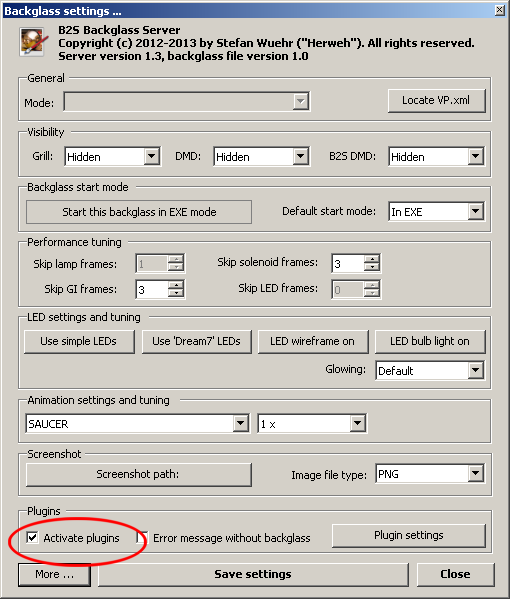
In order to activate the DirectOutput framwork you need to check the Active Plugins checkbox in the B2S Server settings window. If you plan to use DOF for tables not having a directB2S backglass file (e.g. a legacy Rosve style B2S table), make sure the "Error message without backglass" checkbox is unchecked. To open the settings window, you need to move the mouse pointer to the backglass (press T to toggle the visibility of the mousepointer) and press S.

Or when the game is running take the mouse right click the back glass and you should get this menu

B2SServer_Settings_ActivatePlugins.png


#13 jevansoh

jevansoh

    Enthusiast

  • Members
  • PipPipPip
  • 348 posts

  • Flag: United States of America

  • Favorite Pinball: The Simpsons

Posted 09 August 2017 - 03:22 PM

Thanks so much for this.  I registered it successfully, no dll's were blocked, and I'm still getting the error message.


I haven't managed to figure out how to get to the backglass settings yet but I'm getting stuck on the flipper error as soon as doflinx tries to run.


To answer your question, yes I copied over a previous installation.


So a game has to be running to get to this menu?  Does it have to be a visual pinball game?


#14 Outhere

Outhere

    Pinball Wizard

  • Platinum Supporter
  • 4,807 posts

  • Flag: United States of America

  • Favorite Pinball: M M

Posted 09 August 2017 - 03:28 PM

Yes the post I put up is for visual pinball you had mentioned your dof no longer works


#15 jevansoh

jevansoh

    Enthusiast

  • Members
  • PipPipPip
  • 348 posts

  • Flag: United States of America

  • Favorite Pinball: The Simpsons

Posted 09 August 2017 - 03:29 PM

I was just making sure.  I'm not having any luck getting that window to come up...


#16 Outhere

Outhere

    Pinball Wizard

  • Platinum Supporter
  • 4,807 posts

  • Flag: United States of America

  • Favorite Pinball: M M

Posted 09 August 2017 - 03:43 PM

It should be PACLED64=1 or Try adding it to the DOFLinx.ini file instead PACLED64=1

Thanks for being so kind.  I hope you have a great night's sleep.  I'm going to get started trying the things you've mentioned now and will post my progress here.  Thanks again!


Ok, first error.  I added a shortcut to my startup folder and changed the target to be doflinx.exe pacled=1 and still get the flipper error saying it has to be 1-0.


Where do I change this/set this up to get rid of this error?


Thanks,


--J


The doflinx.ini file has the l_flipper already set to 117 and the right to 125.  This should be the proper syntax yet I still get the error message??


#17 jevansoh

jevansoh

    Enthusiast

  • Members
  • PipPipPip
  • 348 posts

  • Flag: United States of America

  • Favorite Pinball: The Simpsons

Posted 09 August 2017 - 03:50 PM

Where would I put it in the ini?


I put it right at the top and it made no difference.


#18 jevansoh

jevansoh

    Enthusiast

  • Members
  • PipPipPip
  • 348 posts

  • Flag: United States of America

  • Favorite Pinball: The Simpsons

Posted 09 August 2017 - 04:00 PM

I checked the backglass settings and it was already set how you said it should be.


I'm getting stuck on the flipper error saying it should be in the order of 1-0 but it is set up that way as 127 I believe.


I don't know what else to do at this point.


#19 Outhere

Outhere

    Pinball Wizard

  • Platinum Supporter
  • 4,807 posts

  • Flag: United States of America

  • Favorite Pinball: M M

Posted 09 August 2017 - 04:19 PM

It is probably best to have the dof working in visual pinball before you move on to other projects


#20 jevansoh

jevansoh

    Enthusiast

  • Members
  • PipPipPip
  • 348 posts

  • Flag: United States of America

  • Favorite Pinball: The Simpsons

Posted 09 August 2017 - 07:58 PM

Is there anything besides DofLinx that would make the lighting and solenoids work?  The reason I'm asking is because Brad at VPCabs sent me a zipped up DofLinx directory and it doesn't have the Doflinx.exe or ini files in it and it's not like me to go and change things without making a backup.  When he sent the directory it triggered my memory (unless I'm just being hopefully optimistic and am wrong) and I honestly think it's exactly what was on the drive before I messed with it.  I don't think there was an exe or ini for me to backup in the first place.


But then how was the force feedback and lighting working in Visual Pinball?


Again, I could be wrong, and maybe it was all there and I just mistakenly overwrote it, but I now have my doubts I did something so dumb.  Who knows at this point, though.


Thanks,


--J