Jump to content


Photo
- - - - -

UPDATE: VP-Man 5.50 released


  • Please log in to reply
62 replies to this topic

#1 Fartian

Fartian

    Enthusiast

  • Charter Member
  • 73 posts
  • Location:River Rhine, Germany

  • Flag: Germany

  • Favorite Pinball: Attack from Mars

Posted 16 August 2009 - 12:53 PM

Hi there!

VP-Man - your friendly front-end for Visual Pinball - has been updated!
You'll find it here.

Changelog for version 5.50:

  • changed and improved VP-Man's help system to Microsoft's HTML-Help since WinHelp is no longer supported by Windows Vista
  • new table image management dialog (to add & delete table images or modify the display order)
  • support for drag & drop operations of tables, table images and table documents (may not work properly in Windows Vista due to security issues)
  • possibility to keep VP-Man the topmost window (useful for drag & drop operations)
  • improved sorting for 'Launches' column of table listview
  • improved image resizing options for saving captured screenshots (no longer limited to 4:3 aspect ratio)
  • fixed a bug in rar-extraction of distribute downloads dialog
  • fixed a bug in VP-Man's update check
  • extended hiscore.dat for displaying more highscores (matahari)
It's free to use for everyone, though you may support me by downloading it from RapidShare (which gains me RapidShare points). yahoo.gif Download link is on VP-Man's homepage.

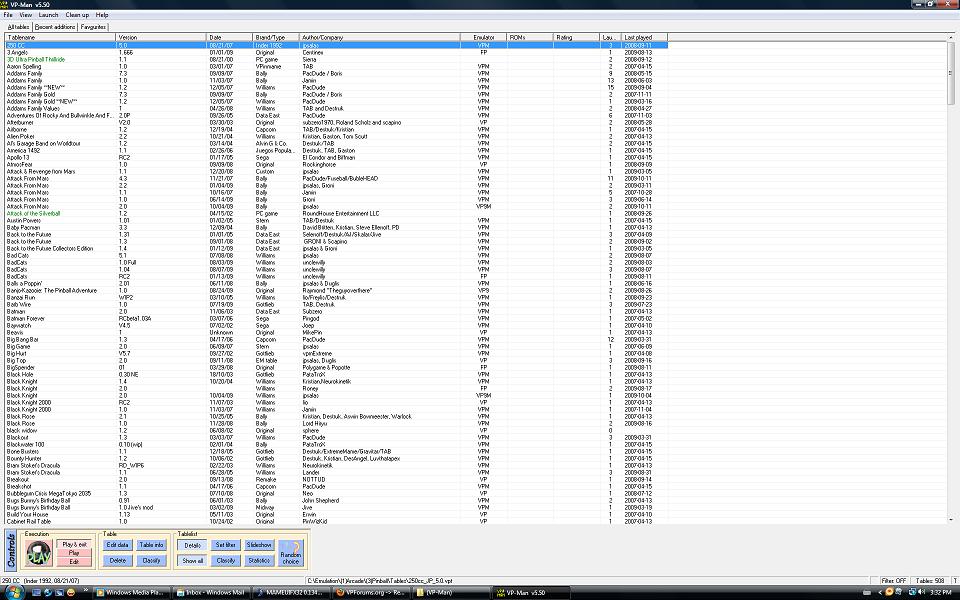
Here's a screenie ...


Hope you enjoy the update!

So long ... fart on ...

Fartian

Author of VP-Man (a front-end for Visual Pinball & Future Pinball)

Visit VP-Man's homepage

#2 gordon

gordon

    Enthusiast

  • Members
  • PipPipPip
  • 261 posts
  • Location:Schleswig-Holstein/Kiel

  • Flag: Germany

  • Favorite Pinball: Pirates of the Caribbean

Posted 16 August 2009 - 02:02 PM

Danke für das update!!!

Many Thanks for update!!!

dblthumb.gif otvclap.gif

#3 bolt

bolt

    VPF Veteran

  • VIP
  • 5,172 posts
  • Location:Kiel / Schleswig Holstein

  • Flag: Germany

  • Favorite Pinball: JP's Deadpool, Harlem Globetrotters, Spiderman and much more

Posted 16 August 2009 - 03:15 PM

Thanks for update
Posted Image

#4 TedB

TedB

    Pinball Fan

  • Charter Member
  • 715 posts

  • Flag: Netherlands

  • Favorite Pinball: those with non virtual steel balls

Posted 16 August 2009 - 10:18 PM

Thanks Fartian! I am a big fan of VP-man smile.gif

Would it be possible to add highscores of originals? That is probably table dependent info, but it might be feasible if you receive the necessary info where it is stored.

#5 Fartian

Fartian

    Enthusiast

  • Charter Member
  • 73 posts
  • Location:River Rhine, Germany

  • Flag: Germany

  • Favorite Pinball: Attack from Mars

Posted 17 August 2009 - 08:11 AM

QUOTE (TedB @ Aug 17 2009, 12:18 AM) <{POST_SNAPBACK}>
Thanks Fartian! I am a big fan of VP-man smile.gif

Would it be possible to add highscores of originals? That is probably table dependent info, but it might be feasible if you receive the necessary info where it is stored.


Yes, that would be possible and is a long planned feature. Currently I'm working on something else, but I've already thought about reading highscores from external files and registry entries. Not only originals, even some PC pinball games (e.g. Balls Of Steel) could be displayed when these features were implemented.
So long ... fart on ...

Fartian

Author of VP-Man (a front-end for Visual Pinball & Future Pinball)

Visit VP-Man's homepage

#6 d3xtro

d3xtro

    Enthusiast

  • Members
  • PipPipPip
  • 186 posts

  • Flag: ---------

  • Favorite Pinball: World Cup Soccer '94

Posted 17 August 2009 - 07:56 PM

Thanks Fartian for the update and of course for your hard work through the years. Much appreciated !!!

Keep up the good work.

Cheers,

drinks.gif

#7 yogiholzer

yogiholzer

    Pinball Fan

  • VIP
  • 1,870 posts
  • Location:Hamburg

  • Flag: Germany

  • Favorite Pinball: All.

Contributor

Posted 17 August 2009 - 10:35 PM

Thanks, Fartian!
Click the picture frame to visit the pinball people gallery.

#8 Sandro

Sandro

    Enthusiast

  • Members
  • PipPipPip
  • 337 posts
  • Location:Canada

  • Flag: ---------

  • Favorite Pinball: Medieval Madness

Posted 17 August 2009 - 11:11 PM

Thank you so much. Is there just the full install v or is there an updated version as with previous updates? Because I can only find the full install version. If not is there a way to install without affecting the way my VP-Man looks?

Thanks Again!

#9 Fartian

Fartian

    Enthusiast

  • Charter Member
  • 73 posts
  • Location:River Rhine, Germany

  • Flag: Germany

  • Favorite Pinball: Attack from Mars

Posted 18 August 2009 - 06:17 AM

QUOTE (Sandro @ Aug 18 2009, 01:11 AM) <{POST_SNAPBACK}>
Thank you so much. Is there just the full install v or is there an updated version as with previous updates? Because I can only find the full install version. If not is there a way to install without affecting the way my VP-Man looks?

Thanks Again!


Update version is no longer supported, please download the full version. Don't be afraid, all settings will be preserved, since the full version only installs files that have changed or that you don't have already.
So long ... fart on ...

Fartian

Author of VP-Man (a front-end for Visual Pinball & Future Pinball)

Visit VP-Man's homepage

#10 kruge99

kruge99

    Pinball Wizard

  • VPF Staff
  • 3,901 posts
  • Location:Markham, Ont.

  • Flag: Canada

  • Favorite Pinball: Black Knight, High Speed and Pin*Bot


Posted 18 August 2009 - 12:03 PM

The FULL 5.50 install worked great to upgrade my old 5.35 install. Thanks Fartian!!


Best Regards,
Todd.

[proud owner of a Williams Solar Fire]

- It's called "The American Dream" because you have to be asleep to believe it.
George Carlin
- Truly great madness cannot be achieved without significant intelligence.
Henrik Tikkanen
- "Reality check, Michelle, Talk about composure, Total lack of. He's a man-- About-- 12 Feet Tall--"
Carrie Kelly
Posted Image

#11 Sandro

Sandro

    Enthusiast

  • Members
  • PipPipPip
  • 337 posts
  • Location:Canada

  • Flag: ---------

  • Favorite Pinball: Medieval Madness

Posted 18 August 2009 - 03:18 PM

QUOTE (Fartian @ Aug 18 2009, 07:17 AM) <{POST_SNAPBACK}>
QUOTE (Sandro @ Aug 18 2009, 01:11 AM) <{POST_SNAPBACK}>
Thank you so much. Is there just the full install v or is there an updated version as with previous updates? Because I can only find the full install version. If not is there a way to install without affecting the way my VP-Man looks?

Thanks Again!


Update version is no longer supported, please download the full version. Don't be afraid, all settings will be preserved, since the full version only installs files that have changed or that you don't have already.


Thank you so much. I just installed it and all is fine. Thanks again for this great Front-End. biggrin.gif

**PS** I noticed that when I use VP-Man to point to an .exe file, it will show up on the list with a green coloured font(which I like, makes it easy to distinguish between a VP tables and a PC pinball table) However is there a way to 1: Change the colour of the font? and 2: Is there a way to do this for FP tables as well? I would really like my VP tables to be one colour my FP tables to be another colour and my PC tables to be another colour.

Edited by Sandro, 18 August 2009 - 03:23 PM.


#12 Fartian

Fartian

    Enthusiast

  • Charter Member
  • 73 posts
  • Location:River Rhine, Germany

  • Flag: Germany

  • Favorite Pinball: Attack from Mars

Posted 18 August 2009 - 09:30 PM

QUOTE (Sandro @ Aug 18 2009, 05:18 PM) <{POST_SNAPBACK}>
**PS** I noticed that when I use VP-Man to point to an .exe file, it will show up on the list with a green coloured font(which I like, makes it easy to distinguish between a VP tables and a PC pinball table) However is there a way to 1: Change the colour of the font? and 2: Is there a way to do this for FP tables as well? I would really like my VP tables to be one colour my FP tables to be another colour and my PC tables to be another colour.


Customizing the display colors is something I haven't planned. Every color has a special meaning. Custom colors could be confusing when looking similar.
For such purposes you can group your tables in certain categories and display them in seperate table lists.
So long ... fart on ...

Fartian

Author of VP-Man (a front-end for Visual Pinball & Future Pinball)

Visit VP-Man's homepage

#13 gordon

gordon

    Enthusiast

  • Members
  • PipPipPip
  • 261 posts
  • Location:Schleswig-Holstein/Kiel

  • Flag: Germany

  • Favorite Pinball: Pirates of the Caribbean

Posted 19 August 2009 - 10:17 AM

Hi Fartian, hab ein kleines problem.

Wenn ich Sreenshots mache jpg (4:3 Monitor), stürzt Vp9 immer ab und er macht ein jpg Bild mit 0 kb und ein BMP.

Hast du eine Idee woran das liegen kann?

#14 TheMcD

TheMcD

    Pinball Wizard

  • VPF Staff
  • 2,461 posts
  • Location:Bavaria

  • Flag: Germany

  • Favorite Pinball: Frankenstein, Safecracker, Big Hurt, Four Horsemen, Tommy, X-Files

Contributor

Posted 19 August 2009 - 10:22 AM

Na ja, dann schaun' mer ma, wie es läuft.

The McD

VPF's resident pinball music fanatic.

The McD's Pinball Music Emporium: YouTube /// MediaFire (old tracks) /// Mega (new tracks)


#15 Fartian

Fartian

    Enthusiast

  • Charter Member
  • 73 posts
  • Location:River Rhine, Germany

  • Flag: Germany

  • Favorite Pinball: Attack from Mars

Posted 19 August 2009 - 01:53 PM

QUOTE (gordon @ Aug 19 2009, 12:17 PM) <{POST_SNAPBACK}>
Hi Fartian, hab ein kleines problem.

Wenn ich Sreenshots mache jpg (4:3 Monitor), stürzt Vp9 immer ab und er macht ein jpg Bild mit 0 kb und ein BMP.

Hast du eine Idee woran das liegen kann?


I have no idea, making screenshots of VP9 tables works for me. Don't blame me when VP9 crashes.
So long ... fart on ...

Fartian

Author of VP-Man (a front-end for Visual Pinball & Future Pinball)

Visit VP-Man's homepage

#16 ta2686

ta2686

    Retired ROM Settings Guru

  • VIP
  • 2,324 posts
  • Location:USA

  • Flag: United States of America

  • Favorite Pinball: ONE THAT WORKS!


Contributor

Posted 20 August 2009 - 02:17 AM

Thanks Fartian for the update!

One question though.....

Are you able to select within the front end which VP exe to use when you select a table to run (VP8 or VP9)? I think it would be a good idea if your front end could do that as I have VP8 tables that I like to run that do not run that well in VP9 (if at all) and I have other tables that are VP9 only and I do not want to have two seperate instances of VP-Man installed, one for VP8 and one for VP9.

Thanks again Fartian!
Need to set or reset replay levels on a particular table? These guides will help you:

For Non-DMD tables: Guide to reset replay levels on non-DMD tables

For DMD tables: Guide to set replay levels on DMD tables

Need to change the number of balls per game on a particular table? These guides will help you:

For Non-DMD tables: Guide to set number of balls per game on non-DMD tables

For DMD tables: Guide to set number of balls per game on DMD tables

Need to adjust the volume on DMD based tables? This guide will help you:

Guide to adjust volume on DMD tables

An alphabetical listing of VPM emulated tables with their MPU and links to their specific replay level, balls per game and volume adjustment procedures can be downloaded as an Excel spreadsheet from this link:

Excel Spreadsheet of VPM emulated tables

#17 Fartian

Fartian

    Enthusiast

  • Charter Member
  • 73 posts
  • Location:River Rhine, Germany

  • Flag: Germany

  • Favorite Pinball: Attack from Mars

Posted 20 August 2009 - 07:43 AM

QUOTE (ta2686 @ Aug 20 2009, 04:17 AM) <{POST_SNAPBACK}>
Thanks Fartian for the update!

One question though.....

Are you able to select within the front end which VP exe to use when you select a table to run (VP8 or VP9)? I think it would be a good idea if your front end could do that as I have VP8 tables that I like to run that do not run that well in VP9 (if at all) and I have other tables that are VP9 only and I do not want to have two seperate instances of VP-Man installed, one for VP8 and one for VP9.

Thanks again Fartian!


Sure thing!

Please read sections "Version handling" followed by "Launching options" from VP-Man's help (just hit <F1> while running VP-Man).
So long ... fart on ...

Fartian

Author of VP-Man (a front-end for Visual Pinball & Future Pinball)

Visit VP-Man's homepage

#18 Sandro

Sandro

    Enthusiast

  • Members
  • PipPipPip
  • 337 posts
  • Location:Canada

  • Flag: ---------

  • Favorite Pinball: Medieval Madness

Posted 21 August 2009 - 09:21 PM

Is there a way to add table manually? The reason I'm asking is because for some reason some Future pinball tables are not being recognized. Any help is greatly appreciated.

**UPDATE**

Never mind I figured out why it wasn't detected some tables and it had nothing to do with VP-Man. blush.gif

Edited by Sandro, 21 August 2009 - 10:57 PM.


#19 Sandro

Sandro

    Enthusiast

  • Members
  • PipPipPip
  • 337 posts
  • Location:Canada

  • Flag: ---------

  • Favorite Pinball: Medieval Madness

Posted 12 October 2009 - 07:34 PM

QUOTE (Fartian @ Aug 16 2009, 12:53 PM) <{POST_SNAPBACK}>
Hi there!

VP-Man - your friendly front-end for Visual Pinball - has been updated!
You'll find it here.

Changelog for version 5.50:

  • changed and improved VP-Man's help system to Microsoft's HTML-Help since WinHelp is no longer supported by Windows Vista
  • new table image management dialog (to add & delete table images or modify the display order)
  • support for drag & drop operations of tables, table images and table documents (may not work properly in Windows Vista due to security issues)
  • possibility to keep VP-Man the topmost window (useful for drag & drop operations)
  • improved sorting for 'Launches' column of table listview
  • improved image resizing options for saving captured screenshots (no longer limited to 4:3 aspect ratio)
  • fixed a bug in rar-extraction of distribute downloads dialog
  • fixed a bug in VP-Man's update check
  • extended hiscore.dat for displaying more highscores (matahari)
It's free to use for everyone, though you may support me by downloading it from RapidShare (which gains me RapidShare points). yahoo.gif Download link is on VP-Man's homepage.

Here's a screenie ...


Hope you enjoy the update!


Please help. I tried Updating my folder location and now VP-Man doesn't show the screenshot on the right side anymore. I've attached an image of what it looks like for me now. Pleas tell me there is a way to get that back. I really don't want to have to re-list the games in the way I like it(ex: I've spent many hours putting all the dates in same fashion). Is there a reason for the screenshot tab to disappear? I used to have my pinball stuff in the folder c:\emulation\(1)Arcade\(3)Pinball I use to have something else occupying the (2) slot but have since deleted it and put my pinball in the (2) slot now but after doing this and updating the necessary files to locations I lost the screenshot tab sad.gif Then I put it back to the way it was and still no screenshot. Please PLEASE help.


#20 Fartian

Fartian

    Enthusiast

  • Charter Member
  • 73 posts
  • Location:River Rhine, Germany

  • Flag: Germany

  • Favorite Pinball: Attack from Mars

Posted 12 October 2009 - 09:02 PM

You'll have to point to your new screenshot folder in VP-Man's settings dialog. Click on the 'Related Files' tab, check 'Support screenshot & flyers' and point to the folder where your table images are located. After that, make sure the 'Related documents' panel is visible: From main menu select View->Related documents.

So long ... fart on ...

Fartian

Author of VP-Man (a front-end for Visual Pinball & Future Pinball)

Visit VP-Man's homepage