Jump to content


Photo
* * * * * 1 votes

New Cabinet with 27 + 20" Monitor

Cabinet Drawings

  • Please log in to reply
43 replies to this topic

#1 powerframe

powerframe

    Hobbyist

  • Platinum Supporter
  • 34 posts
  • Location:Germany

  • Flag: Germany

  • Favorite Pinball: Atack from Mars

Posted 15 July 2013 - 05:24 PM

Hallo Kollegen,
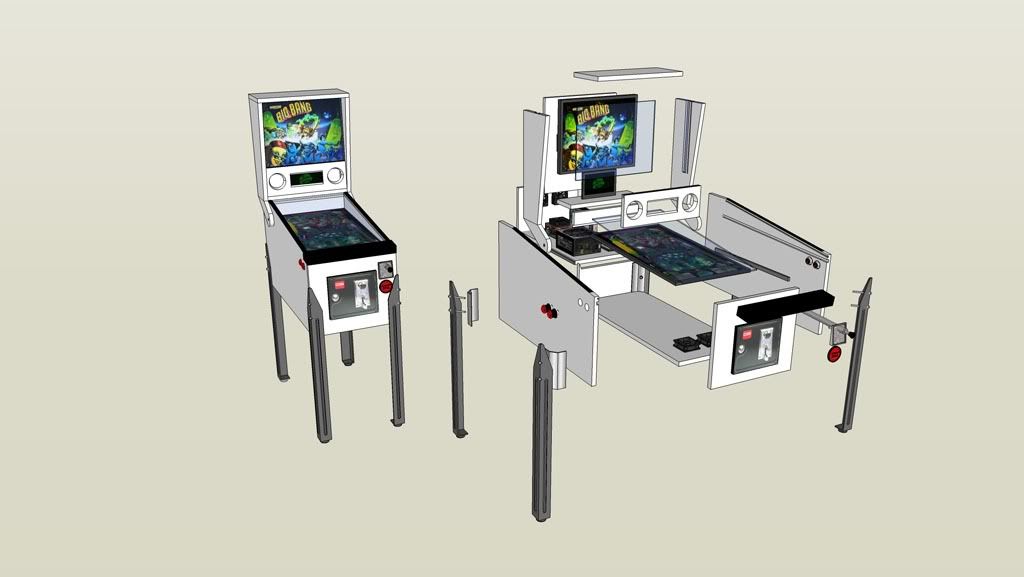
ich bin gerade dabei ein Gehäuse für einen Mini Pin zu zeichnen.

Als Spielfläche kommt ein 27 Zoll Monitor zum Einsatz. Der Backglas-Monitor wird ein 20 Zoll 4:3 Monitor.


Neu: Es wird ein PINLED als DMD verbaut.


Attached File  Minipin Powerframe transparent2.JPG   33.98KB   76 downloads Attached File  Minipin Powerframe transparent.JPG   26.32KB   67 downloads Attached File  minipin zeichnung.gif   21.77KB   71 downloads

Viele Grüße,
Frank


Hello colleagues,
I'm just going to draw a cabinet for a mini pin.

The playing area becomes a 27-inch Acer monitor. The backglas becomes a 20-inch Monitor.  ( 4:3) 


New: For the DMD i will use a PINLED.


Sorry for my bad english. ;-)

Best regards,
Frank


Attached Files


Edited by powerframe, 30 August 2013 - 08:40 PM.


#2 grunger106

grunger106

    Enthusiast

  • Members
  • PipPipPip
  • 177 posts

  • Flag: United Kingdom

  • Favorite Pinball: LOTR,TAF,TOM,AFM

Posted 15 July 2013 - 05:43 PM

Looking at the pic - it looks like the monitor is still in its plastic chassis?

If you de-case it, it takes up less room and you can have a narrower body


Edited by grunger106, 15 July 2013 - 05:44 PM.


#3 Lyanheart

Lyanheart

    Enthusiast

  • Members
  • PipPipPip
  • 178 posts
  • Location:Central Pennsylvania, USA

  • Flag: United States of America

  • Favorite Pinball: Gridiron

Posted 15 July 2013 - 06:34 PM

Great choice of screen sizes... You will be very happy. If I ever do another, I'll probably use the same 20" back and 27-30" playfield.


#4 powerframe

powerframe

    Hobbyist

  • Platinum Supporter
  • 34 posts
  • Location:Germany

  • Flag: Germany

  • Favorite Pinball: Atack from Mars

Posted 15 July 2013 - 07:16 PM

Looking at the pic - it looks like the monitor is still in its plastic chassis?

If you de-case it, it takes up less room and you can have a narrower body


My monitor is on its way to me.

I'll watch how big is the case around the display. Then I'll decide if I divide the housing. The 20 inch monitor I will not break down. I would still use it for drawing. :-)

Best regards,
Frank


Mein Monitor ist auf dem Weg zu mir. Ich werde mir erst einmal anschauen wie groß das Gehäuse um das Display ist. Dann werde ich entscheiden ob ich das Gehäuse zerlege. Den 20 Zoll Monitor werde ich nicht zerlegen. Ich möchte ihn noch noch zum Zeichnen benutzen.  :unsure:

Viele Grüße,
Frank


Great choice of screen sizes... You will be very happy. If I ever do another, I'll probably use the same 20" back and 27-30" playfield.


I look forward to when I can play with the pin for the first time.
I have not yet all the pieces together. Once I start with the drawings.

The monitor comes in a few days to me. Then I can see how big he really is. Maybe I'll break down the body.

Best regards,
Frank


#5 Raptor2099

Raptor2099

    Neophyte

  • Platinum Supporter
  • 3 posts

  • Flag: United States of America

  • Favorite Pinball: Terminator 2

  • PS3 Gamer Tag: Raptor2099
  • 360 Gamer Tag: Raptor2099

Posted 24 July 2013 - 06:07 PM

I'm actually just about to start a build with almost the same setup. I have a REAL 120hz Acer 27" 3DVision monitor which will be my playfield and an old 17" Samsung LCD for the backglass, may upgrade that to a 19" if I can find one for cheap on Craigslist. I tried out the 27" playfield with vpinball at 120hz and it's amazing how smooth it looks at that refresh. I don't know if anyone else has tried it, but at 120Hz Visual Pinball looks amazing! Good luck.


#6 powerframe

powerframe

    Hobbyist

  • Platinum Supporter
  • 34 posts
  • Location:Germany

  • Flag: Germany

  • Favorite Pinball: Atack from Mars

Posted 26 July 2013 - 07:23 AM

Hello,
what typ of monitor you use?
(Modell Nr.?)
Grettings Frank

Send by Tapatalk mobil


#7 gogo69

gogo69

    Enthusiast

  • Members
  • PipPipPip
  • 446 posts
  • Location:Salzburg

  • Flag: Austria

  • Favorite Pinball: hard to tell

Posted 26 July 2013 - 10:35 AM

@powerframe : hast du dir den 27iger schon angeschaut wie der vom blickwinkel ist ? problem bei den meisten PC monitoren ist das die im "pivot-betrieb" von einer seite  komplett absaufen...


my cab : click!


#8 powerframe

powerframe

    Hobbyist

  • Platinum Supporter
  • 34 posts
  • Location:Germany

  • Flag: Germany

  • Favorite Pinball: Atack from Mars

Posted 26 July 2013 - 11:38 AM

@gogo60:

Nein habe ich nicht getan. Der Kollege welcher den 3D Acer benutzt hat dazu auch nichts negatives berichtet. Noch habe ich den Monitor nicht. Der Ebayverkäufer hat mich auflaufen lassen und nichts geschickt. Ich kann das mit dem Blickwinkel aber sicher anpassen indem ich die Neigung der Spielfläche erhöhe. Was meinst du dazu?

Gruß,

Frank


Edited by powerframe, 26 July 2013 - 12:13 PM.


#9 Dodger

Dodger

    Enthusiast

  • Members
  • PipPipPip
  • 68 posts

  • Flag: Germany

  • Favorite Pinball: High Speed, Terminator 2

Posted 26 July 2013 - 01:54 PM

Damit dürftest du den Blickwinkel des Bildschirms sicher in den Griff bekommen. Im schlimmsten Fall wirkt es dann aber etwas unnatürlich, je nachdem wie weit du den Winkel ändern musst und dann von "oben" auf die Spielfläche schaust.


#10 gogo69

gogo69

    Enthusiast

  • Members
  • PipPipPip
  • 446 posts
  • Location:Salzburg

  • Flag: Austria

  • Favorite Pinball: hard to tell

Posted 26 July 2013 - 04:18 PM

naja da kann man eigentlich nur selbst testen ... ansonsten sind lcd-TVs viel problemloser(kosten auch fast nix mehr) ... leider auch größer ... du möchtest es ja schön kompakt.. haben


my cab : click!


#11 powerframe

powerframe

    Hobbyist

  • Platinum Supporter
  • 34 posts
  • Location:Germany

  • Flag: Germany

  • Favorite Pinball: Atack from Mars

Posted 26 July 2013 - 04:56 PM

Meine Idee war es halt einen kompakten schnellen Bildschirm als Spielfläche zu haben. Ich habe lange überlegt und die Acer Monitor waren die schnellsten welche ich gefunden habe.

Der Blickwinkel schien mir bis auch ganz OK. Leider habe ich hier niemanden bei dem ich mir mal einen Virtual Pin anschauen könnte. Am besten natürlich einen mit einem ähnlichen Monitor.

In der Beschreibung des Monitors stehen folgende Daten:


Native Auflösung FullHD 1920 x 1080 bei 60 Hz

Helligkeit 300 cd/m2

Kontrast 100000000:1 (dynamisch)

Farbunterstützung 16,7 Millionen Farben

Reaktionszeit 2 ms

Horizontaler Betrachtungswinkel 178

Vertikaler Betrachtungswinkel 170

Hintergrundbeleuchtungs-Technologie LED-Hintergrundbeleuchtung


Das klingt doch ersteinmal nicht schlecht oder?


Gruß,

Frank


Edited by powerframe, 26 July 2013 - 04:57 PM.


#12 gogo69

gogo69

    Enthusiast

  • Members
  • PipPipPip
  • 446 posts
  • Location:Salzburg

  • Flag: Austria

  • Favorite Pinball: hard to tell

Posted 27 July 2013 - 05:27 PM

vertikal winkel klingt gut !

bin gespannt was du da draus zauberst :)


my cab : click!


#13 Raptor2099

Raptor2099

    Neophyte

  • Platinum Supporter
  • 3 posts

  • Flag: United States of America

  • Favorite Pinball: Terminator 2

  • PS3 Gamer Tag: Raptor2099
  • 360 Gamer Tag: Raptor2099

Posted 31 July 2013 - 09:55 PM

The 3D Acer I'm using is the HN274H bmiiid. The backglass may end up being a 22" Viewsonic 120hz lcd because using one lcd 120hz and the backglass lcd at 60hz causes some sort of slowdown or stuttering, not sure why. I know someone with the 22" Viewsonic so I'll try that and see how it works. Hopefully both lcds at 120Hz will fix the stuttering problem...  :stunned:


#14 powerframe

powerframe

    Hobbyist

  • Platinum Supporter
  • 34 posts
  • Location:Germany

  • Flag: Germany

  • Favorite Pinball: Atack from Mars

Posted 19 August 2013 - 08:03 PM

News from my Cabinett building.


Today I disassembled my monitor. Now it fits better into the pinball cabinet. :pinnochio:


Attached File  Acer1.jpg   82.67KB   33 downloadsAttached File  Acer2.jpg   105.73KB   28 downloadsAttached File  Acer3.jpg   114.6KB   17 downloadsAttached File  Acer4.jpg   109.04KB   19 downloadsAttached File  Acer5.jpg   118.18KB   19 downloadsAttached File  Acer6.jpg   107.43KB   21 downloadsAttached File  Acer7.jpg   86.69KB   26 downloads


New drawings of my cabinet: 


Attached File  Flipper komplett1.jpg   39.88KB   29 downloads  Attached File  Explosion1.jpg   55.39KB   24 downloads


Best regards,
Frank

.................................


Heute habe ich meinen Monitor zerlegt. Er passt jetzt besser in das Flippergehäuse hinein.

Viele Grüße,

Frank


Edited by powerframe, 30 August 2013 - 08:53 PM.


#15 powerframe

powerframe

    Hobbyist

  • Platinum Supporter
  • 34 posts
  • Location:Germany

  • Flag: Germany

  • Favorite Pinball: Atack from Mars

Posted 30 August 2013 - 08:31 PM

News from my Pinball Cabinet: 


The most wooden parts were cut. The body was plugged and screwed.

Cutouts for the buttons and the coin door were made.

Pictures to follow.


...................................................


Neues von meinem Flipper Gehäuse:


Die Holzteile wurden besorgt und zugeschnitten. Der Body wurde gedübelt und verschraubt.

Ausfräsungen für die Taster und die Kassentür wurden gemacht.


Bilder folgen.


Viele Grüße,

Frank


#16 KOPTango

KOPTango

    Enthusiast

  • Members
  • PipPipPip
  • 88 posts
  • Location:NSW, Australia

  • Flag: Australia

  • Favorite Pinball: ACDC, Theater of Magic, Cirquis Voltaire

Posted 30 August 2013 - 11:26 PM

Hey Frank.Its coming along well.

I'm thinking of doing a similar 27 inch setup with a Benq monitor. Would you mind putting up your measurements with your drawings and then maybe some photos of how you attached your monitors when you get to that stage? That would be really helpful and give me a great starting point (as I'm not very good with the tools :(

My thoughts are that my table will not have a seperate dmd (I.e 2 screen setup), will try to keep the base thin with no coin door, but will have virtuapin digital plunger and nudge. I'm thinking that I would like to put play field and bg glass in as well. Does your plans allow the bg to fold down onto the playfield like a real pin? I am hoping to make mine fold down and it won't have legs. It will just sit on a table and can be packed away as it will be using a shared computer. I might try BAM with a PS3EYE as well.

Thanks again for doing this build thread, I really like your designs and inclusions. :) Can't wait to see your finished product.

#17 powerframe

powerframe

    Hobbyist

  • Platinum Supporter
  • 34 posts
  • Location:Germany

  • Flag: Germany

  • Favorite Pinball: Atack from Mars

Posted 31 August 2013 - 10:24 AM

Hey Frank.Its coming along well.

I'm thinking of doing a similar 27 inch setup with a Benq monitor. Would you mind putting up your measurements with your drawings and then maybe some photos of how you attached your monitors when you get to that stage? That would be really helpful and give me a great starting point (as I'm not very good with the tools :(

My thoughts are that my table will not have a seperate dmd (I.e 2 screen setup), will try to keep the base thin with no coin door, but will have virtuapin digital plunger and nudge. I'm thinking that I would like to put play field and bg glass in as well. Does your plans allow the bg to fold down onto the playfield like a real pin? I am hoping to make mine fold down and it won't have legs. It will just sit on a table and can be packed away as it will be using a shared computer. I might try BAM with a PS3EYE as well.

Thanks again for doing this build thread, I really like your designs and inclusions. :) Can't wait to see your finished product.

Hello KOP Tango,

thank you for your words.

My english is not good, but a will answer when i can.


In my next topic i send a lot of pictures. This say more as many words.

The playfield monitor fastening is verry easy. Look at the pictures.


Attached File  Flipper aktuell.JPG   26.41KB   26 downloads Attached File  Flipper komplett.pdf   148.91KB   71 downloads


Greetings from Germany,

Frank


Edited by powerframe, 31 August 2013 - 11:31 AM.


#18 powerframe

powerframe

    Hobbyist

  • Platinum Supporter
  • 34 posts
  • Location:Germany

  • Flag: Germany

  • Favorite Pinball: Atack from Mars

Posted 31 August 2013 - 10:41 AM

Hallo friends,

here comes new pictures from my cabinett build.


Attached File  Cabinett from top.jpg   117.77KB   27 downloads Attached File  Cabinett open.jpg   74.1KB   21 downloads Attached File  Cabinett front open.jpg   76.09KB   19 downloads Attached File  Monitor holder1.jpg   60.67KB   19 downloads Attached File  Monitor holder2.jpg   68.75KB   19 downloadsAttached File  Cabinett with monitor.jpg   107.84KB   19 downloadsAttached File  Cabinet from top1.jpg   47.38KB   19 downloadsAttached File  Cabinett front plywood.jpg   76.21KB   19 downloadsAttached File  Cabinett front plywood closed.jpg   79.84KB   18 downloadsAttached File  Cabinett with monitor fron behind.jpg   75KB   22 downloadsAttached File  Flipper-Buttons2.jpg   51.86KB   17 downloadsAttached File  Flipper-Buttons1.jpg   56.11KB   17 downloads


The right and left side from the cabinet and the playfiled holder is multiplex plywood 12mm. The front and the rear is 6,5mm plywood.


I have chosen the width from the cabinett so that a normal PC fits into the housing.
So I can use the PC for normal tasks if I not want to play pinball.
;)


Frank


#19 swaffar

swaffar

    Enthusiast

  • Members
  • PipPipPip
  • 141 posts
  • Location:Spangdahlem, Germany

  • Flag: United States of America

  • Favorite Pinball: BBB, MM, CV

Posted 31 August 2013 - 10:50 AM

Hallo powerframe
Ich wusste nicht aktualisieren meinem Projekt-Status für eine lange Zeit, aber es könnte für Sie hilfreich sein.


http://www.vpforums....showtopic=18420


11.jpg


Check out my mini-cab project

Signature_zps03cd408c.jpg


#20 powerframe

powerframe

    Hobbyist

  • Platinum Supporter
  • 34 posts
  • Location:Germany

  • Flag: Germany

  • Favorite Pinball: Atack from Mars

Posted 31 August 2013 - 11:53 AM

Hallo powerframe
Ich wusste nicht aktualisieren meinem Projekt-Status für eine lange Zeit, aber es könnte für Sie hilfreich sein.


http://www.vpforums....showtopic=18420


11.jpg

Vielen Dank für deinen Post.


Dein Pin sieht richtig gut aus. Ich möchte mir das Backglasgehäuse auch zum Herunterklappen bauen. Das ist eine gute Idee.

Wir haben ja fast die gleichen Teile eingebaut, nur das ich mir ein richtiges DMD ( PINLED) einbauen möchte. Ich hoffe ich habe nicht zu große Schwierigkeiten mit der Software. :think:


Viele Grüße,

Frank


Also tagged with one or more of these keywords: Cabinet, Drawings