Jump to content


Photo
* * * * * 9 votes

The VP 10.8 beta thread

VP VPX 10.8 beta Visual Pinball

  • Please log in to reply
1972 replies to this topic

#1701 wiesshund

wiesshund

    VPF Legend

  • Members
  • PipPipPipPipPipPipPip
  • 11,871 posts

  • Flag: United States of America

  • Favorite Pinball: How many can i have?

Posted 07 February 2024 - 04:39 AM


Thank you for the detailed reply.  I don't seem to get any shearing.  A lot of games will run up to the 144Hz.  I don't notice any latency.  I built the cab specifically because I could not stand the flipper lag using OTG on the Atgames pinball.  I absolutely could not stand flipper latency.  I also can't stand any stutter what so ever.  I think however my setup is working at the current settings it is working well.  I was hoping that the frame pacing would give some perceivable performance gain but I guess not for me.


You get shearing, you just do not recognize is as such

most of the pinball table is not in motion, only the ball


when the ball gets sliced, it most likely looks to you like the ball shuddered

You sort of need full frame motion to see shearing to its full effect


image003-gif.141925


Watch this carefully
now kind of imagine it happening to just the pinball like 50 times a second or so, to varying degrees


Latency, well you do but you don't.

Depends on how good one is at pinball and how much real pinball one has played


The latency is there, but one can also happily be oblivious to it.
It is the difference in the flipper engaging the ball at exactly spot A or engaging it 1.5mm past spot A
My skill level is just happy the flipper hit the ball period.


But the latency is definitely there and it changes every time g-sync comes into play
you just are not aware of it, which is totally fine, i dont think most of us are good enough to actually be aware of it


I don't think you are having actual stutter.

Stutter is when the machine cannot actually keep up and the ball is actually failing to update and move

and frame rate tanks as well as game play (because other aspects begin to lag too, physics do not keep up etc)


What you get when FPS looks good and physics are not lagging etc is not really stutter.
It just sort of looks like it visually except that it doesnt slow down.


that is usually some kind of sync issue.

I dont have anything nvidia so unfortunately i can not tell you any good nvidia settings to use

and trying to translate AMD settings probably will not work well.

But if what you got going right now seems to work well, just leave it be until you find that you feel it isnt working well

then pop open a new thread, i am sure we can get some other nvidia users involved, since they know the drivers and settings well.


For what it is worth, i have a fairly antique desktop sitting around here

it actually has vp9 and vpx on it, both run well enough, as long as i dont stick some VPW table on it
but, it is incapable of running any fps near it's monitor's sync rate, it can only run a vpx table at 60 to 70 fps tops (with graphics settings maxed)

so i just run the monitor itself to sync at 60hz and let VPX do its frame pacing.


Since that PC can't match the monitor, i bring the monitor to match the PC
Seems to work well, plus i dont really mind if that PC sits in the garage half the time


If you feel the need to empty your wallet in my direction, i don't have any way to receive it anyways

Spend it on Hookers and Blow


#1702 Urko

Urko

    Enthusiast

  • Silver Supporter
  • 345 posts

  • Flag: United Kingdom

  • Favorite Pinball: The Shadow

Posted 07 February 2024 - 01:06 PM


I believe GL is primarily for VR.


GL is not just for VR anymore. The 3D modes in GL are now true stereo instead of being synthesized as in the DirectX version of VPX.


Ok , I believe GL is primarily for 3D.


Edited by Urko, 07 February 2024 - 01:10 PM.


#1703 kaledev

kaledev

    Enthusiast

  • Members
  • PipPipPip
  • 55 posts

  • Flag: ---------

  • Favorite Pinball: White Water

Posted 07 February 2024 - 03:47 PM

Although I saw that GL is for VR - I switched to GL and it did clear up some performance issues I was having. It at least didn't hurt anything (so far).

#1704 Umpa

Umpa

    Pinball Fan

  • Members
  • PipPipPipPip
  • 740 posts

  • Flag: United States of America

  • Favorite Pinball: AC/DC

Posted 07 February 2024 - 04:44 PM

Although I saw that GL is for VR - I switched to GL and it did clear up some performance issues I was having. It at least didn't hurt anything (so far).

Same for me. I've been running 64 GL non vr. Works fantastic!

Sent from my SM-A536U using Tapatalk

#1705 Ltek

Ltek

    Enthusiast

  • Members
  • PipPipPip
  • 152 posts

  • Flag: United States of America

  • Favorite Pinball: TRON NEON, Swamp Thing Bayou Edition, Volkan, SW Bounty Hunter, IT, Harry Potter, Dragon's Lair

Posted 08 February 2024 - 04:58 PM

I did a lot of non-VR performance testing with GL vs DX.  3 screen, 2k playfield with a newer fast AMD CPU + Nvidia RTX2060. Even after trying tweaking a dozen VPX and NVidia driver settings, they were basically the same FPS (most tables were solid144fps, with frame pacing, no limit set in VPX) and visual quality.  I'm staying with DX since PinVol doesnt work on GL... Pinvol is vital to cabinet installs with SSF, Pup-Packs, etc. Wish PinVol was built-into VPX so it would work in GL


Edited by Ltek, 08 February 2024 - 05:05 PM.


#1706 kaledev

kaledev

    Enthusiast

  • Members
  • PipPipPip
  • 55 posts

  • Flag: ---------

  • Favorite Pinball: White Water

Posted 08 February 2024 - 05:00 PM

I did some performance testing with GL vs DX on my fast AMD CPU + Nvidia RTX2060. Even after trying tweaking a dozen VPX and NVidia driver settings, they were basically the same FPS and visual quality.  I'm staying with DX since PinVol doesnt work on GL... Pinvol is vital to cabinet installs with SSF, Pup-Packs, etc. Wish it PinVol was built-into VPX so it would work in GL


If it helps - PinVol does work for GL, I'm using it. It just can't overlay the volume control on the main playfield, so I use my backglass. Annoying for sure, but still functional!

#1707 SmedleyB

SmedleyB

    Enthusiast

  • Members
  • PipPipPip
  • 56 posts

  • Flag: ---------

  • Favorite Pinball: Theatre of Magic

Posted 08 February 2024 - 08:20 PM


I did some performance testing with GL vs DX on my fast AMD CPU + Nvidia RTX2060. Even after trying tweaking a dozen VPX and NVidia driver settings, they were basically the same FPS and visual quality.  I'm staying with DX since PinVol doesnt work on GL... Pinvol is vital to cabinet installs with SSF, Pup-Packs, etc. Wish it PinVol was built-into VPX so it would work in GL


If it helps - PinVol does work for GL, I'm using it. It just can't overlay the volume control on the main playfield, so I use my backglass. Annoying for sure, but still functional!


Set screen size to 1 pixel less for both width and height in VPX Video preferences to work around the bug that GL is still running in fullscreen even when the windowed option is checked.


#1708 lukpcn

lukpcn

    Enthusiast

  • Members
  • PipPipPip
  • 249 posts

  • Flag: Poland

  • Favorite Pinball: I love all !!! :)

  • PS3 Gamer Tag: N/A
  • 360 Gamer Tag: N/A

Posted 08 February 2024 - 09:06 PM

I have strange problem with the GL. On Dx I have stable 120 fps on tables (tested for example johny mnemonic and die hard trilogy) but running the GL version I have fps in range of 30-70... Jumping like crazy. Totally unplayable. My gfx card is rtx 3080. Tested gl in full screen and windowed - same thing. Any clues?

Regards

Luk

My Pinball Youtube Channel: https://www.youtube....lPinballFanatic


#1709 jpsalas

jpsalas

    Grand Schtroumpf

  • VIP
  • 7,337 posts
  • Location:I'm Spanish, but I live in Oslo (Norway)

  • Flag: Norway

  • Favorite Pinball: I like both new and old, but I guess I prefer modern tables with some rules and goals to achieve.


Posted 08 February 2024 - 09:19 PM

I have strange problem with the GL. On Dx I have stable 120 fps on tables (tested for example johny mnemonic and die hard trilogy) but running the GL version I have fps in range of 30-70... Jumping like crazy. Totally unplayable. My gfx card is rtx 3080. Tested gl in full screen and windowed - same thing. Any clues?


Wrong drivers? It looks like the OpenGL is done by the CPU, not by the GPU. So go to Nvidia and install their latest drivers. Microsoft drivers used to do not have OpenGL, but the Nvidia drivers does have OpenGL.


With a high end card, like yours, The OpenGl version should give you over 450 fps, and the DX over 350 fps (more or less depending of the table). At least it does that on my computer, which also has a RTX 3080 :) And of course I use vsync to limit the GPU, otherwise it sounds like the whole computer is going to take off :D All the fans working like mad :D


But on my portable with an Intel card I get 60 fps with the DX version and only 20-25 with OpenGL, because that card do not have any OpenGL drivers.


Edit: I always download the driver from this page:

Official Advanced Driver Search | NVIDIA


Edited by jpsalas, 08 February 2024 - 09:21 PM.

If you want to check my latest uploads then click on the image below:


vp.jpg


#1710 Drybonz

Drybonz

    Really bad at pinball, but having fun.

  • Members
  • PipPipPipPip
  • 1,538 posts

  • Flag: ---------

  • Favorite Pinball: Theatre of Magic

Posted 09 February 2024 - 12:11 AM

The OpenGl version should give you over 450 fps, and the DX over 350 fps

This must be running those lightweight JPSalas tables with the magic small file sizes.  :lol: :D


#1711 wiesshund

wiesshund

    VPF Legend

  • Members
  • PipPipPipPipPipPipPip
  • 11,871 posts

  • Flag: United States of America

  • Favorite Pinball: How many can i have?

Posted 09 February 2024 - 12:18 AM


The OpenGl version should give you over 450 fps, and the DX over 350 fps

This must be running those lightweight JPSalas tables with the magic small file sizes.  :lol: :D


That would be roughly what i see for most table if i disabled vsync
I'd get sick of the shearing though


If you feel the need to empty your wallet in my direction, i don't have any way to receive it anyways

Spend it on Hookers and Blow


#1712 lukpcn

lukpcn

    Enthusiast

  • Members
  • PipPipPip
  • 249 posts

  • Flag: Poland

  • Favorite Pinball: I love all !!! :)

  • PS3 Gamer Tag: N/A
  • 360 Gamer Tag: N/A

Posted 09 February 2024 - 06:23 AM

I'll try with latest drivers today, i didn't update them for a while.


Regards

Luk

My Pinball Youtube Channel: https://www.youtube....lPinballFanatic


#1713 Sontiago

Sontiago

    Neophyte

  • Members
  • Pip
  • 4 posts

  • Flag: United States of America

  • Favorite Pinball: Funhouse

Posted 14 February 2024 - 07:08 AM

Getting odd error in VPinballX-10.8.0-1873-bdd0673-Release-win-x64 and x32
 
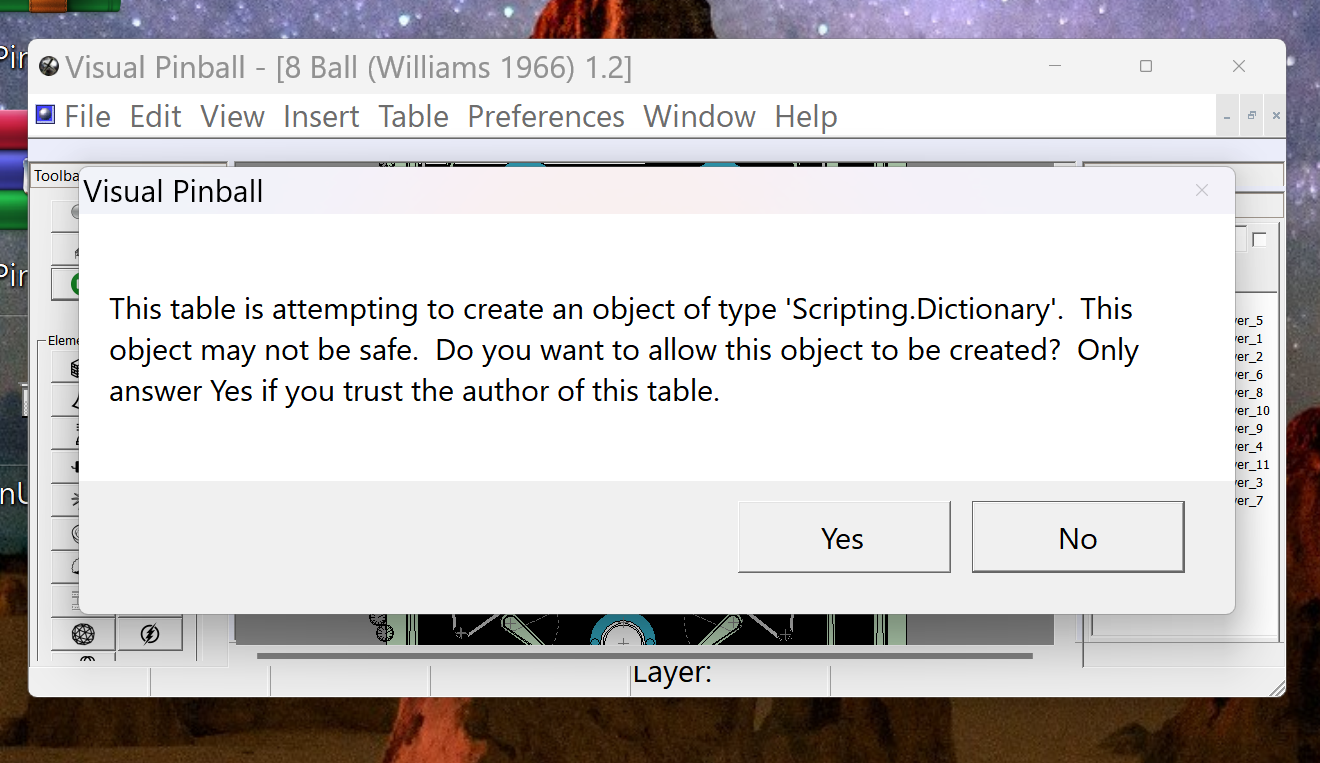
I installed VPinballX-10.8.0-1873-bdd0673-Release-win-x64 and x32 and now when I try to run a table, I get the error:  This table is attempting to create an object of type "scripting.dictionary". The object may not be safe. in VPinballX-10.8.0-1873-bdd0673-Release-win-x64 and x32. The table runs after hitting yes a few times. Has anyone else had this issue?  Is there a way to fix this prior to waiting for another version?  Thank advance... This is an image of the error:   

​

https://vpuniverse.c...77318a44b6b.png

​

I am assuming I must be only person with this issue.  I have even tried uninstalling and reinstalling to no avail. 


#1714 xenonph

xenonph

    I have Pinball Fever!

  • VIP
  • 4,145 posts
  • Location:Castle Rock, WA.

  • Flag: United States of America

  • Favorite Pinball: TRON Classic-Congo-Xenon-PINBOT-BOP-LOTR-A Real American Hero OPERATION PINBALL-Millionaire-Whirlwind-Krull-NFL-BlackKnight-FishTales

Contributor

Posted 14 February 2024 - 07:22 AM

Getting odd error in VPinballX-10.8.0-1873-bdd0673-Release-win-x64 and x32
 
I installed VPinballX-10.8.0-1873-bdd0673-Release-win-x64 and x32 and now when I try to run a table, I get the error:  This table is attempting to create an object of type "scripting.dictionary". The object may not be safe. in VPinballX-10.8.0-1873-bdd0673-Release-win-x64 and x32. The table runs after hitting yes a few times. Has anyone else had this issue?  Is there a way to fix this prior to waiting for another version?  Thank advance... This is an image of the error:   

​

https://vpuniverse.c...77318a44b6b.png

​

I am assuming I must be only person with this issue.  I have even tried uninstalling and reinstalling to no avail. 

I think I saw another person who had exact same problem.

Here is post...

https://www.vpforums...=84#entry533633

Oops looks like it was you who posted.


CHECK OUT THIS TUTORIAL http://www.vpforums....howtopic=32515
TO USE DB2S BACKGLASS PROGRAM WITH DESKTOP TABLES ON 1 MONITOR
 

#1715 scutters

scutters

    Pinball Fan

  • Members
  • PipPipPipPip
  • 545 posts

  • Flag: England

  • Favorite Pinball: Addams Family

Posted 14 February 2024 - 07:23 AM

Getting odd error in VPinballX-10.8.0-1873-bdd0673-Release-win-x64 and x32
 
I installed VPinballX-10.8.0-1873-bdd0673-Release-win-x64 and x32 and now when I try to run a table, I get the error:  This table is attempting to create an object of type "scripting.dictionary". The object may not be safe. in VPinballX-10.8.0-1873-bdd0673-Release-win-x64 and x32. The table runs after hitting yes a few times. Has anyone else had this issue?  Is there a way to fix this prior to waiting for another version?  Thank advance... This is an image of the error:   

​

https://vpuniverse.c...77318a44b6b.png

​

I am assuming I must be only person with this issue.  I have even tried uninstalling and reinstalling to no avail. 


In VPX editor under Preferences menu -> Scripting Security Options select the 'Always create controls' option


#1716 Itchigo

Itchigo

    Pinball Wizard

  • Members
  • PipPipPipPipPip
  • 2,767 posts
  • Location:Chicago, Illinois

  • Flag: United States of America

  • Favorite Pinball: All


  • Trophies:

Posted 15 February 2024 - 12:12 AM

When did they break Flex DMD? I went all the way back to 10.8 Beta 4 and Flex DMD just doesn't show up. It's not a focus issue or behind something. The DMD process just doesn't happen. If I open the same table in 10.72 (example- Bleach), the DMD shows up fine. Something kills the DMD process and I don't know what.


Founder of Rogue Pinball! https://roguepinball.com/index.php                 Making Pinball great again!!


partylikeits1776-.jpg


#1717 wiesshund

wiesshund

    VPF Legend

  • Members
  • PipPipPipPipPipPipPip
  • 11,871 posts

  • Flag: United States of America

  • Favorite Pinball: How many can i have?

Posted 15 February 2024 - 12:44 AM

When did they break Flex DMD? I went all the way back to 10.8 Beta 4 and Flex DMD just doesn't show up. It's not a focus issue or behind something. The DMD process just doesn't happen. If I open the same table in 10.72 (example- Bleach), the DMD shows up fine. Something kills the DMD process and I don't know what.

Are you using the beta action build of flexDMD for 10.8 beta ?


If you feel the need to empty your wallet in my direction, i don't have any way to receive it anyways

Spend it on Hookers and Blow


#1718 Sontiago

Sontiago

    Neophyte

  • Members
  • Pip
  • 4 posts

  • Flag: United States of America

  • Favorite Pinball: Funhouse

Posted 15 February 2024 - 06:38 AM


Getting odd error in VPinballX-10.8.0-1873-bdd0673-Release-win-x64 and x32
 
I installed VPinballX-10.8.0-1873-bdd0673-Release-win-x64 and x32 and now when I try to run a table, I get the error:  This table is attempting to create an object of type "scripting.dictionary". The object may not be safe. in VPinballX-10.8.0-1873-bdd0673-Release-win-x64 and x32. The table runs after hitting yes a few times. Has anyone else had this issue?  Is there a way to fix this prior to waiting for another version?  Thank advance... This is an image of the error:   

​

https://vpuniverse.c...77318a44b6b.png

​

I am assuming I must be only person with this issue.  I have even tried uninstalling and reinstalling to no avail. 


In VPX editor under Preferences menu -> Scripting Security Options select the 'Always create controls' option


OMG!.... I have been trying so hard to get this fixed.  I CANNOT thank you enough scutters for finally helping me resolve this problem... THANK YOU! You are a lifesaver!


#1719 Itchigo

Itchigo

    Pinball Wizard

  • Members
  • PipPipPipPipPip
  • 2,767 posts
  • Location:Chicago, Illinois

  • Flag: United States of America

  • Favorite Pinball: All


  • Trophies:

Posted 15 February 2024 - 11:33 PM


When did they break Flex DMD? I went all the way back to 10.8 Beta 4 and Flex DMD just doesn't show up. It's not a focus issue or behind something. The DMD process just doesn't happen. If I open the same table in 10.72 (example- Bleach), the DMD shows up fine. Something kills the DMD process and I don't know what.

Are you using the beta action build of flexDMD for 10.8 beta ?


Which one is that? I just updated not too long ago.


Founder of Rogue Pinball! https://roguepinball.com/index.php                 Making Pinball great again!!


partylikeits1776-.jpg


#1720 Itchigo

Itchigo

    Pinball Wizard

  • Members
  • PipPipPipPipPip
  • 2,767 posts
  • Location:Chicago, Illinois

  • Flag: United States of America

  • Favorite Pinball: All


  • Trophies:

Posted 16 February 2024 - 12:30 AM

Weisshund thanks. I don't know how my dmddevice.dll64 went missing, but after a search and destroy mission I finally found the right one and fixed it. That was a pita for quite a while, all of the sudden.


Founder of Rogue Pinball! https://roguepinball.com/index.php                 Making Pinball great again!!


partylikeits1776-.jpg


Also tagged with one or more of these keywords: VP, VPX, 10.8, beta, Visual Pinball