Jump to content


Photo
- - - - -

How to rotate the DMD in 16:9 FS tables?


  • Please log in to reply
185 replies to this topic

#141 Tom1965

Tom1965

    Enthusiast

  • Members
  • PipPipPip
  • 122 posts
  • Location:ottawa Canada

  • Flag: Canada

  • Favorite Pinball: bally star trek

Posted 26 May 2012 - 01:28 PM

QUOTE (Mitchell @ Nov 13 2011, 02:12 AM) <{POST_SNAPBACK}>
I need help on understanding on the X scale, Y scale, X offset and Y offset. Which one move the table Up, Down, Left and Right?

I'm trying get the new table at full rotate 270 screen with a perfect round bumper showing.


In the Hyperpin file there is a good help file that describes how to take a 16:9 table and converting it into full screen. There are even pictures, a definite bonus for me.

#142 bob808

bob808

    Hobbyist

  • Members
  • PipPip
  • 46 posts

  • Flag: United States of America

  • Favorite Pinball: Big Guns

Posted 10 April 2013 - 11:05 AM

Thanks for this advice guys- 

With your help I was able to rotate the dmd (from the script-  changing the value in the regestery didn't work as it kept getting changed back to a 0, I'm assuming the script was resetting it with the line that was already there, setting of 0)

I also didn't know about the right clicking of the dmd to show boarder/drag tab.  Makes it easy to resize and drag around, even to 2nd or 3rd monitor ( I am using 2, but will use 3 when I build a cabinet).


I did notice when I removed the boarder that the dmd window resized itself back to it's smaller size though.  I'm not really sure how to do it correctly, but after re-sizing and positioning the dmd, I left the boarder on the dmd, then exited the table and it seemed to save it, as it was (almost) where I had put it before exiting.   


My backglass has a static dmd image, which I overlayed the working dmd onto using the teqinique above.  But I cant get it to match up exactly.  The dmd is in a nice position, but the backglass seems stretched a bit too much.  Now if I can figure out how to resive the backglass image a little smaller, I think I will be in business ;) 


#143 bushdoc

bushdoc

    Neophyte

  • Members
  • Pip
  • 1 posts

  • Flag: ---------

  • Favorite Pinball: Creature from the black lagoon

Posted 27 June 2013 - 10:56 AM

Just wanted to say thanks alot for this very helpful thread, sorted me right out.


#144 raza

raza

    Enthusiast

  • Members
  • PipPipPip
  • 94 posts

  • Flag: Netherlands

  • Favorite Pinball: Attack From Mars, TOTAN

Posted 27 August 2013 - 12:50 PM

The registry option always worked for me, but now with taf_l7 it doesn't. It keeps changing back to 0 instead of 1.


#145 gtxjoe

gtxjoe

    VPF Veteran

  • VIP
  • 5,159 posts

  • Flag: United States of America

  • Favorite Pinball: Medieval Madness, AbraCadabra


Contributor

Posted 27 August 2013 - 01:08 PM

Open the table script and search for "rol", you will probably find this line below


.Games(cGameName).Settings.Value("rol")=0


The script is changing it back to 0 every time the table is loaded.  Comment it out, so the script does not run it by adding the ' in the front

'.Games(cGameName).Settings.Value("rol")=0


or change the value to 1

.Games(cGameName).Settings.Value("rol")=1


Edited by gtxjoe, 27 August 2013 - 01:09 PM.


#146 raza

raza

    Enthusiast

  • Members
  • PipPipPip
  • 94 posts

  • Flag: Netherlands

  • Favorite Pinball: Attack From Mars, TOTAN

Posted 27 August 2013 - 02:19 PM

Yep that did it. Thank you! :love39:


But better type in search field 'end with' because 'rol' will give you too much contROLler results.  :tapping:


Edit; Nowadays I use the SetDmD program. It's very easy and fast to use. Just one time setup after each Pinmame installation.


I use this dmd options;

Rotation; left

X pos 5    Width;  121

Y pos 65  Height; 363


Edited by raza, 13 December 2013 - 02:45 PM.


#147 J0tar0Kjo

J0tar0Kjo

    Neophyte

  • Members
  • Pip
  • 2 posts

  • Flag: ---------

  • Favorite Pinball: Star Wars

Posted 05 March 2014 - 03:51 PM

I managed to rotate the DMD by editing vbs, but its size/form factor now is incorrect. I change height value with regedit but each time i launch the table it's been reset to 259. Any advice?
 
t2.jpg


#148 gtxjoe

gtxjoe

    VPF Veteran

  • VIP
  • 5,159 posts

  • Flag: United States of America

  • Favorite Pinball: Medieval Madness, AbraCadabra


Contributor

Posted 05 March 2014 - 04:31 PM

See the DMD rotation, size, location sections here: http://www.vpforums....als&article=136


#149 J0tar0Kjo

J0tar0Kjo

    Neophyte

  • Members
  • Pip
  • 2 posts

  • Flag: ---------

  • Favorite Pinball: Star Wars

Posted 06 March 2014 - 02:41 PM

Thanks mate, now everything's fine!


#150 Rugged

Rugged

    Neophyte

  • Members
  • Pip
  • 3 posts
  • Location:Guelph, Canada

  • Flag: Canada

  • Favorite Pinball: Sopranos

Posted 26 September 2014 - 05:06 PM

The solution that seemed to work for myself was  to load up the table of choice (apollo 13 was the one I had a problem with) and then click the "script" button.  Next click on the "Find" button and type in "dmd" , you should see a line that suggests the rotation being zero as a default.  Now if you replace the zero with a one and then click "compile" it should rotate 90 degrees to the position you want and make sure you save it when the table is closing.


#151 dimechj

dimechj

    Hobbyist

  • Members
  • PipPip
  • 16 posts

  • Flag: Australia

  • Favorite Pinball: indiana jones

Posted 06 May 2015 - 12:26 PM

Hi Guy's 


hoping someone has had this error before, As above on LOTRO table i was getting the ROL 1 in the script but after changing to ROL 0 i managed to get the DMD in the correct orientation, however a strange things is happening that i cannot seem to solve, as i re size the dmd it starts off ok and dynamically scales with the border but about half way through enlarging the border becomes larger but the dmd itself doesnt resize at the same rate, and in the end the border will go off the dmd screen as it is too big with the dmd not keeping up with the re size, its a weird one that i haven't come accros and i cant seem to fix it. the end result is a smaller than exceptable dmd, anyone had this issue or a resolve before ?

TIA


#152 gigalula

gigalula

    Hummmm not sure yet :)

  • Platinum Supporter
  • 651 posts

  • Flag: Canada

  • Favorite Pinball: All of them from 70' to now. Even more with VP and FP :)

Posted 06 May 2015 - 03:00 PM

Now let's hope someone will explain how to rotate DMD like Zelda on VPX ;)


#153 galahad1966

galahad1966

    Hobbyist

  • Members
  • PipPip
  • 40 posts

  • Flag: Belgium

  • Favorite Pinball: 'AFM' - 'Indiana Jones, The Pinball Adventure'

Posted 02 January 2016 - 02:18 PM

Thank you all for the tips, I was looking for this just now, and it works perfectly!

Just tested it with VPX -> Robocop and it works great!

I then resize the vpinmame window and put it down-right the screen on top of the Robocop player info sticker.

Perfect match... as my eyes are on the playfield I can perfectly keep track of anything on the vpmame window.


Sub Table1_Init
    With Controller
       .GameName=cGameName
       If Err Then MsgBox "Can't start Game" & cGameName & vbNewLine & Err.Description : Exit Sub
       .SplashInfoLine="Robocop (Data East 1990)"
       .HandleKeyboard=0
       .ShowTitle=0
       .ShowDMDOnly=1
       .ShowFrame=0
       .HandleMechanics=0
  .Games(cGameName).Settings.Value("rol") = 1
        If DesktopMode then
       .Hidden = 1 
else
        If cController = 3 then
       .Hidden = 1
        else
       .Hidden = 0
End If
        End If
       '.SetDisplayPosition 1600, 1600, GetPlayerHWnd
       On Error Resume Next
       .Run GetPlayerHWnd
       If Err Then MsgBox Err.Description
    End With
 
    On Error Goto 0

Edited by galahad1966, 02 January 2016 - 02:22 PM.


#154 CICERO EDUARDO

CICERO EDUARDO

    Hobbyist

  • Members
  • PipPip
  • 14 posts
  • Location:Sao Paulo

  • Flag: Brazil

  • Favorite Pinball: medieval madness,VORTEX,OBA-OBA

Posted 26 March 2016 - 02:05 AM

hello people, how to make the DMD in the correct position, explain some roms are in a different position and can not change it in Regedit (list)
someone help me?


#155 kiwi

kiwi

    Pinball Fan

  • VIP
  • 2,694 posts

  • Flag: Italy

  • Favorite Pinball: Star Trek 25th Anniversary


Posted 26 March 2016 - 07:04 AM

Search in the scripts this

.Games(cGameName).Settings.Value("dmd_pos_x")=0
.Games(cGameName).Settings.Value("dmd_pos_y")=0

or that

.SetDisplayPosition 0, 0

You can directly put the values of the position of the DMD,

examples:

.Games(cGameName).Settings.Value("dmd_pos_x")=100
.Games(cGameName).Settings.Value("dmd_pos_y")=100
.SetDisplayPosition 100, 100

or disinhibit the DMD position putting the apostrophe in front of the line/lines,

'.Games(cGameName).Settings.Value("dmd_pos_x")=100
'.Games(cGameName).Settings.Value("dmd_pos_y")=100
'.SetDisplayPosition 100, 100

now you can manually move the DMD in the desired position.


Max


#156 CICERO EDUARDO

CICERO EDUARDO

    Hobbyist

  • Members
  • PipPip
  • 14 posts
  • Location:Sao Paulo

  • Flag: Brazil

  • Favorite Pinball: medieval madness,VORTEX,OBA-OBA

Posted 27 March 2016 - 10:06 PM

Search in the scripts this

.Games(cGameName).Settings.Value("dmd_pos_x")=0
.Games(cGameName).Settings.Value("dmd_pos_y")=0

or that

.SetDisplayPosition 0, 0

You can directly put the values of the position of the DMD,

examples:

.Games(cGameName).Settings.Value("dmd_pos_x")=100
.Games(cGameName).Settings.Value("dmd_pos_y")=100
.SetDisplayPosition 100, 100

or disinhibit the DMD position putting the apostrophe in front of the line/lines,

'.Games(cGameName).Settings.Value("dmd_pos_x")=100
'.Games(cGameName).Settings.Value("dmd_pos_y")=100
'.SetDisplayPosition 100, 100

now you can manually move the DMD in the desired position.


Max

Thank kiwi, your tip was very important to me, my doubt was about DMD be positioned vertically or horizontally, not because it was good when placed in backglass monitor, I could not change the Regedit, always returned to anterior.resolvi position opening the script and changing right there with the following >>>> Games (cGameName) .Settings.Value ("rol") = 0 'rotated to the left << changed the value ("rol") = 0 to 1. thank you


Edited by CICERO EDUARDO, 27 March 2016 - 10:08 PM.


#157 blackvulcan3

blackvulcan3

    Enthusiast

  • Members
  • PipPipPip
  • 253 posts
  • Location:Cairns, QLD, Australia

  • Flag: Australia

  • Favorite Pinball: NBA Fastbreak, IJ, TOM, Demolition Man, AFM, T2 & too many others to mention

  • 360 Gamer Tag: jayweb

Posted 29 October 2016 - 11:30 AM

Big thank you guys. Trying for hours to fix the DMD on my 3 monitor display for X-Files. 


Read this, changed the script from rol to ror and bang, worked first time.


Love it when research pays off!!!!


#158 yolomate

yolomate

    Enthusiast

  • Members
  • PipPipPip
  • 50 posts

  • Flag: Argentina

  • Favorite Pinball: terminator 2

Posted 01 May 2018 - 05:23 AM

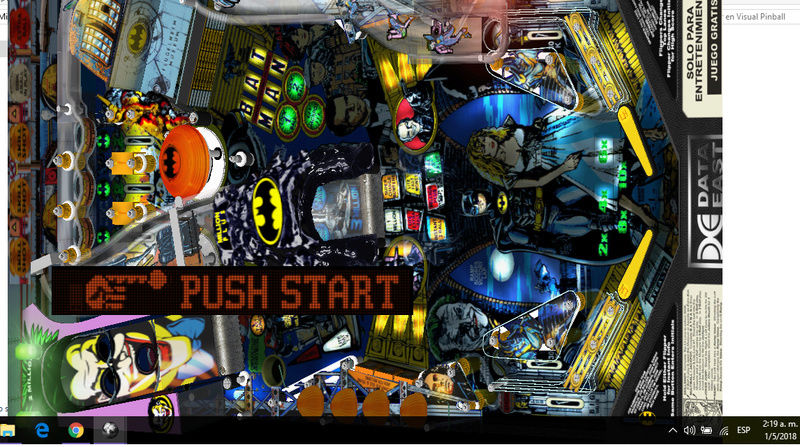
and batman? I got Batman-DE-ALPHA_BMPR_MOD.1.2 I used my notebook for play!! I need rotate the game!

sin_ty11.jpg


#159 xenonph

xenonph

    I have Pinball Fever!

  • VIP
  • 4,154 posts
  • Location:Castle Rock, WA.

  • Flag: United States of America

  • Favorite Pinball: TRON Classic-Congo-Xenon-PINBOT-BOP-LOTR-A Real American Hero OPERATION PINBALL-Millionaire-Whirlwind-Krull-NFL-BlackKnight-FishTales


Contributor

Posted 01 May 2018 - 07:15 AM

Open the table script and look on Line 85.

you will see this..


         '.Games(cGameName).Settings.Value("rol") = 0


remove the  '

and change 0 to 1.

So it will look like this...


         .Games(cGameName).Settings.Value("rol") = 1


As seen in pic..

Change from..

capture372_t.png


to


capture2114_t.png


This will rotate the DMD to the left.

If you want to rotate to the right, change "rol" to "ror".


Hope this helps.


EDIT


If you are not talking about the DMD but want the table rotated instead,I would try a DT version of the table, as there are reels on this FS version that will need to be rotated also, if you are rotating playfield.

http://www.vpforums....s&showfile=3585


Edited by xenonph, 01 May 2018 - 07:23 AM.

CHECK OUT THIS TUTORIAL http://www.vpforums....howtopic=32515
TO USE DB2S BACKGLASS PROGRAM WITH DESKTOP TABLES ON 1 MONITOR


#160 yolomate

yolomate

    Enthusiast

  • Members
  • PipPipPip
  • 50 posts

  • Flag: Argentina

  • Favorite Pinball: terminator 2

Posted 01 May 2018 - 01:12 PM

I try first changes and nothing!!! I wanna   rotating playfield , the second working fine !yeah thank you but I don't see the points etc...and the vision no is fine for me


Edited by yolomate, 01 May 2018 - 01:25 PM.