Jump to content


Photo
* * * * - 5 votes

My Mouse Plunger Setup (aka... Cheap :)

plunger

  • Please log in to reply
167 replies to this topic

#121 jicarlin

jicarlin

    Neophyte

  • Members
  • Pip
  • 1 posts

  • Flag: United Kingdom

  • Favorite Pinball: Medieval Madness

Posted 22 April 2020 - 11:09 PM

I've been running mouse plunger since last year and it's worked well enough for me until today. The plunger no longer seems to respond. I know VPX is recognising it's recoil as I hear the plunger audio however the plunger itself onscreen does not move. Same exact issue within VP9 also. Whether i run direct from VP or Pinup.


Could anyone suggest a fix at all? I've tried running as admin but it didn't help sadly.


#122 DCGozer

DCGozer

    Neophyte

  • Members
  • Pip
  • 4 posts

  • Flag: United States of America

  • Favorite Pinball: addams family

Posted 24 April 2020 - 11:26 AM

I've been running mouse plunger since last year and it's worked well enough for me until today. The plunger no longer seems to respond. I know VPX is recognising it's recoil as I hear the plunger audio however the plunger itself onscreen does not move. Same exact issue within VP9 also. Whether i run direct from VP or Pinup.


Could anyone suggest a fix at all? I've tried running as admin but it didn't help sadly.

You verified its working and can see Y Rotation moving through Windows controller settings when pulling?


#123 vampyr

vampyr

    Neophyte

  • Members
  • Pip
  • 2 posts

  • Flag: United Kingdom

  • Favorite Pinball: Pinbot

Posted 25 April 2020 - 08:56 PM


I've been running mouse plunger since last year and it's worked well enough for me until today. The plunger no longer seems to respond. I know VPX is recognising it's recoil as I hear the plunger audio however the plunger itself onscreen does not move. Same exact issue within VP9 also. Whether i run direct from VP or Pinup.


Could anyone suggest a fix at all? I've tried running as admin but it didn't help sadly.

You verified its working and can see Y Rotation moving through Windows controller settings when pulling?


I haven't tested it within windows controller settings however i do know that it shows up within the vjoy device list when i run the mouse plunger application as well as moving my mouse on screen and VPX and VP9 responding with the plunger noises. I will test within the controller settings however. Thanks for the reply.


Edited by vampyr, 25 April 2020 - 08:57 PM.


#124 felicedebene

felicedebene

    Neophyte

  • Members
  • Pip
  • 3 posts

  • Flag: ---------

  • Favorite Pinball: gn'r

Posted 25 April 2020 - 10:23 PM

Hello to all Thanks FIR the tutorial but in having a hard time making It work can Someone tell me the distanze vetween the Stick and the mouse?

#125 bschaberg21

bschaberg21

    Neophyte

  • Members
  • Pip
  • 1 posts

  • Flag: United States of America

  • Favorite Pinball: Indiana Jones

  • PS3 Gamer Tag: bschaberg21
  • 360 Gamer Tag: bschaberg21

Posted 27 April 2020 - 07:54 PM

This is performing great in my cab.  I am having one issue though.  When I exit the table my normal mouse acts erratically.  I can't click correctly, I can't close programs, etc. Has anyone seen this or have any ideas? 


#126 felicedebene

felicedebene

    Neophyte

  • Members
  • Pip
  • 3 posts

  • Flag: ---------

  • Favorite Pinball: gn'r

Posted 28 April 2020 - 01:35 PM

Ok After few days i got mine working lol.now i Need a script for making the plunger mouse.exe autolaunch in pin-up popper did somebody already wrote It?

Edited by felicedebene, 28 April 2020 - 01:35 PM.


#127 DCGozer

DCGozer

    Neophyte

  • Members
  • Pip
  • 4 posts

  • Flag: United States of America

  • Favorite Pinball: addams family

Posted 02 May 2020 - 12:58 PM

This is performing great in my cab.  I am having one issue though.  When I exit the table my normal mouse acts erratically.  I can't click correctly, I can't close programs, etc. Has anyone seen this or have any ideas? 

I saw some weird behavior after using this as well.  So... what i have done is have mouseplunger launch at startup in the same .bat file i use to launch PinballY, when exiting PinballY i launch a little exe i wrote to simulate the middle mouse click and then kill the mouseplunger process. Haven't had issue since.


#128 whynotpizza

whynotpizza

    Enthusiast

  • Members
  • PipPipPip
  • 385 posts

  • Flag: United States of America

  • Favorite Pinball: TRON Legacy

Posted 02 May 2020 - 02:02 PM

Never seen the issue you describe, probably cause I have two batch files which run (START and STOP) configured in PinballY and HideCursor=0.


I set the HideCursor=0 to help resolve issues I did see with the PC losing mouse control completely when the computer exited from the PinballY/VisualPinball.


Here are some of my settings ...


C:\myarcade\MousePlunger\mouseplunger.ini

-------------------------------------------------------------

HideCursor=0


C:\myarcade\PinballY\Settings.txt

--------------------------------------------

RunAtStartup = C:\myarcade\MousePlunger\MousePlungerSTART.bat
RunAtExit = C:\myarcade\MousePlunger\MousePlungerSTOP.bat
 

MousePlungerSTART.bat

----------------------------------

@echo off
start /b /MIN C:\myarcade\MousePlunger\MousePlunger.exe
start /b /MIN C:\myarcade\visualpinball\PinVol.exe
start /b /MIN C:\myarcade\JoyToKey_en\JoyToKey.exe
 

MousePlungerSTOP.bat

--------------------------------

@echo off
taskkill /IM "MousePlunger.exe"
taskkill /IM "PinVol.exe"
taskkill /F /IM "JoyToKey.exe"


#129 felicedebene

felicedebene

    Neophyte

  • Members
  • Pip
  • 3 posts

  • Flag: ---------

  • Favorite Pinball: gn'r

Posted 02 May 2020 - 09:25 PM

Can i set this script to pin-up popper?

#130 gscott69

gscott69

    Neophyte

  • Members
  • Pip
  • 9 posts
  • Location:New Jersey

  • Flag: United States of America

  • Favorite Pinball: Iron Maiden - Virtual Time

Posted 15 June 2020 - 04:20 PM

Thank you for this. It works great for my pinball setup. I designed a plunger using a rotary encoder and an Arduino Pro Micro to emulate a mouse. Files and instructions are all available for free at https://www.thingive...m/thing:4458323

#131 MikePinball

MikePinball

    Oak Micros Pinball Products

  • Platinum Supporter
  • 416 posts

  • Flag: United States of America

  • Favorite Pinball: Space Invaders

Posted 16 June 2020 - 11:34 PM

Thank you for this. It works great for my pinball setup. I designed a plunger using a rotary encoder and an Arduino Pro Micro to emulate a mouse. Files and instructions are all available for free at https://www.thingive...m/thing:4458323

Very interesting. This really deserves its own topic. I reviewed the Arduino code and as expected you have an interrupt routine to handle the gray code from the encoder. I have similar but different algorithm for my rotary encoder.


One concern is the plastic you used for the rack and pinion style mechanism. PLA is brittle and could break under stress. Presumably you used some other kind of plastic like ABS? Did you investigate using metal parts or other types of mechanisms such as the one shown here: youtube.com/watch?v=vTbtyHJn5nQ


The nice thing about this design is the accuracy (provided by the high resolution encoder) and presumably also free of jitter.


Lastly, it would be nice to have this interface with Pinscape rather than just provide mouse input via USB. That would need working together with MJR.


MikePinball (dba Oak Micros).


#132 gscott69

gscott69

    Neophyte

  • Members
  • Pip
  • 9 posts
  • Location:New Jersey

  • Flag: United States of America

  • Favorite Pinball: Iron Maiden - Virtual Time

Posted 24 June 2020 - 05:08 PM


Thank you for this. It works great for my pinball setup. I designed a plunger using a rotary encoder and an Arduino Pro Micro to emulate a mouse. Files and instructions are all available for free at https://www.thingive...m/thing:4458323

Very interesting. This really deserves its own topic. I reviewed the Arduino code and as expected you have an interrupt routine to handle the gray code from the encoder. I have similar but different algorithm for my rotary encoder.


One concern is the plastic you used for the rack and pinion style mechanism. PLA is brittle and could break under stress. Presumably you used some other kind of plastic like ABS? Did you investigate using metal parts or other types of mechanisms such as the one shown here: youtube.com/watch?v=vTbtyHJn5nQ


The nice thing about this design is the accuracy (provided by the high resolution encoder) and presumably also free of jitter.


Lastly, it would be nice to have this interface with Pinscape rather than just provide mouse input via USB. That would need working together with MJR.


Thank you for the comments. I use this same encoder for my arcade spinner and thought it could be incorporated into a pinball shooter. Once I found this thread, I knew it could be possible and I had to try it. I'm really happy with how it turned out. I haven't tried any of the other methods that are already out there, so I have nothing to compare it to, but I like it a lot.


I printed everything using PLA Plus, but I don't think there will be any stress related issues. The rotary encoder is free-spinning, so there's no real force on any of the parts. It could be printed in different materials, but so far the PLA Plus is working well. I don't have access to any metalworking tools, so everything I do is either wood or 3D printed plastic. The mechanism you posted looks interesting. I may look into other designs, but I like the simplicity of the rack and pinion setup.


I would be interested to see if this can be implemented directly into the Pinscape setup. I haven't used Pinscape yet, but I'd love to eventually. 


#133 WiiMoritz

WiiMoritz

    Enthusiast

  • Members
  • PipPipPip
  • 61 posts

  • Flag: Brazil

  • Favorite Pinball: Addams Family

Posted 14 September 2020 - 03:25 PM

Hi, I have X and Y axis for nudging (microsoft freestyle controller), so I can't use Y axis again for plunger, so in this case I can't make this mouse plunger works?


Forget it, just tested and it's not Y, its rotation Y (rY), so it will work fine.


Edited by WiiMoritz, 14 September 2020 - 05:48 PM.


#134 WiiMoritz

WiiMoritz

    Enthusiast

  • Members
  • PipPipPip
  • 61 posts

  • Flag: Brazil

  • Favorite Pinball: Addams Family

Posted 20 September 2020 - 02:28 AM

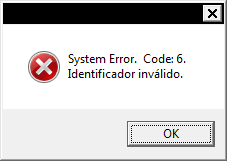
I have a weird issue with Pro Pinball Ultra, the game has no analog plunger, but the key 13 (enter) is not working and I am getting an error in the mouse plunger software. If I hit enter in a keyboard, it launches the ball just fine.


Here is the screenshot of the error when I try to launch the ball with mouse plunger running:


error.png


Edited by WiiMoritz, 25 April 2024 - 01:54 PM.


#135 wiesshund

wiesshund

    VPF Legend

  • Members
  • PipPipPipPipPipPipPip
  • 11,859 posts

  • Flag: United States of America

  • Favorite Pinball: How many can i have?

Posted 20 September 2020 - 02:38 AM

I have a weird issue with Pro Pinball Ultra, the game has no analog plunger, but the key 13 (enter) is not working and I am getting an error in the mouse plunger software. If I hit enter in a keyboard, it launches the ball just fine.


Here is the screenshot of the error when I try to launch the ball with mouse plunger running:


error.png


Have you tried asking here  http://www.pro-pinball.com/ in their support forum?

I dont have their game, so i have no idea what it means by invalid identifier, or the code 6
nothing comes up in a google search


If you feel the need to empty your wallet in my direction, i don't have any way to receive it anyways

Spend it on Hookers and Blow


#136 WiiMoritz

WiiMoritz

    Enthusiast

  • Members
  • PipPipPip
  • 61 posts

  • Flag: Brazil

  • Favorite Pinball: Addams Family

Posted 21 September 2020 - 12:05 AM


I have a weird issue with Pro Pinball Ultra, the game has no analog plunger, but the key 13 (enter) is not working and I am getting an error in the mouse plunger software. If I hit enter in a keyboard, it launches the ball just fine.


Here is the screenshot of the error when I try to launch the ball with mouse plunger running:


error.png


Have you tried asking here  http://www.pro-pinball.com/ in their support forum?

I dont have their game, so i have no idea what it means by invalid identifier, or the code 6
nothing comes up in a google search


No, Pro Pinball is working fine, that error is on the mouse plunger software each time I try to launch the ball with my mouse plunger, if I hit enter key on keyboard the ball launch just fine, but mouse plunger give me that error I don't know why (only on pro pinball, Visual Pinball is working fine).


Edited by WiiMoritz, 21 September 2020 - 12:06 AM.


#137 wiesshund

wiesshund

    VPF Legend

  • Members
  • PipPipPipPipPipPipPip
  • 11,859 posts

  • Flag: United States of America

  • Favorite Pinball: How many can i have?

Posted 21 September 2020 - 12:24 AM

Mouse plunger software?

 What is the mouse plunger software?


And do you not use same said software for VPX?


It would seem that the mouse plunger software, which obviously must translate mouse axis to analog joystick axis, could probably care less what is being run
and simply translates a mouse position to a direct input/ x input axis value.

And if that is the case, it would still seem that the issue is Pro Pinball.
but there really isnt enough detailed information here to decide either way.


If you feel the need to empty your wallet in my direction, i don't have any way to receive it anyways

Spend it on Hookers and Blow


#138 NailBuster

NailBuster

    Enthusiast

  • Members
  • PipPipPip
  • 300 posts

  • Flag: Canada

  • Favorite Pinball: YES

Posted 21 September 2020 - 02:38 PM

fyi.  the mouse plunger has no idea(or monitors) whats actually running.  it uses vjoy to emulate a joystick.   The enter key is just a normal windows msg sent.  I ran timeshock with no issues.


only thing i could think of is you're running timeshock as admin?  but still makes no sense why it would get an error.  Maybe you have some other 3rd party joytokey, xce360...etc thats conflicting.


#139 WiiMoritz

WiiMoritz

    Enthusiast

  • Members
  • PipPipPip
  • 61 posts

  • Flag: Brazil

  • Favorite Pinball: Addams Family

Posted 29 September 2020 - 09:57 PM

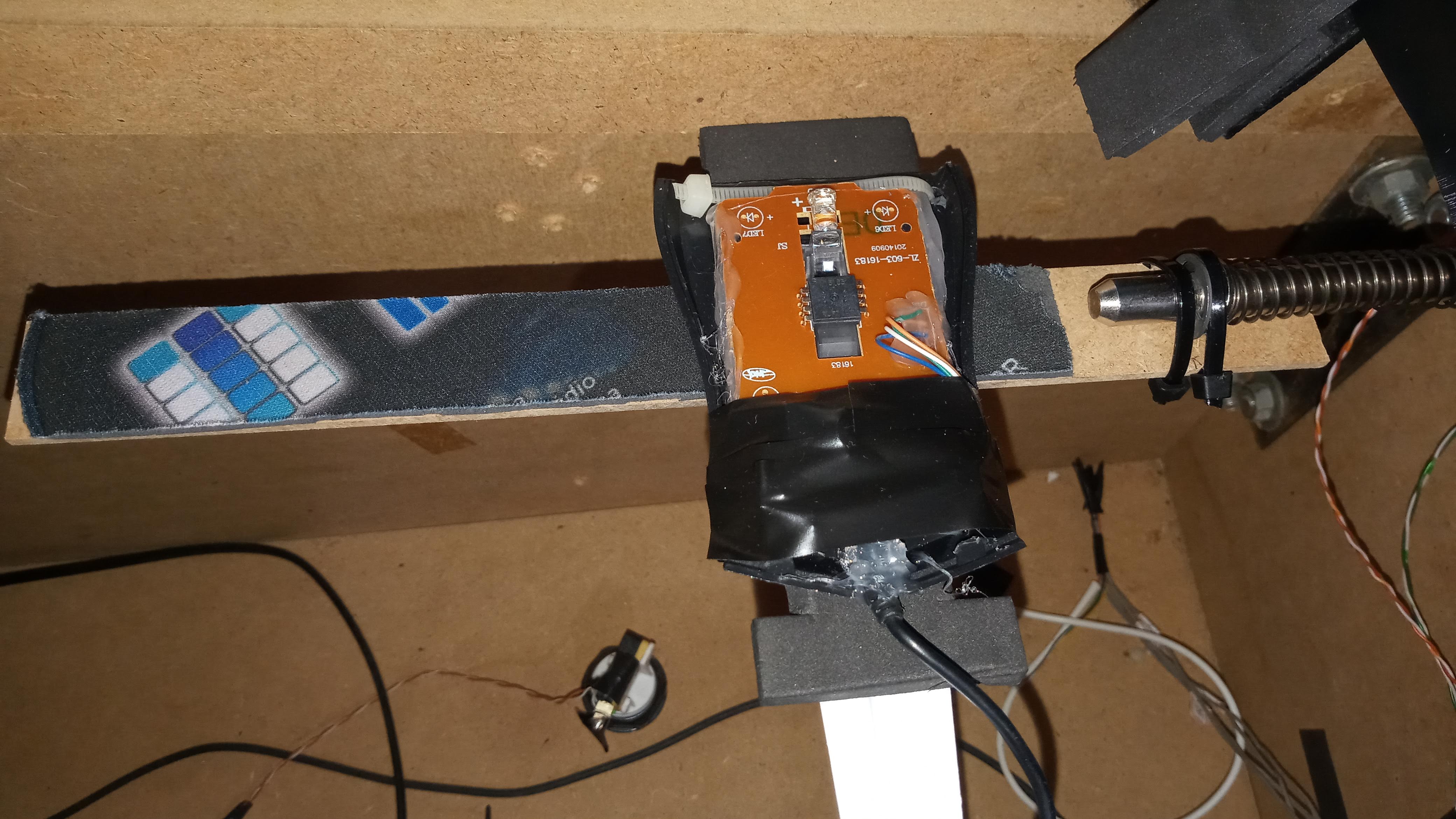
Here is a video of my mouse plunger setup with an image below:


https://www.youtube....h?v=bGf_J_YOsS8


mouse_plunger.jpg


30 cm wood scale, I cut a mouse pad and paste in the scale.


Working fine with visual pinball and pinball fx2 but sadly got that error I mentioned on pro pinball.


Edited by WiiMoritz, 25 April 2024 - 01:56 PM.


#140 skaboy91

skaboy91

    Neophyte

  • Members
  • Pip
  • 1 posts

  • Flag: Argentina

  • Favorite Pinball: addams family

  • PS3 Gamer Tag: |

Posted 12 November 2020 - 06:15 PM

hi Nailbuster, thx for the software! It works great and its really easy to run!  :D i love it!!


Also tagged with one or more of these keywords: plunger