
I was wondering if it was normal that the program window does not cover the whole desk,
there are a few pixels to the left and right and between the toolbar, where I see the desktop background.
Thanks!


 40 votes

Pinball Fan




Posted 07 February 2021 - 02:14 PM
I was wondering if it was normal that the program window does not cover the whole desk,
there are a few pixels to the left and right and between the toolbar, where I see the desktop background.
Thanks!
Hobbyist


Posted 09 February 2021 - 08:05 AM
Topic SSF and the sound manager
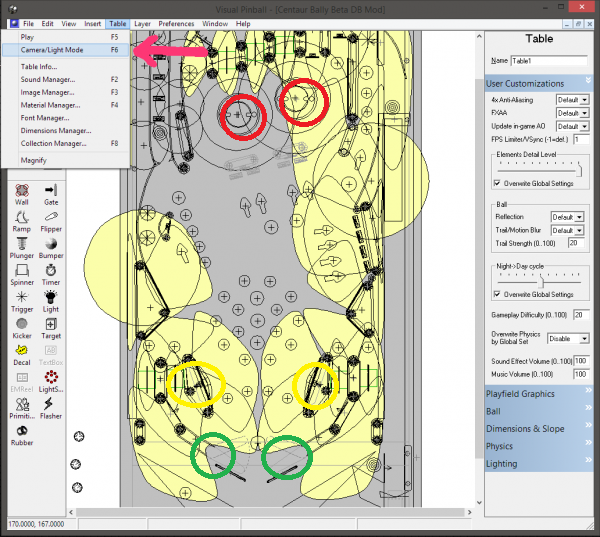
what would it be great if you could adjust the position of the respective sound using an optical table display and mouse support. Simply grab the relevant sound with a click of the mouse and position it in the right place ... the whole thing would then have to be saved as a script and, if necessary, just copied into the new one when updating the table that's roughly how I imagine it ... the table is displayed on the monitor ... and I select the relevant noise in an adapted sound manager, e.g. bumper or flipper finger ... then I just mark (see red, green or yellow Circles) the exact position in the table this way you could adapt the whole thing much more precisely than how it is now done using numerical values in the sound manager ... the whole thing would also be easier for the table builder (Picture is only an example)
Edited by timblo, 09 February 2021 - 08:05 AM.
Pinball Wizard



Posted 09 February 2021 - 08:12 AM
If you are using numeric values - you are doing it all wrong. Use objects - in almost all cases ActiveBall is enough. Many good examples available here : https://github.com/s...pxtable_scripts
Edited by Thalamus, 09 February 2021 - 08:14 AM.
From now on. I won't help anyone here at VPF. Please ask Noah why that is.
VPF Legend


Posted 09 February 2021 - 08:56 AM
Like Thalamus said
If you want sound to play at the flipper, then play sound at the flipper
If you want sound to play where the slingshot is, then play sound at the slingshot (Use the actuator foot since it is a prim and a wall can not be a sound location)
Want sounds at wall based objects? or other more flexible locations just playsoundAtball, you could have a 6 foot long rubber band and the sound would be at the correct
spot in 3d space in regards to the impact.
No need for anything more complicated when you can already tell the table, play sound Here, and it will.
It just happens that there are more tables that do not use the ability, than do
but you can change that for yourself, it is a bit tedious, but not hard.
I do it to every table i download, if the table does not already work that way.
You can play a sound at
Flippers, Bumpers, Targets, Switches, Kickers, the Ball (both active ball, as well as an enumerated ball), and anything made of a primitive.
it is easy and quick for the table author, you can do it while you are denoting your DOF items
Sub LeftSlingShot_Slingshot
PlaySoundAt SoundFX("slingshot",DOFContactors), Sling2
Presto, sound plays at the slingshot actuator
Sub Bumper1_Hit
PlaySoundAt SoundFX("bumper",DOFContactors), Bumper1
Sound at position of bumper1
PlaySoundAt SoundFX("fx_flipperup",DOFFlippers), LeftFlipper
Sound at the left flipper
You dont even need to manually do the fade and pan
Use a set of sound routines like this
Dim TableWidth, TableHeight

TableWidth = Table1.width
TableHeight = Table1.height

Function Vol(ball) ' Calculates the Volume of the sound based on the ball speed
    Vol = Csng(BallVel(ball) ^2 / 2000)
End Function

Function AudioPan(ball) ' Calculates the pan for a ball based on the X position on the table. "table1" is the name of the table
    Dim tmp
    tmp = ball.x * 2 / TableWidth-1
    If tmp > 0 Then
        AudioPan = Csng(tmp ^10)
    Else
        AudioPan = Csng(-((- tmp) ^10))
    End If
End Function

Function Pitch(ball) ' Calculates the pitch of the sound based on the ball speed
    Pitch = BallVel(ball) * 20
End Function

Function BallVel(ball) 'Calculates the ball speed
    BallVel = (SQR((ball.VelX ^2) + (ball.VelY ^2)))
End Function

Function AudioFade(ball) 'only on VPX 10.4 and newer
    Dim tmp
    tmp = ball.y * 2 / TableHeight-1
    If tmp > 0 Then
        AudioFade = Csng(tmp ^10)
    Else
        AudioFade = Csng(-((- tmp) ^10))
    End If
End Function

Sub PlaySoundAt(soundname, tableobj) 'play sound at X and Y position of a fast object, like bumpers, flippers and other solenoids
    PlaySound soundname, 0, 1, AudioPan(tableobj), 0.1, 0, 0, 0, AudioFade(tableobj)
End Sub

Sub PlaySoundAtBall(soundname) ' play a sound at the ball position, like rubbers, wall targets, metals, plastics
    PlaySound soundname, 0, Vol(ActiveBall), AudioPan(ActiveBall), 0.4, 0, 0, 0, AudioFade(ActiveBall)
End Sub

Sub PlayXYSound(soundname, tableobj, loopcount, volume, randompitch, pitch, useexisting, restart)
	PlaySound soundname, loopcount, volume, AudioPan(tableobj), randompitch, pitch, useexisting, restart, AudioFade(tableobj)
End Sub
If you feel the need to empty your wallet in my direction, i don't have any way to receive it anyways
Spend it on Hookers and Blow
Enthusiast


Posted 09 February 2021 - 02:06 PM
Dear Development team,
the commandReference.txt does not refer to the Target.x & Target.y as a readable x/y (float). The Pacman script that i am working with is reading the Target.x and .y positions without problems.
Thankyou for the VPX_7_beta_rev4388 upgrade. Its looking good & its moving in the right direction.
VPF Veteran

Posted 10 February 2021 - 05:57 PM
After reading your post, i checked with other tables, and while i thought they were loading fast before, now it load even faster with "Texture Compression (Performance)" unchecked !
Wow, i had no idea this option was making everything (performance and loading time) actually worse.
Maybe the wording "performance" should just be removed from the option menu because in VPX what i see is that it create micro visual stutters when new textures are loaded by tables events in the fly, and as a lot of textures can be loaded during an event, those micro visual stutter can add up and lead to longer visual sttuter (and as those stutter are only visual, the ball still move but you don't see it, easy to get it into the drain without knowing).
This is actually really weird. The only overhead one should see should be during the pre-processing of the table (loading bar when starting the game). And that part can even be kinda very noticable even. :/
After that though, the textures are not touched anymore, except for the graphics driver. Which GPU do you have?
I'm sure Toxie and Fuzzel would agree that VPX 10.7 beta isn't quite ready for the regular user / player... at least not yet. (please correct me if I'm wrong there guys).
I think except for the outstanding sound issues (especially on more complex audio setups, and when using MP3 and OGG), the beta could be used by everybody, at least for playing tables.
Dear Development team,
the commandReference.txt does not refer to the Target.x & Target.y as a readable x/y (float). The Pacman script that i am working with is reading the Target.x and .y positions without problems.
Thankyou for the VPX_7_beta_rev4388 upgrade. Its looking good & its moving in the right direction.
Added. Thanks!
VPF Legend
Posted 10 February 2021 - 09:21 PM
I did not notice before because I have always used the native resolution 16/10 of the screen,
the lights used in the backglass do not adapt in height as the resolution changes.
On the left the resolution 16/10, on the right 16/9 and you can see that the lights are not inside the frame.
Is it possible to have an option to adapt the lights also in height, as the resolution varies?
That is not part of VPX, but B2S server and B2S designer
What you would do for yourself to correct that is, export the backglass image, resize to 16.10
reimport it, allow backglass to auoto adjust the lights and reels
give it a once over in case and hand adjusting is necessary, then save a new backglass file
If you feel the need to empty your wallet in my direction, i don't have any way to receive it anyways
Spend it on Hookers and Blow
VPF Veteran
Posted 10 February 2021 - 10:21 PM
This is an already reported bug and probably not completely fixed,
I noticed it in VPX6 and also in VPX7 Beta, the "Alpha Mask" value is transferred from one image to another when deleting images in the Image Manager.
For example: take the Example Table, go to the Image Manager and delete the ColorGradeLUT256x16_Sepia,
the value of the 128 alpha mask of the ColorGradeLUT256x16_ConSat image is transferred to the "CustomBlackTip" which previously had value 1.
This should be fixed in the next release. So please test carefully again!
spaghetti code
Posted 11 February 2021 - 06:08 AM
I take a look...This should be fixed in the next release. So please test carefully again!This is an already reported bug and probably not completely fixed,
I noticed it in VPX6 and also in VPX7 Beta, the "Alpha Mask" value is transferred from one image to another when deleting images in the Image Manager.
For example: take the Example Table, go to the Image Manager and delete the ColorGradeLUT256x16_Sepia,
the value of the 128 alpha mask of the ColorGradeLUT256x16_ConSat image is transferred to the "CustomBlackTip" which previously had value 1.
Pinball Fan
Posted 11 February 2021 - 08:11 AM
I did not notice before because I have always used the native resolution 16/10 of the screen,
the lights used in the backglass do not adapt in height as the resolution changes.
On the left the resolution 16/10, on the right 16/9 and you can see that the lights are not inside the frame.
Is it possible to have an option to adapt the lights also in height, as the resolution varies?
That is not part of VPX, but B2S server and B2S designer
What you would do for yourself to correct that is, export the backglass image, resize to 16.10
reimport it, allow backglass to auoto adjust the lights and reels
give it a once over in case and hand adjusting is necessary, then save a new backglass file
No, it's VPX, it's an EMReel and the segments are lights.
VPF Legend
Posted 11 February 2021 - 08:25 AM
I did not notice before because I have always used the native resolution 16/10 of the screen,
the lights used in the backglass do not adapt in height as the resolution changes.
On the left the resolution 16/10, on the right 16/9 and you can see that the lights are not inside the frame.
Is it possible to have an option to adapt the lights also in height, as the resolution varies?
That is not part of VPX, but B2S server and B2S designer
What you would do for yourself to correct that is, export the backglass image, resize to 16.10
reimport it, allow backglass to auoto adjust the lights and reels
give it a once over in case and hand adjusting is necessary, then save a new backglass file
No, it's VPX, it's an EMReel and the segments are lights.
In the backglass?
or you mean in the desktop backbox?
I was thinking you meant the b2s backglass?
If you feel the need to empty your wallet in my direction, i don't have any way to receive it anyways
Spend it on Hookers and Blow
Pinball Wizard
Posted 11 February 2021 - 04:43 PM
Sure that the hit threshold is achieved / enabled ? Using correct object for the event ?
From now on. I won't help anyone here at VPF. Please ask Noah why that is.
Pinball Fan
Posted 11 February 2021 - 07:08 PM
Dear Visual Pinball Developers,
The _PlaySlingshotHit() method does not run the code that sits in the _PlaySlingshotHit() sub routine.

You have to put the slingshot name and function into a sub routine:
Sub Test
LeftSlingshot.PlaySlingshotHit()
End Sub
It's just a curiosity, can we have other objects available in the Backglass, like the primitives?
Enthusiast
Posted 11 February 2021 - 07:25 PM
Sure that the hit threshold is achieved / enabled ? Using correct object for the event ?
Tweaked + Double checked all values and the object name was correctly assigned. The _PlaySlingShotHit() sub routine still failed to run the code that sits in it. ("to no avail"!)
Pinball Wizard
Posted 11 February 2021 - 07:36 PM
I highly doubt that it anything wrong with the slings, but, probably a simple thing that you've overlooked. It happens to us all. You keep looking at it and becomes totally blind to the obvious. You saw Kiwi's example above ? For table code, you've got a lot of easily accessible table scripts via browser too https://www.vpforums...=61#entry468697
From now on. I won't help anyone here at VPF. Please ask Noah why that is.
Enthusiast
Posted 11 February 2021 - 07:50 PM
Dear Visual Pinball Developers,
The _PlaySlingshotHit() method does not run the code that sits in the _PlaySlingshotHit() sub routine.
You have to put the slingshot name and function into a sub routine:
Sub Test
LeftSlingshot.PlaySlingshotHit()
End Sub
Thanks for that!
Enthusiast
Posted 11 February 2021 - 11:03 PM
I highly doubt that it anything wrong with the slings, but, probably a simple thing that you've overlooked. It happens to us all. You keep looking at it and becomes totally blind to the obvious. You saw Kiwi's example above ? For table code, you've got a lot of easily accessible table scripts via browser too https://www.vpforums...=61#entry468697
Dear Visual Pinball Developers,
The _PlaySlingshotHit() method does not run the code that sits in the _PlaySlingshotHit() sub routine.
You have to put the slingshot name and function into a sub routine:
Sub Test
LeftSlingshot.PlaySlingshotHit()
End Sub
It also helps if you use the _slingshot() method. It runs code without issues!
VPF Legend
Posted 12 February 2021 - 01:31 AM
Over time the name has changed from, Backdrop, Backglass / POV, Backglass, it's the "opposite" of the editor.
lol, it gets confusing
i try to refer to the b2s as backglass, and the table as backdrop
or i confuse myself
And yea, there is a few things that go a wandering if you change aperture ratios
Anything connected to the table sides of the editor especially seems to automatically go astray, which is probably expected.
Like floating DMD flashers etc.
My guess is that the backdrop image stretches, but the objects simply sit at the same X/Y coordinates
which are no longer correct for the places painted on the now differently stretched image
It also funks them up if you put things in an ultrawide rez, or a 4.3 rez
If you feel the need to empty your wallet in my direction, i don't have any way to receive it anyways
Spend it on Hookers and Blow


Community Forum Software by IP.Board
Licensed to: VPForums.org
 are all trademarks of VPFORUMS.
 Top
Top
