Looking forward to any future updates as to the progress here. Whirlwind is a great table and this is going to be awesome.
Edited by gear323, 10 October 2020 - 12:10 AM.


 14 votes

VPXVR is awesome.


Posted 10 October 2020 - 12:09 AM
Edited by gear323, 10 October 2020 - 12:10 AM.
Pinball Fan


Posted 02 November 2020 - 05:42 PM
I'm sure, he is, but he is involved in many other projects.Got pretty quiet here - is Flupper1 still active?
Rajo Joey - My front-end-files; Hundreds of Audio- and Videorecordings in high quality for Playfield (4k/60FPS) and Backglass (HD), Wheels & POV-Files: The Media-Post
https://www.facebook...02697096474910/
Enthusiast

 Contributor
Posted 02 November 2020 - 08:31 PM
I am still working on this (and also other projects...), but little to show for it right now. Will do an update soon...
Enthusiast
Contributor
Posted 08 November 2020 - 04:54 PM
Chapter 6: bats, bumpers, screws
Today I will show you what I worked on over the last couple of months. Some of them took me way longer then anticipated, like the bumpers and the flasher domes. First the Williams bats:
I always wanted to make new bats with the correct proportions and the Williams logo. For Whirlwind, I finally found a good reference image for that which I converted into a vector drawing, which I could use as a reference for the new bats:

I imported the vector image in Blender and reshaped an existing Williams bat of mine to the exact contours of the vector image:

With some experimentation I found a good material (a combination of reflection, diffuse color and subsurface scattering), which I baked into a 1024x1024 texture. I simplified the primitive a little and boosted the contrast of the texture in photoshop:

In order to test them I updated the bats in BK2K, I think they look spiffy:

If you want, you can check them out yourself, yesterday I uploaded a new version of BK2K which has these bats and also my new bumpers:

The bumpers are quite complicated in setting up, I spent way too much time trying to get them look right. Here are some issues which I faced:
- primitives cannot color anything which is behind them in VPX. This means that a colored transparent bumpertop looks wrong when in VPX. The only thing which can actually color something is the VPX light object. So I used this to my advantage: my new bumpertops are almost opaque when displayed in VPX. I put a colored VPX light directly/just below the bumpertop, which is really bright. Combined with the almost opaque bumpertop, these cancel each other, and the effect is a colored effect through the bumpertop.
- Bumpertops have layers of transparency effects. I wanted to make them to look nice, not only in one POV but multiple and even VR. Hard to explain what I did, but if you look at the bumpertop texture in VPX, you will see two parts of it. When rendering multiple transparency layers in the bumpertop, these two parts give a good 3d transparency effect (at least I think so...). When looking at the bumpertops they work quite well, unless you view them more or less directly from the side. One drawback is that you cannot rotate them, then they look off.
- The lightbulb also uses two different transparency layers, I wanted to let the glowing wire also have 3d effect.
Last part, the screws. There are several problems with screws in blender and VPX:
- there are many of them, and they have a lot of faces (compared to plastics for instance which are way bigger).
- they catch reflections, so they cannot be too low poly otherwise they look off.
- If you use highpoly screws in blender, it is hard to translate that to VPX (because of the performance). And even Blender does not like a large amount of high-poly screws, this will increase rendertime.
- Blender has problems with shadows for small objects. A raytracer has a hard time "finding" these shadows.
So I fixed that in the following way:first I modelled a relatively low poly screw, which is also exportable to VPX:

For the shadow issues I baked an Ambient Occlusion map for the screw and also for the shadow underneath the screw (the flat face in the screenshot above). Also, I baked the normals from a highpoly version of the screw, to have better reflections.
If you render that, it looks like this:

If you disable the normal and AO maps, and the subdivision, then the base mesh looks really bad; so that shows why I use all these extras:

The same method I used on the other type of screw, which I call the hexanut:

If you want to see my new flasher domes (also made for Whirlwind, but ended up as a demo table), you can find it here:
https://www.vpforums...&showfile=13138
Next update: https://www.vpforums...430#entry469993
Edited by flupper1, 28 February 2021 - 04:17 PM.
Pinball Wizard



Posted 08 November 2020 - 06:51 PM
Impressive as always. Thanks for sharing. It is always interesting getting an insight into how you solve problems I would not even know was there 
From now on. I won't help anyone here at VPF. Please ask Noah why that is.
Enthusiast



Posted 09 November 2020 - 10:59 AM
"- primitives cannot color anything which is behind them in VPX. This means that a colored transparent bumpertop looks wrong when in VPX. The only thing which can actually color something is the VPX light object. So I used this to my advantage: my new bumpertops are almost opaque when displayed in VPX. I put a colored VPX light directly/just below the bumpertop, which is really bright. Combined with the almost opaque bumpertop, these cancel each other, and the effect is a colored effect through the bumpertop."
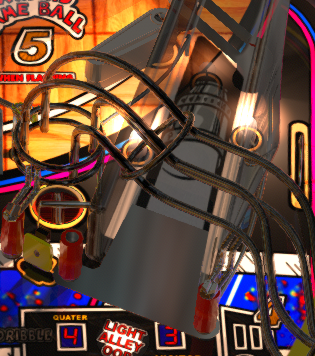
This week end, i discover this tips by hazard by working in shaq attaq. I made a very bright light with transmit value at 0 and I discover you see elements behind the first mesh which is coloring the other.
This is what i use for the 3 bulb under the plastic ramp on shaq attaq. It make a very relastic bright bulb and great effect over the ramp. Stickers are opaque, but when GI is on, you can see the sticker have translucide black color, and which is behind, is colored too by the stickers.
Edited by JLouLoulou, 09 November 2020 - 12:03 PM.
Pinball Fan

Posted 21 December 2020 - 04:56 AM
Dang, that's a lot of effort Flupper, keep pushing forward. And I'll at least say thanks in advance, because that attention to detail will make for a fantastic table. I'm coming to believe that the skill set in the VP community is at least on par and perhaps even better than what the commercial dev houses are able to produce. Am glad you shared your approach because I and others can at least learn from it and maybe become contributors some day. Very nice high quality work Flupper !, Thanks. mrjc.
Hobbyist

Posted 23 January 2021 - 02:46 PM
Just learned that you've been working on this one past year. Man oh man, you've made my day!!! Very fun table to play. And your skills are superb, Flupper1! I know for sure this table will go straight to the top of my favorites list. Ziet er top uit!!! Thanks in advance!!!!
0Cool...really Zero cool!
Enthusiast
Contributor
Posted 28 February 2021 - 04:17 PM


Edited by flupper1, 09 August 2021 - 07:56 PM.
VPXVR is awesome.
Posted 28 February 2021 - 05:26 PM
Where is the "Love" button when I need it. Ha.. Guess I'll have to settle for "Like". Awesome work Flupper1! While most of this is a bit over my head, it is very interesting to read about the process and see how much work goes into the tables you (and others) create. Makes me appreciate the effort even more. Those ramps look amazing, really looking forward to this one.
Thanks again!
Edited by gear323, 28 February 2021 - 05:43 PM.
Pinball Fan
Posted 28 February 2021 - 07:28 PM
That looks totally awesome Flupper. What I like about you and the other table developers is how professional each consecutive table rebuilds end up looking. Each time you go up a version, you totally "Kick it up a notch." And I think you can rival or surpass what the commercial game developers can do. You all keep improving on this great hobby. I'm happy to volunteer as a tester if you wish when you are ready for beta testing. (Thanks again and for all your other prior awesome tables, I certainly appreciate all your work and effort.)
P.S. The chrome looks fantastic and I like that you allow the fake light bulb to shine through the center of the pop bumpers, nice touch of realism.


Community Forum Software by IP.Board
Licensed to: VPForums.org
 are all trademarks of VPFORUMS.
 Top
Top