- View New Content
-
Getting Started
-
Tutorials
Tutorial Categories
Tutorials Main Page Installation and Setup Downloadable TutorialsROM Adjustments
Number of Balls Adjustments Volume Adjustments
-
Visual Pinball Tables
VP 8 Desktop Tables
All VPM Recreations VP Recreations VP/VPM MODs VP Originals ROMsVP 9 Desktop Tables
All VPM Recreations VP Recreations VP/VPM MODs VP Originals ROMsVP9 Cabinet Tables
All Full Screen Cabinet Full Screen B2S Cabinet Spanned Cabinet Tables Media Packs ROMsVPX Tables
All VPinMAME Recreations VPX- - /VPinMAME - MOD Tables VPX Recreations VPX Originals Media Packs ROMs VR
-
Frontend Media & Backglass
Media Packs
Complete Media Packs Wheel Logos VideosBackglasses
dB2S Animated Backglasses UVP Animated Backglasses Topper Images
- Future Pinball Tables
-
Design Resources
Main Resources
Table Templates Playfield Images Image Library Sound Library Key CodesVP Guides
VP8 Guide - English VP8 Guide - Deutsch VP9 Guide - English VP9.1.x Guide - English VP Object Guide VPM DocumentationFuture Pinball Resources
Playfield Images 3D Model LibraryFuture Pinball Guides
FP Script Guide Big Draco Script Guide FP Table Design Guide FP DMD Guide
- Other Features
- Bug Tracker
- Image Gallery
- Blogs
-
More
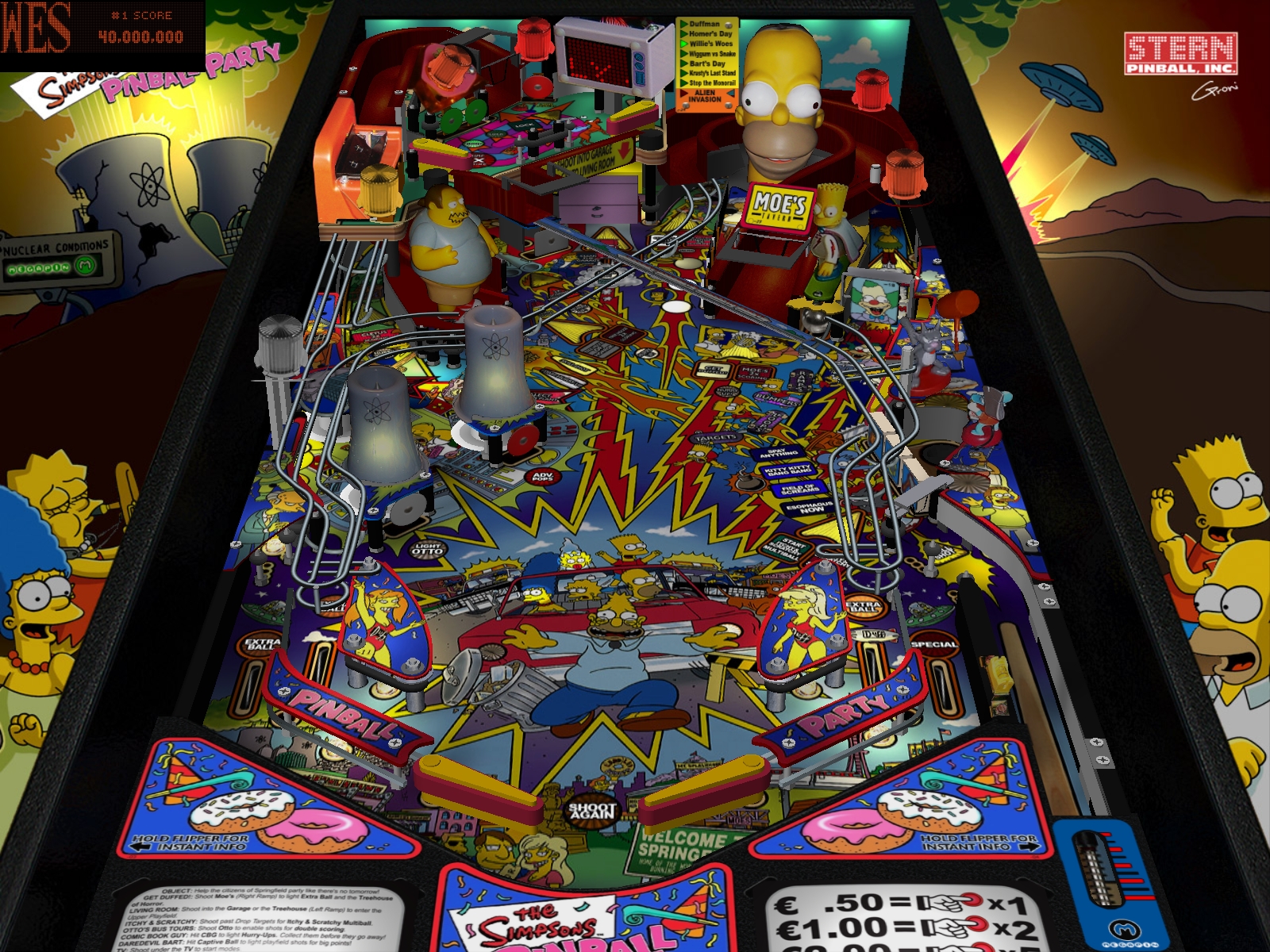
The Simpsons Pinball Party - Megapin - V1.2
Started By
GRONI
, Jul 22 2009 09:11 PM
137 replies to this topic
#101
Posted 22 December 2009 - 04:05 AM
Has anyone seen a problem on this Simpson's table where the playfield is completely yellow? This happens regardless if I have hardware rendering on or off (and I save the change, exit VP completely, and then restart the table). I'm running a Core i7 3.0 GHz with a GTX 260 graphics card, Windows 7 with UAC turned off and Run As Administrator.
I have also seen this happen on El Timbo's Dirty Harry FS table, but only parts of the playfield are yellow on that table.
Thanx for any help.
I have also seen this happen on El Timbo's Dirty Harry FS table, but only parts of the playfield are yellow on that table.
Thanx for any help.
#103
Posted 22 December 2009 - 05:44 PM
QUOTE (bjjb @ Dec 21 2009, 11:05 PM) <{POST_SNAPBACK}>
Has anyone seen a problem on this Simpson's table where the playfield is completely yellow? This happens regardless if I have hardware rendering on or off (and I save the change, exit VP completely, and then restart the table). I'm running a Core i7 3.0 GHz with a GTX 260 graphics card, Windows 7 with UAC turned off and Run As Administrator.
I have also seen this happen on El Timbo's Dirty Harry FS table, but only parts of the playfield are yellow on that table.
Thanx for any help.
I have also seen this happen on El Timbo's Dirty Harry FS table, but only parts of the playfield are yellow on that table.
Thanx for any help.
You could try disabling Direct Draw and see what happens?
Edited by marv75, 22 December 2009 - 10:27 PM.
VPF The Premiere Pinball Site

#105
Posted 04 January 2010 - 10:52 AM
QUOTE (Delaypat @ Jan 4 2010, 06:43 PM) <{POST_SNAPBACK}>
I keep getting "cannot create offscreen surface" Can anyone help...Yes I'm a noob!!!
Before clicking the Play icon, up top of the editor click Preferences > Video Options, then select a x16 option. If the error still occurs try again at a lower settings. Basically your video card hasn't enough memory to run the table at the higher settings.
#106
Posted 04 January 2010 - 10:53 AM
You need to have this application.
http://vpforums.org/...aller_1_0_3.exe
I only download the new version VPinball 9.0.5
http://www.vpforums....a...d&f_id=2753
Extract to:
C:\Program Files\Visual Pinball\
TABLE:
http://www.vpforums....a...d&f_id=2406
Put in the table:
C:\Program Files\Visual Pinball\VPinMame\TABLES
(you need to open the archive and just put in the TABLES table, the table will be blue)
ROMS:
http://www.vpforums....a...d&f_id=1130
ROMS that take off and put in:
C:\Program Files\Visual Pinball\VPinMame\ROMs
(do not open the archive, so it must be to take off)
http://vpforums.org/...aller_1_0_3.exe
I only download the new version VPinball 9.0.5
http://www.vpforums....a...d&f_id=2753
Extract to:
C:\Program Files\Visual Pinball\
TABLE:
http://www.vpforums....a...d&f_id=2406
Put in the table:
C:\Program Files\Visual Pinball\VPinMame\TABLES
(you need to open the archive and just put in the TABLES table, the table will be blue)
ROMS:
http://www.vpforums....a...d&f_id=1130
ROMS that take off and put in:
C:\Program Files\Visual Pinball\VPinMame\ROMs
(do not open the archive, so it must be to take off)
Edited by mars007, 04 January 2010 - 11:02 AM.
#107
Posted 08 January 2010 - 09:53 AM
Wow So strange, my video card can handle MS flght sim X just fine...Lowered settings to 800X600...Works fine! Thanks
Before clicking the Play icon, up top of the editor click Preferences > Video Options, then select a x16 option. If the error still occurs try again at a lower settings. Basically your video card hasn't enough memory to run the table at the higher settings.
QUOTE (StevOz @ Jan 4 2010, 02:52 AM) <{POST_SNAPBACK}>
QUOTE (Delaypat @ Jan 4 2010, 06:43 PM) <{POST_SNAPBACK}>
I keep getting "cannot create offscreen surface" Can anyone help...Yes I'm a noob!!!
Before clicking the Play icon, up top of the editor click Preferences > Video Options, then select a x16 option. If the error still occurs try again at a lower settings. Basically your video card hasn't enough memory to run the table at the higher settings.
#108
Posted 08 January 2010 - 10:30 AM
QUOTE (marv75 @ Dec 22 2009, 10:44 AM) <{POST_SNAPBACK}>
QUOTE (bjjb @ Dec 21 2009, 11:05 PM) <{POST_SNAPBACK}>
Has anyone seen a problem on this Simpson's table where the playfield is completely yellow? This happens regardless if I have hardware rendering on or off (and I save the change, exit VP completely, and then restart the table). I'm running a Core i7 3.0 GHz with a GTX 260 graphics card, Windows 7 with UAC turned off and Run As Administrator.
I have also seen this happen on El Timbo's Dirty Harry FS table, but only parts of the playfield are yellow on that table.
Thanx for any help.
I have also seen this happen on El Timbo's Dirty Harry FS table, but only parts of the playfield are yellow on that table.
Thanx for any help.
You could try disabling Direct Draw and see what happens?
http://www.imged.org/75/260.jpg
That's what I get. Vista64 nvidia 191.07, gtx260. I don't understand why the playfield would be yellow for you, when there doesn't appear to be much yellow anywhere on the playfield. Not even the VP lights are yellow.
Build a fire, vipers love the heat.
#110
Posted 25 January 2010 - 02:32 PM
Hi all I am new member to the site and its awesome!!
I am a nebie so bare with me, I also am getting "cannot create offscreen surface", I read to change video settings to something with X16 I dont have that option only the X32 is there something else I can to or try I really want to try this master piece. I am running 9.02
Thank you in advance.
I am a nebie so bare with me, I also am getting "cannot create offscreen surface", I read to change video settings to something with X16 I dont have that option only the X32 is there something else I can to or try I really want to try this master piece. I am running 9.02
Thank you in advance.
#111
Posted 25 January 2010 - 02:38 PM
QUOTE (vegas83 @ Jan 25 2010, 07:32 AM) <{POST_SNAPBACK}>
Hi all I am new member to the site and its awesome!!
I am a nebie so bare with me, I also am getting "cannot create offscreen surface", I read to change video settings to something with X16 I dont have that option only the X32 is there something else I can to or try I really want to try this master piece. I am running 9.02
Thank you in advance.
I am a nebie so bare with me, I also am getting "cannot create offscreen surface", I read to change video settings to something with X16 I dont have that option only the X32 is there something else I can to or try I really want to try this master piece. I am running 9.02
Thank you in advance.
Run 9.0.5 - then you'll have 16 bit display modes.
Build a fire, vipers love the heat.
#112
Posted 25 January 2010 - 02:58 PM
QUOTE (vegas83 @ Jan 25 2010, 10:32 PM) <{POST_SNAPBACK}>
Hi all I am new member to the site and its awesome!!
I am a nebie so bare with me, I also am getting "cannot create offscreen surface", I read to change video settings to something with X16 I dont have that option only the X32 is there something else I can to or try I really want to try this master piece. I am running 9.02
Thank you in advance.
I am a nebie so bare with me, I also am getting "cannot create offscreen surface", I read to change video settings to something with X16 I dont have that option only the X32 is there something else I can to or try I really want to try this master piece. I am running 9.02
Thank you in advance.
I spent a bit of time trying to deal with this problem. The solution is pretty easy, once you know what to do.
Open your table in the editor and click on the options button on the left of the screen. Over on the right hand side a menu will appear. This menu is used to edit the table and objects. Open up the "colours and formatting" menu and untick "HD render". Save the table and play.
I have to do this for every V9 pinball (once only) but they all work fine after that. If I ever get a decent video card I'll undo them all again, I suppose.
#113
Posted 25 January 2010 - 10:39 PM
QUOTE (Red Menace @ Jan 25 2010, 07:58 AM) <{POST_SNAPBACK}>
QUOTE (vegas83 @ Jan 25 2010, 10:32 PM) <{POST_SNAPBACK}>
Hi all I am new member to the site and its awesome!!
I am a nebie so bare with me, I also am getting "cannot create offscreen surface", I read to change video settings to something with X16 I dont have that option only the X32 is there something else I can to or try I really want to try this master piece. I am running 9.02
Thank you in advance.
I am a nebie so bare with me, I also am getting "cannot create offscreen surface", I read to change video settings to something with X16 I dont have that option only the X32 is there something else I can to or try I really want to try this master piece. I am running 9.02
Thank you in advance.
I spent a bit of time trying to deal with this problem. The solution is pretty easy, once you know what to do.
Open your table in the editor and click on the options button on the left of the screen. Over on the right hand side a menu will appear. This menu is used to edit the table and objects. Open up the "colours and formatting" menu and untick "HD render". Save the table and play.
I have to do this for every V9 pinball (once only) but they all work fine after that. If I ever get a decent video card I'll undo them all again, I suppose.
If you don't want to have to change the tables individually - http://www.vpforums....i...t=0&start=0
Build a fire, vipers love the heat.
#115
Posted 07 February 2010 - 04:43 AM
QUOTE (jpsalas @ Jul 24 2009, 07:44 PM) <{POST_SNAPBACK}>
Invisible plunger: this is a result of the dropwalls being drawn too low for VP to display. This depends of the resolution and the graphics card. The solution is to grab the 13 dropwalls that make the plunger and move them a few pixels up, until they are displayed.
JP
JP
Where are the dropwalls and how do i do that?
Edited by GamerKid, 07 February 2010 - 05:08 AM.
#116
Posted 08 February 2010 - 08:59 AM
Great game GRONI!
However, the right outlane is a lot more vicious than it should be, and I'm not just saying that! You have the post set at the hardest setting, when the default setting is the second notch from the top.
See: http://ipdb.org/show...cno=8464&zoom=1
I adjusted it in mine, but now it feels like I"m cheating...
However, the right outlane is a lot more vicious than it should be, and I'm not just saying that! You have the post set at the hardest setting, when the default setting is the second notch from the top.
See: http://ipdb.org/show...cno=8464&zoom=1
I adjusted it in mine, but now it feels like I"m cheating...
#117
Posted 14 February 2010 - 08:23 AM
Holy crap! I was having the best game ever, and then the game just RESET! Not pinMAME, but the ROM itself! It was like an reset from lack of power on a real machine! It happened during a crazy 4 ball mutliball frenzy with everything going on, too
I have no idea how on earth it could have happened... maybe too much was going on at once for it to handle!
Also, something NEEDS to be done about that feed from the bumpers. I lost at least 3 balls last game draining out of the pop bumpers instead of going into the return lane like it's supposed to
#120
Posted 17 April 2010 - 05:24 PM
This tabe is fantastic recreation.
However i dont get many have the table as favourite
the miniplayfield is just very boring and the table has
lack of flow. Anyone tell?
Notated this though:
* For every shot except when a mystery award is being given, you can press the left and right flippers buttons simultaneously to skip any animation and keep game play moving. While I don't blame people for not realizing you can skip the animations, at least for me it makes a huge difference in terms of the games enjoyability


Top


are all trademarks of VPFORUMS.