

Sounds good
One more maybe
A Setting so you can select the size of the file, how much it will compress


 4 votes

Enthusiast


Posted 31 January 2016 - 01:22 PM
Thank you GTXJOE for your efforts however...... is there an upload error?
I downloaded the 32bits version (filename PBXRecorder_x32_1.2) but although my system is Win7-32bits it gives a Windows non-compatibility error on 32 or 64 bits
Thanks in advance
Posted 31 January 2016 - 01:41 PM

Posted 31 January 2016 - 11:43 PM
Here is the existing PBX Recorder 1.2 installs. (I re-compiled the 32bit version): https://drive.google...S19UOWJPb2k2WWc
And here is the Beta 1.3 release: https://drive.google...eGc&usp=sharing
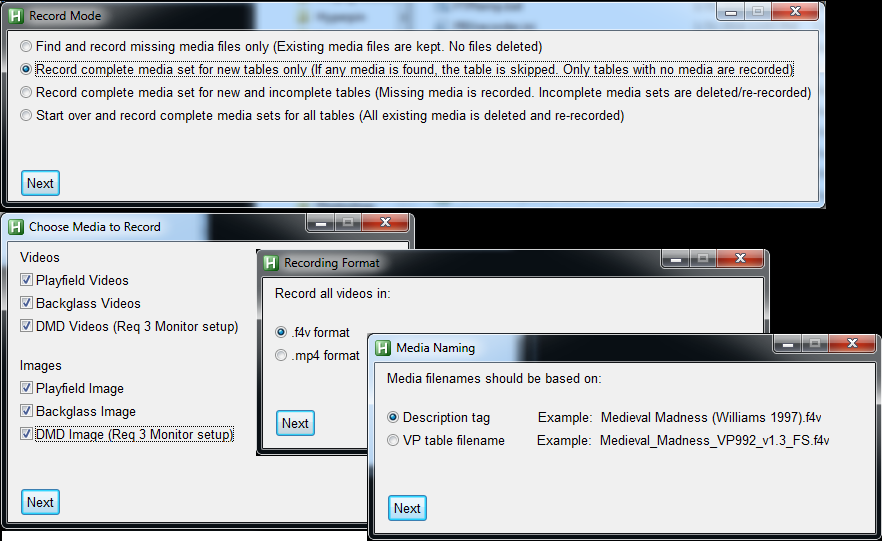
- New recording mode added: "Record complete media set for new tables only" If any media is found, the table is skipped. Only tables with no media are recorded. This might eliminate the need for the drag and drop feature, since this leaves your existing Pinballx Media set unchanged, i.e if you do not have DMD images for some existing tables, PBX Recorder will not try to create them
- Drag and drop .vpt/.vpx file onto PBXrecorder to record only one table (Table must be exist in the PinballX xml files)
- New option to record video in .mp4 or existing .f4v. Now checks for existing .f4v or .mp4 or any file.
- New option to save Media filenames based on description name or table name
- Speed up the scanning of tables for people with larger libraries
- Improve DMD recording success by forcing dvd dimensions to an even pixel value
- Bug fix: Enable recordings for VP xml systems missing the enabled xml tag
(The Beta requires the PBX Recorder 1.2 install files, do download the beta exe or ahk script and place it in the PBX Recorder folder)
Some screenshots of the changes
Autistic Genius



Posted 01 February 2016 - 08:27 AM
I am finally recording my tables now on the real setup, seems much more involved just because 1 more monitor, I tested each table and all worked and the ones that didn't, I disabled but it is still findinb errors and some tables have that box where you can hit ok or never show it again, I always seem to see those just as the timer to start recording runs out, oh well, nothing I can't fix. I still don't know how many tables I have and a few errored out 2 actually. I can fix them after the main recording.

If it ain't broke, it's probably a good idea to take it apart anyway!
I just post here to hear myself type.
Enthusiast

Posted 02 February 2016 - 03:44 AM
Hobbyist

Posted 03 February 2016 - 03:48 AM
This program is absolutely brilliant, works like a charm!
I just re-recorded all table videos because with all the variations out there,
it's nice to have a real representation of what the actual table in the cab looks like!
Plus I like to tweak the visual settings on most tables a bit to better fit my tastes for the cab.
My O.C.D is completely satiated.
Ruling, thanks for this!!!!
Edited by nightgaunt98, 03 February 2016 - 03:50 AM.
Posted 04 February 2016 - 06:10 PM
Maybe it is a permissions issue, try running PBXR as administrator. If that doesnt work, please attached the log file to review
Hobbyist

Posted 06 February 2016 - 11:01 PM
I have spent many hours trying to downloading PF, BG and DMD videos for my 3screen pincab for VP9. Now that I am updating my system to include PM5 and VPX tables I am very excited about using this tool.
I down loaded the tool today and have been trying to get it to work. I think I have overcome the screentext, PX and VPXrecorder resolutions setting as I can save images and they work in PX but I have not been able to get the videos to work. The video's seem to capture and get saved to the video folders in PX but when I run PX they do not run. Does anyone know why the images work but the videos don't?
Posted 06 February 2016 - 11:22 PM
On my cab, I had to install the LAV filter linked on the www.pinballx.net webpage to get it to work
To play the video outside of PinballX, I use Media Player Classic Home Cinema here: https://mpc-hc.org/
Zip up and post one of your videos for us to try.
Here is what I am working on now for PBXR - drag and drop vpt/vpx file to add table to PinballX xml file before recording

Hobbyist
Posted 07 February 2016 - 12:07 AM
tried the LAV filter not luck. . Im not sure how to post a video?
figured out how to attach. in zip is screentext, pbx record and PX settings also videos created
trying again for attaching a zip
now the video
dmd video file
 pbxrecorder settings1.JPG 95.7KB
7 downloads
pbxrecorder settings2.JPG 115.13KB
7 downloads
PX settings.JPG 142.4KB
6 downloads
screenres.JPG 15.66KB
6 downloads
pbxrecorder settings1.JPG 95.7KB
7 downloads
pbxrecorder settings2.JPG 115.13KB
7 downloads
PX settings.JPG 142.4KB
6 downloads
screenres.JPG 15.66KB
6 downloads
 DMD Videos.zip 112.2KB
4 downloads
DMD Videos.zip 112.2KB
4 downloads
Posted 07 February 2016 - 12:50 AM
I put your dmd video on my cab, the video plays fine in PinballX. You will probably need to adjust the dmd window location slightly but it's working
Pinball Fan

Posted 07 February 2016 - 02:11 AM


Visual Pinball →
VR Discussion →
Visual Pinball VR - New Releases →
Break (Video Dens 1986) v2.1b DT-FS-VR-MR Ext2k Conversion [VR Room VPX]Started by Ext2k , 08 Jan 2025  vr, video, dens, 1986, break and 1 more... vr, video, dens, 1986, break and 1 more...
|
|
||
Emulation Station →
Virtual Pinball Cabinets →
Sharing my PSX & SNES Bezels and MediaStarted by LoungeLizard , 05 Oct 2023 artwork, psx, snes, bezel, media
|
|
||
Visual Pinball →
Visual Pinball →
Batman '66 MediaStarted by jdoa87 , 06 Mar 2023 media
|
|
||
Virtual Pinball →
Frontends and Addons →
Pinup Media LocationStarted by spacegoogie , 02 Mar 2023 pinup, media, location
|
|
||
Virtual Pinball →
Frontends and Addons →
Any good leads on where to find PinUp Popper "Playlists" media/themes?Started by Danman89 , 23 Aug 2022 Pinup, popper, playlist, media and 3 more...
|
|

Community Forum Software by IP.Board
Licensed to: VPForums.org
 are all trademarks of VPFORUMS.
 Top
Top




 Contributor
