Jump to content


Photo
* * * * * 9 votes

Pinscape Controller software V2

pinscape

  • Please log in to reply
975 replies to this topic

#941 mjr

mjr

    Pinball Wizard

  • Members
  • PipPipPipPipPip
  • 3,331 posts

  • Flag: United States of America

  • Favorite Pinball: Medieval Madness

Posted 04 April 2023 - 05:35 PM

WadeZ - I'm not sure what's going wrong.  It sounds like the config tool is having problems communicating with the device - that message about "an error occurred loading settings" suggests that it's having trouble with the USB data exchange.  But USB problems usually show up in much more obvious ways, like you get repeated bing-bong tones from Windows because the device is randomly connecting and disconnecting.  I haven't run into an issue like this before so I'm not sure what to suggest.  Do you have another PC you can try it on?  Maybe there's something about this PC's USB hardware that's conflicting, or you're running some other software that's getting in the way, or whatever else - trying on another PC wouldn't do much to narrow down what the problem is, but it might at least confirm that it's something about the PC rather than something wrong with the KL25Z board.


#942 WadeZ

WadeZ

    Neophyte

  • Members
  • Pip
  • 4 posts

  • Flag: ---------

  • Favorite Pinball: aliens

Posted 06 April 2023 - 01:11 PM

MJR

I tried it on another computer and I got it to work, thanks a lot for your help.


#943 Geteos

Geteos

    Neophyte

  • Members
  • Pip
  • 1 posts

  • Flag: ---------

  • Favorite Pinball: Deadpool

Posted 15 June 2023 - 08:59 PM

Edit: Moving the folder from My Downloads to just the C: drive appears to have resolved this. I'll leave it here in case anyone else runs into this problem.


I'm having an issue with my setup. I'm on Firmware 2148 which I believe is the most up to date version.


If I click on the Joystick menu, the browser says "Can't reach this page, make sure the web address http://ps is correct."


When I try to click on the 'Buttons' menu I'm presented with an Unhandled exception error. 


The details show this:


See the end of this message for details on invoking 
just-in-time (JIT) debugging instead of this dialog box.
 
************** Exception Text **************
System.NullReferenceException: Object reference not set to an instance of an object.
   at PinscapeConfigTool.ButtonStatus.statusTimer_Tick(Object sender, EventArgs e)
   at System.Windows.Forms.Timer.OnTick(EventArgs e)
   at System.Windows.Forms.Timer.TimerNativeWindow.WndProc(Message& m)
   at System.Windows.Forms.NativeWindow.Callback(IntPtr hWnd, Int32 msg, IntPtr wparam, IntPtr lparam)
 
 
************** Loaded Assemblies **************
mscorlib
    Assembly Version: 4.0.0.0
    Win32 Version: 4.8.4614.0 built by: NET48REL1LAST_B
 
----------------------------------------
PinscapeConfigTool
    Assembly Version: 1.0.8026.24749
    Win32 Version: 1.0.0.0
 
----------------------------------------
System
    Assembly Version: 4.0.0.0
    Win32 Version: 4.8.4605.0 built by: NET48REL1LAST_C
 
----------------------------------------
System.Windows.Forms
    Assembly Version: 4.0.0.0
    Win32 Version: 4.8.4550.0 built by: NET48REL1LAST_C
 
----------------------------------------
System.Drawing
    Assembly Version: 4.0.0.0
    Win32 Version: 4.8.4390.0 built by: NET48REL1LAST_C
 
----------------------------------------
System.Configuration
    Assembly Version: 4.0.0.0
    Win32 Version: 4.8.4190.0 built by: NET48REL1LAST_B
 
----------------------------------------
System.Core
    Assembly Version: 4.0.0.0
    Win32 Version: 4.8.4605.0 built by: NET48REL1LAST_C
 
----------------------------------------
System.Xml
    Assembly Version: 4.0.0.0
    Win32 Version: 4.8.4084.0 built by: NET48REL1
 
----------------------------------------
System.IO.Compression
    Assembly Version: 4.0.0.0
    Win32 Version: 4.8.4084.0 built by: NET48REL1
 
----------------------------------------
System.IO.Compression.FileSystem
    Assembly Version: 4.0.0.0
    Win32 Version: 4.8.4084.0
 
----------------------------------------
WindowsBase
    Assembly Version: 4.0.0.0
    Win32 Version: 4.8.4605.0 built by: NET48REL1LAST_C
 
----------------------------------------
 
************** JIT Debugging **************
To enable just-in-time (JIT) debugging, the .config file for this
application or computer (machine.config) must have the
jitDebugging value set in the system.windows.forms section.
The application must also be compiled with debugging
enabled.
 
For example:
 
<configuration>
    <system.windows.forms jitDebugging="true" />
</configuration>
 
When JIT debugging is enabled, any unhandled exception
will be sent to the JIT debugger registered on the computer
rather than be handled by this dialog box.
 
Any idea what might causing this?
Thanks in advance.

Edited by Geteos, 16 June 2023 - 10:29 PM.


#944 dopdahl

dopdahl

    Hobbyist

  • Members
  • PipPip
  • 35 posts

  • Flag: United States of America

  • Favorite Pinball: Triple Action

Posted 28 September 2023 - 07:17 PM

This is an odd one.  Pinscape has been fine for a couple of years.  Swapped out monitor only recently.

Noticed that button 'shift' mode functionality isn't working any more.  Inspected keystrokes.  With my keyboard, a keydown event shows 'shift' the key was pressed.  When I press the cabinet  button that is mapped to the 'shift' mode key, no keystroke is shown as having been pressed.  I assume this is because I have the OR option selected so no keystroke is sent for the 'shift' key until the second key is pressed by the KLZ.

Pressing the second key, however, doesn't emit the "shifted" mode keystroke even though I've changed nothing in the config and it worked forever.  So this one has me stumped.  Pinscape is otherwise working well, flashing blue and green light, non-shifted button presses work normally.


So I figure, let me push my config to the PinScape again just to make sure nothing is corrupted.

The latest PinScape Tool fails with the following 2 errors.  Not sure exactly what path the Pinscape Tool is failing to access here.  And also not sure if these 2 issues are even remotely related.

Any ideas would be a big help.  Already checked out the cables.  I use 2 and they seem fine.  The config tool seems happy until I try to update the KLZ itself.  And I don't see any issues in Event Viewer.

PinScape Tool is just run from a folder under C:\ and is always launched with Admin rights.


Could this be some sort of browser related issue?


"An Error occured.  Error writing file:Access to the path is denied."


and THEN


"An error occured.  An error occurred saving the external config data in the local file system. [File error:  Access to the path is denied]


#945 mjr

mjr

    Pinball Wizard

  • Members
  • PipPipPipPipPip
  • 3,331 posts

  • Flag: United States of America

  • Favorite Pinball: Medieval Madness

Posted 28 September 2023 - 07:52 PM

dopdahl - I don't have any good guess about what's going on, but I'd start by taking the error message at face value.  "Access to the path is denied" probably means that you have a permissions problem.


You say you're launching in Admin mode, which is something I'd try to avoid whenever possible, because it can have weird effects with Windows permissions.  (The common belief is that Admin mode just kind of turns off all of the Windows security mechanisms and makes you invincible, but like everything about Windows, it's more complicated than that.)  The config tool is meant to be an ordinary user-mode program; there's no scenario where it needs Admin mode.


Windows usually sets default permissions on the root of the system boot drive to be read-only for normal users, so you might just need to move the whole config tool folder tree somewhere where Windows wants you to put user files, such as under your c:\users\dopdahl folder.


#946 dopdahl

dopdahl

    Hobbyist

  • Members
  • PipPip
  • 35 posts

  • Flag: United States of America

  • Favorite Pinball: Triple Action

Posted 29 September 2023 - 03:27 PM

Thanks so much for the quick response!


So, yeah.  Not sure exactly what happened but the dlFolder permissions were messed up at some point.

After ensuring user access permission and even resetting permissions on the Drive itself, still no go.  So I allowed a windows update ran DISM and SFC and the problem resolved.


The shift-mode issue was confusion on my part.  Partly caused by weird behavior with the VP 10.8 builds.


So everything appears to be fine.

Thanks!


#947 draziw

draziw

    Neophyte

  • Members
  • Pip
  • 5 posts

  • Flag: Canada

  • Favorite Pinball: none

Posted 04 January 2024 - 04:21 AM

I did a search on how to enable IR Trans/Receiver using the default pins stated in the software and it brought me here. When I do use them I get the red exclamation and the reason why. The pins have multiple uses, where do I need to go to change this and how do I do it. I bought 2 pre-made units, wired them up but....appreciate any help you may offer. No Toys are being used, Hey I'm 68:-) no time to lose. 


#948 mjr

mjr

    Pinball Wizard

  • Members
  • PipPipPipPipPip
  • 3,331 posts

  • Flag: United States of America

  • Favorite Pinball: Medieval Madness

Posted 04 January 2024 - 06:28 AM

I did a search on how to enable IR Trans/Receiver using the default pins stated in the software and it brought me here. When I do use them I get the red exclamation and the reason why. The pins have multiple uses, where do I need to go to change this and how do I do it. I bought 2 pre-made units, wired them up but....appreciate any help you may offer. No Toys are being used, Hey I'm 68:-) no time to lose. 


If you hover the mouse over the error icon, it should pop up a little box that says what the conflicting use of the pins is.  You can also just scroll through the settings window and look for OTHER red error icons - each pin that's assigned more than once will show an error icons everywhere it's used.  Once you find the other usage of the same pin, you need to delete that other usage.  The way you do that varies according to what the other usage is - if it's not clear how to delete the other thing once you find it, post the details of what you found, and someone should be able to explain how to delete it.


#949 draziw

draziw

    Neophyte

  • Members
  • Pip
  • 5 posts

  • Flag: Canada

  • Favorite Pinball: none

Posted 16 January 2024 - 12:27 PM

Thanks MJR, I couldn't find this post so I posted in another forum so please disregard the other. I wanted to use the recommended pins in your Manual. PTC9 = PWM - GPIO In/Out  and  PTA13 = Interrupt - GPIO - PWM. I will try this out today and let you know how it went.


#950 draziw

draziw

    Neophyte

  • Members
  • Pip
  • 5 posts

  • Flag: Canada

  • Favorite Pinball: none

Posted 18 January 2024 - 09:41 PM

here's where I'm at now....changed the pins to PTA1 IR Trans and Output Port 1 and PTA2 IR Rec'r and Output Port 2 per someone else's setup, still getting the red exclamation mark. 


#951 JLPicard001

JLPicard001

    Enthusiast

  • Members
  • PipPipPip
  • 270 posts
  • Location:Earth

  • Flag: United States of America

  • Favorite Pinball: Attack from Mars, Theatre of Magic

Posted 04 February 2024 - 02:12 PM


https://www.aliexpre...7c-9aa74b4dac83

Edited by JLPicard001, 05 February 2024 - 01:38 PM.


#952 fhjui

fhjui

    Enthusiast

  • Members
  • PipPipPip
  • 364 posts
  • Location:Germany

  • Flag: Germany

  • Favorite Pinball: especially EM tables

Posted 05 February 2024 - 10:00 AM

no, Pinscape firmware works only with "FRDM KL25z" controller-board and boards which use this controller like Rigmaster, Pinscape-All-in-one, KL-Shield


Edited by fhjui, 05 February 2024 - 10:02 AM.

My documentation for installing vpin software with PinUpsystem (Baller installer): https://mega.nz/fold...wAXZlOEMQGbdutQ

Files and PDF-docu in the subdir "Installation vPin-Software with Baller-Installer"


#953 soup001

soup001

    Neophyte

  • Members
  • Pip
  • 6 posts

  • Flag: Australia

  • Favorite Pinball: Adams Family

Posted 23 February 2025 - 02:01 PM

Hi all,


I've had a look over the past few pages, and many hours Googling, and am still none the wiser with an issue I'm having trying to run the PinscapeConfigTool.exe on a brand new FRDM-KL25Z board. I've detailed a summary below - any assistance would be much appreciated!!!


Context: I've purchased a new FRDM-KL25Z board from RS Components and am trying to install Pinscape using the PinscapeConfigTool.exe.

Issue: I am able to progress successfully through to "Step 5" but in plugging in the USB cable to the Joystick port the PinScape Setup page does not progress to the next step (no error presented). I did try the recommendation of selecting the reset switch/unlplugging for some time and retrying to install.


Supporting information:

  1. After the initial install with USB lead connected to the Programming USB port the green light closest to the port is on constantly and the other LED is flashing green ~3seconds and my computer recognises it as a Drive "FRDM-KL25Z". Alternatively holding the reset button and connecting the USB cable to the Programming USB port results in the green light alternating off/on (other LED flashes green ~3seconds) and recognised by my computer as the Drive "BOOTLOADER". Connecting the same USB (supplied) cable to the Joystick port results in none of the LEDS lighting up.
  2. The same files appear in either "FRDM-KL25Z"/"Bootloader" drive as below:
    1. FSI_WEB.HTM
    2. LASTSTAT.TXT
    3. SDA_INFO.HTM
    4. SERCDC89.CAT
    5. SERCD89.INF
    6. TOOLS.HTM
  3. Opening SDA_INFO.HTM in a browser displays:
    1. Board Name is: FRDM-KL25Z
    2. MicroBoot Kernel Version is: 1.06
    3. Bootloader Version is: 1.12
    4. Installed application: PEMicro FRDM-KL25Z Mass Storage/Debug APP
    5. Application  Version is: 1.18
    6. Then a whole bunch of EUID/TUID/TOA etc etc and their values.
  4. I am using the USB cable that come in the box. I tried a number of differing USB cables to no success.
  5. I have tried on x3 Win11 machines and a Win10 machine. All see the board as "Pinscape Controller" under Bluetooth & Devices with the USB cable plugged into the Joystick USB. I had also downloaded (after initial attempts) windows USB drivers (PEDrivers_install.exe) from the pemicro.com website (resulting in a number of questioned entries in Device Manager resolving).
  6. The BIN file automatically downloaded by the tool is "Pinscape Controller 2024-10-05-2011.bin", I even tried older BIN files (from the site).
  7. I have not tried on Win7/XP machine as understanding is this only for Bootloader version prior to 1.11. I did however tried some associated tips like disabling search related services, registry entry addition, and others. 
  8. One interesting fact (?) Is that the board shape is square and not having the rounded edges of the typical KL25Z boards, yet the packaging/instructions are about the rounded version, there are some very slight board differences (immediate is two jumpers next to the Joystick USB port). I had ordered it through rs-components so assume legit. Item is "NXP Freedom KL25Z MCU Development Kit FRDM-KL25Z". I assume an updated version (?) as has "© 2024 NXP B.V" printed on the back of the board yet I cannot find this 'square' version anywhere in Google pics. The QR code on the back seems to go to fsls.co (doesn't resolve):
    1. 700-27556
    2. REV D1
    3. SCH-27556
    4. REV 1
  9. My concern is if either this a false board, or one of a particular revision not compatible with Pinscape. Note the reason I went with the FRDM-KL25Z was owing to suiting my build and my access/cost to alternative options.


#954 Suikazz

Suikazz

    Enthusiast

  • Members
  • PipPipPip
  • 131 posts

  • Flag: Hungary

  • Favorite Pinball: GoT

Posted 23 February 2025 - 06:12 PM

could you post a picture of your board?
i have dozens here from 2024 and they all have rounded edges like since 10 years now.


#955 mjr

mjr

    Pinball Wizard

  • Members
  • PipPipPipPipPip
  • 3,331 posts

  • Flag: United States of America

  • Favorite Pinball: Medieval Madness

Posted 23 February 2025 - 07:09 PM

The square corners do make me a little suspicious that it's not NXP original equipment, but it sounds like it's MOSTLY working as expected.  In particular:


> All see the board as "Pinscape Controller" under Bluetooth & Devices with

> the USB cable plugged into the Joystick USB.


It sounds like the firmware is running at least a little bit, since otherwise Windows wouldn't be able to interrogate the device for the identification string saying "Pinscape Controller".


What's the RGB LED doing?


What do you see when you run JOY.CPL (the Windows "Set up USB Game Devices" control panel)?


#956 soup001

soup001

    Neophyte

  • Members
  • Pip
  • 6 posts

  • Flag: Australia

  • Favorite Pinball: Adams Family

Posted 24 February 2025 - 08:09 AM

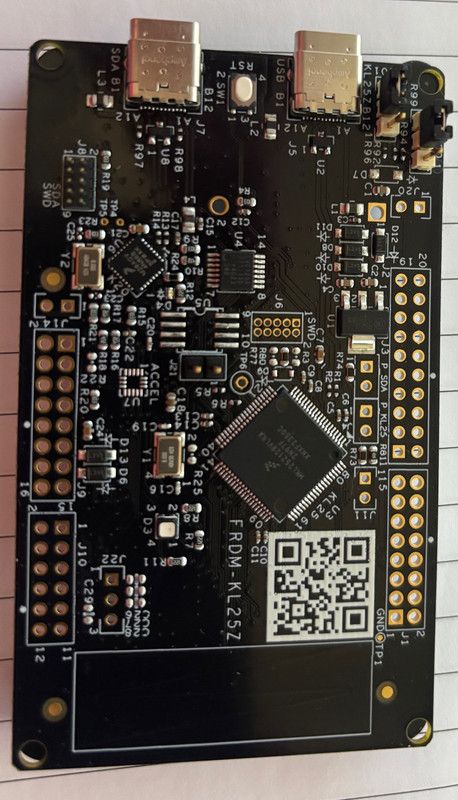
Some pics below:


KL25-Z-Top.jpg


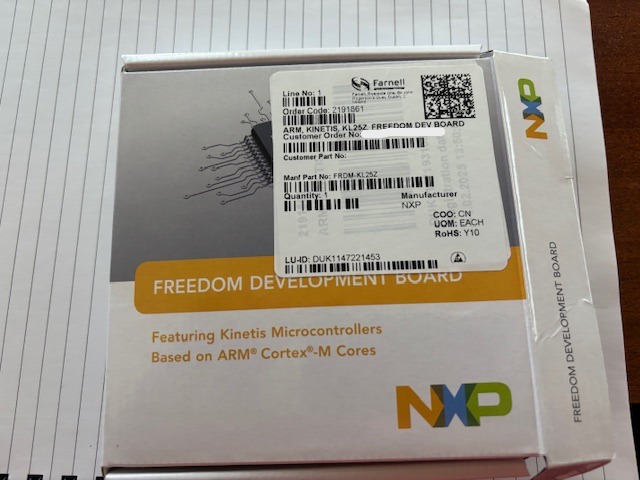
Box.jpg


#957 soup001

soup001

    Neophyte

  • Members
  • Pip
  • 6 posts

  • Flag: Australia

  • Favorite Pinball: Adams Family

Posted 24 February 2025 - 08:20 AM

The square corners do make me a little suspicious that it's not NXP original equipment, but it sounds like it's MOSTLY working as expected.  In particular:


> All see the board as "Pinscape Controller" under Bluetooth & Devices with

> the USB cable plugged into the Joystick USB.


It sounds like the firmware is running at least a little bit, since otherwise Windows wouldn't be able to interrogate the device for the identification string saying "Pinscape Controller".


What's the RGB LED doing?


What do you see when you run JOY.CPL (the Windows "Set up USB Game Devices" control panel)?

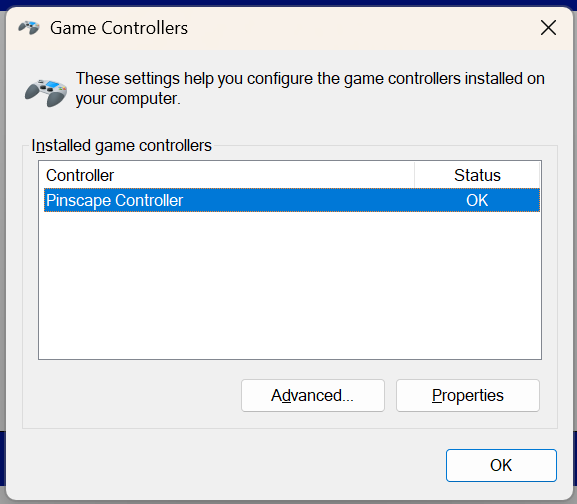
The Game Controller panel pops up as per below, just for kicks I went through the Calibration process but tilting/rolling the device or sliding my finger on the touch panel resulted in nothing being displayed (the slider was working for changing the LED color out of the box). The RGB light I take it is the one further away from the USB-c ports  - with the cable plugged into the Joystick Port no lights are on, when plugged into the programming port the LED closest to the USB-c port is steady green with the LED further away is brightly flashing green every ~3secs for a split second (strobe style). 

During the install process the LED closest to the USB-c port flashes slowly green then stays green once the install completed (and the other goes into strobe mode).

Joy-CPL.png


#958 rickh

rickh

    Enthusiast

  • Gold Supporter
  • 435 posts
  • Location:Raleigh

  • Flag: United States of America

  • Favorite Pinball: I love them all

Posted 24 February 2025 - 03:47 PM

This NXP board appears to be a re-spin, as it has USB C instead of the old mini-USB connector.  I am speculating that if NXP went through the trouble of re-spinning this board they would have also changed the accelerometer, as the original was EOL.   A close up up this PCBA would verify that, or at least identifying the accelerometer chip which is tiny.  


Regards,


Rick


Rickey

Intense Arcade

http://www.intensearcade.com


#959 mjr

mjr

    Pinball Wizard

  • Members
  • PipPipPipPipPip
  • 3,331 posts

  • Flag: United States of America

  • Favorite Pinball: Medieval Madness

Posted 24 February 2025 - 07:10 PM

> the LED further away is brightly flashing green every ~3secs for a split second (strobe style)


Any chance those short pulses are actually yellow?  The subjective color is sometimes a little off from the nominal color with very short blinks.  Here's the decoder ring for the flashes:


http://mjrnet.org/pi...id=statusLights


>  I am speculating that if NXP went through the trouble of re-spinning this board

> they would have also changed the accelerometer, as the original was EOL.


If that's the case, then this version of the board probably won't be compatible with the Pinscape software, since the accelerometer (at least) would probably have a different software interface.  If they changed that, they might have also changed the USB adapter, which could conceivably explain why it's not connecting properly.  It would have been courteous of them to give the board a new name if they were going to make a bunch of incompatible hardware changes, though!


And I agree, those do look like USB-C connectors.  @soup001, can you confirm the connector type?


The packaging looks like genuine NXP, and Farnell is certainly a legitimate vendor.  I checked the Farnell page for the order code on the package (2191861), and nothing there suggests that there's a new rev.  The tech specs still list MMA8451Q, for example.  But of course, retailer metadata is never to be trusted, and the board in the picture has some obvious physical differences from the original FRDM-KL25Z.


Edited by mjr, 24 February 2025 - 07:12 PM.


#960 fhjui

fhjui

    Enthusiast

  • Members
  • PipPipPip
  • 364 posts
  • Location:Germany

  • Flag: Germany

  • Favorite Pinball: especially EM tables

Posted 24 February 2025 - 11:00 PM

A bit strange, the whole thing...

  • What's astonishing with your picture that the accelerometer chip U7 is missing at the top of the board, perhaps a similar chip is mounted on the bottom. It would be helpful if you took a photo of the bottom side. The manufacturer's informations all refer to the old revision, no current information.
  • Your photo is a bit blurry, you can't read the name of the KL controller properly. It looks like "MKL25Z129VLK4", but I couldn't find such an IC. It must be called "MKL25Z128VLK4".
  • Otherwise the board is populated with the same ICs, except for the USB-C ports.
  • Please check the content of the file "LASTSTAT.TXT" when the controller is started in bootmode. It must be logged "ready".
  • The two files "SERCDC89.." are installation files for virtual com driver. You don't need them here. They are visible when the usb connector is connected to the programmer port (not switched to bootloader mode)
  • When connected to the programmer port the RGB LED flashes green/yellowish every 2 seconds four times, then 2 seconds pause.
  • The bootloader version of newer boards (~ 2018) is 1.12, but thats ok. Installing the pinscape firmware works well on these boards (boards with round edges and accelerator chip populated on top)

A picture from KL-board from 2018

kl25z-top_t.jpg


Edited by fhjui, 24 February 2025 - 11:01 PM.

My documentation for installing vpin software with PinUpsystem (Baller installer): https://mega.nz/fold...wAXZlOEMQGbdutQ

Files and PDF-docu in the subdir "Installation vPin-Software with Baller-Installer"


Also tagged with one or more of these keywords: pinscape