Jump to content


Photo
* * * * * 5 votes

The Machine - Bride Of Pinbot (Williams 1991) [Visual Pinball X]

williams 1991 machine pinbot of bride

  • Please log in to reply
81 replies to this topic

#61 batch

batch

    VPFroggie

  • Members
  • PipPipPipPipPip
  • 2,152 posts
  • Location:Center of France

  • Flag: France

  • Favorite Pinball: Anyone if gaming and appearence are great

Posted 25 January 2019 - 07:45 AM

Perhaps you can read posts #17 and #18 in this topic


signature_11042026.jpg          DIRECT LINK TO MY TABLES http://www.vpforums....loads&mid=30858    

                                               LINK TO MY 204 BACKDROPS : Design Resources/ Main Resources/Table Templates/Table Resources/Backdrops for VPX Tables (DT 16/9)  2.0 


#62 DreamTrap

DreamTrap

    Wheel Master

  • Platinum Supporter
  • 395 posts

  • Flag: ---------

  • Favorite Pinball: big bang bar, scared stiff, fish tales

Posted 23 March 2019 - 11:58 AM

it's not displaying correctly on my cabinet i have  checked test desktop is not checked and the mode is set to fullscreen but it still appears like this? (see attachment)

Attached Files


My wheels CHECK THEM OUT HERE.

Fantasy Tarcisio style Popper Wheels

Cab specs:

Spoiler


#63 Outhere

Outhere

    Pinball Wizard

  • Platinum Supporter
  • 4,805 posts

  • Flag: United States of America

  • Favorite Pinball: M M

Posted 23 March 2019 - 12:10 PM

https://vpinball.com.../7/#post-113295

https://www.vpforums...=36333&p=389061


#64 NorthernLitez

NorthernLitez

    Neophyte

  • Members
  • Pip
  • 3 posts

  • Flag: Canada

  • Favorite Pinball: Blackhole

Posted 21 April 2019 - 01:28 AM

Xenonph you are the best! I've been trying to get this table working for weeks. Editing the POV worked like a charm

#65 FDSystems

FDSystems

    Eclectic end-user

  • Charter Member
  • 2,477 posts
  • Location:Bahia

  • Flag: Brazil

  • Favorite Pinball: I will have to find out again.............

Posted 06 May 2020 - 05:09 PM

Back to VP after a 4 years leave, I' downloading & testing a LOT of tables.

Maybe due to my laptop limitations?(DELL Inspiron  Intel® Core™ i5-8250U CPU @ 1.60GHz  8GB Memory.) I prefer UW VP9 version.


To my taste the VPX version is too dark, too fast, too "cosmetic". I also get a lot of stuttering.


BUT, this is a GREAT table!


Thanks a lot to all the authors


From Brasil. Updated version of 1234fd


#66 Thalamus

Thalamus

    Pinball Wizard

  • Platinum Supporter
  • 4,975 posts

  • Flag: Norway

  • Favorite Pinball: GOT, Alien Star, LOTR, TOM

Posted 06 May 2020 - 10:42 PM

Yes. Your PC is on the low end for vpx. You will be able to play EM's and some of the SS re-creations without issues. But, you need a Nvidia 750ti or better to really enjoy these tables as they are built.


From now on. I won't help anyone here at VPF. Please ask Noah why that is.


#67 FDSystems

FDSystems

    Eclectic end-user

  • Charter Member
  • 2,477 posts
  • Location:Bahia

  • Flag: Brazil

  • Favorite Pinball: I will have to find out again.............

Posted 06 May 2020 - 10:55 PM

Not a problem to me. I now have about 80 fantastic tables & I only play one at a time, once in a while.

Beside this I live in Brasil where Hardware cost at leasr the double than In the US or in Europe due to taxes.

I did not need much money when I was playing the real thing.


From Brasil. Updated version of 1234fd


#68 The Loafer

The Loafer

    Pinball Wizard

  • VIP
  • 3,471 posts
  • Location:Embrun, Ontario, Canada

  • Flag: ---------

  • Favorite Pinball: Superman, Firepower & Tron


Posted 07 May 2020 - 01:38 AM

FYI for the dark comment, there is a daytime/night time slider that can be set per table in the table options screen. That should fix your issue


#69 galahad1966

galahad1966

    Hobbyist

  • Members
  • PipPip
  • 40 posts

  • Flag: Belgium

  • Favorite Pinball: 'AFM' - 'Indiana Jones, The Pinball Adventure'

Posted 12 May 2020 - 12:20 PM

Just wonderful, you artists never cease to amaze me!

How in the world do you recreate pinball tables with such precision?... just Whawww!

Thanks to all you artists I'm starting to have a nice collection of wonderful tables, thank you!


Here is your table with some "modification" for Desktop play only...

https://youtu.be/bGMb8Q5cS_E


Greetz,

Galahad.


#70 wrd1972

wrd1972

    Authoring Padawan

  • Platinum Supporter
  • 2,265 posts
  • Location:Central KY. USA

  • Flag: United States of America

  • Favorite Pinball: Funhouse

Posted 12 May 2020 - 12:48 PM

BOP is on my list for yet again...another revision. Looking to make it even more wonderful. :)


My VP Pincab /MAME Arcade  Specs: Dell T3400 workstation with Core2 Quad core 3.0GHZ (Q9650) CPU - 8GB of RAM - Nvidia  GTX 970

40" PF Sony gaming LED TV, Dual 21" Dell monitors in the backbox - Pinscape dual boards - Full DOF - Full MAME arcade support.


#71 The Loafer

The Loafer

    Pinball Wizard

  • VIP
  • 3,471 posts
  • Location:Embrun, Ontario, Canada

  • Flag: ---------

  • Favorite Pinball: Superman, Firepower & Tron


Posted 12 May 2020 - 02:29 PM

Oh boy!  We are all winners when you decide to revisit your past tables wrd1972!


#72 FDSystems

FDSystems

    Eclectic end-user

  • Charter Member
  • 2,477 posts
  • Location:Bahia

  • Flag: Brazil

  • Favorite Pinball: I will have to find out again.............

Posted 12 May 2020 - 11:02 PM

FYI for the dark comment, there is a daytime/night time slider that can be set per table in the table options screen. That should fix your issueed the table 


I downloaded the table once again to test your suggestions.


Now I' unable to register the credits. I cannot go over the message " Factory settings restored..... ".


This is happening to my other VPM tables too.


Yesterday, everythig was working fine.


Any idea ?


From Brasil. Updated version of 1234fd


#73 Emre

Emre

    Enthusiast

  • Members
  • PipPipPip
  • 110 posts

  • Flag: ---------

  • Favorite Pinball: Creature From The Black Lagoon

Posted 18 September 2021 - 12:15 AM

Is there anyone still has the 1.0 version of this table?


#74 bigus1

bigus1

    Pinball Fan

  • Members
  • PipPipPipPip
  • 972 posts
  • Location:Brisbane, Australia

  • Flag: Australia

  • Favorite Pinball: Firepower

Posted 18 September 2021 - 06:13 AM

I guess the authors' mailbox must be full.....


#75 PunkTiger

PunkTiger

    Enthusiast

  • Platinum Supporter
  • 60 posts
  • Location:New England

  • Flag: United States of America

  • Favorite Pinball: No Good Go'fers!

  • 360 Gamer Tag: PunkTiger63

Posted 17 January 2022 - 07:48 PM

Is there a specific backglass I can use for this on a 2-screen cabinet that will show the game score? I've found the one(s) here -- http://www.vpforums....&showfile=13235 -- but none of them seem to work for my cabinet.


The first two (Bright and Not As Bright) will show a red box around the score area with the message "Please use the exclusive and recommended grill version", while the other four have no scoring area at all.


Thank you for any help you can give me.


#76 PunkTiger

PunkTiger

    Enthusiast

  • Platinum Supporter
  • 60 posts
  • Location:New England

  • Flag: United States of America

  • Favorite Pinball: No Good Go'fers!

  • 360 Gamer Tag: PunkTiger63

Posted 18 January 2022 - 03:11 AM

Never mind. I managed to find a backglass that works for my cabinet on another site. It took me long enough to think of that.


#77 Tiki

Tiki

    Enthusiast

  • Members
  • PipPipPip
  • 187 posts
  • Location:Germany

  • Flag: Germany

  • Favorite Pinball: Medieval Madness, Tales of Arabian Nights, Creature from the black Lagoon

Posted 17 April 2022 - 11:29 AM

What is this "show cheater post" entry doing in the script? I guess I'm too blind to notice a change in the table....


vpforumstiki.jpg


#78 hatchlof

hatchlof

    Neophyte

  • Members
  • Pip
  • 2 posts
  • Location:Detroit, MI

  • Flag: ---------

  • Favorite Pinball: dirty harry

Posted 26 January 2023 - 08:59 PM

I've got the table and rom loaded, but when I launch the ball, it stops only a couple inches after traveling up the ramp and then the ball just freezes. The odd thing is that you can move the ball with the arrow keys after that but normal physics don't seem to apply. I'm on the newest version of VPX. I've tried hunting for a solution everywhere but can't seem to find anyone running into this issue. I've attempted downloading this table from multiple sources as well.


#79 xenonph

xenonph

    I have Pinball Fever!

  • VIP
  • 4,127 posts
  • Location:Castle Rock, WA.

  • Flag: United States of America

  • Favorite Pinball: TRON Classic-Congo-Xenon-PINBOT-BOP-LOTR-A Real American Hero OPERATION PINBALL-Millionaire-Whirlwind-Krull-NFL-BlackKnight-FishTales

Contributor

Posted 26 January 2023 - 09:36 PM


I've got the table and rom loaded, but when I launch the ball, it stops only a couple inches after traveling up the ramp and then the ball just freezes. The odd thing is that you can move the ball with the arrow keys after that but normal physics don't seem to apply. I'm on the newest version of VPX. I've tried hunting for a solution everywhere but can't seem to find anyone running into this issue. I've attempted downloading this table from multiple sources as well.


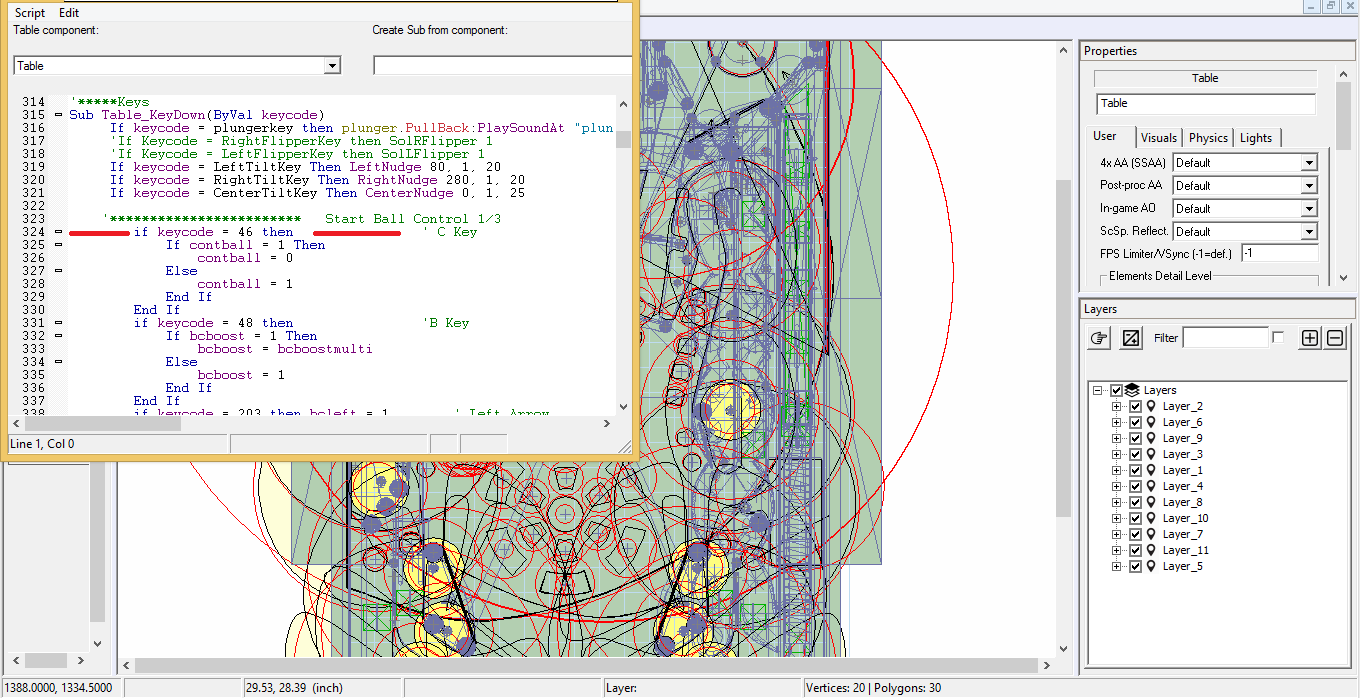
You must have your C key assigned to something, or you are accidently hitting your C key which toggles the Ball Control.

If you do have this C key already assigned for something, then go into table script, and you will see on Line 324 this...


        if keycode = 46 then                ' C Key


Change the 46 to 14 so it looks like this...


        if keycode = 14 then                ' C Key


Now Ball Control is toggled with your Backspace key instead of the C key.


capture436_t.png


CHECK OUT THIS TUTORIAL http://www.vpforums....howtopic=32515
TO USE DB2S BACKGLASS PROGRAM WITH DESKTOP TABLES ON 1 MONITOR
 

#80 hatchlof

hatchlof

    Neophyte

  • Members
  • Pip
  • 2 posts
  • Location:Detroit, MI

  • Flag: ---------

  • Favorite Pinball: dirty harry

Posted 28 January 2023 - 03:07 PM

This did the trick. Thank you so much!


I've got the table and rom loaded, but when I launch the ball, it stops only a couple inches after traveling up the ramp and then the ball just freezes. The odd thing is that you can move the ball with the arrow keys after that but normal physics don't seem to apply. I'm on the newest version of VPX. I've tried hunting for a solution everywhere but can't seem to find anyone running into this issue. I've attempted downloading this table from multiple sources as well.


You must have your C key assigned to something, or you are accidently hitting your C key which toggles the Ball Control.

If you do have this C key already assigned for something, then go into table script, and you will see on Line 324 this...


        if keycode = 46 then                ' C Key


Change the 46 to 14 so it looks like this...


        if keycode = 14 then                ' C Key


Now Ball Control is toggled with your Backspace key instead of the C key.


capture436_t.png


Also tagged with one or more of these keywords: williams, 1991, machine, pinbot, of, bride