Jump to content


Photo
- - - - -

Followed tutorials but can't get DofLinx working


  • Please log in to reply
197 replies to this topic

#41 jevansoh

jevansoh

    Enthusiast

  • Members
  • PipPipPip
  • 348 posts

  • Flag: United States of America

  • Favorite Pinball: The Simpsons

Posted 09 August 2017 - 11:07 PM

Nope.  Same thing.  I click ok after filling out the three fields and the window just disappears.


It says it's running in the taskmgr but there is no window and nothing to click on...Just like doflinx.exe



#42 Outhere

Outhere

    Pinball Wizard

  • Platinum Supporter
  • 4,807 posts

  • Flag: United States of America

  • Favorite Pinball: M M

Posted 09 August 2017 - 11:26 PM

It should automatically open another window

Nope.  Same thing.  I click ok after filling out the three fields and the window just disappears.


It says it's running in the taskmgr but there is no window and nothing to click on...Just like doflinx.exe


#43 jevansoh

jevansoh

    Enthusiast

  • Members
  • PipPipPip
  • 348 posts

  • Flag: United States of America

  • Favorite Pinball: The Simpsons

Posted 09 August 2017 - 11:59 PM

It doesn't though so now I don't know what to do.


#44 DDH69

DDH69

    Pinball Wizard

  • Platinum Supporter
  • 3,603 posts
  • Location:DOFLinx HQ, Adelaide

  • Flag: Australia

  • Favorite Pinball: Monster Bash

Posted 10 August 2017 - 12:00 AM

Do you have DEBUG=1 in your INI file?  It sounds like DOFLinx is starting successfully and doing what it does, hiding and waiting.  To see it and use the test functions turn DEBUG on.


DOFLinx
Contributions for equipment to help with ongoing DOFLinx development can be made here

#45 jevansoh

jevansoh

    Enthusiast

  • Members
  • PipPipPip
  • 348 posts

  • Flag: United States of America

  • Favorite Pinball: The Simpsons

Posted 10 August 2017 - 12:07 AM

debug=1 is the very first line in the doflinx.ini file.


We're talking about two different things though, right?


I need to get my visual pinball tables working with DOF again and can't seem to figure out how to do that because the program that's supposed to open another window after I pick the table, rom, and xml file, doesn't do anything.  It's running in the background but no window shows up so I don't even know what I'm looking for.


I don't know if anyone would be interested, but I have TeamViewer installed if anyone would like to take a look at the PC directly instead of going back and forth here.  I would be (and am) grateful for all your help.


#46 jevansoh

jevansoh

    Enthusiast

  • Members
  • PipPipPip
  • 348 posts

  • Flag: United States of America

  • Favorite Pinball: The Simpsons

Posted 10 August 2017 - 12:21 AM

So is the directoutputconfig20.ini file the file that communicates with all my toys/devices such as solenoids, shaker motor, etc, and works with DOF or is it something else.  Nobody has been able to tell me exactly what I'm missing or what I need in order to get my devices working with visual pinball and DOF yet.


#47 jevansoh

jevansoh

    Enthusiast

  • Members
  • PipPipPip
  • 348 posts

  • Flag: United States of America

  • Favorite Pinball: The Simpsons

Posted 10 August 2017 - 12:42 AM

I sure hope I haven't stumped you guys.  Now I'm getting nervous.


#48 Outhere

Outhere

    Pinball Wizard

  • Platinum Supporter
  • 4,807 posts

  • Flag: United States of America

  • Favorite Pinball: M M

Posted 10 August 2017 - 01:03 AM

By putting dof r3 over the top of the R2 version should not have affected anything

Have you tried rebooting your computer at all to see if that makes any difference ....as far as TeamViewer I have not really used that much but tonight I could not, but maybe tomorrow


#49 jevansoh

jevansoh

    Enthusiast

  • Members
  • PipPipPip
  • 348 posts

  • Flag: United States of America

  • Favorite Pinball: The Simpsons

Posted 10 August 2017 - 01:07 AM

I've rebooted so many times I've lost count. :(


If and when you're interested, I'd be happy to give you access.  It's a free download and is easy to set up.


In the mean time, if we could keep troubleshooting here (and if anyone else has any ideas, please chime in) that would be great.


Thanks,


--J


#50 Outhere

Outhere

    Pinball Wizard

  • Platinum Supporter
  • 4,807 posts

  • Flag: United States of America

  • Favorite Pinball: M M

Posted 10 August 2017 - 01:10 AM

It might be a good idea to start a new post since this is no longer about DOFLinx, it's about visual pinball DOF


#51 jevansoh

jevansoh

    Enthusiast

  • Members
  • PipPipPip
  • 348 posts

  • Flag: United States of America

  • Favorite Pinball: The Simpsons

Posted 10 August 2017 - 01:17 AM

Ok, I can do that...Just so you know, though, I restarted one more time and this time the new window came up!!!  So do you want to continue here (I will eventually get back to DofLinx if I can ever get DOF working) or do you want me to make a new thread first?


#52 Outhere

Outhere

    Pinball Wizard

  • Platinum Supporter
  • 4,807 posts

  • Flag: United States of America

  • Favorite Pinball: M M

Posted 10 August 2017 - 01:20 AM

Are you able to get the tester to work now


#53 jevansoh

jevansoh

    Enthusiast

  • Members
  • PipPipPip
  • 348 posts

  • Flag: United States of America

  • Favorite Pinball: The Simpsons

Posted 10 August 2017 - 01:23 AM

yes.  when I click pulse it activated different lights and solenoids.  that's some progress at least but I still don't know what to do about it or how to use it.


so what file, what is the name of the file, that normally has all that stuff set up and working?  THAT is the file I need from the seller, right?  If I can get it replaced.  If not, I'll have to use the tester to somehow recreate the file?  Am I understanding correctly?


#54 Outhere

Outhere

    Pinball Wizard

  • Platinum Supporter
  • 4,807 posts

  • Flag: United States of America

  • Favorite Pinball: M M

Posted 10 August 2017 - 01:26 AM

I'm not sure exactly how this program works but I just know stuff from having to troubleshoot it, did you try a game and see if it works now


#55 jevansoh

jevansoh

    Enthusiast

  • Members
  • PipPipPip
  • 348 posts

  • Flag: United States of America

  • Favorite Pinball: The Simpsons

Posted 10 August 2017 - 01:27 AM

yes, I tried.  no it doesn't work.  I can manually activate stuff with that program but that's it.


#56 DDH69

DDH69

    Pinball Wizard

  • Platinum Supporter
  • 3,603 posts
  • Location:DOFLinx HQ, Adelaide

  • Flag: Australia

  • Favorite Pinball: Monster Bash

Posted 10 August 2017 - 01:38 AM

Still here and still happy to help.  Just trying to keep up as to the current status.


DOFLinx
Contributions for equipment to help with ongoing DOFLinx development can be made here

#57 Outhere

Outhere

    Pinball Wizard

  • Platinum Supporter
  • 4,807 posts

  • Flag: United States of America

  • Favorite Pinball: M M

Posted 10 August 2017 - 01:39 AM

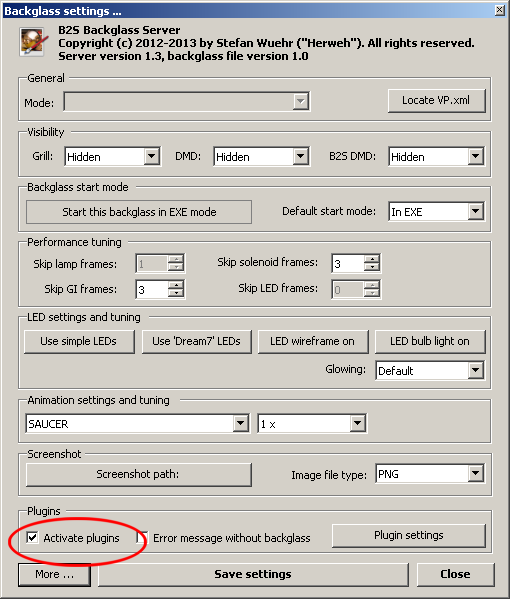
Check this again


B2SServer_Settings_ActivatePlugins.png


#58 DDH69

DDH69

    Pinball Wizard

  • Platinum Supporter
  • 3,603 posts
  • Location:DOFLinx HQ, Adelaide

  • Flag: Australia

  • Favorite Pinball: Monster Bash

Posted 10 August 2017 - 01:39 AM

Sounds like you've got the ROM tester firing off some devices - correct?


DOFLinx
Contributions for equipment to help with ongoing DOFLinx development can be made here

#59 jevansoh

jevansoh

    Enthusiast

  • Members
  • PipPipPip
  • 348 posts

  • Flag: United States of America

  • Favorite Pinball: The Simpsons

Posted 10 August 2017 - 01:40 AM

yes, that is set correctly.  I verified.


yes, I have it firing off devices now in the tester...I just don't know what to do with the tester or what's what.


#60 DDH69

DDH69

    Pinball Wizard

  • Platinum Supporter
  • 3,603 posts
  • Location:DOFLinx HQ, Adelaide

  • Flag: Australia

  • Favorite Pinball: Monster Bash

Posted 10 August 2017 - 01:43 AM

Have we checked that all EXE and DLL files in the DirectOutput folder are unblocked?


DOFLinx
Contributions for equipment to help with ongoing DOFLinx development can be made here