Jump to content


Photo
* * * * - 6 votes

The VP 10.1 beta thread


  • Please log in to reply
868 replies to this topic

#481 hauntfreaks

hauntfreaks

    Real 4K Tables Since 2013

  • VIP
  • 2,522 posts
  • Location:South Jersey

  • Flag: United States of America

  • Favorite Pinball: -<3<3<3 All Real Pins


Posted 26 April 2016 - 04:40 PM

maybe I'm remember this different... but i noticed with the last couple builds... to sink a primitive into the playfield you now have to uncheck , static and reflection for it to work?

was this always the case??.... I dont remember it being that way....


 26794541816_30ca1cca80_o.gif 43109635392_fc11af1a57_o.gif


#482 boiydiego

boiydiego

    Pinball Fan

  • Members
  • PipPipPipPip
  • 978 posts
  • Location:baal

  • Flag: Belgium

  • Favorite Pinball: flinstones,t2 chrome edition,wcs,afm,fish tales,medieval,rollercoaster tycoon,taxi

Posted 26 April 2016 - 05:53 PM

hauntfreaks i think your inbox is full could not send you a pm..


boiydiego___gebruik-n2kbkyc.png


#483 hauntfreaks

hauntfreaks

    Real 4K Tables Since 2013

  • VIP
  • 2,522 posts
  • Location:South Jersey

  • Flag: United States of America

  • Favorite Pinball: -<3<3<3 All Real Pins


Posted 26 April 2016 - 07:54 PM

hauntfreaks i think your inbox is full could not send you a pm..


you know that wouldnt happen if....lol  never mind


cleaned out a few.... try again


 26794541816_30ca1cca80_o.gif 43109635392_fc11af1a57_o.gif


#484 gtxjoe

gtxjoe

    VPF Veteran

  • VIP
  • 5,151 posts

  • Flag: United States of America

  • Favorite Pinball: Medieval Madness, AbraCadabra


Contributor

Posted 26 April 2016 - 08:47 PM

I will say it -


       Time to announce the 2015 VIP Class!  It's 5 months overdue...


#485 hauntfreaks

hauntfreaks

    Real 4K Tables Since 2013

  • VIP
  • 2,522 posts
  • Location:South Jersey

  • Flag: United States of America

  • Favorite Pinball: -<3<3<3 All Real Pins


Posted 26 April 2016 - 11:14 PM

so this is the dumb ass in me showiing.... 


but what is the difference between "windowed full screen"  and  "forced full scree"  just wondering


 26794541816_30ca1cca80_o.gif 43109635392_fc11af1a57_o.gif


#486 ICPjuggla

ICPjuggla

    Early Retirement

  • VIP
  • 1,193 posts

  • Flag: United States of America

  • Favorite Pinball: Star Wars

Posted 27 April 2016 - 12:57 AM

I was wondering the same thing hauntfreaks about the windowed and forced full screen . lol

Also, I don't really understand what the new primitive texture thing does! It really makes no sence to me the way it was or was not explained.. lol maybe we need a new feature write up for dummy's when new features come out.. Ha ha ha lol :-)

I've also been wondering if we will ever see some other features many have asked for?? built in wire guides, built in wall guides, assigning primitives there own or seperate HDR image etc. etc. maybe none of these features are possible but one can only hope!

cosmicgunfight-sig2.png breakshot-sig-small3.png atlantis-sig-small.png mousinaround-sig6.png hurricane-sig16.png sc-badge1.png lw-sig.png embryon-logo0.png icp-3.png apollo13_badge(1).png whirlwind_badge0.png playboy_badge0.png oxo1.png raven_logo.png rambo_logo4.png


#487 NEW

NEW

    Enthusiast

  • Members
  • PipPipPip
  • 180 posts

  • Flag: Argentina

  • Favorite Pinball: Centaur

Posted 27 April 2016 - 01:18 AM

Hey guys, I think something solved but now with the new version now this happens.
 
ll1_t.png
 
Greetings and thank you very much for the help you are giving me.
 
Cesar

Edited by NEW, 27 April 2016 - 01:19 AM.


#488 hauntfreaks

hauntfreaks

    Real 4K Tables Since 2013

  • VIP
  • 2,522 posts
  • Location:South Jersey

  • Flag: United States of America

  • Favorite Pinball: -<3<3<3 All Real Pins


Posted 27 April 2016 - 01:41 AM

I was wondering the same thing hauntfreaks about the windowed and forced full screen . lol

Also, I don't really understand what the new primitive texture thing does! It really makes no sence to me the way it was or was not explained.. lol maybe we need a new feature write up for dummy's when new features come out.. Ha ha ha lol :-)

I've also been wondering if we will ever see some other features many have asked for?? built in wire guides, built in wall guides, assigning primitives there own or seperate HDR image etc. etc. maybe none of these features are possible but one can only hope!


I found our answers.... lol


26394441020_81240b715c_o.png


 26794541816_30ca1cca80_o.gif 43109635392_fc11af1a57_o.gif


#489 nFozzy

nFozzy

    Pinball Fan

  • Members
  • PipPipPipPip
  • 553 posts

  • Flag: ---------

  • Favorite Pinball: Pinbot

Posted 27 April 2016 - 01:41 AM

Thanks for suggesting xNormal, getting promising results with it so far. Great AO maps too.


maybe I'm remember this different... but i noticed with the last couple builds... to sink a primitive into the playfield you now have to uncheck , static and reflection for it to work?

was this always the case??.... I dont remember it being that way....

Been that way for awhile now, all elements under the playfield have to be rendered in real-time.


#490 hauntfreaks

hauntfreaks

    Real 4K Tables Since 2013

  • VIP
  • 2,522 posts
  • Location:South Jersey

  • Flag: United States of America

  • Favorite Pinball: -<3<3<3 All Real Pins


Posted 27 April 2016 - 01:52 AM


Been that way for awhile now, all elements under the playfield have to be rendered in real-time.


:(  now I need to ask what rendering in real time means.... do you mean its being rendered over and over...???


 26794541816_30ca1cca80_o.gif 43109635392_fc11af1a57_o.gif


#491 BorgDog

BorgDog

    We come in peace.. shoot to kill.. shoot to kill.

  • Members
  • PipPipPipPip
  • 1,427 posts
  • Location:Leavenworth, WA

  • Flag: United States of America

  • Favorite Pinball: Alien Star, TNA


Posted 27 April 2016 - 01:55 AM

yes, as opposed to static which just gets rendered once when the table first starts, real time aka dynamic


Edited by BorgDog, 27 April 2016 - 01:55 AM.


#492 nFozzy

nFozzy

    Pinball Fan

  • Members
  • PipPipPipPip
  • 553 posts

  • Flag: ---------

  • Favorite Pinball: Pinbot

Posted 27 April 2016 - 02:05 AM


Been that way for awhile now, all elements under the playfield have to be rendered in real-time.


:(  now I need to ask what rendering in real time means.... do you mean its being rendered over and over...???


Make sure any walls/ramps have a material with opacity checked and you'll be good


#493 hauntfreaks

hauntfreaks

    Real 4K Tables Since 2013

  • VIP
  • 2,522 posts
  • Location:South Jersey

  • Flag: United States of America

  • Favorite Pinball: -<3<3<3 All Real Pins


Posted 27 April 2016 - 04:49 AM

I just got done testing the new forced FS on my cab... and like others have noted , it loads in the background, so to play it you need to bring it forward... so loading from PBX is a no go (at least for me)


that being said I did play a few tables in this mode.... and i've said this before...lol... maybe its just wishful thinking, but it did seem to have better performance (then windowed FS)


so is this just a temporary issue with it loading in the background?... or a flew with windows itself?? 


 26794541816_30ca1cca80_o.gif 43109635392_fc11af1a57_o.gif


#494 Dozer316

Dozer316

    Dozer

  • VIP
  • 669 posts

  • Flag: Australia

  • Favorite Pinball: Cirqus Voltaire

Posted 27 April 2016 - 08:04 AM

I was wondering the same thing hauntfreaks about the windowed and forced full screen . lol

Also, I don't really understand what the new primitive texture thing does! It really makes no sence to me the way it was or was not explained.. lol maybe we need a new feature write up for dummy's when new features come out.. Ha ha ha lol :-)

I've also been wondering if we will ever see some other features many have asked for?? built in wire guides, built in wall guides, assigning primitives there own or seperate HDR image etc. etc. maybe none of these features are possible but one can only hope!


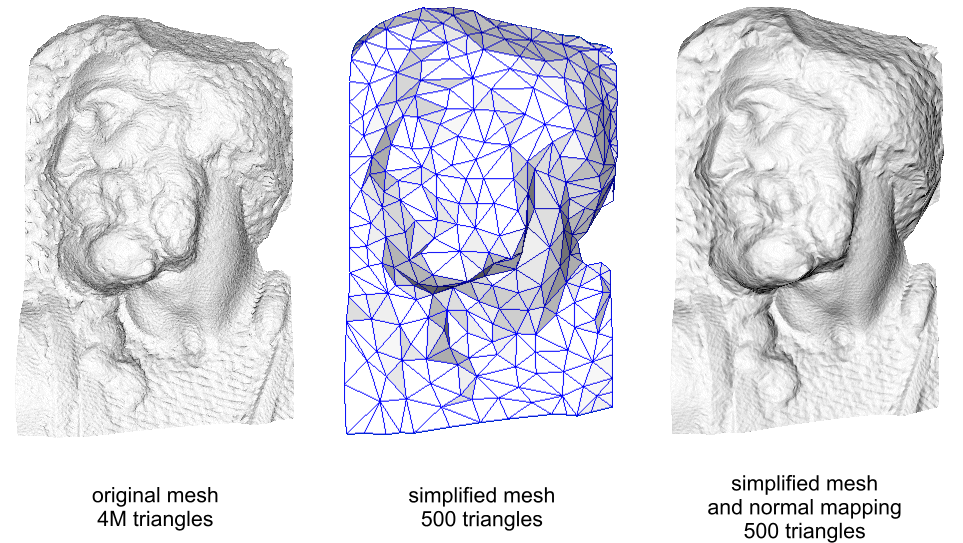
Heya - Normal mapping is explained here - it's a technique to re detail a mesh that has had its polygon count reduced using a special texture that is placed over it.  It was used extensively in the mid to late 90's to make games look more realistic when their CPU grunt could only render very low poly count models. They are still used a lot too.

https://en.wikipedia.../Normal_mapping


Normal_map_example.png


Edited by Dozer316, 27 April 2016 - 08:18 AM.


#495 toxie

toxie

    VPF Veteran

  • VP Dev Team
  • PipPipPipPipPipPip
  • 5,734 posts
  • Location:berlin, germany

  • Flag: Germany

  • Favorite Pinball: AFM

Posted 27 April 2016 - 12:24 PM

so this is the dumb ass in me showiing.... 


but what is the difference between "windowed full screen"  and  "forced full scree"  just wondering


with newer windows versions, there is something called the desktop window manager, responsible for the desktop composition (the stuff where you can have transparent blurry borders, etc).

one of the drawbacks of this is that windowed full screen will also go through that pipeline, which potentially adds a bit of lag.


exclusive full screen will use a "true" fullscreen mode, e.g. VP will be the only window visible on the given screen (thats why the VPM window will not show up on the same screen for example). this can disable the desktop composition (at least on windows 7, newer ones i don't think so), removing the bit of lag mentioned above, plus other potential optimizations the graphics driver might be able to do. in addition one can also choose the resolution and refresh rate without having to do that for all of windows (obviously).


another thing possible with exclusive fullscreen is the support of 10bit monitors. and maybe HDR monitors in the near future (unclear if that works with DX9 though for now).


maybe I'm remember this different... but i noticed with the last couple builds... to sink a primitive into the playfield you now have to uncheck , static and reflection for it to work?

was this always the case??.... I dont remember it being that way....


this is the case since a looooong time, at least since VP10 final. ;)

its a restriction that gets the rendering a bit faster, and mainly saves gfx memory, along with solving some engine headaches.


I've also been wondering if we will ever see some other features many have asked for?? built in wire guides, built in wall guides, assigning primitives there own or seperate HDR image etc. etc. maybe none of these features are possible but one can only hope!


the separate HDR image is not really feasible, as we want to make the rendering and lighting more and more dynamic (and more realistic) over time, and this is one of the things that would produce more headaches for us in the near future.

wire & wall guides is something fuzzel might be able to answer, he's the geometry expert.


Heya - Normal mapping is explained here - it's a technique to re detail a mesh that has had its polygon count reduced using a special texture that is placed over it.  It was used extensively in the mid to late 90's to make games look more realistic when their CPU grunt could only render very low poly count models. They are still used a lot too.


Indeed. Every AAA game out there uses it excessively on almost every object in the game.



#496 fuzzel

fuzzel

    spaghetti code

  • VP Dev Team
  • PipPipPipPipPip
  • 2,818 posts

  • Flag: Germany

  • Favorite Pinball: yes I have

Posted 27 April 2016 - 12:35 PM


I've also been wondering if we will ever see some other features many have asked for?? built in wire guides, built in wall guides, assigning primitives there own or seperate HDR image etc. etc. maybe none of these features are possible but one can only hope!


the separate HDR image is not really feasible, as we want to make the rendering and lighting more and more dynamic (and more realistic) over time, and this is one of the things that would produce more headaches for us in the near future.

wire & wall guides is something fuzzel might be able to answer, he's the geometry expert.


I've already answered that from time to time here. Adding wire/wall guides to VPX is a bit tricky and time consuming and time is a bit short on my side at the moment. The only solution you have at the moment is to build them in Blender or FP and import them as mesh primitives. I know that isn't comfortable but until I found a good way to add good looking and working guides to VPX it's the only option.


Edited by fuzzel, 27 April 2016 - 12:36 PM.


#497 toxie

toxie

    VPF Veteran

  • VP Dev Team
  • PipPipPipPipPipPip
  • 5,734 posts
  • Location:berlin, germany

  • Flag: Germany

  • Favorite Pinball: AFM

Posted 27 April 2016 - 12:42 PM


Hey guys, I think something solved but now with the new version now this happens.
 
ll1_t.png
 
Greetings and thank you very much for the help you are giving me.
 
Cesar


Just do what the message box tells you. That fixes it.  ;)


I just got done testing the new forced FS on my cab... and like others have noted , it loads in the background, so to play it you need to bring it forward... so loading from PBX is a no go (at least for me)


that being said I did play a few tables in this mode.... and i've said this before...lol... maybe its just wishful thinking, but it did seem to have better performance (then windowed FS)


so is this just a temporary issue with it loading in the background?... or a flew with windows itself?? 


the code that does the exclusive fullscreen mode is exactly the same as the windowed fullscreen, so i do not have a clue why this happens.  :/


#498 lodger

lodger

    Board Certified Funk Master

  • Members
  • PipPipPipPip
  • 993 posts
  • Location:Altoona Pennsylvania

  • Flag: United States of America

  • Favorite Pinball: Whirlwind, TAF

Contributor

Posted 27 April 2016 - 02:19 PM

Just a thought regarding the question about a "poke objects in editor mode" as an alternative, might it be possible to bring up a window that has a matrix of all the given objects and different event types i.e. wall hit, wall slingshot and you click in the grid to accomplish that? This could help overcome the issue with trying to trigger objects across multiple planes


berzerk2_0logo.png

http://www.vpforums....&showfile=11819

Version 2.0- Released 2/27/16


#499 unclewilly

unclewilly

    sofa king.....

  • VIP
  • 5,170 posts
  • Location:Baltimore, Maryland

  • Flag: United States of America

  • Favorite Pinball: tz, tom, big hurt, who dunnit


Posted 27 April 2016 - 03:03 PM

With the fs mode that only allows vp to show. Would it be possible to get a rotation feature on the text box. I only have one screen to work with at the moment.
Or can i already do this using a ramp or flasher object for the dmd, i can't remember which one you can pipe vpm to

"it will all be ok in the end, if it's not ok, it's not the end"
 
Monster Bash VP10 WIP https://dl.dropboxus... (vpx)WIP15.vpx

uw2.gif


#500 flupper1

flupper1

    Enthusiast

  • Members
  • PipPipPip
  • 464 posts
  • Location:Netherlands

  • Flag: Netherlands

  • Favorite Pinball: Visual Pinball

Contributor

Posted 27 April 2016 - 03:10 PM

I was working on a chrome apron for my WIP of BK2000, and the normal maps was just what I needed! This is what it looks like:

screenshot11_t.jpg


The apron model in VPX does not contain any of the texts, only the apron itself:

screenshotnonormalmapandnotexture_t.jpg


In Blender I made the model with the texts and everything, from that I generate a texture. If I only apply that texture, it looks like this (no normal map in VPX):

screenshotnonormalmap_t.jpg


And if I only apply the normal map, but no texture, it looks like this:

screenshotonlynormalmap_t.jpg


The Blender model with the texts is 6.1M triangles (needed to generate the normal map and the texture), the model in VPX is just 23k triangles.


Edited by flupper1, 27 April 2016 - 03:45 PM.