
Hi.
Thanks for the continued work on this.
I am a bit stuck, how on earth do you get the latest files from github?, i beleive it is 10.7.1.
All i see is the +32 releases at the side which says latest is 10.7.0.
Thanks.


 40 votes

Hobbyist


Posted 08 January 2022 - 12:04 AM
Hi.
Thanks for the continued work on this.
I am a bit stuck, how on earth do you get the latest files from github?, i beleive it is 10.7.1.
All i see is the +32 releases at the side which says latest is 10.7.0.
Thanks.
VPF Legend


Posted 08 January 2022 - 01:27 AM
Could be a crash. Is there a crash.dmp file in the same folder where you had opened the table?
looking now
Nope. No crash file in the folder.
Does not really feel like a crash. Its that the table simply wants to close it self out automatically when you return to the editor.
Okay here is some more info. Once the editor is up, if I load the "Full Sample Table", play it and then exit, then load a normal table, everything works much better. I did this and managed to get a table to run/exit 10 times in a row without it closing down.
So as long as I have run the Full Sample Table as my first table, then everything is normal. How can that be?
that happens to me sometimes
I will hit Q to quit out to editor, and it will zip right passed the editor and exit out completely
No crash, it is a clean exit, it's just that i did not want to to exit that far
If i have unsaved changes, then it wont do that, because the do you want to save changes dialog stops it.
If you feel the need to empty your wallet in my direction, i don't have any way to receive it anyways
Spend it on Hookers and Blow
Authoring Padawan


Posted 08 January 2022 - 06:06 AM
My VP Pincab /MAME Arcade Specs: Dell T3400 workstation with Core2 Quad core 3.0GHZ (Q9650) CPU - 8GB of RAM - Nvidia GTX 970
40" PF Sony gaming LED TV, Dual 21" Dell monitors in the backbox - Pinscape dual boards - Full DOF - Full MAME arcade support.
VPF Legend
Posted 08 January 2022 - 06:28 AM
Hmm. Sounds like a bug. I guess I can drop a random object somewhere and force the save dialog to appear. Sounds like a second work-around to mask the issue.
For me this now happens all the time. Makes me wonder how it's only happening occasionally for you?
This behavior is happening on the cab. I will see if it also happens on my desktop pc tomorrow.
dont need to drop any object, just toggle a layer on or off
Why is it only occasionally for me?
Might be because i consciously try not to let the exit key be pressed for more than a fraction of a nano second
and it still may simply just clean exit
If you feel the need to empty your wallet in my direction, i don't have any way to receive it anyways
Spend it on Hookers and Blow
I have Pinball Fever!



 Contributor
Posted 08 January 2022 - 06:38 AM
I click Table tab, Table Info, and then click OK. (If you click CANCEL, it won't work.) No need to edit anything.
Click the red X and the save dialog comes up every time.
Edited by xenonph, 08 January 2022 - 06:38 AM.
CHECK OUT THIS TUTORIAL http://www.vpforums....howtopic=32515
TO USE DB2S BACKGLASS PROGRAM WITH DESKTOP TABLES ON 1 MONITOR
Grand Schtroumpf


Posted 08 January 2022 - 09:31 AM
I'm using the 1.7.0 release version and it doesn't happen to me.
If you want to check my latest uploads then click on the image below:

VPF Veteran


Posted 08 January 2022 - 01:19 PM
So how do you guys exit the table? Pressing Q? ESC Menu?
And i'm very confused about your description, xenonph, how is this related??
Or is this (and wiesshunds suggestion) just so that the popping up save dialog avoids the editor to close immediately due to the bug?
Uhm wait.. There was already a regedit for it??
In that case please tell me.. .. I missed that one..
wiesshund: *ping* on this
Authoring Padawan
Posted 08 January 2022 - 03:41 PM
Toxie,
To exit a table, I always use ESC, Q. Pretty much have dont that from day one.
If I use ESC, "Quit to editor", I get the same problem. So there are now 3 workarounds mentioned here for those that are plagued by the issue. And again, this does not happen with the embedded sample tables.
I had 10.7 on for days, but since I was making changes to tables, the issue was masked. But I now have this non-stop if I just want to play.
My VP Pincab /MAME Arcade Specs: Dell T3400 workstation with Core2 Quad core 3.0GHZ (Q9650) CPU - 8GB of RAM - Nvidia GTX 970
40" PF Sony gaming LED TV, Dual 21" Dell monitors in the backbox - Pinscape dual boards - Full DOF - Full MAME arcade support.
VPF Legend
Posted 08 January 2022 - 05:54 PM
So how do you guys exit the table? Pressing Q? ESC Menu?
And i'm very confused about your description, xenonph, how is this related??
Or is this (and wiesshunds suggestion) just so that the popping up save dialog avoids the editor to close immediately due to the bug?
Uhm wait.. There was already a regedit for it??
In that case please tell me.. .. I missed that one..
wiesshund: *ping* on this
by hitting Q, which pops up the menu, then hitting Q again
but using Escape has the same result
Sometimes, it just kind of steam lines the exit process right out of vpx entirely
if the table has no changes that are unsaved
Does not matter which PC i am on or what keyboard is being used.
Again, it does not crash, it is a clean exit, if there are unsaved changes, it will stop and ask you if you want to save them
it simply gets ahead of itself.
Same effect as if you pressed and held Q which tells VPX to exit all the way to the desktop.
It isnt a show stopper thing, just a darn i didnt want to exit fully thing
As for the other thing
Computer\HKEY_CURRENT_USER\Software\Visual Pinball\VP10\CVEdit
BackgroundColor (hex_value)
BackGroundSelectionColor (hex_value)
the only one i have not figured out quite yet is
background highlight color, have to figure out what it calls that
or what Windows calls it
when you click a line, but dont actually select anything and the entire line gets highlighted in bright white
I am pretty sure it has to do with the cursor itself, it is polar opposite to the cursor
like to set the cursor color and the active typing line background, as it is hard to see while typing unless you use only black text.
i dont see anything in the source yet, that seems to refer to it, i am assuming that it is just deferring to windows common dialog at that point and not asking for anything special?

If you feel the need to empty your wallet in my direction, i don't have any way to receive it anyways
Spend it on Hookers and Blow
Authoring Padawan
Posted 08 January 2022 - 06:23 PM
"It isnt a show stopper thing, just a darn i didnt want to exit fully thing"
That pretty much sums it up.
Let me know if you guys need anything from me for troubleshooting.
My VP Pincab /MAME Arcade Specs: Dell T3400 workstation with Core2 Quad core 3.0GHZ (Q9650) CPU - 8GB of RAM - Nvidia GTX 970
40" PF Sony gaming LED TV, Dual 21" Dell monitors in the backbox - Pinscape dual boards - Full DOF - Full MAME arcade support.
Grand Schtroumpf
Posted 08 January 2022 - 06:29 PM
Ok. I can reproduce the quit error, but then I need to hold down the Q key or the ESC key much longer then simply short 2 key presses. I think I remember that it was a requested feature. I'm used to press ESC and then Q quite fast, and it works just like I wanted, quitting to the editor.
So, to make VPX quit completely I need to hold ESC or Q quite a long time, not just a simple key press. Can it be something with the keyboards you are using? Or you hold down the keys for too long? Try pressing twice the Q key instead of holding the key down until you see the game stopping.
Edited by jpsalas, 08 January 2022 - 06:31 PM.
If you want to check my latest uploads then click on the image below:
Authoring Padawan
Posted 08 January 2022 - 07:45 PM
JP,
My cab has a Q400 wireless, and the Desktop a typical wireless. Nothing special there.
I tried various key presses and the problem remains. I am doing the exact same process I have done for years, so yes something has changed. I tried the double Q, long press, nothing reduces the problem. Its on my Desktop too.
I cant imagine that its just me and encountering this, but weirder shit has happened. If other folks start chiming in with this matter, I vote that the requested feature get reviewed again. This is very annoying.
My VP Pincab /MAME Arcade Specs: Dell T3400 workstation with Core2 Quad core 3.0GHZ (Q9650) CPU - 8GB of RAM - Nvidia GTX 970
40" PF Sony gaming LED TV, Dual 21" Dell monitors in the backbox - Pinscape dual boards - Full DOF - Full MAME arcade support.
VPF Veteran
Posted 08 January 2022 - 09:28 PM
Toxie,
To exit a table, I always use ESC, Q. Pretty much have dont that from day one.
If I use ESC, "Quit to editor", I get the same problem. So there are now 3 workarounds mentioned here for those that are plagued by the issue. And again, this does not happen with the embedded sample tables.
I had 10.7 on for days, but since I was making changes to tables, the issue was masked. But I now have this non-stop if I just want to play.
Can you please check what the 'Exitconfirm' registry key is set to?
Authoring Padawan
Posted 08 January 2022 - 09:35 PM
Toxie,
To exit a table, I always use ESC, Q. Pretty much have dont that from day one.
If I use ESC, "Quit to editor", I get the same problem. So there are now 3 workarounds mentioned here for those that are plagued by the issue. And again, this does not happen with the embedded sample tables.
I had 10.7 on for days, but since I was making changes to tables, the issue was masked. But I now have this non-stop if I just want to play.
Can you please check what the 'Exitconfirm' registry key is set to?
Gonna need some directions to it.
My VP Pincab /MAME Arcade Specs: Dell T3400 workstation with Core2 Quad core 3.0GHZ (Q9650) CPU - 8GB of RAM - Nvidia GTX 970
40" PF Sony gaming LED TV, Dual 21" Dell monitors in the backbox - Pinscape dual boards - Full DOF - Full MAME arcade support.
VPF Veteran
Posted 08 January 2022 - 09:40 PM
Under Computer\HKEY_CURRENT_USER\SOFTWARE\Visual Pinball\VP10\Player
If there is no such key there, then all should be good.
But you could try adding it under Player, use a REG_DWORD value for it and set it to something very high like 10000.
Authoring Padawan
Posted 08 January 2022 - 09:45 PM
Looking now.
1000-
Hex or decimal?
My VP Pincab /MAME Arcade Specs: Dell T3400 workstation with Core2 Quad core 3.0GHZ (Q9650) CPU - 8GB of RAM - Nvidia GTX 970
40" PF Sony gaming LED TV, Dual 21" Dell monitors in the backbox - Pinscape dual boards - Full DOF - Full MAME arcade support.
Authoring Padawan
Posted 08 January 2022 - 10:35 PM
Okay I added the Dword. Problem remains.
Anything else you want me to try?
My VP Pincab /MAME Arcade Specs: Dell T3400 workstation with Core2 Quad core 3.0GHZ (Q9650) CPU - 8GB of RAM - Nvidia GTX 970
40" PF Sony gaming LED TV, Dual 21" Dell monitors in the backbox - Pinscape dual boards - Full DOF - Full MAME arcade support.
VPF Legend
Posted 09 January 2022 - 01:08 AM
Toxie,
To exit a table, I always use ESC, Q. Pretty much have dont that from day one.
If I use ESC, "Quit to editor", I get the same problem. So there are now 3 workarounds mentioned here for those that are plagued by the issue. And again, this does not happen with the embedded sample tables.
I had 10.7 on for days, but since I was making changes to tables, the issue was masked. But I now have this non-stop if I just want to play.
Can you please check what the 'Exitconfirm' registry key is set to?
no key
ExitGameKey (hex)10
but no exit confirm, so i made one
Exitconfirm (hex)2710
will see what it does
Ok. I can reproduce the quit error, but then I need to hold down the Q key or the ESC key much longer then simply short 2 key presses. I think I remember that it was a requested feature. I'm used to press ESC and then Q quite fast, and it works just like I wanted, quitting to the editor.
So, to make VPX quit completely I need to hold ESC or Q quite a long time, not just a simple key press. Can it be something with the keyboards you are using? Or you hold down the keys for too long? Try pressing twice the Q key instead of holding the key down until you see the game stopping.
doubful
I can get it to happen on 5 different PC's
2 are laptops, one dell, one asus, both incidently have brand new keyboards in them
and 3 desktops, one with a Dell keyboard, one with a microsoft natural keyboard, one with a logitec keyboard
and no, im not holding the q or escape keys down
That is the funny part, sometimes it just zips right on out the door as if i held the key down for several seconds
But the exit is instant, no quit / debug etc menu just Bye Bye
It does not do it every time, but often enough.
It doesnt skip passed asking about saving changes so it does not screw up editing any
except when maybe you are working on a b2s and you might relaunch the table a few times but no changes are happening to the table itself
then its like HEY! i didnt say quit everything
If you feel the need to empty your wallet in my direction, i don't have any way to receive it anyways
Spend it on Hookers and Blow
t.me/horsepin


Posted 09 January 2022 - 12:54 PM
What is the trick to do playfield mesh holes? I'm sure I had this down ages ago but haven't been able to get it working most of the morning....
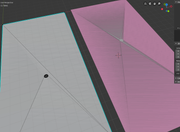
Only difference is the example (on the right) seems to be cut from the corners.
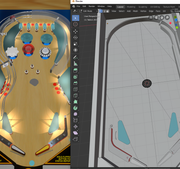
painful work, really is.
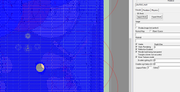
Whatever with this one, should be good...decimate afterwards and should keep nice shape.
Missing steps would be to
- Sub Divide a lot
- Do your holes
- Decimate the faces keeping the shapes intact
Edited by chepas, 09 January 2022 - 01:35 PM.
Bump maps are the new auto-tune 
VPX - RSS Updates ---- blog.flippingflips.xyz/en/ -- Visual Pinball No.1 (2021) . Est.2000


Community Forum Software by IP.Board
Licensed to: VPForums.org
 are all trademarks of VPFORUMS.
 Top
Top