Jump to content


Photo
* * * * * 1 votes

Project: Glow Pin FINISHED!


  • Please log in to reply
429 replies to this topic

#241 Darkfall

Darkfall

    Enthusiast

  • Gold Supporter
  • 453 posts
  • Location:Langley, BC

  • Flag: Canada

  • Favorite Pinball: Attack From Mars, Scared Stiff

Posted 13 August 2011 - 07:58 AM

QUOTE (bladexdsl @ Aug 12 2011, 10:45 PM) <{POST_SNAPBACK}>
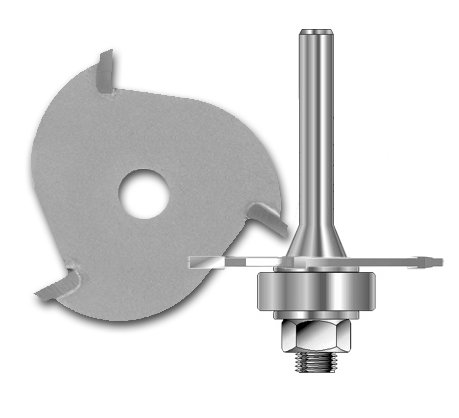
sorry dont have a router or the skills to use and never used one. i asked my bro in law he said that would be really tricky to do and i dont wanna stuff up the backbox laugh.gif


It's not really tricky, unless you try to wing it by eyeball and hand guiding the router - that'd be a recipe for failure, in most cases.

When I edged the top of my sides for the glass guides, I clamped extra wood on both sides flush with the edge (in kind of a long T shape, with my cabinet's side being the vertical of the T, and my clamped on bits being the top of the T) to keep the router at a 90-degree angle to the edge, then used the edge guide on the router against one edge of the top of my T to keep me straight.

I'd definitely do a test or two on scrap wood first before trying it, though. Get the feel for it before doing it on your good wood.

Maybe someone else you know has the experience to do it, and the needed tools? I'd not used a router much until I started my build, but I love the thing now. I routered all kinds of crap on mine! LOL.

Edited by Darkfall, 13 August 2011 - 08:01 AM.

...Paul


Check out Wildfire Pinball's build details here: Project Wildfire

#242 numiah

numiah

    Pinball Fan

  • Validating
  • PipPipPipPip
  • 984 posts
  • Location:Netherlands

  • Flag: Netherlands

  • Favorite Pinball: TOTAN

Posted 13 August 2011 - 08:22 AM

QUOTE (bladexdsl @ Aug 13 2011, 08:00 AM) <{POST_SNAPBACK}>
QUOTE (numiah @ Aug 13 2011, 05:54 AM) <{POST_SNAPBACK}>
That custom wheel looks awesome !

zubulon gets most of the credit dblthumb.gif


Is that out in the open in some thread anywhere ?

**Each pinball machine is a tiny universe... that we control.**


#243 bladexdsl

bladexdsl

    Joined the elite ranks

  • Banned
  • PipPipPipPip
  • 1,234 posts
  • Location:Queensland

  • Flag: Australia

  • Favorite Pinball: Scared stiff and Congo

Posted 13 August 2011 - 08:47 AM

QUOTE (numiah @ Aug 13 2011, 09:22 AM) <{POST_SNAPBACK}>
QUOTE (bladexdsl @ Aug 13 2011, 08:00 AM) <{POST_SNAPBACK}>
QUOTE (numiah @ Aug 13 2011, 05:54 AM) <{POST_SNAPBACK}>
That custom wheel looks awesome !

zubulon gets most of the credit dblthumb.gif


Is that out in the open in some thread anywhere ?

yep go get it tongue.gif
http://www.vpforums....pic=12755&st=80

#244 Lobotomy

Lobotomy

    Enthusiast

  • Members
  • PipPipPip
  • 203 posts

  • Flag: Sweden

  • Favorite Pinball: Terminator 2, High Speed II, Funhouse, Taxi...

Posted 13 August 2011 - 09:10 AM

QUOTE (bladexdsl @ Aug 13 2011, 07:45 AM) <{POST_SNAPBACK}>
sorry dont have a router or the skills to use and never used one. i asked my bro in law he said that would be really tricky to do and i dont wanna stuff up the backbox laugh.gif


Use a T-molding cutter, easy as 1... 2... 4...


Project: TeraPin

#245 bladexdsl

bladexdsl

    Joined the elite ranks

  • Banned
  • PipPipPipPip
  • 1,234 posts
  • Location:Queensland

  • Flag: Australia

  • Favorite Pinball: Scared stiff and Congo

Posted 13 August 2011 - 10:19 AM

can you attach them to drills?

#246 maxxsinner

maxxsinner

    Enthusiast

  • Platinum Supporter
  • 319 posts
  • Location:Australia

  • Flag: Australia

  • Favorite Pinball: F14 Tomcat

Posted 13 August 2011 - 10:32 AM

No bladex. It needs the router base plate to do the slot at an acurate depth.

#247 numiah

numiah

    Pinball Fan

  • Validating
  • PipPipPipPip
  • 984 posts
  • Location:Netherlands

  • Flag: Netherlands

  • Favorite Pinball: TOTAN

Posted 13 August 2011 - 10:40 AM

Routers can always be rented for a few bucks.

**Each pinball machine is a tiny universe... that we control.**


#248 bladexdsl

bladexdsl

    Joined the elite ranks

  • Banned
  • PipPipPipPip
  • 1,234 posts
  • Location:Queensland

  • Flag: Australia

  • Favorite Pinball: Scared stiff and Congo

Posted 13 August 2011 - 10:44 AM

about my freezing problem

uac is disabled (already was)
lan is disabled

yet if i use hyperpin in startup it will freeze 5-10 secs after starting. if i wait and use mouse to start it however it does not freeze. frickin thing is weird!

maybe i should just give up and put my old xp pro sp3 in maybe i'll have better luck with that? hp/vp doesnt seem to like win7 it either freezes or causes lots of ball stutter think.gif

Edited by bladexdsl, 13 August 2011 - 11:41 AM.


#249 bladexdsl

bladexdsl

    Joined the elite ranks

  • Banned
  • PipPipPipPip
  • 1,234 posts
  • Location:Queensland

  • Flag: Australia

  • Favorite Pinball: Scared stiff and Congo

Posted 13 August 2011 - 01:15 PM

in the meantime i cut and painted an apron and also attached the service buttons under it so their right under the door when i open it! the apron will be much higher than in the pic it will be flush up against the bottom of the screen.


#250 Darkfall

Darkfall

    Enthusiast

  • Gold Supporter
  • 453 posts
  • Location:Langley, BC

  • Flag: Canada

  • Favorite Pinball: Attack From Mars, Scared Stiff

Posted 14 August 2011 - 03:55 AM

QUOTE (bladexdsl @ Aug 13 2011, 03:44 AM) <{POST_SNAPBACK}>
about my freezing problem

uac is disabled (already was)
lan is disabled

yet if i use hyperpin in startup it will freeze 5-10 secs after starting. if i wait and use mouse to start it however it does not freeze. frickin thing is weird!

maybe i should just give up and put my old xp pro sp3 in maybe i'll have better luck with that? hp/vp doesnt seem to like win7 it either freezes or causes lots of ball stutter think.gif


It sounds like you're having freezing problems with more than one program. Maybe software isn't the issue - maybe you're having an overheating problem, or some other hardware issue.
...Paul


Check out Wildfire Pinball's build details here: Project Wildfire

#251 bladexdsl

bladexdsl

    Joined the elite ranks

  • Banned
  • PipPipPipPip
  • 1,234 posts
  • Location:Queensland

  • Flag: Australia

  • Favorite Pinball: Scared stiff and Congo

Posted 14 August 2011 - 04:02 AM

definitely it isn't overheating not with the cpu cooler i have plus the damn thing is sitting on a table in the open! the only programs i have installed are hp, vp and audio and video drivers nothing else. i made a scheduled task and tell windows to start hyperpin 30 secs after bootup that fixed it. but i'll prob end up putting xp pro in instead win7 doesn't really play nice with hp and vp plus i want to use UVP happy.gif

Edited by bladexdsl, 14 August 2011 - 05:32 AM.


#252 numiah

numiah

    Pinball Fan

  • Validating
  • PipPipPipPip
  • 984 posts
  • Location:Netherlands

  • Flag: Netherlands

  • Favorite Pinball: TOTAN

Posted 14 August 2011 - 07:11 AM

Win7 has some amazing analysis stuff built in.
That way you can exactly pinpoint boot issues and see whats hogging.
http://itexpertvoice...s-in-windows-7/
http://sourcedaddy.c...up-process.html
I'd take a look at that first.

Edited by numiah, 14 August 2011 - 07:17 AM.

**Each pinball machine is a tiny universe... that we control.**


#253 oooPLAYER1ooo

oooPLAYER1ooo

    habitual deflector

  • VIP
  • 806 posts
  • Location:sydney , Australia

  • Flag: Australia

  • Favorite Pinball: Al's Garage Band Goes On A World Tour

  • 360 Gamer Tag: oooPLAYER1ooo


Posted 14 August 2011 - 08:37 AM

make sure your windows 64bit has the service pack 1 upgrade,
to use win7 with success you really need to disable everything you don't need and that starts with aero and all the other graphic enhancments.
go through the process's and make sure nothing is starting up that don't have to. with your specs you should be having no issues at all.

°)つ◕_◕༽つ( ͡° ͜ʖ ͡°)つ◕_◕༽つ( ͡° ͜ʖ ͡°)つ◕_◕༽つ( ͡° ͜ʖ ͡°)つ◕_◕༽つ( ͡° ͜ʖ ͡°)つ◕_◕༽つ( ͡° ͜ʖ ͡°)つ◕_◕༽つ( ͡° ͜ʖ ͡°)つ◕_◕༽つ( ͡° ͜ʖ ͡°)つ◕_◕༽つ( ͡° ͜ʖ ͡°)つ◕_◕༽つ( ͡° ͜ʖ ͡°)つ◕_◕༽つ( ͡° ͜ʖ ͡°)つ◕_◕༽つ( ͡° ͜ʖ ͡°)つ◕_◕༽つ( ͡° ͜ʖ ͡°)つ◕_◕༽つ( ͡° ͜ʖ ͡°)つ◕_◕༽つ( ͡° ͜ʖ ͡°)つ◕_◕༽つ( ͡° ͜ʖ ͡°)つ◕_◕༽つ( ͡° ͜ʖ ͡°)つ◕_◕༽つ( ͡° ͜ʖ ͡°)つ◕_◕༽つ( ͡° ͜ʖ ͡°)つ◕_◕༽つ( ͡° ͜ʖ ͡°)


ozpin.gif


#254 bladexdsl

bladexdsl

    Joined the elite ranks

  • Banned
  • PipPipPipPip
  • 1,234 posts
  • Location:Queensland

  • Flag: Australia

  • Favorite Pinball: Scared stiff and Congo

Posted 14 August 2011 - 08:43 AM

QUOTE (oooPLAYER1ooo @ Aug 14 2011, 09:37 AM) <{POST_SNAPBACK}>
to use win7 with success you really need to disable everything you don't need and that starts with aero and all the other graphic enhancments.
go through the process's and make sure nothing is starting up that don't have to.

it's all disabled that's the 1st thing i did after installing. the only thing running in the taskbar is the sound thing.

Edited by bladexdsl, 14 August 2011 - 08:57 AM.


#255 numiah

numiah

    Pinball Fan

  • Validating
  • PipPipPipPip
  • 984 posts
  • Location:Netherlands

  • Flag: Netherlands

  • Favorite Pinball: TOTAN

Posted 14 August 2011 - 11:29 AM

QUOTE (bladexdsl @ Aug 14 2011, 10:43 AM) <{POST_SNAPBACK}>
QUOTE (oooPLAYER1ooo @ Aug 14 2011, 09:37 AM) <{POST_SNAPBACK}>
to use win7 with success you really need to disable everything you don't need and that starts with aero and all the other graphic enhancments.
go through the process's and make sure nothing is starting up that don't have to.

it's all disabled that's the 1st thing i did after installing. the only thing running in the taskbar is the sound thing.

Player1 also meant extra services.
Services don't show up in taskbar to begin with.
Like he said, with your hardware specs you shouldn't be running into lag problems.
Odd...

**Each pinball machine is a tiny universe... that we control.**


#256 bladexdsl

bladexdsl

    Joined the elite ranks

  • Banned
  • PipPipPipPip
  • 1,234 posts
  • Location:Queensland

  • Flag: Australia

  • Favorite Pinball: Scared stiff and Congo

Posted 14 August 2011 - 11:52 AM

theres nothing else running i've checked it all. anyway i only have to wait an extra 30 secs to start hp so big deal.

Edited by bladexdsl, 14 August 2011 - 01:12 PM.


#257 rosve

rosve

    :)

  • VIP
  • 1,179 posts
  • Location:Always travelling around the world

  • Flag: Sweden

  • Favorite Pinball: Funhouse, Faces, Starship Troopers


Posted 14 August 2011 - 01:13 PM

QUOTE (bladexdsl @ Aug 14 2011, 01:52 PM) <{POST_SNAPBACK}>
theres nothing else running i've checked it all.


Surlely you must have more services running. I have at least 30 services running on my Win7 cab without any problem.
Here is a screenshot of my running services.


#258 Darkfall

Darkfall

    Enthusiast

  • Gold Supporter
  • 453 posts
  • Location:Langley, BC

  • Flag: Canada

  • Favorite Pinball: Attack From Mars, Scared Stiff

Posted 14 August 2011 - 02:22 PM

QUOTE (bladexdsl @ Aug 13 2011, 09:02 PM) <{POST_SNAPBACK}>
definitely it isn't overheating not with the cpu cooler i have plus the damn thing is sitting on a table in the open! the only programs i have installed are hp, vp and audio and video drivers nothing else. i made a scheduled task and tell windows to start hyperpin 30 secs after bootup that fixed it. but i'll prob end up putting xp pro in instead win7 doesn't really play nice with hp and vp plus i want to use UVP happy.gif


The only thing I've encountered that is an issue on some machines with Windows 7 (x64 or x86) is HyperPin running slowly on some machines. For example, it runs slowly on my cabinet, but fine on my laptop - both are Windows 7 x64. I tried Windows 7 x86 on the cabinet - no change. XP solves the problem, though - but then I run into speed issues on DMD tables with UVP.

UVP works fine on Windows 7.
...Paul


Check out Wildfire Pinball's build details here: Project Wildfire

#259 bladexdsl

bladexdsl

    Joined the elite ranks

  • Banned
  • PipPipPipPip
  • 1,234 posts
  • Location:Queensland

  • Flag: Australia

  • Favorite Pinball: Scared stiff and Congo

Posted 14 August 2011 - 10:20 PM

not for me it doesn't if i use uvp with dmd tables i get incredible ball stutter that's,prob the 550 TI fault.

#260 Darkfall

Darkfall

    Enthusiast

  • Gold Supporter
  • 453 posts
  • Location:Langley, BC

  • Flag: Canada

  • Favorite Pinball: Attack From Mars, Scared Stiff

Posted 15 August 2011 - 12:42 AM

QUOTE (bladexdsl @ Aug 14 2011, 03:20 PM) <{POST_SNAPBACK}>
not for me it doesn't if i use uvp with dmd tables i get incredible ball stutter that's,prob the 550 TI fault.


It's hard to say what the fault is. I have an ATI HD 6850, and I find I can't use UVP with LED tables with Windows 7, but DMD tables work fine. If I switch to XP on the same machine, the exact opposite occurs - DMD tables are a problem, but LED tables work fine.

I play mostly DMD tables, so I stayed with Windows 7 and just use static backglasses for LED tables. The version of VP that ManOWar is working on will hopefully solve the issues once and for all, and provide animation abilities on the backglass on top of it.

Here's hoping!
...Paul


Check out Wildfire Pinball's build details here: Project Wildfire