
D'oh, so that was what is written in that textbox..
Haha, yeah!. Wouldn't hurt to make a little bigger though.


 40 votes

t.me/horsepin



Posted 13 July 2021 - 06:18 PM
D'oh, so that was what is written in that textbox..
Haha, yeah!. Wouldn't hurt to make a little bigger though.
Bump maps are the new auto-tune 
VPX - RSS Updates ---- blog.flippingflips.xyz/en/ -- Visual Pinball No.1 (2021) . Est.2000
Enthusiast



Posted 13 July 2021 - 06:42 PM
That was the whole reason behind the light sequencer: to make a light effect without disturbing the state of the lights. This way you didn't need to save the states of all the lights before making an effect, and restoring them afterwards.
Yeah I read that before and it makes sense.
But it sure would be slick if it could work somehow. Maybe a second variable that shows if the light is on or off (or even 0-100 O_O ) Something different than the state.
I added the second thing, so it will return the state that the light sequencer set the light to at the moment, or just the 'normal' state otherwise (called: GetInPlayState).
Please let me know if that works as expected then.
if you have a github account you can dload a build here: https://github.com/v...runs/1027446526
Now I have a github account ;-) seems to be working great. Even seems to work during normal play.
t.me/horsepin
Posted 13 July 2021 - 07:00 PM
I tweaked the table slightly now.
No worries, do what you have to there, thanks for adding / cleaning. It's just very nice to be accessed there, otherwise you have to go web searching for how to use sequencer.
I just tried 10.7 for the first time in a while, I'm assuming you know the script find function doesn't work at the moment?
Working here with CTRL + F and from the menu. Restart VP?
Bump maps are the new auto-tune
VPX - RSS Updates ---- blog.flippingflips.xyz/en/ -- Visual Pinball No.1 (2021) . Est.2000
Enthusiast


Posted 13 July 2021 - 08:07 PM
I have a rather strange question...Is it possible to reset how the edit screen looked like when VP was first installed? I was trying to get to the layers, and somehow detached it from the edit screen. Could not figure out how to put it back where it was, and in doing so detached properties, and can't get them to fit into edit screen the way they did, and things just don't look balanced. Been moving and changing the size of stuff to try to get it back to how it originally looked to no avail. Tried uninstalling and reinstalling VP and VPinmame thinking that would reset it., but it didn't. Anel stuff I know, but for some reason it's driving me nuts! I'll live if there's not a way to reset it, but have to ask. Thanks!
Pinball Wizard



Posted 13 July 2021 - 08:14 PM
@pinballman : You can open regedit and delete HKEY_CURRENT_USER\Software\Visual Pinball\VP10\Editor.
Now run VP, setup the editor as you like it. Export the same registry key as a backup. Next time that happens, close VP and doubleclick that backup file and you have your preferred settings/layout back.
From now on. I won't help anyone here at VPF. Please ask Noah why that is.
Enthusiast


Posted 13 July 2021 - 08:30 PM
I am on version 228 and have noticed on the latest tales from the crypt that I can't set ingame ao in properties to Off, after saving and loading the table it's default again.
Edited by lukpcn, 14 July 2021 - 06:00 AM.
t.me/horsepin
Posted 13 July 2021 - 08:48 PM
About the recent filenames being clipped in the File Menu....PITA
Can do this to set the length but still clipped in menu.
menuInfo.cch = _tcslen(recentMenuname);
-------------------------------------------
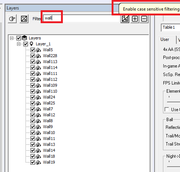
Added case sensitive filter. I prefer it to be just lower but someone will probably want that choice for casing.
I haven't looked into making that toggle, I'm hoping fuzzel can sort that and the icon.
Edited by chepas, 13 July 2021 - 10:47 PM.
Bump maps are the new auto-tune
VPX - RSS Updates ---- blog.flippingflips.xyz/en/ -- Visual Pinball No.1 (2021) . Est.2000
Enthusiast
Posted 13 July 2021 - 09:38 PM
@pinballman : You can open regedit and delete HKEY_CURRENT_USER\Software\Visual Pinball\VP10\Editor.
Now run VP, setup the editor as you like it. Export the same registry key as a backup. Next time that happens, close VP and doubleclick that backup file and you have your preferred settings/layout back.
Everything's right now, thank you again. I was fiddling around with this for hours!
Enthusiast


Posted 14 July 2021 - 11:10 AM
 Is there a known bug where table sounds and back glass sounds are swapped?I load up White Water (with Altsound) and the Backglass sounds are roaring through the exciters instead of the backglass speakers. VPX audio preferences is set up properly. Only happens with that table.
Edited by bietekwiet, 14 July 2021 - 11:11 AM.
Pinball Wizard
Posted 14 July 2021 - 11:14 AM
@bietekwiet : Go trough your sound output. Try switching between 'Default Sound Driver' and your real device.
From now on. I won't help anyone here at VPF. Please ask Noah why that is.
DJ Force Feedback




Posted 15 July 2021 - 09:08 AM
hello fellas,
I am wondering if this would be possible to open an external ide for the vbs script, i am a very big fan of vscode.
When i want to change some code of a table, i paste the script to vscode, change it and then reimport it to the embedded script of a table, open vscode as external ide, save and update the table script from vscode woudl be awesome 

VPF Legend

Posted 15 July 2021 - 10:17 AM
hello fellas,
I am wondering if this would be possible to open an external ide for the vbs script, i am a very big fan of vscode.
When i want to change some code of a table, i paste the script to vscode, change it and then reimport it to the embedded script of a table, open vscode as external ide, save and update the table script from vscode woudl be awesome
um
Just save your code as tablename.vbs?
You can have a table with 0 lines of code in the table itself.
I am not entirely sure why one would want to, but it is already entirely doable if that is what you want.
I would not expect anyone else to be terribly interested in that, and you'd probably find you get very few table downloads if you upload them like that
but if you want to do it for yourself, have at it.
If you feel the need to empty your wallet in my direction, i don't have any way to receive it anyways
Spend it on Hookers and Blow
DJ Force Feedback
Posted 15 July 2021 - 10:26 AM
Hobbyist


Posted 15 July 2021 - 11:23 AM
thanks for adding / cleaning. It's just very nice to be accessed there, otherwise you have to go web searching for how to use sequencer.
I just tried 10.7 for the first time in a while, I'm assuming you know the script find function doesn't work at the moment?
Working here with CTRL + F and from the menu. Restart VP?
Yeah, it worked when I downloaded an updated version, must have been a build issue, thanks.
Edited by Sixtoed, 15 July 2021 - 11:23 AM.
Pinball Wizard
Posted 15 July 2021 - 12:06 PM
@arngrim : I understand why you would want to use a different editor. I use vim if there is anything over 5 lines I want to change 
One idea is almost what I do. I've got a wrapper script, it runs 'vpinball.exe -exportvbs <tablename>' for all tables I don't already have exported. I move them to a different folder afterwards and add them under git control so I can go back if I make any mistakes. Actually, if could be a doable to make a git repo in the tables folder, ignoring all the *.vpx and *.vpt files, you will get a backup of *.pov, *.vbs, screenres, db2sserversettings and whatever you like. If you only "add" and "pull" from your pinball machine. You would have no issues to take whatever you've got in that repoistory with you everywhere to edit "offline" if you wanted to.
I do much of this myself, but, by moving the script files out after exporting, well - the script exports them to c:\temp before I move them to a linux machine for a proper editor
From now on. I won't help anyone here at VPF. Please ask Noah why that is.
t.me/horsepin
Posted 15 July 2021 - 12:25 PM
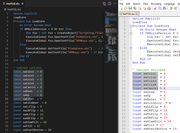
Notepad++ or Visual Studio (NOT CODE) for editing .VBS.
It is only because both editors feature ALT + Mouse selection where you can select pieces of code and I find I do this a lot with VBS.
Bump maps are the new auto-tune
VPX - RSS Updates ---- blog.flippingflips.xyz/en/ -- Visual Pinball No.1 (2021) . Est.2000


Community Forum Software by IP.Board
Licensed to: VPForums.org
 are all trademarks of VPFORUMS.
 Top
Top


