Jump to content


Photo
* * * * * 3 votes

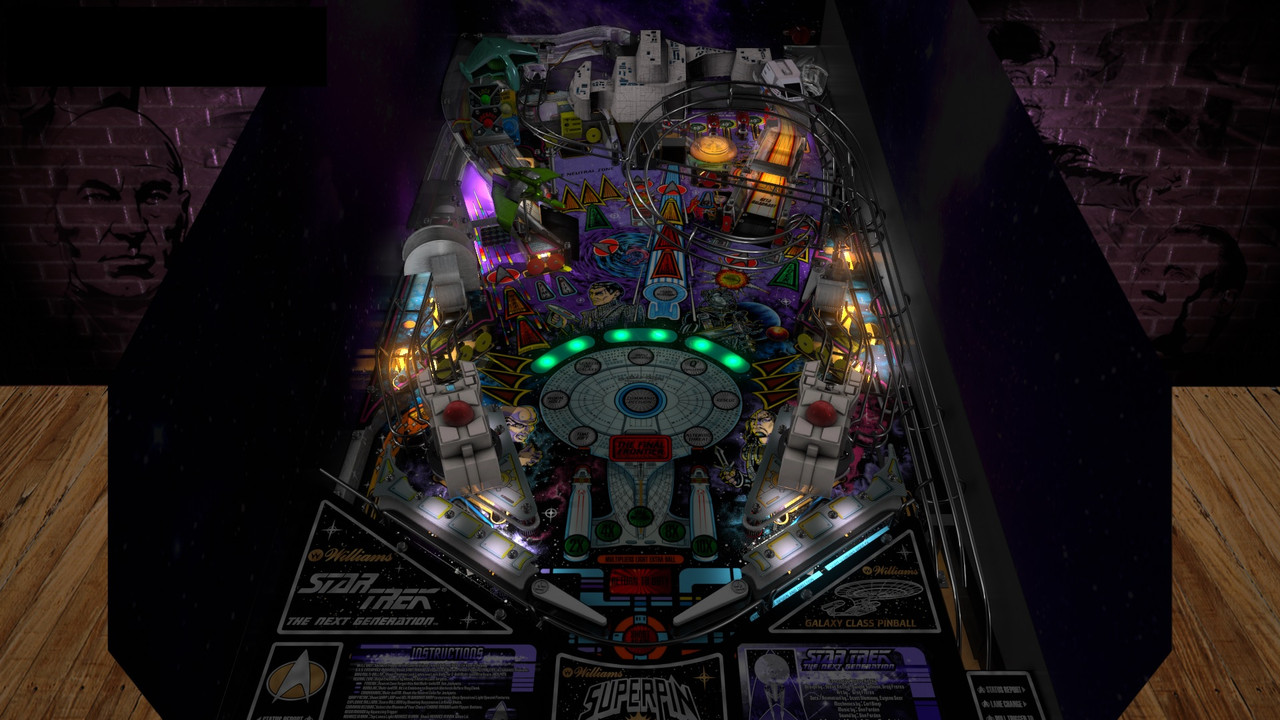
Star Trek - The Next Generation (Williams 1993)[Visual Pinball X MOD]


  • Please log in to reply
36 replies to this topic

#1 LoadedWeapon

LoadedWeapon

    The Night Owl..

  • Members
  • PipPipPipPipPip
  • 2,572 posts
  • Location:South Carolina USA

  • Flag: United States of America

  • Favorite Pinball: Star Trek TNG


Posted 09 April 2022 - 12:54 AM

Posted Image


File Name: Star Trek - The Next Generation (Williams 1993)

File Submitter: LoadedWeapon

File Submitted: 08 Apr 2022

File Category: VPX/VPinMAME - MOD Tables

Author(s): Knorr
Clark Kent
Bigus1
LoadedWeapon
Manufacturer: Williams
Year: 1993
Permission to MOD?: Yes, without approval


This is a mod of one of my favorite table.
Knorr and Clark made a masterpiece so all thanks goes to them for this amazing table!
Bigus1 also worked on updating this table lighting, images, sounds and physics
I have worked on this a little off and on for awhile so I don't remember all the changes. 
 
Updated:
Images
lighting
physics
Sorry Fixed a desktop version.. 
Maybe someone else will enjoy it as much as I do! :)


Click here to download this file


#2 bolt

bolt

    VPF Veteran

  • VIP
  • 5,160 posts
  • Location:Kiel / Schleswig Holstein

  • Flag: Germany

  • Favorite Pinball: JP's Deadpool, Harlem Globetrotters, Spiderman and much more

Posted 09 April 2022 - 08:09 AM

Thanks for this great mod and welcome back Loadedweapon.


Edited by bolt, 09 April 2022 - 08:11 AM.

Posted Image

#3 STAT

STAT

    Pinball and Arcade Freak

  • VIP
  • 4,981 posts
  • Location:Wels - Austria

  • Flag: Austria

  • Favorite Pinball: Twilight Zone

Posted 09 April 2022 - 08:20 AM

The old Night Mode Master in Action ;) .. i will test that tonight ... thanks Man !


#4 brefreez

brefreez

    Enthusiast

  • Members
  • PipPipPip
  • 111 posts
  • Location:Wilmington, Delaware

  • Flag: United States of America

  • Favorite Pinball: Bram Stokers Dracula

Posted 09 April 2022 - 01:16 PM

Beautiful table ! thank you for sharing


#5 ashleyb

ashleyb

    Enthusiast

  • Members
  • PipPipPip
  • 71 posts

  • Flag: United Kingdom

  • Favorite Pinball: White Water

Posted 09 April 2022 - 02:33 PM

Nice update! Thanks. Is there an issue with the ball rolling sounds, it feels slightly off, like theyre playing slightly too long or something? Knorrs original works fine.

Edited by ashleyb, 09 April 2022 - 02:39 PM.


#6 LoadedWeapon

LoadedWeapon

    The Night Owl..

  • Members
  • PipPipPipPipPip
  • 2,572 posts
  • Location:South Carolina USA

  • Flag: United States of America

  • Favorite Pinball: Star Trek TNG


Posted 09 April 2022 - 03:04 PM

Nice update! Thanks. Is there an issue with the ball rolling sounds, it feels slightly off, like theyre playing slightly too long or something? Knorrs original works fine.


I did not change that part.. I did open it and save it in 7.1 So maybe that had something to do with it.. I will check it after work today.

Edited by LoadedWeapon, 09 April 2022 - 03:11 PM.


#7 ashleyb

ashleyb

    Enthusiast

  • Members
  • PipPipPip
  • 71 posts

  • Flag: United Kingdom

  • Favorite Pinball: White Water

Posted 09 April 2022 - 03:10 PM

Nice update! Thanks. Is there an issue with the ball rolling sounds, it feels slightly off, like theyre playing slightly too long or something? Knorrs original works fine.

I did not change that part..

Ah ok, thanks for the update.

#8 bolt

bolt

    VPF Veteran

  • VIP
  • 5,160 posts
  • Location:Kiel / Schleswig Holstein

  • Flag: Germany

  • Favorite Pinball: JP's Deadpool, Harlem Globetrotters, Spiderman and much more

Posted 09 April 2022 - 07:09 PM

The lightshow is fantastic :love39: .


But what is with the backdrop, looks strange. Other TNG other verion work without this problem, Any idea?.


STTNG-BD.jpg


Edited by bolt, 09 April 2022 - 07:18 PM.

Posted Image

#9 LoadedWeapon

LoadedWeapon

    The Night Owl..

  • Members
  • PipPipPipPipPip
  • 2,572 posts
  • Location:South Carolina USA

  • Flag: United States of America

  • Favorite Pinball: Star Trek TNG


Posted 09 April 2022 - 07:37 PM

The lightshow is fantastic :love39: .
 
But what is with the backdrop, looks strange. Other TNG other verion work without this problem, Any idea?.
 
STTNG-BD.jpg


Yea just click the wall in the editor and change the image

#10 LoadedWeapon

LoadedWeapon

    The Night Owl..

  • Members
  • PipPipPipPipPip
  • 2,572 posts
  • Location:South Carolina USA

  • Flag: United States of America

  • Favorite Pinball: Star Trek TNG


Posted 09 April 2022 - 08:30 PM

ok for you Desktop users... Sorry I fixed it for you.. uploading now :)


#11 studlygoorite

studlygoorite

    Enthusiast

  • Silver Supporter
  • 398 posts
  • Location:Stoney Creek, Ontario

  • Flag: Canada

  • Favorite Pinball: Any VR table

  • 360 Gamer Tag: King JJ

Posted 09 April 2022 - 08:48 PM

Nice update! Thanks. Is there an issue with the ball rolling sounds, it feels slightly off, like theyre playing slightly too long or something? Knorrs original works fine.

Hi Ashleyb, change line 1570 in the script from 500 to 2000 and go into the sound manager and adjust the ball rolling sounds from 1.0 volume to 0. If you need help, let me know.


#12 ashleyb

ashleyb

    Enthusiast

  • Members
  • PipPipPip
  • 71 posts

  • Flag: United Kingdom

  • Favorite Pinball: White Water

Posted 09 April 2022 - 09:01 PM

Nice update! Thanks. Is there an issue with the ball rolling sounds, it feels slightly off, like theyre playing slightly too long or something? Knorrs original works fine.

Hi Ashleyb, change line 1570 in the script from 500 to 2000 and go into the sound manager and adjust the ball rolling sounds from 1.0 volume to 0. If you need help, let me know.

Thanks for the info, Ill give that a try tomorrow.

#13 studlygoorite

studlygoorite

    Enthusiast

  • Silver Supporter
  • 398 posts
  • Location:Stoney Creek, Ontario

  • Flag: Canada

  • Favorite Pinball: Any VR table

  • 360 Gamer Tag: King JJ

Posted 09 April 2022 - 09:03 PM


Nice update! Thanks. Is there an issue with the ball rolling sounds, it feels slightly off, like theyre playing slightly too long or something? Knorrs original works fine.

Hi Ashleyb, change line 1570 in the script from 500 to 2000 and go into the sound manager and adjust the ball rolling sounds from 1.0 volume to 0. If you need help, let me know.

Thanks for the info, Ill give that a try tomorrow.


Actually, changing line 1570 to a 1000 sounds perfect for my setup.


#14 LoadedWeapon

LoadedWeapon

    The Night Owl..

  • Members
  • PipPipPipPipPip
  • 2,572 posts
  • Location:South Carolina USA

  • Flag: United States of America

  • Favorite Pinball: Star Trek TNG


Posted 09 April 2022 - 09:05 PM


Nice update! Thanks. Is there an issue with the ball rolling sounds, it feels slightly off, like theyre playing slightly too long or something? Knorrs original works fine.

Hi Ashleyb, change line 1570 in the script from 500 to 2000 and go into the sound manager and adjust the ball rolling sounds from 1.0 volume to 0. If you need help, let me know.


Thanks I forgot I will update this also on both tables..

I updated both tables and should be back up soon.. Sorry :)


Edited by LoadedWeapon, 09 April 2022 - 09:20 PM.


#15 bolt

bolt

    VPF Veteran

  • VIP
  • 5,160 posts
  • Location:Kiel / Schleswig Holstein

  • Flag: Germany

  • Favorite Pinball: JP's Deadpool, Harlem Globetrotters, Spiderman and much more

Posted 09 April 2022 - 11:05 PM

Thank you LW it works.


Posted Image

#16 Redwings13

Redwings13

    Enthusiast

  • Platinum Supporter
  • 319 posts
  • Location:Near Detroit, Mich

  • Flag: United States of America

  • Favorite Pinball: Circus by Brunswick

Posted 10 April 2022 - 12:00 AM

Thanks LW, that continuous ball rolling is gone now.  Thank you for a great table.


#17 ashleyb

ashleyb

    Enthusiast

  • Members
  • PipPipPip
  • 71 posts

  • Flag: United Kingdom

  • Favorite Pinball: White Water

Posted 10 April 2022 - 11:07 AM


Nice update! Thanks. Is there an issue with the ball rolling sounds, it feels slightly off, like theyre playing slightly too long or something? Knorrs original works fine.

Hi Ashleyb, change line 1570 in the script from 500 to 2000 and go into the sound manager and adjust the ball rolling sounds from 1.0 volume to 0. If you need help, let me know.


Thanks I forgot I will update this also on both tables..

I updated both tables and should be back up soon.. Sorry :)


Thanks plays great now.


Nice update! Thanks. Is there an issue with the ball rolling sounds, it feels slightly off, like theyre playing slightly too long or something? Knorrs original works fine.

Hi Ashleyb, change line 1570 in the script from 500 to 2000 and go into the sound manager and adjust the ball rolling sounds from 1.0 volume to 0. If you need help, let me know.

Thanks for the info, Ill give that a try tomorrow.


Actually, changing line 1570 to a 1000 sounds perfect for my setup.


Thanks, got new version with the changes you mentioned and works great now.


#18 CPSNine

CPSNine

    Enthusiast

  • Platinum Supporter
  • 136 posts

  • Flag: ---------

  • Favorite Pinball: Tales of the Arabian Nights

Posted 16 April 2022 - 08:26 PM

Wow!

Looks great, sounds great and plays great.

Really nice job. And for once I did not have to adjust the POV, gess we like the same view.


My Cab: Pin-up
Universal Pinball Machine

#19 mekishiko916

mekishiko916

    Hobbyist

  • Members
  • PipPip
  • 12 posts

  • Flag: United States of America

  • Favorite Pinball: medieval madness

  • PS3 Gamer Tag: mekishiko916

Posted 11 August 2022 - 08:32 AM

Does anyone know what button is for firing the cannons & making mode selections? I am trying to map my Launch button (ZBLaunch with pinscape set to ENTER) to the same as fire so that i can launch the cannons/choose modes  by pressing ion the plunger.

I assumed it was the LOCKBAR/FIRE in the VPX button config, so I set that one to ENTER just like my LAUNCH...however it doesn't work. So just to double check I assigned it to the F key and even that isn't working when i press it on my keyboard.

Sorry if this is well known...I haven't been able to find answers & I've been searching for hours. 


#20 wiesshund

wiesshund

    VPF Legend

  • Members
  • PipPipPipPipPipPipPip
  • 11,859 posts

  • Flag: United States of America

  • Favorite Pinball: How many can i have?

Posted 11 August 2022 - 08:54 AM

Does anyone know what button is for firing the cannons & making mode selections? I am trying to map my Launch button (ZBLaunch with pinscape set to ENTER) to the same as fire so that i can launch the cannons/choose modes  by pressing ion the plunger.

I assumed it was the LOCKBAR/FIRE in the VPX button config, so I set that one to ENTER just like my LAUNCH...however it doesn't work. So just to double check I assigned it to the F key and even that isn't working when i press it on my keyboard.

Sorry if this is well known...I haven't been able to find answers & I've been searching for hours. 


Check the table script itself
see if perhaps the script has it set to the magnasave buttons or something


Look at the keydowns
If will most likely be a keydown that says if key is down the switch ## =1  with nothing else to the command

You can change that to be lockbarkey


Like here is the lockbar fire key command from AC DC


Key downs

If KeyCode = LockbarKey Then Controller.Switch(64)=1


Key ups


If KeyCode = LockbarKey Then Controller.Switch(64)=0


If you feel the need to empty your wallet in my direction, i don't have any way to receive it anyways

Spend it on Hookers and Blow