Jump to content


Photo
* * * * * 2 votes

Need Pinball Cabinet Clear button labels, anyone know where I can buy or Print?

pinball cabinet button labels

  • Please log in to reply
21 replies to this topic

#1 hogcia

hogcia

    Hobbyist

  • Members
  • PipPip
  • 22 posts
  • Location:New York

  • Flag: United States of America

  • Favorite Pinball: Super Mario Bros

Posted 21 July 2013 - 07:54 PM

I need to label my Visual Pinball buttons and do not know where to buy the clear labels from. Can I buy clear paper and print them? Or is they're a website that sells them? For example I am looking for buttons labels that say "launch ball" and "flyer". thanks for your help. 
 
Alex Febo


Edited by hogcia, 21 July 2013 - 07:54 PM.


#2 htamas

htamas

    Pinball Wizard

  • VIP
  • 2,227 posts
  • Location:California

  • Flag: Hungary

  • Favorite Pinball: cannot pick just one, and they change anyway


Posted 21 July 2013 - 08:43 PM

Easiest would be to just print your own labels on transparencies with an inkjet printer.


#3 hogcia

hogcia

    Hobbyist

  • Members
  • PipPip
  • 22 posts
  • Location:New York

  • Flag: United States of America

  • Favorite Pinball: Super Mario Bros

Posted 21 July 2013 - 10:55 PM

<blockquote class='ipsBlockquote'data-author="htamas" data-cid="232599" data-time="1374439407"><p>
Easiest would be to just print your own labels on transparencies with an inkjet printer.</p></blockquote>

Is there a special transparent sheet I should buy?

#4 hogcia

hogcia

    Hobbyist

  • Members
  • PipPip
  • 22 posts
  • Location:New York

  • Flag: United States of America

  • Favorite Pinball: Super Mario Bros

Posted 21 July 2013 - 11:12 PM

Okay nevermind, looks like I found it. Is there a website that has button logos I can just print out instead of me making my own? Thanks.

#5 nickbuol

nickbuol

    Enthusiast

  • Members
  • PipPipPip
  • 268 posts
  • Location:Marion, IA

  • Flag: United States of America

  • Favorite Pinball: Theatre of Magic

Posted 21 July 2013 - 11:33 PM

Name or link?


#6 hogcia

hogcia

    Hobbyist

  • Members
  • PipPip
  • 22 posts
  • Location:New York

  • Flag: United States of America

  • Favorite Pinball: Super Mario Bros

Posted 22 July 2013 - 01:13 AM

<blockquote class='ipsBlockquote'data-author="nickbuol" data-cid="232624" data-time="1374449601"><p>
Name or link?</p></blockquote>

The one I found is called 3M Write on presentation transparency, found a lot of 10 sheets on eBay for $5 shipped, not bad.

#7 zebulon

zebulon

    Cantankerous old B****D

  • Platinum Supporter
  • 1,179 posts
  • Location:Whitby, Ontario, Canada

  • Flag: Canada

  • Favorite Pinball: xenon, Medieval Madness, Royal Flush, Silverball Mania

Posted 22 July 2013 - 12:26 PM

You can get the same thing at any office supply store. Staples, Business Depot, etc.


 ZB%20%20Storefront1%20.png               [email protected]

Don't pm or expect an answer from me here ... the links above are my contacts.

I know so much about so little that I could teach you all there is to know about nothing......


#8 hogcia

hogcia

    Hobbyist

  • Members
  • PipPip
  • 22 posts
  • Location:New York

  • Flag: United States of America

  • Favorite Pinball: Super Mario Bros

Posted 22 July 2013 - 12:30 PM

<blockquote class='ipsBlockquote'data-author="zebulon" data-cid="232667" data-time="1374495998"><p>
You can get the same thing at any office supply store. Staples, Business Depot, etc.</p></blockquote>

That's correct, but you just can't beat the price $5 for 10 sheets online. I only need one.

#9 mitchelwb

mitchelwb

    Enthusiast

  • Members
  • PipPipPip
  • 88 posts

  • Flag: United States of America

  • Favorite Pinball: Sing Along

Posted 22 July 2013 - 01:00 PM

I just used my label printer with black print on clear labels.  My buttons aren't fancy, but my start button looks almost identical to my Bally/Williams games, so I figure the others can't look much different than they would if Bally/Williams had a "Flyer" or "Exit" button.


WIP Cabinet build: Intel i3-3225 | 4Gb 1600 DDR3 | 64Gb SSD | Gigabyte GTX 650 2Gb video | Modified Slugfest cabinet


#10 MTPPC

MTPPC

    Enthusiast

  • Members
  • PipPipPip
  • 352 posts
  • Location:Big Sky, Montana USA

  • Flag: ---------

  • Favorite Pinball: Mata Hari .directB2S

Posted 24 July 2013 - 04:24 PM

What's the website for the button images?


#11 nickbuol

nickbuol

    Enthusiast

  • Members
  • PipPipPip
  • 268 posts
  • Location:Marion, IA

  • Flag: United States of America

  • Favorite Pinball: Theatre of Magic

Posted 24 July 2013 - 06:16 PM

I got some button decals for my MAME arcade from someon over at BYOAC.  I think his username is Pongo.  There is a nother guy, Slammedniss that does some custom stuff too.


Here is the player1 and coin button....


player1.jpg


Edited by nickbuol, 24 July 2013 - 06:19 PM.


#12 hogcia

hogcia

    Hobbyist

  • Members
  • PipPip
  • 22 posts
  • Location:New York

  • Flag: United States of America

  • Favorite Pinball: Super Mario Bros

Posted 07 August 2013 - 02:22 AM

So, I am making my own button labels and I will be uploading the final image file here to share with those who don't feel like making there own, I will be using different fonts.


Can someone tell me if I am missing something? I am not actually on this part of my project yet, so I need confirmation from the community that this is the layout I should have. Please give me your feedback, thanks.


Alex


VisualPinButtons.jpg


Edited by hogcia, 07 August 2013 - 02:23 AM.


#13 zeenon

zeenon

    Enthusiast

  • Platinum Supporter
  • 217 posts
  • Location:Somerville, NJ

  • Flag: United States of America

  • Favorite Pinball: Attack from Mars

Posted 07 August 2013 - 02:34 AM

I'd be interested in printing those when you're all finished.

Everyone has there own take about buttons on the front of the cab, but i like to keep it simple. If you look at my cab (search tiki gods) I only have 4 buttons total. Start, extra ball, exit on the left and launch ball on the right. If your using hyperpin you can get to the flyer, genre, how to play via the exit button.

If you are going with that many buttons, maybe a coin in?

I also setup xpadder, so the Start is a shift button, Start + extra ball = run hyperpin from the desktop. Start + right flipper = coin in.

Z

Edited by zeenon, 07 August 2013 - 02:38 AM.


#14 hogcia

hogcia

    Hobbyist

  • Members
  • PipPip
  • 22 posts
  • Location:New York

  • Flag: United States of America

  • Favorite Pinball: Super Mario Bros

Posted 10 August 2013 - 03:09 AM

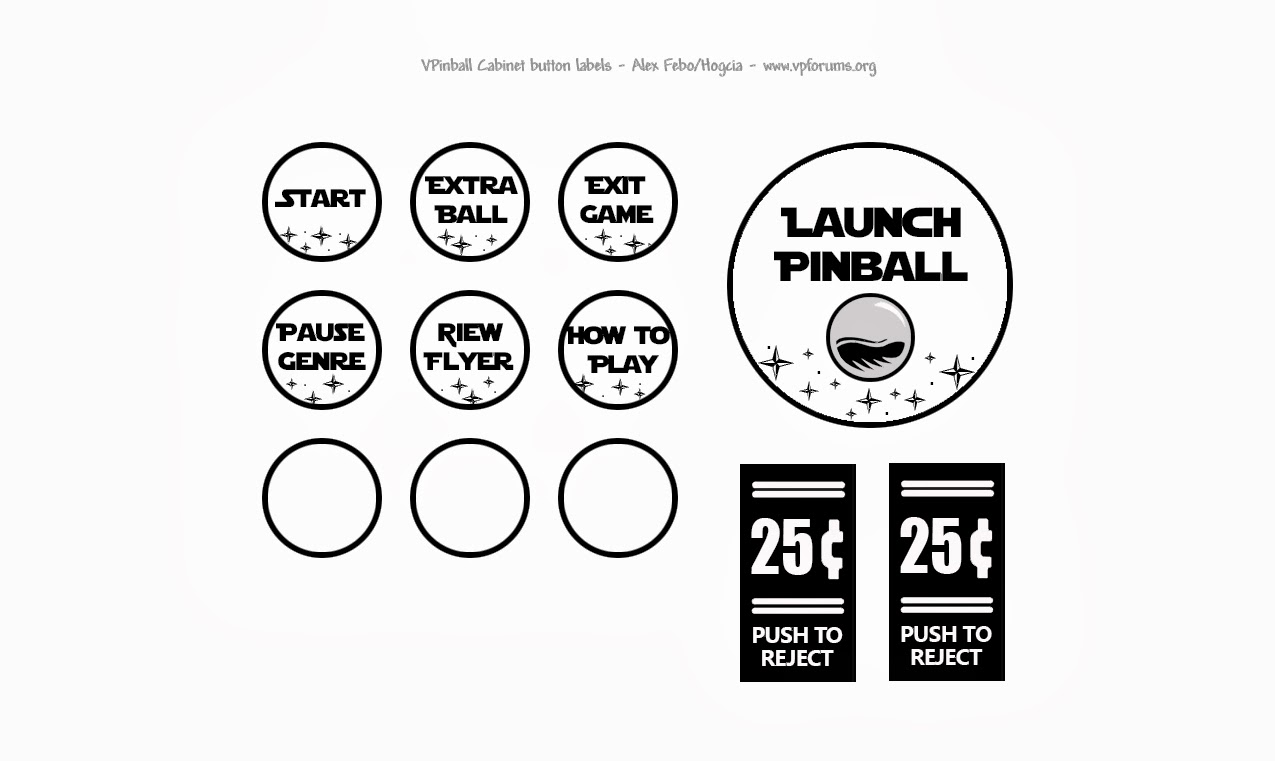
Hi zeenon, never heard of xpadder before, I will check it out, thanks. Below you have 4 different designs for VPinball buttons, not sure if all arcade/pinball buttons are the same diameter, but the size should be right.


I have also included the Photoshop .Psd file so people can design there own or make changes. thanks


Photoshop CS6 PSD File (8.5x11 Standard Paper)

http://vpforums.org/...lpinbuttons.psd


Alex

VisualPin_Buttons1.jpg

VisualPin_Buttons2.jpg

VisualPin_Buttons3.jpg

VisualPin_Buttons4.jpg


#15 hogcia

hogcia

    Hobbyist

  • Members
  • PipPip
  • 22 posts
  • Location:New York

  • Flag: United States of America

  • Favorite Pinball: Super Mario Bros

Posted 10 August 2013 - 03:44 AM

So I printed some labels right from the jpg image and the sizes were perfect. Didn't use my clear paper because it keeps getting jammed in my printer for some reason. :hmm:

button_sample.jpg


#16 mountaingamer

mountaingamer

    Enthusiast

  • Members
  • PipPipPip
  • 137 posts
  • Location:Denver Colorado

  • Flag: United States of America

  • Favorite Pinball: twilight zone

Posted 10 August 2013 - 04:35 AM

They look really good. Mine are hand written with sharpie marker & look lamo. Nice work!

#17 zeenon

zeenon

    Enthusiast

  • Platinum Supporter
  • 217 posts
  • Location:Somerville, NJ

  • Flag: United States of America

  • Favorite Pinball: Attack from Mars

Posted 10 August 2013 - 06:03 AM

Those look great!!!!!


Alex what font did you use on the 4th set?


Z


#18 hogcia

hogcia

    Hobbyist

  • Members
  • PipPip
  • 22 posts
  • Location:New York

  • Flag: United States of America

  • Favorite Pinball: Super Mario Bros

Posted 10 August 2013 - 02:20 PM

Those look great!!!!!


Alex what font did you use on the 4th set?


Z

Thanks, the font type is "Creampuff".


Fonts used in order:


MVGothicH (Heavy)
Creampuff
Star Jedi
Aardvark Cafe


#19 zeenon

zeenon

    Enthusiast

  • Platinum Supporter
  • 217 posts
  • Location:Somerville, NJ

  • Flag: United States of America

  • Favorite Pinball: Attack from Mars

Posted 13 August 2013 - 11:23 PM

Used Clear 2"x4" mailing labels (Avery 5663) for my pin and mame cabs. Thanks to hogcia for the template!!!!


DSCN1619.JPG


DSCN1618.JPG


#20 hogcia

hogcia

    Hobbyist

  • Members
  • PipPip
  • 22 posts
  • Location:New York

  • Flag: United States of America

  • Favorite Pinball: Super Mario Bros

Posted 16 August 2013 - 07:08 AM

They came out nice, using the mailing labels was a good idea :)