

- View New Content
-
Getting Started
-
Tutorials
Tutorial Categories
Tutorials Main Page Installation and Setup Downloadable TutorialsROM Adjustments
Number of Balls Adjustments Volume Adjustments
-
Visual Pinball Tables
VP 8 Desktop Tables
All VPM Recreations VP Recreations VP/VPM MODs VP Originals ROMsVP 9 Desktop Tables
All VPM Recreations VP Recreations VP/VPM MODs VP Originals ROMsVP9 Cabinet Tables
All Full Screen Cabinet Full Screen B2S Cabinet Spanned Cabinet Tables Media Packs ROMsVPX Tables
All VPinMAME Recreations VPX- - /VPinMAME - MOD Tables VPX Recreations VPX Originals Media Packs ROMs VR
-
Frontend Media & Backglass
Media Packs
Complete Media Packs Wheel Logos VideosBackglasses
dB2S Animated Backglasses UVP Animated Backglasses Topper Images
- Future Pinball Tables
-
Design Resources
Main Resources
Table Templates Playfield Images Image Library Sound Library Key CodesVP Guides
VP8 Guide - English VP8 Guide - Deutsch VP9 Guide - English VP9.1.x Guide - English VP Object Guide VPM DocumentationFuture Pinball Resources
Playfield Images 3D Model LibraryFuture Pinball Guides
FP Script Guide Big Draco Script Guide FP Table Design Guide FP DMD Guide
- Other Features
- Bug Tracker
- Image Gallery
- Blogs
-
More

Submitter

SUPPORT TOPIC File Information
- Submitted: Dec 27 2017 08:25 AM
- Last Updated: Mar 27 2026 02:46 PM
- File Size: 63.07MB
- Views: 26501
- Downloads: 6,616
-
Author(s):
Batch
BorgDog
Hauntfreaks
JPSalas - Manufacturer: Gottlieb
- Year: 1975
-
IPDB Link:

- Permission to MOD?: Yes, with approval
Previous Versions
-
14 Jan 2018
 Abra Ca Dabra (Gottlieb 1975) 1.1
Download Abra Ca Dabra (Gottlieb 1975) 8.0
 42 Votes
 10
10
8.0 - Updated to JP's VPX8 Physics Rev3.1
JPSalas added Flipper Subs + Real Time Flipper adjustments - by JLouLouLou & JPSalas (to enable flipper tricks),
JP's VPX Rolling Sounds with ball spin & speed control and Supporting Ball & Sound Functions v4.0
Added JPSalas' LUT Option (thanks also to Vogliadicane for LUT Images) and Cabinet Rails to User Options (F12). Thanks to JPSalas for his help.
Added new Backdrop for desktop users.
New Lighting.
1.1 - Updated script for "Reel100K1" to be visible when the score is more than 100.000 points (thanks to STAT for telling me, and to BorgDog for fixing it)
Added bumper rings animation (thanks to BorgDog for telling me and fixing it)
1.0 - Here is the VPX version of Abra Ca Dabra from Gottlieb (1975)
Original playfield is from Popotte and I found plastics images on Pinballrescue
I used a table template from BorgDog as a starting point
BorgDog did script, physics, chimes, animated rubbers behind drop targets, half moon credit wheel and the b2s file
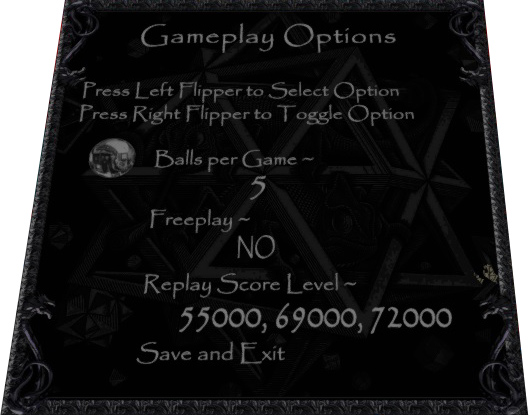
He also did a gameplay options menu, it will open if you press left flipper when not in a game
Hauntfreak did lighting, material for metal parts, environment emission image, color grading lookup table, reworked playfield, improved plastics and provided some primitives
He also sent me a nice backglass image I used to do my backdrop
So, big thanks to them because this table is « AT LEAST » as much theirs than mine
Thanks also to Pinuck for his VP9 version, he made me want to do the VPX version, because, as I’ve no cab, I could’t play his fantastic table
You’ll also find the following XML files in the same folder than the table :
ACDportraitFS -> DT and FS settings from BorgDog
ACDlandscapeFS -> DT and FS settings from Hauntfreaks
ACDportraitFSBatch -> my DT settings and FS settings from BorgDog
ACDlandscapeFSBatch -> my DT settings and FS settings from Hauntfreaks
For those who don’t know how to use them yet, just do the following : File -> Import -> Backdrop POV
Hope you like it, and Happy New Year everybody on VPForums !
JPSalas added Flipper Subs + Real Time Flipper adjustments - by JLouLouLou & JPSalas (to enable flipper tricks),
JP's VPX Rolling Sounds with ball spin & speed control and Supporting Ball & Sound Functions v4.0
Added JPSalas' LUT Option (thanks also to Vogliadicane for LUT Images) and Cabinet Rails to User Options (F12). Thanks to JPSalas for his help.
Added new Backdrop for desktop users.
New Lighting.
1.1 - Updated script for "Reel100K1" to be visible when the score is more than 100.000 points (thanks to STAT for telling me, and to BorgDog for fixing it)
Added bumper rings animation (thanks to BorgDog for telling me and fixing it)
1.0 - Here is the VPX version of Abra Ca Dabra from Gottlieb (1975)
Original playfield is from Popotte and I found plastics images on Pinballrescue
I used a table template from BorgDog as a starting point
BorgDog did script, physics, chimes, animated rubbers behind drop targets, half moon credit wheel and the b2s file
He also did a gameplay options menu, it will open if you press left flipper when not in a game
Hauntfreak did lighting, material for metal parts, environment emission image, color grading lookup table, reworked playfield, improved plastics and provided some primitives
He also sent me a nice backglass image I used to do my backdrop
So, big thanks to them because this table is « AT LEAST » as much theirs than mine
Thanks also to Pinuck for his VP9 version, he made me want to do the VPX version, because, as I’ve no cab, I could’t play his fantastic table
You’ll also find the following XML files in the same folder than the table :
ACDportraitFS -> DT and FS settings from BorgDog
ACDlandscapeFS -> DT and FS settings from Hauntfreaks
ACDportraitFSBatch -> my DT settings and FS settings from BorgDog
ACDlandscapeFSBatch -> my DT settings and FS settings from Hauntfreaks
For those who don’t know how to use them yet, just do the following : File -> Import -> Backdrop POV
Hope you like it, and Happy New Year everybody on VPForums !
What's New in Version 8.0 (See full changelog)
- Updated to JP's VPX8 Physics Rev3.1
- Added JPSalas' LUT and Cabinet Rails options (F12)
- New backdrop and new Lighting
Screenshots


These images were at format JPG and I converted them to WebP, perhaps you can try to reimport the old ones, via your Image Manager ?
Or, do you run VP10.8.1 ?
It' seems to me I 've tried to upgrade to VP10.8.1 and I went back to VP10.8.0 because of this problem.


Great update. (i think its wise for authors and players not to use 10.8.1 till an official release)

Thank you for sharing this and all the table updates!!! Thank you to all who contributed!

Thank You batch for this table.
Mad703

Thank you batch!

Hi! I'd like to set this to Free Play, but when I hold down Left Shift for the Options Menu, I get the following error:
Runtime error
-------------
Line: 411
Variable is undefined:  'OptionsBack'
Hi, are you talking about the F12 Options, and do you run VP10.8 ?
Anyway, there's no Free play option on this table.
Hi, are you talking about the F12 Options, and do you run VP10.8 ?
Anyway, there's no Free play option on this table.
Thanks. It's in the table script but perhaps it isn't fully implemented.
Edit: All good, I figured it out, I just had to set freeplay=1 a little later in the script.
Sorry, I didn't know that, I'm not the author of the script (I'm not very good at that ! ), thanks for the information.
Other files you may be interested in ..
- 18,472 Total Files
- 57 Total Categories
- 880 Total Authors
- 25,805,868 Total Downloads
- Night Rider (Bally-1977) Latest File
- Popotte Latest Submitter
user(s) are online (in the past 15 minutes)
members, guests, anonymous users


 are all trademarks of VPFORUMS.
Yeah thats not it. Only happens on that table and i have far larger tables and files. Also got an error of the same type on penthouse as well... only 3 images missing there. Tried downloading again just incase it was corrupt and same result. The older versions work perfectly though.