Jump to content


Photo
- - - - -

How would I make a free-spinning wheel object in Visual Pinball X?

physics

Best Answer Lucas9348 , 28 April 2026 - 11:21 PM

All I'm showing is a spinning prim that is also collidable.  Of course you won't get TOTAN lamp with 3 lines but, without knowing the application, I'm just showing how this much is done and an effect you can produce - good, bad or otherwise. Physics effects are a whole other element to something like the lamp but making it solid and spinning is simple enough.


Flippers can do full rotation, like on Monopoly, while keeping their normal physics and you can make them into lots of shapes with the standard settings (something else I've been playing-around with)


It did not occur to me until now I can literally just look at the code from the latest TOTAN recreation table. Whoopsie...

Go to the full post


  • Please log in to reply
5 replies to this topic

#1 Lucas9348

Lucas9348

    Neophyte

  • Members
  • Pip
  • 7 posts

  • Flag: United States of America

  • Favorite Pinball: Cirqus Voltaire

Posted 25 April 2026 - 10:23 PM

s-l300.jpgTales_of_The_Arabian_Nights_Pinball_Lamp


I'm specifically referring to the spinning objects in play like the wheel in Safe Cracker or the lamp in Tales of the Arabian Nights. These would look really cool to add, but up to my knowledge VPX doesn't offer free-spinning primitives. The only freely moving physical object in VPX appears to be the pinball object, but for the everything else, collision is static and only calculated once. I would be working against the existing physics engine if I wanted a chance at accomplishing this wheel object behavior. 


I'm curious to know what odds are at making this possible, if there are already scripts written for it somewhere I haven't looked, and how else I might be able to accomplish a reasonable design. Granted, I have only been using the Visual Pinball X 10.8.0 standalone as it comes out of the box; no additional extensions or scripts being used thus far.


Edited by Lucas9348, 25 April 2026 - 10:25 PM.


#2 bigus1

bigus1

    Pinball Fan

  • Members
  • PipPipPipPip
  • 982 posts
  • Location:Brisbane, Australia

  • Flag: Australia

  • Favorite Pinball: Firepower

Posted 26 April 2026 - 07:00 AM

All you need is a timer, prim and a couple of lines.  Add a timer, name it spin, give it 5 interval and enable it. Add a prim, uncheck Static Rendering, set physics to Collidable, give it 1 elasticity and friction. Add below sub to script and press play for a spinning, collidable prim :)   This at least works for built-in prims and the bumper caps on the Example table (roty for bumper caps) and the cog-shaped one throws the ball well.


sub spin_timer()
prim.rotz = prim.rotz+1
end sub


#3 Lucas9348

Lucas9348

    Neophyte

  • Members
  • Pip
  • 7 posts

  • Flag: United States of America

  • Favorite Pinball: Cirqus Voltaire

Posted 27 April 2026 - 01:44 AM

All you need is a timer, prim and a couple of lines.  Add a timer, name it spin, give it 5 interval and enable it. Add a prim, uncheck Static Rendering, set physics to Collidable, give it 1 elasticity and friction. Add below sub to script and press play for a spinning, collidable prim :)   This at least works for built-in prims and the bumper caps on the Example table (roty for bumper caps) and the cog-shaped one throws the ball well.


sub spin_timer()
prim.rotz = prim.rotz+1
end sub

You can't disable static collision though. The mesh can rotate and move and change shape, but won't actually move. You said it worked for the bumper cap and "built in primitives", but this is not true. Again, it visually renders spinning motion, but because it's round it's collision shape stays mostly the same when spinning. Having an elasticity of 1 also gives it the illusion of throwing the ball back, but it's not actually reacting to the teeth of the cog spinning. If you lower the elasticity back down and manually control the ball to set it's position 45 degrees from the cog's center, you'll find the ball can rest in the wedge between the cogs teeth. It's not moving physically at all.

If it's working for you, please share what version you are working in and if its working for an object that is not round.


Edited by Lucas9348, 27 April 2026 - 01:46 AM.


#4 bigus1

bigus1

    Pinball Fan

  • Members
  • PipPipPipPip
  • 982 posts
  • Location:Brisbane, Australia

  • Flag: Australia

  • Favorite Pinball: Firepower

Posted 27 April 2026 - 03:11 AM

All I'm showing is a spinning prim that is also collidable.  Of course you won't get TOTAN lamp with 3 lines but, without knowing the application, I'm just showing how this much is done and an effect you can produce - good, bad or otherwise. Physics effects are a whole other element to something like the lamp but making it solid and spinning is simple enough.


Flippers can do full rotation, like on Monopoly, while keeping their normal physics and you can make them into lots of shapes with the standard settings (something else I've been playing-around with)


Edited by bigus1, 27 April 2026 - 03:28 AM.


#5 Lucas9348

Lucas9348

    Neophyte

  • Members
  • Pip
  • 7 posts

  • Flag: United States of America

  • Favorite Pinball: Cirqus Voltaire

Posted 27 April 2026 - 07:23 AM

All I'm showing is a spinning prim that is also collidable.  Of course you won't get TOTAN lamp with 3 lines but, without knowing the application, I'm just showing how this much is done and an effect you can produce - good, bad or otherwise. Physics effects are a whole other element to something like the lamp but making it solid and spinning is simple enough.


Flippers can do full rotation, like on Monopoly, while keeping their normal physics and you can make them into lots of shapes with the standard settings (something else I've been playing-around with)


Ah, thanks. I didn't consider the flippers. Unfortunately it's not quite what I'm looking for either, but I'm glad you mentioned it.

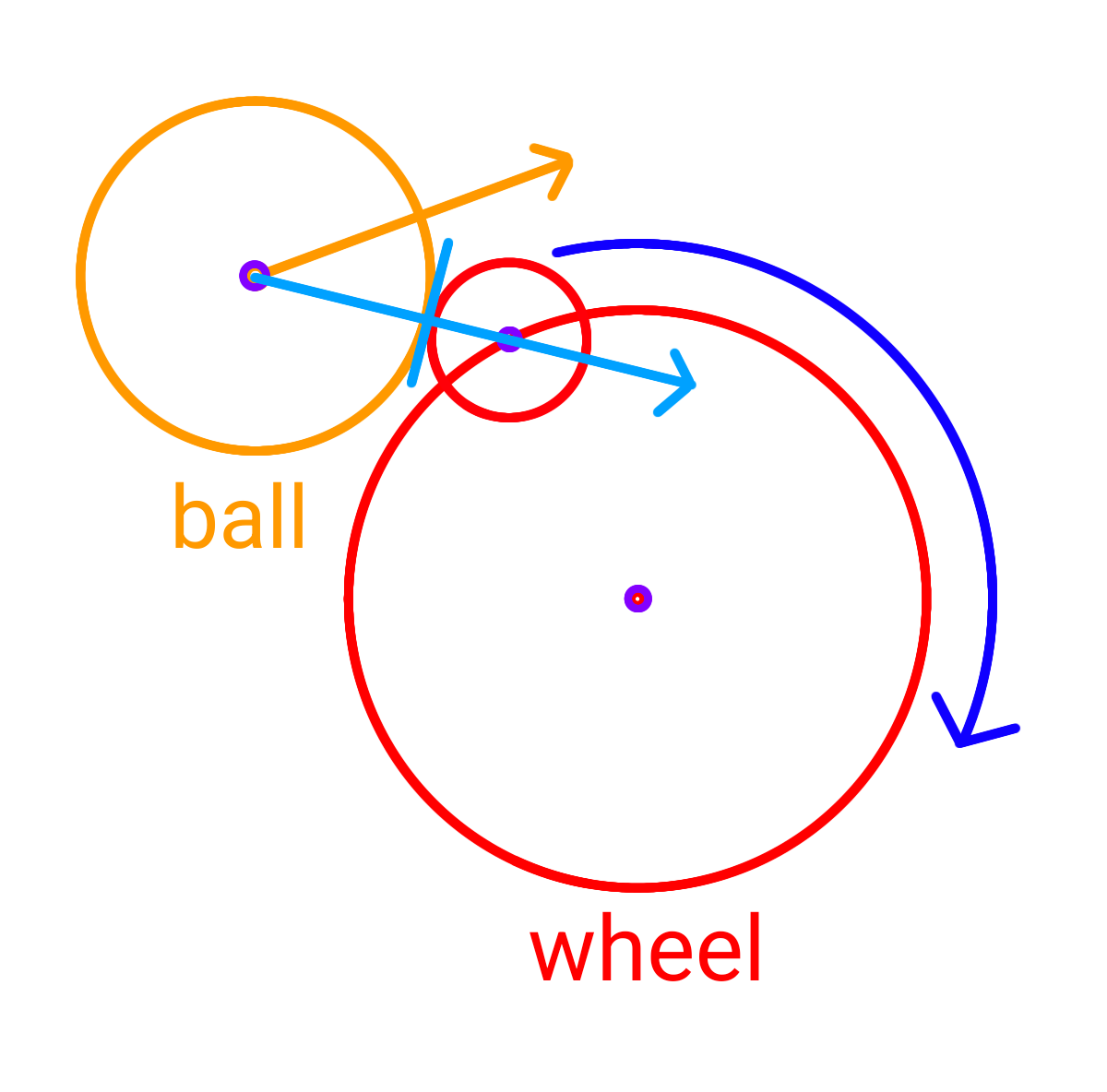
The niche problem here is that both ToTAN's wheel and Safe Cracker's wheel have a collision point outside of that central point. As far as I can see, flippers don't have an offset center option. Manually changing the flipper's X and Y positions also purely offset the rendered mesh, which is unfortunate. I hope I'm not doing something wrong.
 

wheel_example.png


I went and used a ball to substitute the offset peg and had Claude generate the necessary scripting for the physics I aim to achieve. The ball needed to move in a circle around a central point and then manually calculate how fast it should should spin around that point when hit by an incoming ball. It actually worked (ChatGPT failed, lol).

Again, thank you for your suggestions. I'm not sure if I will actually be making one of these in one of my pinball projects, I just wanted to see if it was possible. If I was more serious about it I would probably try to understand the math and physics first and then do it myself (I did try to do it myself at first, but the moment I realized I would need to calculate rotational velocity, I gave up)


Edited by Lucas9348, 27 April 2026 - 07:28 AM.


#6 Lucas9348

Lucas9348

    Neophyte

  • Members
  • Pip
  • 7 posts

  • Flag: United States of America

  • Favorite Pinball: Cirqus Voltaire

Posted 28 April 2026 - 11:21 PM   Best Answer

All I'm showing is a spinning prim that is also collidable.  Of course you won't get TOTAN lamp with 3 lines but, without knowing the application, I'm just showing how this much is done and an effect you can produce - good, bad or otherwise. Physics effects are a whole other element to something like the lamp but making it solid and spinning is simple enough.


Flippers can do full rotation, like on Monopoly, while keeping their normal physics and you can make them into lots of shapes with the standard settings (something else I've been playing-around with)


It did not occur to me until now I can literally just look at the code from the latest TOTAN recreation table. Whoopsie...


Also tagged with one or more of these keywords: physics
