
Jump to content


Photo
- - - - -

Help needed configuring backglass


  • Please log in to reply
5 replies to this topic

#1 BoltBait

BoltBait

    Software Developer

  • Members
  • PipPipPip
  • 456 posts
  • Location:Sacramento, CA

  • Flag: United States of America

  • Favorite Pinball: Elvira, Whitewater, Big Bang Bar, Fun House and All the old EM tables of the 70s that I played as a kid (including Buccaneer, Spirit of 76, and King Kool)

Posted 02 February 2026 - 12:07 AM

I recently upgraded my B2S cabinet from two screens to three.


When configuring the tables, I moved the DMD window to the new screen:
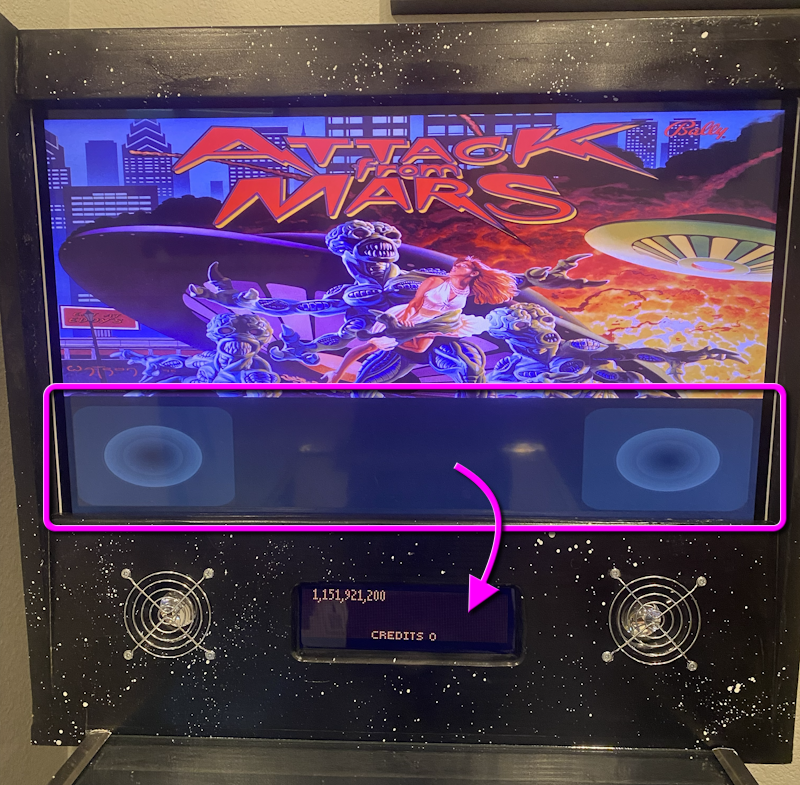
 

ReconfigureBackglass.png


Is there a way to reconfigure the backglass screen to show a different graphic that doesn't have the DMD/speaker grill section?


Or, do I have to go download all new backglass files?


Thanks!


How I built my B2S Pinball Cabinet, step-by-step, with pictures!  Full-sized cabinet for ~$700. Believe me, if I can do it, so can you!

"Making anything with your hands goes wonderfully with whatever in your life you would consider your grind." ~Nick Offerman


#2 Urko

Urko

    Enthusiast

  • Silver Supporter
  • 349 posts

  • Flag: United Kingdom

  • Favorite Pinball: The Shadow

Posted 02 February 2026 - 12:23 AM

Try right click on backglass and on the pulldown tab for the grill setting change to hidden.


Edited by Urko, 02 February 2026 - 12:24 AM.


#3 BoltBait

BoltBait

    Software Developer

  • Members
  • PipPipPip
  • 456 posts
  • Location:Sacramento, CA

  • Flag: United States of America

  • Favorite Pinball: Elvira, Whitewater, Big Bang Bar, Fun House and All the old EM tables of the 70s that I played as a kid (including Buccaneer, Spirit of 76, and King Kool)

Posted 02 February 2026 - 01:02 AM

Try right click on backglass and on the pulldown tab for the grill setting change to hidden.


That worked perfectly for the VPX tables. But, there is no menu for VP9 tables.


How I built my B2S Pinball Cabinet, step-by-step, with pictures!  Full-sized cabinet for ~$700. Believe me, if I can do it, so can you!

"Making anything with your hands goes wonderfully with whatever in your life you would consider your grind." ~Nick Offerman


#4 digitalarts

digitalarts

    Pinball Fan

  • Members
  • PipPipPipPip
  • 874 posts
  • Location:Bavaria

  • Flag: Germany

  • Favorite Pinball: Judge Dredd (have the real one); all virtual EM's

Posted 02 February 2026 - 11:10 AM

Vp9 use the Same b2sserver as vpx.
I guess you Just have a .directb2s where the "Dmd&speaker" is fix in the bg graphic.
Maybe try another, different b2s.
Or even better, use b2s Designer to modify this backglass to your needing

#5 BoltBait

BoltBait

    Software Developer

  • Members
  • PipPipPip
  • 456 posts
  • Location:Sacramento, CA

  • Flag: United States of America

  • Favorite Pinball: Elvira, Whitewater, Big Bang Bar, Fun House and All the old EM tables of the 70s that I played as a kid (including Buccaneer, Spirit of 76, and King Kool)

Posted 13 February 2026 - 12:36 AM

OK, I found out the problem.  Some of my backglass files are .exe and not .directb2s files.


The .exe backglasses do not respond to right-click and therefore can't be changed.


How I built my B2S Pinball Cabinet, step-by-step, with pictures!  Full-sized cabinet for ~$700. Believe me, if I can do it, so can you!

"Making anything with your hands goes wonderfully with whatever in your life you would consider your grind." ~Nick Offerman


#6 digitalarts

digitalarts

    Pinball Fan

  • Members
  • PipPipPipPip
  • 874 posts
  • Location:Bavaria

  • Flag: Germany

  • Favorite Pinball: Judge Dredd (have the real one); all virtual EM's

Posted 13 February 2026 - 04:29 PM

Yes, there are some (very few) VP9x Tables which uses These b2s exe.
These are "compiled b2s with integrated b2sserver"
One urgent hint: These backglasses only Work with a "old plain-style" screenres.txt, WITHOUT commentary Lines in it.
