Jump to content


Photo
- - - - -

I need help configuring the Virtuapin controller


  • Please log in to reply
9 replies to this topic

#1 BoltBait

BoltBait

    Software Developer

  • Members
  • PipPipPip
  • 456 posts
  • Location:Sacramento, CA

  • Flag: United States of America

  • Favorite Pinball: Elvira, Whitewater, Big Bang Bar, Fun House and All the old EM tables of the 70s that I played as a kid (including Buccaneer, Spirit of 76, and King Kool)

Posted 16 January 2026 - 02:22 AM

If you've been following along with my latest B2S cabinet build, https://www.vpforums...showtopic=56049 you'll see that I'm at the point of installing/configuring the software.


I installed VPX/VP9/etc and everything is working... to a point.  All 3 screens (playfield, backglass, and DMD) are setup and working.  I've got VPX and VP9 tables working fine... ish.


I have two problems:


1) Whenever I enter the VPX interactive settings mode, I get the following error message:
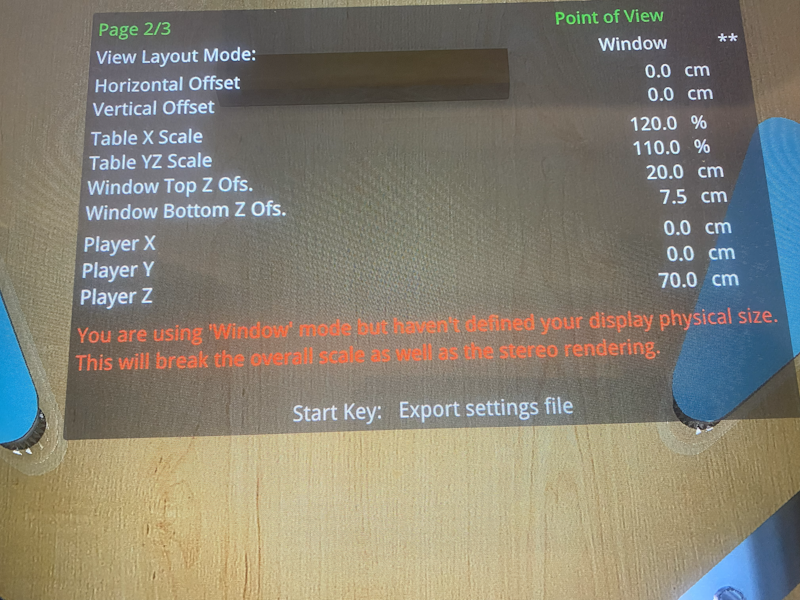
 

GravitySettings.png


"You are using 'Window' mode but haven't defined your display physical size.

This will break the overall scale as well as the stereo rendering."


How do I fix this?


...and...


2) This is a digital system, yet, every table seems to lean to the right:
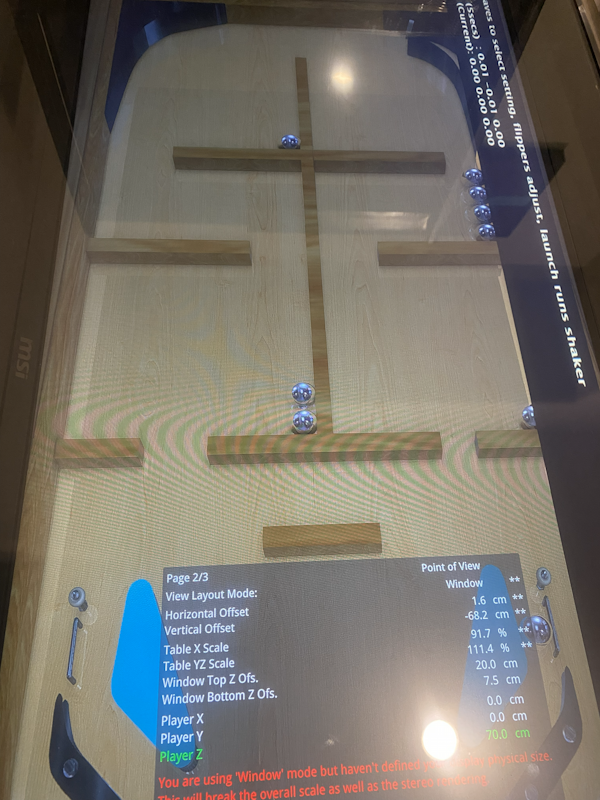
 

GravityCombined.png


I've never run into this before!?


Any ideas?


Is there a step-by-step instruction manual on how to use this table to configure the nudging and tilting settings of VPX/VP9?  (Honestly, I looked and the best thing I could find was http://mjrnet.org/pi...de.php?sid=tilt But, this doesn't have a troubleshooting section.


My physical setup is like this:
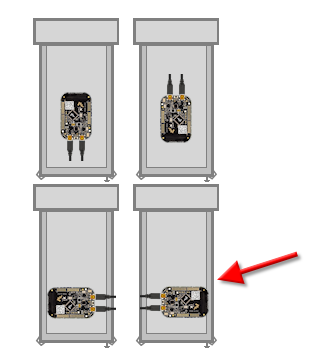
 

CardOrientation.png


What settings should I use?


Thanks in advance for any help!


How I built my B2S Pinball Cabinet, step-by-step, with pictures!  Full-sized cabinet for ~$700. Believe me, if I can do it, so can you!

"Making anything with your hands goes wonderfully with whatever in your life you would consider your grind." ~Nick Offerman


#2 Tesla

Tesla

    Pinball Fan

  • Silver Supporter
  • 1,423 posts
  • Location:Texas, USA

  • Flag: United States of America

  • Favorite Pinball: Star Trek - TNG

Posted 16 January 2026 - 05:14 AM

0. I've got VPX and VP9 tables working fine... ish.


1) Whenever I enter the VPX interactive settings mode, I get the following error message:


"You are using 'Window' mode but haven't defined your display physical size.

This will break the overall scale as well as the stereo rendering."


How do I fix this?


0. Well, I purposely erased all VP9 stuff from my memory (and never reinstalled on newer computers). I found that any good tables that I am interested in have been remastered in VPX (v10.7.x and v10.8.0)


1. I think it's fixable, ... like View Layout Mode says "Windowed" not "FullScreen" (like you would want on a cabinet)

... but I wonder why you are using that interface on a Windows system?


When I was messing with Batocera (Linux and VPX-Standalone) that is all you have and it was PAINFULL to get working (but I did... mostly).

IIRC, I switched it to "Legacy" so you can use the POV parameters we are more used to.


Or, just don't use it at all and set that stuff in VPX like a normal "VPX for Windows" install on a cabinet.


Edited by Tesla, 16 January 2026 - 05:15 AM.


#3 deadmanworking

deadmanworking

    Enthusiast

  • Members
  • PipPipPip
  • 231 posts

  • Flag: Germany

  • Favorite Pinball: Pinbot, Attack From Mars, Cactus Canyon

Posted 16 January 2026 - 05:33 AM

In Preferences / video settings enter the physical site of your display, then the red text will go away on most tables and you'll be able to hit the launch ball key for a quick fit of the POV to the windows size.

And, for the tables tilting to one side, you'll first need to calibrate your accelerometer. I guess in Pinscape software?

#4 Tesla

Tesla

    Pinball Fan

  • Silver Supporter
  • 1,423 posts
  • Location:Texas, USA

  • Flag: United States of America

  • Favorite Pinball: Star Trek - TNG

Posted 16 January 2026 - 05:51 AM


Is there a step-by-step instruction manual on how to use this table to configure the nudging and tilting settings of VPX/VP9?  (Honestly, I looked and the best thing I could find was http://mjrnet.org/pi...de.php?sid=tilt But, this doesn't have a troubleshooting section.


My physical setup is like this:


CardOrientation.png


What settings should I use?


Thanks in advance for any help!


In Pinscape Config (or whatever VirtuaPin gave you to config that special KL25z) you select the picture that looks like yours and then save that config.

Let it write that to the board and it should reboot/re-initialize. That's it.


It Windows-10/11 it should show-up in Game-Controllers. Make sure there is NO-CALIBRATION or said another way ... not calibrated (as far as Windows is concerned).

That's the way a real Pinscaped KL25z works in Windows with VPX.


#5 BoltBait

BoltBait

    Software Developer

  • Members
  • PipPipPip
  • 456 posts
  • Location:Sacramento, CA

  • Flag: United States of America

  • Favorite Pinball: Elvira, Whitewater, Big Bang Bar, Fun House and All the old EM tables of the 70s that I played as a kid (including Buccaneer, Spirit of 76, and King Kool)

Posted 16 January 2026 - 07:49 AM


In Pinscape Config (or whatever VirtuaPin gave you to config that special KL25z) you select the picture that looks like yours and then save that config.

Let it write that to the board and it should reboot/re-initialize. That's it.


I bought that controller 7+ years ago and whatever software came with it (if any did) is long gone (when my house burned down).  Is there a download?


0. Well, I purposely erased all VP9 stuff from my memory (and never reinstalled on newer computers). I found that any good tables that I am interested in have been remastered in VPX (v10.7.x and v10.8.0)


There are a handful of tables that actually work better in VP9.


For example, one of my favorite tables, Buccaneer, is much better in VP9 than VPX.  In the VPX version there is an error where after you light the special, it never goes out... even after you score special or even if you start a new game.  You have to restart the table to get it back to normal.


There are a few others as well.


Edited by BoltBait, 16 January 2026 - 10:46 PM.

How I built my B2S Pinball Cabinet, step-by-step, with pictures!  Full-sized cabinet for ~$700. Believe me, if I can do it, so can you!

"Making anything with your hands goes wonderfully with whatever in your life you would consider your grind." ~Nick Offerman


#6 scutters

scutters

    Pinball Fan

  • Members
  • PipPipPipPip
  • 545 posts

  • Flag: England

  • Favorite Pinball: Addams Family

Posted 16 January 2026 - 12:52 PM


I bought that controller 7+ years ago and whatever software came with it (if any did) is long gone.  Is there a download?


Not sure if this is the correct version for your controller (or not!), but the download link in the document still works;


https://virtuapin.ne...Guide v3.12.pdf


#7 BoltBait

BoltBait

    Software Developer

  • Members
  • PipPipPip
  • 456 posts
  • Location:Sacramento, CA

  • Flag: United States of America

  • Favorite Pinball: Elvira, Whitewater, Big Bang Bar, Fun House and All the old EM tables of the 70s that I played as a kid (including Buccaneer, Spirit of 76, and King Kool)

Posted 16 January 2026 - 10:10 PM

One more issue I need to correct.


On some tables, I'm seeing misplaced graphics:


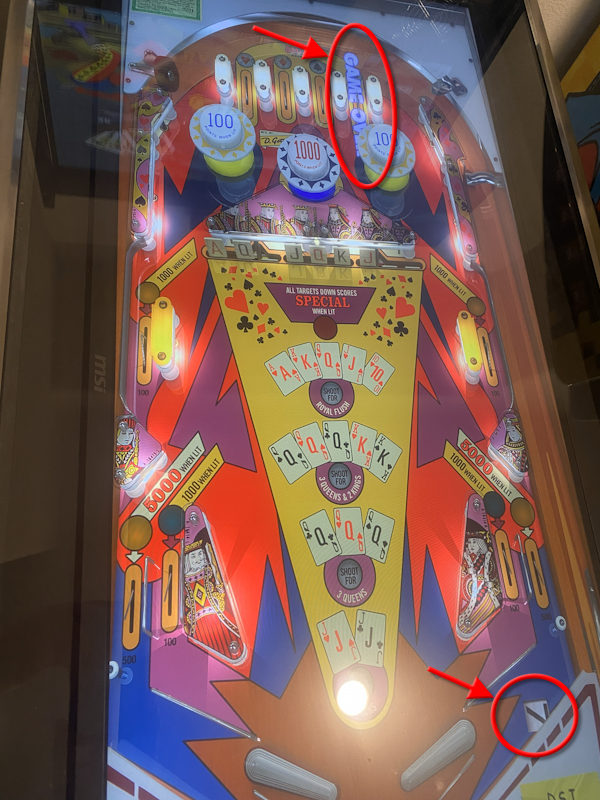
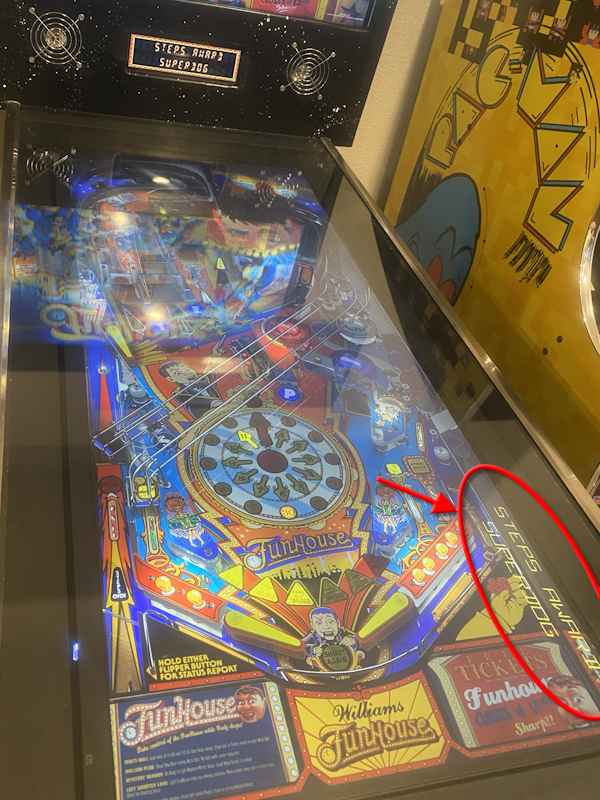
BadLocation1.png BadLocation2.png


Any idea what setting I'm missing?


I'm running VPX 10.8 release version.


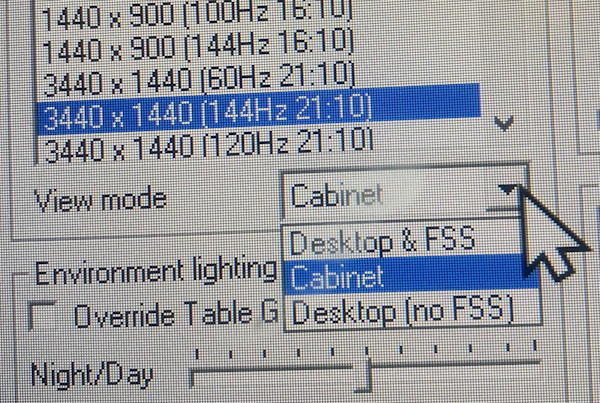
EDIT: OK, I think I figured this one out.  In VPX, I did not have the view drop-down box set to "Cabinet".  Looks like I need to start over and reposition/scale all my tables again... sigh...


CabinetSetting.png


Changing View mode from Desktop & FSS to Cabinet fixed this issue.  Sorry for wasting all of your time.


Learning... :D 


Edited by BoltBait, 16 January 2026 - 10:40 PM.

How I built my B2S Pinball Cabinet, step-by-step, with pictures!  Full-sized cabinet for ~$700. Believe me, if I can do it, so can you!

"Making anything with your hands goes wonderfully with whatever in your life you would consider your grind." ~Nick Offerman


#8 digitalarts

digitalarts

    Pinball Fan

  • Members
  • PipPipPipPip
  • 874 posts
  • Location:Bavaria

  • Flag: Germany

  • Favorite Pinball: Judge Dredd (have the real one); all virtual EM's

Posted 16 January 2026 - 10:20 PM

These are textboxes, used in Desktop orientation.
In Editor, Go to backglass-view and drag These objects Out of the View.

#9 BoltBait

BoltBait

    Software Developer

  • Members
  • PipPipPip
  • 456 posts
  • Location:Sacramento, CA

  • Flag: United States of America

  • Favorite Pinball: Elvira, Whitewater, Big Bang Bar, Fun House and All the old EM tables of the 70s that I played as a kid (including Buccaneer, Spirit of 76, and King Kool)

Posted 16 January 2026 - 10:41 PM

Seriously, I think during the setup of VPX it should ask you if you're setting this up for a cabinet and fix up everything for you.


How I built my B2S Pinball Cabinet, step-by-step, with pictures!  Full-sized cabinet for ~$700. Believe me, if I can do it, so can you!

"Making anything with your hands goes wonderfully with whatever in your life you would consider your grind." ~Nick Offerman


#10 Tesla

Tesla

    Pinball Fan

  • Silver Supporter
  • 1,423 posts
  • Location:Texas, USA

  • Flag: United States of America

  • Favorite Pinball: Star Trek - TNG

Posted 17 January 2026 - 01:44 AM

VPX it should ... fix up everything for you.


That is funny.

I LOL ... thanks.