
Jump to content


Photo
- - - - -

DMD Not Showing on Funhouse VR Table

Funhouse DMD VR

  • Please log in to reply
3 replies to this topic

#1 ChrisCrawford

ChrisCrawford

    Neophyte

  • Members
  • Pip
  • 3 posts

  • Flag: United States of America

  • Favorite Pinball: Funhouse

Posted 07 October 2025 - 03:27 PM

Hello, all. I'm trying to get the VR version of Funhouse up and running, and I can't get the digital display to show on the table. Other than that, the table is awesome and works great. I'll try to be as specific as I can here, and hopefully someone will have a solution.


I'm running VPX GL64 version 10.8.0. The Funhouse version that I'm running is Funhouse (Williams 1990)_Bigus(MOD) 1.6, which is found here:
https://www.vpforums...&showfile=17076


The ROM that I'm running is fh_905h.zip, which is found here:
https://www.vpforums...s&showfile=4036


If I run the table without VR, this is what my screen looks like:
FunHouseDMDIssueDesktopSmall.png


The DMD just floats in front of the table screen. You can resize it using the bottom right corner, and you can drag it over the DMD window at the top right, but when the game reloads, it's back to this format. Also, it's possible for the DMD to get behind the table screen.


When I run the game in VR, this is what the VR screen looks like:

FunHouseDMDIssueVRSmall.jpg


You can see that there's no display on the back glass. 


However, if I look back at my computer monitor, I see this:
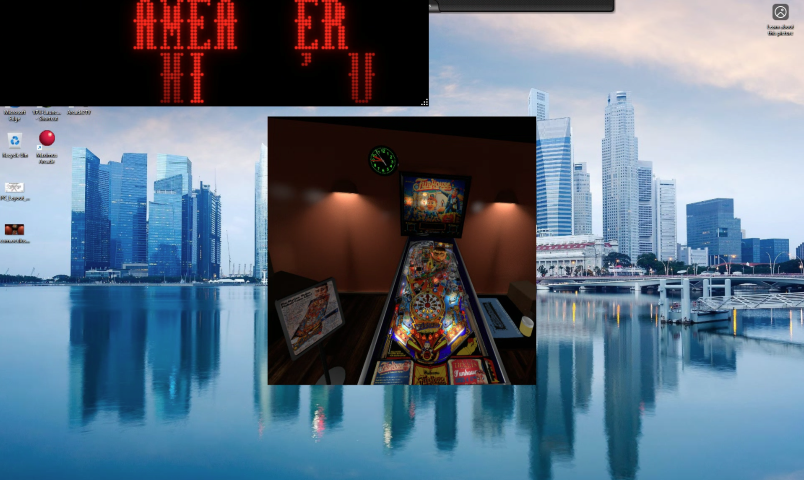
FunHouseDMDIssueVRDesktopSmall.png


Is this just a bug with this table? Or is there a way to join the two together, particularly in VR?


If anyone can help, I'd really appreciate it. Funhouse pinball is what got me into VPX. The table holds fond memories for me from 30+ years ago.


Thanks!


#2 Emanoel299

Emanoel299

    Enthusiast

  • Members
  • PipPipPip
  • 377 posts

  • Flag: Brazil

  • Favorite Pinball: Black Knight, AFM, Creature Black Lagoon, Dr.Who

Posted 07 October 2025 - 07:15 PM

Hi


Take a look if you marked in VR settings/options capture external DMD


 vrsettings0_t.png


Edited by Emanoel299, 07 October 2025 - 07:22 PM.


#3 ChrisCrawford

ChrisCrawford

    Neophyte

  • Members
  • Pip
  • 3 posts

  • Flag: United States of America

  • Favorite Pinball: Funhouse

Posted 07 October 2025 - 10:53 PM

Hey Emanoel299, Thanks for the suggestion. 


I've been trying everything I could come across, and I finally resolved the issue just before coming back here to update the post and seeing your message. What I ended up having to do was edit the script file on line 50 and I changed "UseFlexDMD" from True to False. On line 66 I also changed "DMDRotation" from 1 to 0, but I'm not really sure if that was necessary. After compiling and restarting the table, I started getting the scoreboard. I think it may just be the default one, but it's fine with me.


By the way, I did try enabling "Capture External DMD" in the VR settings, but when I have that enabled, VPX locks up when exiting tables. Have you heard of that before.


Thanks.


#4 Emanoel299

Emanoel299

    Enthusiast

  • Members
  • PipPipPip
  • 377 posts

  • Flag: Brazil

  • Favorite Pinball: Black Knight, AFM, Creature Black Lagoon, Dr.Who

Posted 08 October 2025 - 01:11 AM

Hi


I´m glad you fixe your issue


@By the way, I did try enabling "Capture External DMD" in the VR settings, but when I have that enabled, VPX locks up when exiting tables. Have you heard of that before.


No I never heard. My system works fine


My setup hardware is:


I5 - 11th

MB LA1200

16 GB DDR4

PS 850W

Hard Disk - 1TB

GPU RTX 3060 12GB

W10

Quest 2 - Air Link or Cable work good


Edited by Emanoel299, 08 October 2025 - 01:12 AM.


Also tagged with one or more of these keywords: Funhouse, DMD, VR