Hello,
First of all I wanted to say that this community is amazing, looking at all the hard work thats done on all those machines.
English is not my first language, so sorry for my grammar.
I'm new to visual pin and emulating.
As I was curious on how the development was voor these machines I started looking into the code and dipping my toes in the scripting. (as a c# dev,VBA is not my prefered language  )
)
So I started playing around with a table rom JD_L1.
I tried to ad a FLEXDMD. But I started getting into issues.
And seems that I can't find good documentation on how to resolve.
my code :
Sub Table1_Init()
If UseFlexDMD Then FlexDMD_Init
vpmInit Me
On Error Resume Next
With Controller
.GameName = cGameName
If Err Then MsgBox "Can't start Game" & cGameName & vbNewLine & Err.Description : Exit Sub
.SplashInfoLine = "Judge Dredd - Bally 1993" & vbNewLine & "by V-Pin Workshop"
HandleKeyboard = 0
.ShowTitle = 0
.ShowDMDOnly = 1
.ShowFrame = 0
.HandleMechanics = 0
.Hidden = 1
If UseFlexDMD Then ExternalEnabled = .Games(cGameName).Settings.Value("showpindmd")
If UseFlexDMD Then .Games(cGameName).Settings.Value("showpindmd") = 0
On Error Resume Next
.Run GetPlayerHWnd
If Err Then MsgBox Err.Description
On Error Goto 0
End With
...
Sub FlexDMD_Init() 'default/startup values
' flex dmd variables
If UseFlexDMD = 0 then
Exit Sub
End if
Dim i
On Error Resume Next
Set FlexDMD = CreateObject("FlexDMD.FlexDMD")
On Error GoTo 0
If IsObject(FlexDMD) Then
FlexDMD.GameName = cGameName
FlexDMD.TableFile = Table1.Filename & ".vpx"
FlexDMD.RenderMode = 2
FlexDMD.Width = 128
FlexDMD.Height = 48
FlexDMD.Clear = True
FlexDMD.Run = True
Set FlexDMDScene = FlexDMD.NewGroup("Scene")
With FlexDMDScene
'populate blank display
.AddActor FlexDMD.NewImage("BackG", "FlexDMD.Resources.dmds.black.png")
.AddActor FlexDMD.NewFrame("Frame")
.GetFrame("Frame").Visible = True
.GetFrame("Frame").Height = 48
.GetFrame("Frame").Width= 128
.GetFrame("Frame").Fill= True
.GetFrame("Frame").Thickness= 1
End With
FlexDMD.LockRenderThread
FlexDMD.Stage.AddActor FlexDMDScene
FlexDMD.Show = True
FlexDMD.UnlockRenderThread
Else
UseFlexDMD = 0
End If
this results in a black screen in DMDFlex, i added a custom menu , this is shown in the FLEXDMD when i add scene
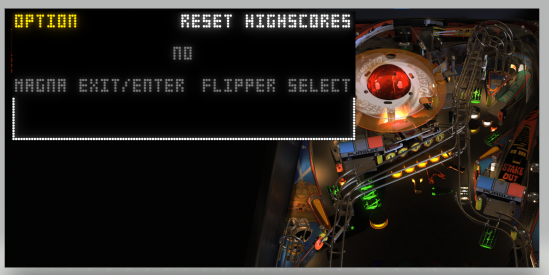
if I TURN ON use external dll so Freezy's dll with If UseFlexDMD Then .Games(cGameName).Settings.Value("showpindmd") = 1,
I get 2 FLEXDMD's
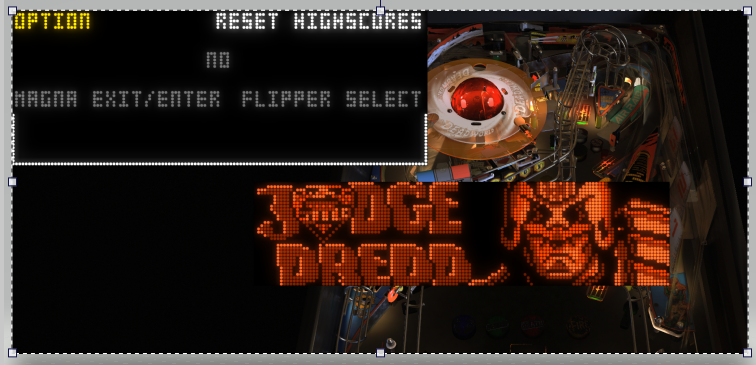
my question is there a way to get the
Dim UseVPMDMD
Const UseVPMColoredDMD = True
into the flexDMD.
I hope this makes sense, I'm new to all of this .
Kind regards
E



 Top
Top



 are all trademarks of VPFORUMS.