


So, I’ve been tuning and changing my setup for the last few years and decided to document it as it may help others on the same road.
I've publish all my code and configurations in this repo
https://github.com/n...ira/multiarcade
## Summary

***Emulators and OS***
My requirements started with mame and dosbox (SWOS exclusively) and later evolved to VPX.
I’m a Linux user so my first preference is Linux, as I find it easier to customize to a more solid setup. Windows is the backup.
I have both Windows and Linux environments and continue to maintain them in parallel, using which one gives me better performance.
***Physical Setup***
I’m using a low end PC or a laptop so I’ll be targeting performance and not quality. I’m leaving the door open to a more powerful setup. I don’t think that I have anything that limits me on this.
Ended in a two screen setup: 32’’ LCD for playfield and a Long Strip, 1920x480 LCD for DMD
The 32’’ screen uses a dc motor that allows it to rotate for landscape and portrait mode, with the press of a switch on the side.
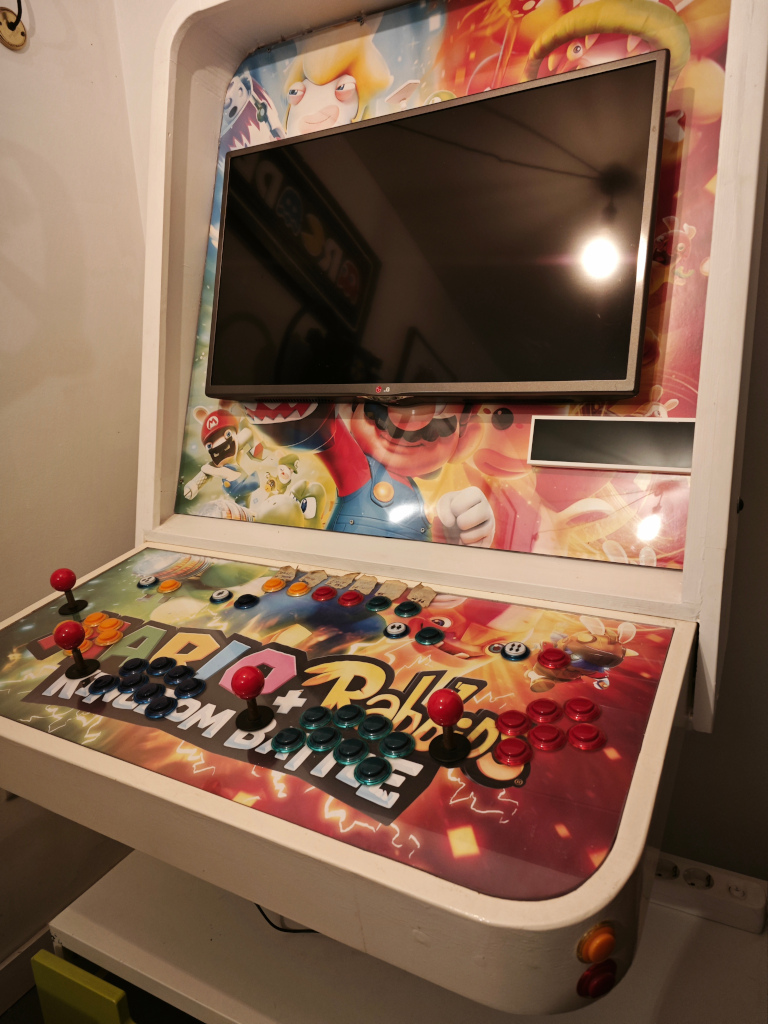 ​
​
***Frontend***
I experimented with PinUPPopper for a while and, although I like the visual and features, I found it hard to set up, maintain and is also not Linux compatible.
Ended with Attract Mode with a lot of customizations.
## Attract Frontend
Attract](https://attractmode.org/) is the frontend I'm using.
It’s Windows and Linux compatible, is open-source and I find it easy to customize layouts and plugins.
I liked PinUp Popper visual so my first task was to create a similar look and feel.
Another thing I was aiming for was a “Back” option on each menu (same as Esc).
***Menus Structure***
Menus are a pain to configure and it’s hard to find proper guidance to configure them.
Below is my approach but I’m sure a better one exists.
> ```
> - Displays Menu (default) + Main Menu (display) (Level1)
> - MameCategories (display) (Level 2)
> - Beat ‘em Up (display) (Level 3)
> - Shoot ‘em Up (display) (Level 3)
> - …
> - VP Categories (display) (Level 2)
> - Music (display) (Level 3)
> - Movies (display) (Level 3)
> - …
> - DosBox (display) (Level 2)
> ```
***Top Menu***
By default, there is no configurable top menu where to navigate to, Displays are the default top menu when Attract starts.
But, to implement a “Back” option, I would need a Top Menu.
My solution was to create a Main Menu display, with the same configuration as the Displays menu.
So my attract.cfg beggining looks like this:
> ```
> display MameCategories
> layout nevato_full
> romlist MameCategories
> in_cycle yes
> in_menu yes
>
> display VPCategories
> layout nevato_full
> romlist VPCategories
> in_cycle yes
> in_menu yes
>
> display dosbox
> layout nevato
> romlist dosbox
> in_cycle yes
> in_menu yes
>
> display Main
> layout nevato_full
> romlist Main
> in_cycle no
> in_menu no
> ```
Notice the in_menu=yes in the displays I want on the Displays Menu and in_menu=no in the displays that are for navigation.
Main display (copy of displays) is hidden because it will shown only on the lower menus.
To navigate between displays, I use a default attract romlist configuration as shown below in the Main display romlist.
> ```
> #Name;Title;Emulator;CloneOf;Year;Manufacturer;Category;Players;Rotation;Control;Status;DisplayCount;DisplayType;AltRomname;AltTitle;Extra;Buttons;Series;Language;Region;Rating
> MameCategories;Mame Categories;@;;;;;;;;;;;;;;;;;;
> VPCategories;VP Categories;@;;;;;;;;;;;;;;;;;;
> dosbox;dosbox;@;;;;;;;;;;;;;;;;;;
> ```
***Romlists and filters***
I tried a lot of different settings and ended up with one romlist per menu and one romlist per emulator.
I also don’t use filters besides a global one for each display.
So for example for MameCategories, a Level 2 menu:
- In attract.cfg you'd have:
> ```
> display MameCategories
> layout nevato_full
> romlist MameCategories
> in_cycle yes
> in_menu yes
> ```
- In MameCategories.txt romlist file you'd have:
> ```
> #Name;Title;Emulator;CloneOf;Year;Manufacturer;Category;Players;Rotation;Control;Status;DisplayCount;DisplayType;AltRomname;AltTitle;Extra;Buttons;Series;Language;Region;Rating
> pl_shemup;Shootem Up;@;;;;;;;;;;;;;;;;;;
> pl_btemup;Beatem Up;@;;;;;;;;;;;;;;;;;;
> pl_fighter;Fighter;@;;;;;;;;;;;;;;;;;;
> pl_platform;Platform;@;;;;;;;;;;;;;;;;;;
> pl_driving;Driving;@;;;;;;;;;;;;;;;;;;
> pl_rungun;Run & Gun;@;;;;;;;;;;;;;;;;;;
> pl_puzzle;Puzzle;@;;;;;;;;;;;;;;;;;;
> pl_sports;Sports;@;;;;;;;;;;;;;;;;;;
> pl_4players;4 Players;@;;;;;;;;;;;;;;;;;;
> pl_all;All Arcade;@;;;;;;;;;;;;;;;;;;
> Main;Main;@;;;;;;;;;;;;;;;;;;
> ```
Notice the Main line at the bottom that allows me to navigate to the Main (Level 1) Menu and behaves as a “Back” option.
Each of the lines pl_shemup, pl_btemup,... are displays, configured in attract.cfg with a global filter:
> ```
> display pl_shemup
> layout nevato
> romlist mame
> in_cycle no
> in_menu no
> global_filter
> exception Emulator equals @
> rule CloneOf not_equals .*
> rule Category contains Shooter
> ```
Mame emulator has a single Mame.txt romlist file for all categories (level 3) displays.
One additional detail is that I added a line at the bottom of each emulator romlist to allow me to return to the Categories (level 2) Menu
On Mame.txt the last line is:
> ```
> MameCategories;MameCategories;@;;;;;;
> ```
***Second screens***
If you remember, my setup has 2 screens: Playfield and DMD.
While in the frontend I want the second screen to show something relevant.
I’m using the multimon plugin to display the marquee in the DMD monitor.
## Attract Layout
I’m using [Nevato](https://onyxarcade.com/nevato.html). This layout is perfect for Mame and DosBox but need some tweaking for VPinball.

***Wheel and Backgrounds***
Changed a bit the wheel and background, to be able to use the wheel T-Arc images available.

***Overlay***
I also added the possibility to add an overlay image over the background media.
This allows me to use non specific videos in the background and use the overlay for additional info on where I’m at.
In my setup, the overlay is a transparent png with the name of the display. This is available in all my Nevato layouts.

In the layout config menu, background art, you can choose fanart&overlay to read the overlay images from a specific folder. Don’t forget to add this config in your emulator config file
VisualPinball.cfg.
> ```
> artwork overlay $HOME/.attract/menu-art/VisualPinball/overlay
> ```
***Nevato_Full***
I wanted a PinUp Popper look and feel when navigating through the menus. In these menus you have no rom info, just media files to show up.
I ended up editing the layout to create nevato_full. This layout shows only a media file in the background, fulfilling all the screen.

***Nevato_Pinball***
Nevato by default is targeted at mame/consoles but I was looking for a more Pinball oriented design.
Changed the cabinet, naming for a specific backglass folder images and some other things that I can't quite recall.
The result is a new layout.

Don’t forget to add this config in your emulator config file
VisualPinball.cfg.
> ```
> artwork backglass $HOME/multiarcade/attract/menu-art/VisualPinball/backglass
> ```
## Visual Pinball Standalone
I have a two screen setup: 32’’ LCD for playfield and a Long Strip, 1920x480 LCD for DMD.
The HW is a Low end laptop so optimizing for performance will always be a priority.
I have two coexisting setups with Linux and Windows.
I’m using the same VPX 10.8.0 RC1 (VPinballX_GL) in both environments.
The good news is that it works in both environments.
***Installation***
For windows: https://github.com/v....0-1873-bdd0673
For Linux: https://github.com/v...lone/standalone
Follow the instruction for compiling: https://github.com/v...alone#compiling
Configuration in Linux is way trickier as you don’t have a configuration interface and will have to use only VPinballX.ini.
I've been documenting my VPinballX.ini using the info I can find, but is far from exaustive.
*** Configuring DMD position in Linux ***
Using VPinbalX.ini I can configure the playfield screen without issues:
> ```
> ; Video options
> Display = 0 # or 1;
> ```
Found this post from Toxie where he has a Linux Batocera setup with a video.
https://www.vpforums...one#entry529214
In his YouTube video he has the link to his Github repo where he describes his VPX Display Server
https://github.com/jsm174/vpxds
I noticed that he extends his screens and configures the DMD to be placed on the X position 2104 (X start of the right screen).
> ```
> DMD=1
> DMDX=2104
> DMDY=0
> ```
Replicated with my screen info and it works perfectly
*** Table patches for VPX Standalone ***
The patches are available in
https://github.com/j...ndalone-scripts
*** Displaying a DMD in standalone and other workarounds ***
Many newer tables render the DMD inside Visual Pinball's window using Textbox objects.
Other tables will rely on positioning VPinMAME or FlexDMD's application window over Visual Pinball's window.
https://github.com/v...one#workarounds
## Miscelaneous
*** MAME clean clone roms and media ***
There is a linux script in attract/scraper/scrape_mame_file.sh that moves all clone roms and clone media to different folders.
I edited the paths before commiting, so I could have ruined something. It should be easy to correct.
## TO DO
- Loading screen
- A lot more things I’ll surely remember along the way.
Edited by astribuncio, 09 March 2024 - 12:23 PM.
 Top
Top


 are all trademarks of VPFORUMS.