Jump to content


Photo
- - - - -

Neons in future pinball


  • Please log in to reply
12 replies to this topic

#1 ruckage

ruckage

    Enthusiast

  • VIP
  • 70 posts
  • Location:UK

  • Flag: United Kingdom

  • Favorite Pinball: Tales from the crypt


Posted 18 January 2010 - 10:26 PM

Hi everyone,

One of things I love about FP is that if you think outside the box a little you can make it do things that it was never intended do. I had an idea earlier for creating neon lights from within FP so have been experimenting and thought I'd share the results.
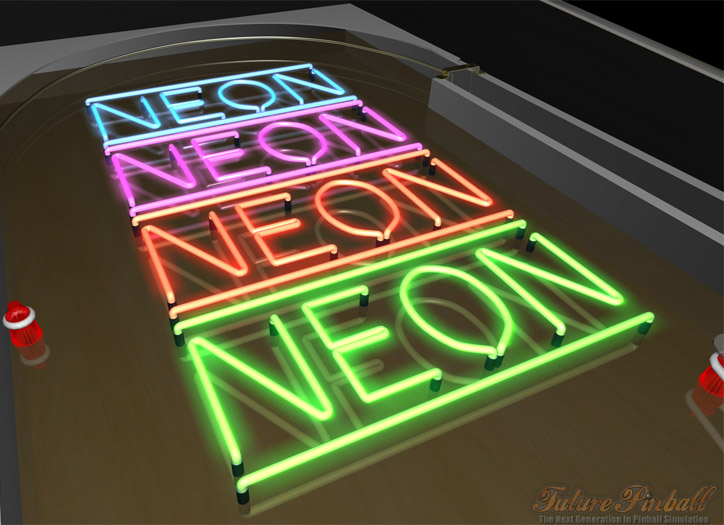


Here's how I did it:
  1. I created the neon tubes using the standard wire guide object set to its largest width (5mm).
  2. I set the colour of the guide to the colour I want the neon to be - colours on the verge of being pastel work well.
  3. Export a blue print of the neon bulbs
  4. In photoshop/gimp I created a 'glow map' using the blueprint to match the shapes. The map should look like blurred glowing versions of the bulbs in the appropriate colour against a black background.
  5. Saved the glowmap as a jpg.
  6. Loaded the map into the FP texture editor and added it to an image list.
  7. I then created a hologram object set to the size and width of the table ensuring the tilt is set to 0 and the height is about the height of the wire guides/neons, a few mm higher seems to give the best results.
  8. Assign the image list you created to the hologram object and you're done.
  9. I also created the black caps on the tubes as a finishing touch just using surfaces.


Sorry if that was a little hard to follow, I may do a more in depth tutorial later describing each step more clearly, particularly the creation of the glow map for those unfamilliar with photoshop or the gimp.

You can also set this up so you can turn them on and off at will by setting the wire colour to dark gray and having an on and off image in the image list but the colours aren't quite as vibrant then and you would need a different hologram object for every neon you wished to control.

I'll try and get this demo table uploaded so you can see it first hand.

Edit:

The table has been uploaded and I've added an animated neon as well so you can see how it looks http://www.vpforums....u...l&f_id=2825

#2 pinballwzd

pinballwzd

    Enthusiast

  • VIP
  • 176 posts
  • Location:Coquitlam, B.C. Canada

  • Flag: Canada

  • Favorite Pinball: Cyclone


Posted 18 January 2010 - 10:36 PM

Thank you for sharing.. That is a very, very nice effect !!

You are right.. It is cool what Future Pinball can do when you think out side the box !

David...
- PINBALLWZD -

"It's not all about playing with balls..."

Tables: Alien Pinball Legacy (FP), Surgical R1 (FP), Pirahna - The Hunger(FP - WIP)

#3 rossicomputers

rossicomputers

    Gustavo

  • Members
  • PipPipPipPip
  • 608 posts
  • Location:Boston MA USA

  • Flag: Brazil

  • Favorite Pinball: Black Knight 2000

Posted 18 January 2010 - 10:45 PM

About your vampire table... How is going?


Rossi

#4 ruckage

ruckage

    Enthusiast

  • VIP
  • 70 posts
  • Location:UK

  • Flag: United Kingdom

  • Favorite Pinball: Tales from the crypt


Posted 18 January 2010 - 11:28 PM

I've uploaded the demo table - link is at the bottom of the first post.

@Rossi:
Hello, Vampire Revamped is going well, I haven't done much on it the past week but it will be released soon.

#5 wtiger

wtiger

    Pinball Fan

  • VIP
  • 1,148 posts
  • Location:Los Angeles, CA

  • Flag: United States of America

  • Favorite Pinball: Junkyard


Contributor

Posted 18 January 2010 - 11:36 PM

ruckage,
That is too cool! Thanks for sharing it with all of us. cool.gif

#6 Sinball

Sinball

    Neophyte

  • Banned
  • Pip
  • 4 posts

  • Flag: United Kingdom

  • Favorite Pinball: Tron (WIP)

Posted 18 January 2010 - 11:48 PM

Good work ruckage.

#7 Steve Paradis

Steve Paradis

    Pinball Fan

  • Members
  • PipPipPipPip
  • 555 posts
  • Location:Montreal,Qc Canada

  • Flag: Canada

  • Favorite Pinball: RFM


Posted 19 January 2010 - 12:17 AM

I'm proud of you smile.gif ..that's the spirit!

Steve
I like poutine...Not the russian guy but the fries and gravy and cheese curds stuff.

#8 Gravy

Gravy

    Pinball Fan

  • VIP
  • 1,147 posts

  • Flag: Australia

  • Favorite Pinball: Simpsons pinball party


Posted 19 January 2010 - 02:31 AM

The Neons look awesome. I wonder if you can get the imagelist to cycle fast enough to create a very rapid flickering effect that you might get from a real neon, so perhaps create an extra frame or two that has a slightly less amount of glow and then alternate between the two frames very rapidly.

Can anyone remember what the maximum amount of frames per second is possible in an image list?

You can do some pretty cool plasma effects with lights too, see a little example table I made a while ago at http://www.pinballad...p...einfo&id=22

Pinball Addict


#9 Steve Paradis

Steve Paradis

    Pinball Fan

  • Members
  • PipPipPipPip
  • 555 posts
  • Location:Montreal,Qc Canada

  • Flag: Canada

  • Favorite Pinball: RFM


Posted 19 January 2010 - 02:38 AM

QUOTE (Gravy @ Jan 18 2010, 09:31 PM) <{POST_SNAPBACK}>
Can anyone remember what the maximum amount of frames per second is possible in an image list?


you can achieve up to 20fps if you put the interval 50ms wich is really fluid


I like poutine...Not the russian guy but the fries and gravy and cheese curds stuff.

#10 Gravy

Gravy

    Pinball Fan

  • VIP
  • 1,147 posts

  • Flag: Australia

  • Favorite Pinball: Simpsons pinball party


Posted 19 January 2010 - 05:46 AM

QUOTE (Steve Paradis @ Jan 19 2010, 01:38 PM) <{POST_SNAPBACK}>
QUOTE (Gravy @ Jan 18 2010, 09:31 PM) <{POST_SNAPBACK}>
Can anyone remember what the maximum amount of frames per second is possible in an image list?


you can achieve up to 20fps if you put the interval 50ms wich is really fluid


Seems you can set the animation update interval as low as 25ms actually, Ive just been having a play with it. I've found that even at that fast speed its not fast enough to get a realistic neon flicker effect if you are actually attempting to flick between an on state and a totally off state for the neon.

However if you make the "off" state a very slightly less bright version of the fully "on" image then set the update to 25ms and run an animation that flicks constantly between the 2 images then you get quite a nice neon flicker effect.

Ruckage, I can upload the test mod I just made to my server if you would like to have a look. Let me know.

Pinball Addict


#11 ruckage

ruckage

    Enthusiast

  • VIP
  • 70 posts
  • Location:UK

  • Flag: United Kingdom

  • Favorite Pinball: Tales from the crypt


Posted 19 January 2010 - 10:21 AM

QUOTE (Gravy @ Jan 19 2010, 02:31 AM) <{POST_SNAPBACK}>
The Neons look awesome. I wonder if you can get the imagelist to cycle fast enough to create a very rapid flickering effect that you might get from a real neon, so perhaps create an extra frame or two that has a slightly less amount of glow and then alternate between the two frames very rapidly.


Thanks for the feedback, I actually had a pretty much the same idea. If you look at real neons though they don't actually flicker across the whole bulb from say full bright to half bright, instead you can see kind of a turbublent pulsating happening instead.
what I've done is create some random noise in photoshop, enlarged it, applied gausian blur and adjusted the contrast. I then set it's blend mode to multiply and adjusted the opacity so that the effect isn't too prominent. I did three different frames like this and animate between them to get the flickering effect.

I've udated the file to v1.1 with this effect added

#12 Gravy

Gravy

    Pinball Fan

  • VIP
  • 1,147 posts

  • Flag: Australia

  • Favorite Pinball: Simpsons pinball party


Posted 19 January 2010 - 10:32 AM

QUOTE (ruckage @ Jan 19 2010, 09:21 PM) <{POST_SNAPBACK}>
QUOTE (Gravy @ Jan 19 2010, 02:31 AM) <{POST_SNAPBACK}>
The Neons look awesome. I wonder if you can get the imagelist to cycle fast enough to create a very rapid flickering effect that you might get from a real neon, so perhaps create an extra frame or two that has a slightly less amount of glow and then alternate between the two frames very rapidly.


Thanks for the feedback, I actually had a pretty much the same idea. If you look at real neons though they don't actually flicker across the whole bulb from say full bright to half bright, instead you can see kind of a turbublent pulsating happening instead.
what I've done is create some random noise in photoshop, enlarged it, applied gausian blur and adjusted the contrast. I then set it's blend mode to multiply and adjusted the opacity so that the effect isn't too prominent. I did three different frames like this and animate between them to get the flickering effect.

I've udated the file to v1.1 with this effect added


Cool, I'll download and check it out. If you are interested I've uploaded my efforts temporarily to http://www.pinballad...eon_flicker.zip if you want to have a quick look. There are two versions in the zip, first one is very subtle flicker, zoom in on it to really see it. The second is a more extreme flicker, the flicker on the red doesnt seem to be as easy to see.

I think neons cycle at around 50hz or something?? Could be wrong though.

Edit: Just had a look at your flicker version, looks very cool however maybe a little too intense when compared to a real neon? My gut feeling is if you could change it so that there is only half as much intensity variation as what you have done it might add more realism. Its possible that it looks different on an LCD compared to a CRT as well (Im running a CRT).

For the 2 versions I did, I duplicated your neon image and adjusted the levels so that the gray point was 0.95 for the standard (less flicker) and 0.90 for the extreme version (I think those were the settings I used, very close if not).

I love these toys, well done for thinking out the box.

Edited by Gravy, 19 January 2010 - 10:51 AM.

Pinball Addict


#13 jpop

jpop

    Hobbyist

  • Pinball Legend
  • PipPip
  • 36 posts

  • Flag: United States of America

  • Favorite Pinball: Capt. Fantastic

Posted 24 February 2011 - 04:46 PM

Very nice....can you make a ramp this way using the neon
maps or as a wire guide?

John

QUOTE (ruckage @ Jan 18 2010, 04:26 PM) <{POST_SNAPBACK}>
Hi everyone,

One of things I love about FP is that if you think outside the box a little you can make it do things that it was never intended do. I had an idea earlier for creating neon lights from within FP so have been experimenting and thought I'd share the results.


Here's how I did it:
  1. I created the neon tubes using the standard wire guide object set to its largest width (5mm).
  2. I set the colour of the guide to the colour I want the neon to be - colours on the verge of being pastel work well.
  3. Export a blue print of the neon bulbs
  4. In photoshop/gimp I created a 'glow map' using the blueprint to match the shapes. The map should look like blurred glowing versions of the bulbs in the appropriate colour against a black background.
  5. Saved the glowmap as a jpg.
  6. Loaded the map into the FP texture editor and added it to an image list.
  7. I then created a hologram object set to the size and width of the table ensuring the tilt is set to 0 and the height is about the height of the wire guides/neons, a few mm higher seems to give the best results.
  8. Assign the image list you created to the hologram object and you're done.
  9. I also created the black caps on the tubes as a finishing touch just using surfaces.


Sorry if that was a little hard to follow, I may do a more in depth tutorial later describing each step more clearly, particularly the creation of the glow map for those unfamilliar with photoshop or the gimp.

You can also set this up so you can turn them on and off at will by setting the wire colour to dark gray and having an on and off image in the image list but the colours aren't quite as vibrant then and you would need a different hologram object for every neon you wished to control.

I'll try and get this demo table uploaded so you can see it first hand.

Edit:

The table has been uploaded and I've added an animated neon as well so you can see how it looks http://www.vpforums....u...l&f_id=2825