Jump to content


Photo
- - - - -

b2s designer error


  • Please log in to reply
9 replies to this topic

#1 Slydog43

Slydog43

    Pinball Wizard

  • Platinum Supporter
  • 3,008 posts
  • Location:Hackettstown, NJ

  • Flag: United States of America

  • Favorite Pinball: Addams Family, All Williams 90's Games

Posted 13 February 2023 - 01:16 PM

I'm trying to add DMD images to some of my older DirectB2s files to include either the manufacturer or the title to the DMD area on old EM tables.

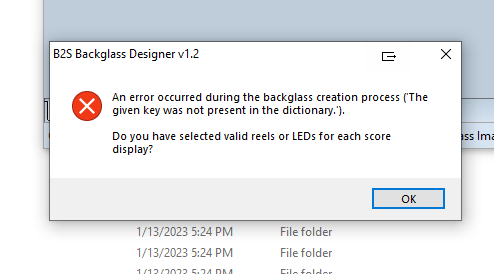
When I import the Directb2s to the b2sdesigner (1.2) and then import the dmd image, then try and export the Directb2s I get this error.


https://i.postimg.cc...S/b2s-error.png


Any ideas?


I only want to add an image to the Directb2s, nothing else.  Is there a newer version of b2s designer?


#2 STAT

STAT

    Pinball and Arcade Freak

  • VIP
  • 4,983 posts
  • Location:Wels - Austria

  • Flag: Austria

  • Favorite Pinball: Twilight Zone

Posted 13 February 2023 - 01:38 PM

Try to change "Reel" Set to another Basic Reel - could be because someone used an own Set, and (of course) you haven't.


In Case this doesn't work, tell me one example ...


Edited by STAT, 13 February 2023 - 01:39 PM.


#3 Slydog43

Slydog43

    Pinball Wizard

  • Platinum Supporter
  • 3,008 posts
  • Location:Hackettstown, NJ

  • Flag: United States of America

  • Favorite Pinball: Addams Family, All Williams 90's Games

Posted 13 February 2023 - 02:12 PM

Thanks for the quick reply.  I tried that and you might be onto something but I still can't get it to go.  Ive tried a few but one that definitely gives me trouble is 300 by Gottlieb.  I had to import a fet ttf but if you can show me how on this one, I'm good to go, thanks


tell me if I have to send you the directb2s


Steve


#4 STAT

STAT

    Pinball and Arcade Freak

  • VIP
  • 4,983 posts
  • Location:Wels - Austria

  • Flag: Austria

  • Favorite Pinball: Twilight Zone

Posted 13 February 2023 - 02:18 PM

Pls send me or tell me the Download Source, so we are on the same ...


#5 Slydog43

Slydog43

    Pinball Wizard

  • Platinum Supporter
  • 3,008 posts
  • Location:Hackettstown, NJ

  • Flag: United States of America

  • Favorite Pinball: Addams Family, All Williams 90's Games

Posted 13 February 2023 - 09:36 PM

Here is a link to the DirectB2s on my Google Drive:


https://drive.google...?usp=share_link


I see that I can import a DMD image now, but I still have trouble with many of my DirectB2s's.


#6 Halen

Halen

    Enthusiast

  • Platinum Supporter
  • 251 posts
  • Location:Belo Horizonte - Brasil

  • Flag: Brazil

  • Favorite Pinball: Shark - Taito

Posted 13 February 2023 - 10:51 PM

Try to use the older B2S designer version. Works for me.

#7 STAT

STAT

    Pinball and Arcade Freak

  • VIP
  • 4,983 posts
  • Location:Wels - Austria

  • Flag: Austria

  • Favorite Pinball: Twilight Zone

Posted 14 February 2023 - 08:29 AM

I did a Check, Main Issue was/is, there are Fonts in use, which you/we haven't installed - you will get an Error - the same for another imported Reels,

thats the reason why i always use "Basic Settings" for all ... ( exc. there is a Special, well )


Edited by STAT, 14 February 2023 - 08:29 AM.


#8 Slydog43

Slydog43

    Pinball Wizard

  • Platinum Supporter
  • 3,008 posts
  • Location:Hackettstown, NJ

  • Flag: United States of America

  • Favorite Pinball: Addams Family, All Williams 90's Games

Posted 16 February 2023 - 07:41 PM

I can even try with Flying Carpet b2s (just uplaoded the other day here).  If I try and change the DMD area, I can't export the Directb2s, program just crashes.  Please someone try this and tell me how it goes, thanks


Steve


#9 brefreez

brefreez

    Enthusiast

  • Members
  • PipPipPip
  • 111 posts
  • Location:Wilmington, Delaware

  • Flag: United States of America

  • Favorite Pinball: Bram Stokers Dracula

Posted 10 August 2025 - 05:36 PM

Did you ever get this to work Slydog43? Im currently trying to add some dmd images to some older b2s files but am getting the exact thing you have tried. my version is 2.1.0.0-d4a9598-35. Would be nice to have other options than making pup videos.  I have restepped my tracks even redoing from scratch and its always the reels that make the files unsavable and locks the program up. 


#10 brefreez

brefreez

    Enthusiast

  • Members
  • PipPipPip
  • 111 posts
  • Location:Wilmington, Delaware

  • Flag: United States of America

  • Favorite Pinball: Bram Stokers Dracula

Posted 10 August 2025 - 06:24 PM

Halen's solution worked for me, I just switched out the executables and boom it worked fine. I dropped to version 1.2