Jump to content


Photo
- - - - -

Opinions on my Cab plans + PC hardware:

vpin pc 4k hardware

  • Please log in to reply
23 replies to this topic

#1 Dipkid

Dipkid

    Hobbyist

  • Members
  • PipPip
  • 21 posts
  • Location:Oslo

  • Flag: Norway

  • Favorite Pinball: Medieval Madness

  • PS3 Gamer Tag: the_dipkid

Posted 10 January 2022 - 08:47 AM

Hi guys! Old lurker here, first post, so please be gentle..

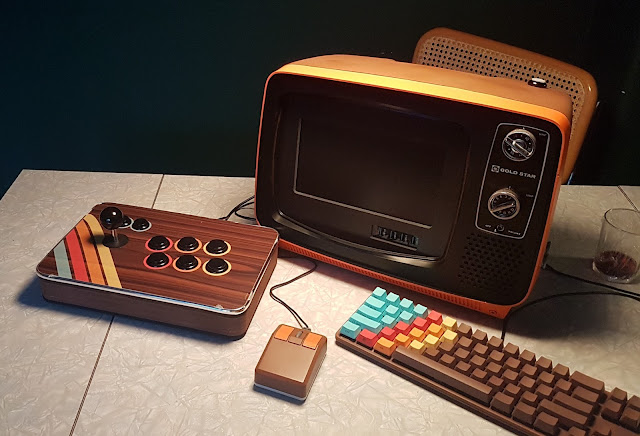
Back in 2018 i built a low budget 2 screen cab, out of an old 32" samsung tv and my old imac. (you can see some crappy pics of it at my link below)

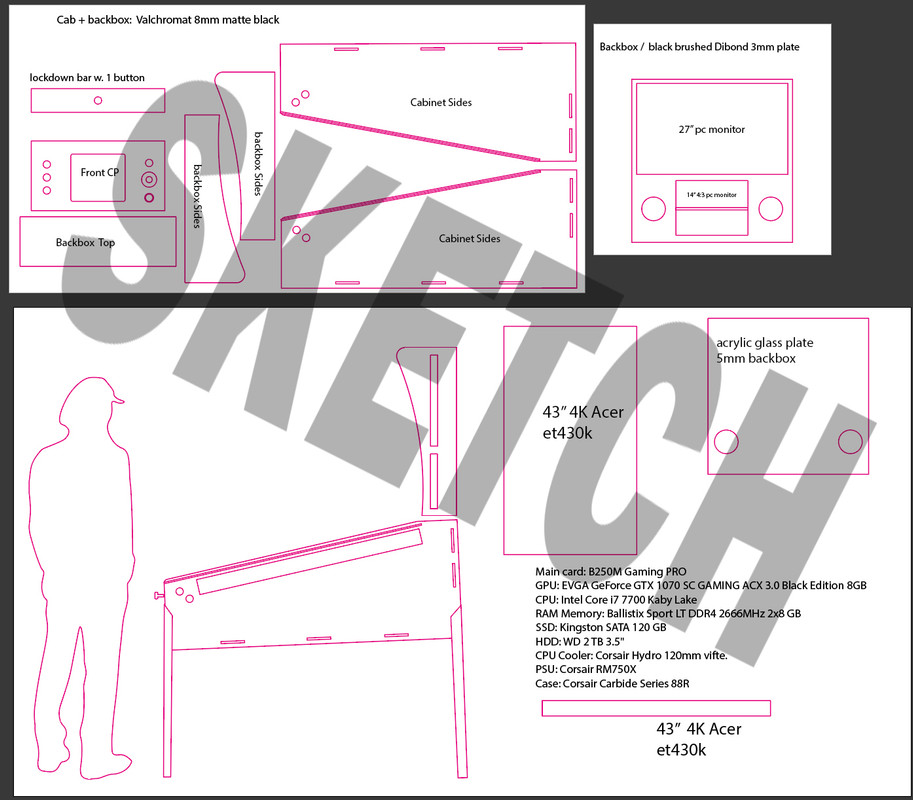
But now I have more room and a wee bit bigger budget, so here are my plans / blueprints for my upcoming 3 screen 4k 43" PF build.

So far I got  buttons, Williams legs, pf screen, materials, some led lights. A Plunger and the kl25z pinscape board are on their way..  

Just throwing it out here to hear if you see any big no-no with my build, and would also really appreciate your opinions on the pc specs. (Im aiming for 4k at 60fps)

I know close to nothing about pc hardware, I've mainly built DIY arcade cabs with SBCs before..

Im goin to be running Pinup Popper, VPX and PFX3 (and hopefully the new PFX coming out..)

Im eager to get going on this project, and thanks for looking!


Some of my old builds and DIYs: http://mattiaskullberg.blogspot.com


vp-plans.jpg


Edited by Dipkid, 10 January 2022 - 09:14 AM.


#2 LynnInDenver

LynnInDenver

    Pinball Fan

  • Members
  • PipPipPipPip
  • 570 posts
  • Location:Denver

  • Flag: United States of America

  • Favorite Pinball: Genie

Posted 10 January 2022 - 12:31 PM

My first recommendation - don't divide up the lower backbox monitor with a bezel to make separate DMD and Topper areas. There are "FullDMD" tables out there now that can take advantage of having an undivided 16:9 LCD panel in that position, like the tribute recreations of Guardians of the Galaxy and Batman '66. I actually went with the "FullDMD" configuration myself, even though at the time I built the cabinet there were NO tables that really supported the format - but I had seen the "writing on the wall" when I was seeing Stern move over to the configuration, and I figured that I would regret doing a divided bezel vs an undivided one.


#3 Dipkid

Dipkid

    Hobbyist

  • Members
  • PipPip
  • 21 posts
  • Location:Oslo

  • Flag: Norway

  • Favorite Pinball: Medieval Madness

  • PS3 Gamer Tag: the_dipkid

Posted 10 January 2022 - 01:29 PM

@LynnInDenver
Thanks for the input! just got the same advice over at VPUniverse, so looks like i'll go for a 16:9 dmd screen instea.i wasn't aware of the new fulldmd updates. putting the dmd over a topper / bg video seems smoother yes. :otvclap:

Edited by Dipkid, 10 January 2022 - 02:27 PM.


#4 garnel

garnel

    Enthusiast

  • Gold Supporter
  • 267 posts
  • Location:Oregon

  • Flag: United States of America

  • Favorite Pinball: Medieval Madness

Posted 10 January 2022 - 08:52 PM

I upgraded from a 60hz 4k Vizio to a 120hz 4k Sony. Depending on your budget, and functional goals for your table, you might consider a 120hz playfield display rather than 60hz. It does make a difference. For example, the ball rolling is more realistic - less choppy - new tv's are coming out now so there may be more 120hz choices soon.


Right now 43" Gaming Monitors are around $1000 USD. The 4K 43" Sony X85J TV at 120hz - cost $600 to $700 USD depending where you buy it.

All the best with your build - you are in for a challenging, sometimes frustrating, yet rewarding experience.


Edited by garnel, 10 January 2022 - 08:54 PM.


#5 Dipkid

Dipkid

    Hobbyist

  • Members
  • PipPip
  • 21 posts
  • Location:Oslo

  • Flag: Norway

  • Favorite Pinball: Medieval Madness

  • PS3 Gamer Tag: the_dipkid

Posted 11 January 2022 - 06:18 AM

@Garnel I've been lookin at it, but goin 120hz will break the bank right now, on both screen and pc. I went with the Acer ET430K, I think i got a good deal on it.. (ca 200 usd)

Knowing myself, and how Im constantly tinkering with my Mame-cabs, I will proabaly upgrade alot of stuff on the vpin down the line..


#6 wiesshund

wiesshund

    VPF Legend

  • Members
  • PipPipPipPipPipPipPip
  • 11,859 posts

  • Flag: United States of America

  • Favorite Pinball: How many can i have?

Posted 11 January 2022 - 09:33 AM

I think the monitor should do nicely


If you are not a pinball pro, then as long as you got everything set up to maintain a nice solid 60fps
you probably are not going to know the difference.


If you are a pro, then maybe cause maybe, cause they measure flipper shots in nano seconds LOL


 but I had seen the "writing on the wall" when I was seeing Stern move over to the configuration, and I figured that I would regret doing a divided bezel vs an undivided one.


Hehe i was scribling on that wall to in 2020


And then said "Well crap, this doesn't fit on anyone's DMD screens"
fits on mine though :)


@Dipkid
Not to mention, the blank space, for things not using all the screen
that can easily be filled with lots of stuff, and does not even require popper to do it.
Lots of fun ways to make use of a full screen in the DMD slot


If you feel the need to empty your wallet in my direction, i don't have any way to receive it anyways

Spend it on Hookers and Blow


#7 Dipkid

Dipkid

    Hobbyist

  • Members
  • PipPip
  • 21 posts
  • Location:Oslo

  • Flag: Norway

  • Favorite Pinball: Medieval Madness

  • PS3 Gamer Tag: the_dipkid

Posted 11 January 2022 - 09:46 AM

Thanks for all the knowledge dudes! Will def go for a 14 - 17" 16:9 dmd display.  Was thinking that it cant be that hard to have a generic video (gat damn flames or lightning bolts probably) behind the dmd on those tables that dont have FullDMD support.  :)


#8 wiesshund

wiesshund

    VPF Legend

  • Members
  • PipPipPipPipPipPipPip
  • 11,859 posts

  • Flag: United States of America

  • Favorite Pinball: How many can i have?

Posted 11 January 2022 - 11:59 AM

Thanks for all the knowledge dudes! Will def go for a 14 - 17" 16:9 dmd display.  Was thinking that it cant be that hard to have a generic video (gat damn flames or lightning bolts probably) behind the dmd on those tables that dont have FullDMD support.  :)

I think 14" to 15.6" is generally what works scale wise


Many ways to source that.

Personally, i get them from laptops, usually toasted beyond repair laptops whose screen is still good
usually, they are 1366x768 which for a DMD is like way more than enough.

You get the LCD panel model off the back of the LCD and then look for an LCD controller for it, usually about 20 dollars

(also a cheap way to make little spare monitors for stuff)


You can also buy them, at least the 15" ones, they sell them as portable monitors for laptops, they just tend to charge a lot for those
but they work fine


As far as putting filler stuff on it.
Well, Most tables do not use the full screen for the DMD
and the DMD display looks kind of janky if you stretch it to do so, gets really tall and skinny looking


Now pinup i know will play media if you set it up to, i dont know how hard it is as i dont use popper


But a very simple way is via freezy's DMD extensions which you will no doubt be using anyways.
Freezy's allows you to do a lot of custom stuff with the DMD display

And aside from just making the DMD aspect nice, it allows you to do other things as well

This image wont make much sense but, i made it for someone whose cabinet is WB/loony toons themed

You have freezy's apply the image as a DMD frame, and then adjust the DMD to fit in the opening, and the logo fills the rest of the screen


Now one could make all kinds of custom images like this with table logos etc, freey's will let you do a per table kind of thing

Unc1HsL.png


These are not full panel, but here are some i made for various tables

pXpTVfr.png


5nKaKsv.png


rf2m53f.png


here is what some look like in use

2xesPYH.png


Ld4T64d.png


b2LcYKK.png


jzsrm90.png


6vWz7zZ.png


UUpAoyS.png


ykmpciX.png


There are even some things you can do with non DMD B2S backglasses to make some use of the DMD screen, even if a scoreboard itself is not the proper thing to display
It could be a logo for example

Mbn6fjB.png


uPbTNUq.png


And there are ways to properly add a DMD to most any ROM table that does not have an actual DMD display

Scutters wrote a tutorial on it

wGY2zPI.png


So there is a way to do almost anything
Heck i can make an EM table play Budweiser ads from 1961 to 1970 on the DMD screen if you want LOL


None of the above entails any magic from a front end, though i know that they can do it in some fashion or another
the above stuff is just using vpx, vpinmame, freezy's DMD extensions and in some cases flexDMD

Pacman showing a colored DMD where it really does not have one, is flexDMD


this is also flexDMD doing the full screen DMD video, it isnt pinup player, not that pinup is a bad thing

u18NoaX.png 


but yea, you can make the DMD screen get used, and it isnt difficult if you are willing to tinker a little
You could have it feature naked dancing Gnomes if you wanted, but i dont wanna know about it LOL


If you feel the need to empty your wallet in my direction, i don't have any way to receive it anyways

Spend it on Hookers and Blow


#9 Dipkid

Dipkid

    Hobbyist

  • Members
  • PipPip
  • 21 posts
  • Location:Oslo

  • Flag: Norway

  • Favorite Pinball: Medieval Madness

  • PS3 Gamer Tag: the_dipkid

Posted 11 January 2022 - 12:43 PM

Whelp, time to fall down another rabbithole then, my family will be thrilled..!

I' ve actually spent years doing custom splashscreens, overlays, bezels and themes for my Arcade Cabs, Attract Mode, Emulationstation and even PinballX during the time I had my  

first 32" 2 screen MiniCab. But thats the fun part right, we dont really play, we just polish & tinker.. :D


Your frames / overlays looks great btw!


Edited by Dipkid, 11 January 2022 - 12:46 PM.


#10 Dipkid

Dipkid

    Hobbyist

  • Members
  • PipPip
  • 21 posts
  • Location:Oslo

  • Flag: Norway

  • Favorite Pinball: Medieval Madness

  • PS3 Gamer Tag: the_dipkid

Posted 11 January 2022 - 01:12 PM

Darn, just remembered I once had a suitable screen for the dmd, one of those Ali Express TFT screens. I used it in this: 

20170824_181940.jpg

But the ribbon broke, and now its scrapped..


#11 wiesshund

wiesshund

    VPF Legend

  • Members
  • PipPipPipPipPipPipPip
  • 11,859 posts

  • Flag: United States of America

  • Favorite Pinball: How many can i have?

Posted 11 January 2022 - 06:28 PM

Those screens work, if you can find a screen and controller for a reasonable amount
I just dont know much about the quality of aliexpress or shipping times


If you feel the need to empty your wallet in my direction, i don't have any way to receive it anyways

Spend it on Hookers and Blow


#12 Dipkid

Dipkid

    Hobbyist

  • Members
  • PipPip
  • 21 posts
  • Location:Oslo

  • Flag: Norway

  • Favorite Pinball: Medieval Madness

  • PS3 Gamer Tag: the_dipkid

Posted 11 January 2022 - 08:03 PM

they do work, but they feel cheap. and shipping to Europe is usually a couple of months, probably even vorse now due to covid. (Will pick up dmd and backbox screens
from a it-company that we share work location with.)

#13 LynnInDenver

LynnInDenver

    Pinball Fan

  • Members
  • PipPipPipPip
  • 570 posts
  • Location:Denver

  • Flag: United States of America

  • Favorite Pinball: Genie

Posted 11 January 2022 - 11:52 PM

Yeah, just to give the amusement, my cabinet is a little different. I grabbed a 1366x768 screen at a thrift store to serve as my FullDMD screen. It's an EIGHTEEN inch screen, which is technically huge, but it doesn't feel overly large.


#14 wiesshund

wiesshund

    VPF Legend

  • Members
  • PipPipPipPipPipPipPip
  • 11,859 posts

  • Flag: United States of America

  • Favorite Pinball: How many can i have?

Posted 12 January 2022 - 12:17 AM

Yeah, just to give the amusement, my cabinet is a little different. I grabbed a 1366x768 screen at a thrift store to serve as my FullDMD screen. It's an EIGHTEEN inch screen, which is technically huge, but it doesn't feel overly large.


Yea, but you have like a 65" playfield, so its fine
:)


If you feel the need to empty your wallet in my direction, i don't have any way to receive it anyways

Spend it on Hookers and Blow


#15 ACDNate

ACDNate

    Enthusiast

  • Members
  • PipPipPip
  • 94 posts
  • Location:Biloxi, MS

  • Flag: United States of America

  • Favorite Pinball: Simpsons

Posted 12 January 2022 - 01:15 AM

Only input I have is on the computer build, re your 2tb hdd. The motherboard your mentioned has an m2 nvme slot. Those drives in smaller sizes, 2tb and under, have gotten pretty cheap. Leaps and bounds faster than a traditional HDD. Might work better overall to go with a 2tb m2 nvme drive

#16 LynnInDenver

LynnInDenver

    Pinball Fan

  • Members
  • PipPipPipPip
  • 570 posts
  • Location:Denver

  • Flag: United States of America

  • Favorite Pinball: Genie

Posted 12 January 2022 - 03:09 AM


Yeah, just to give the amusement, my cabinet is a little different. I grabbed a 1366x768 screen at a thrift store to serve as my FullDMD screen. It's an EIGHTEEN inch screen, which is technically huge, but it doesn't feel overly large.


Yea, but you have like a 65" playfield, so its fine
:)


It's only 49". I actually have a REAL vintage pinball lockdown bar on the cabinet. :D


#17 wiesshund

wiesshund

    VPF Legend

  • Members
  • PipPipPipPipPipPipPip
  • 11,859 posts

  • Flag: United States of America

  • Favorite Pinball: How many can i have?

Posted 12 January 2022 - 04:06 AM


It's only 49". I actually have a REAL vintage pinball lockdown bar on the cabinet. :D


[looks at 14" laptop]

Only 49 inches she says


If you feel the need to empty your wallet in my direction, i don't have any way to receive it anyways

Spend it on Hookers and Blow


#18 Dipkid

Dipkid

    Hobbyist

  • Members
  • PipPip
  • 21 posts
  • Location:Oslo

  • Flag: Norway

  • Favorite Pinball: Medieval Madness

  • PS3 Gamer Tag: the_dipkid

Posted 31 January 2022 - 09:08 PM

some follow up questions here for the veterans and advanced users.. what typ of connectors and crimps are people using for the gpio pins on kl25z board? I really don't want to solder the buttons directly to the board. very hard to Google the English named parts for a swede living in Norway..
and question nr 2: I want to do ssf, but will do that later. Will a regular 5.1 system without exciters have any benefit over a 2.1 system? Will I get surround sound through vpx with the sounds coming from the "right" places, minus the physical vibrations..?

#19 mjr

mjr

    Pinball Wizard

  • Members
  • PipPipPipPipPip
  • 3,323 posts

  • Flag: United States of America

  • Favorite Pinball: Medieval Madness

Posted 31 January 2022 - 09:20 PM

what typ of connectors and crimps are people using for the gpio pins on kl25z board? I really don't want to solder the buttons directly to the board. very hard to Google the English named parts for a swede living in Norway..


There's a reference set of part numbers here:


http://mjrnet.org/pi...p?sid=partslist


Go to the section for KL25Z Microcontroller (Standalone) - that lists all of the pin headers and connector housings you need.  All of those 0.1" headers are standardized parts that are made by several manufacturers, so there's no need to buy the exact parts in the list, but that'll give you concrete examples to compare when searching for parts.  The 0.1" headers and housings are widely used for hobby robotics, so you can find them at all of the vendors that cater to that market - Adafruit, Sparkfun, Pololu, etc.  Those guys are all US vendors, but I'm sure there are also some EU-based vendors that will be cheaper for shipping for you.


#20 Dipkid

Dipkid

    Hobbyist

  • Members
  • PipPip
  • 21 posts
  • Location:Oslo

  • Flag: Norway

  • Favorite Pinball: Medieval Madness

  • PS3 Gamer Tag: the_dipkid

Posted 31 January 2022 - 09:43 PM

I have been reading the bible! the single needle looking pin was what I was going to take a chance on, so I'll be visiting my local arduino dealer tomorrow


Also tagged with one or more of these keywords: vpin, pc, 4k, hardware