Jump to content


Photo
- - - - -

Alphanumeric displays in Freezy?

dmd freezy alpahnumeric

  • Please log in to reply
17 replies to this topic

#1 topper2k

topper2k

    Enthusiast

  • Members
  • PipPipPip
  • 258 posts
  • Location:Virginia

  • Flag: United States of America

  • Favorite Pinball: Indiana Jones Pinball Adventure

Posted 11 June 2020 - 12:04 AM

To enable Alphanumeric display in my LCD DMD (running Freezy 1.7.1) do I need to upgrade to 1.8?


Are there instructions for setting this up somewhere? Google hasn't turned anything up.


Also, if I do upgrade Freezy, what do I need to backup in case I need to roll back?


#2 vothar

vothar

    Enthusiast

  • Members
  • PipPipPip
  • 55 posts

  • Flag: Canada

  • Favorite Pinball: medieval madness

Posted 11 June 2020 - 03:22 PM

https://github.com/f.../dmd-extensions


#3 topper2k

topper2k

    Enthusiast

  • Members
  • PipPipPip
  • 258 posts
  • Location:Virginia

  • Flag: United States of America

  • Favorite Pinball: Indiana Jones Pinball Adventure

Posted 11 June 2020 - 03:58 PM

Thanks Vothar. I'm aware of that resource. My questions are:

  • Is 1.8 the only way to enable alphanumeric displays or can it be done in earlier (1.7.1) versions of Freezy?
  • What files do I need to backup to roll back to 1.7.1 if something goes wrong?
  • Are there any additional instructions/resources out there for enabling alphanumeric displays?

A big part of my concern is that the VPX setup guides go out of their way to specify that we install version 1.7.1 of Freezy. They state that more recent versions (or at least 1.7.2) have issues that make them not work well with VPX.


Are a lot of people running 1.8 without issues or should we stick with 1.7.1?


#4 vothar

vothar

    Enthusiast

  • Members
  • PipPipPip
  • 55 posts

  • Flag: Canada

  • Favorite Pinball: medieval madness

Posted 11 June 2020 - 04:26 PM

The 1.7.1 is obsolete.. you can go with the 1.7.3 without problems (also if you want to use color rom) , the alphanumeric appear with beta 1.5.2 r3 ( https://github.com/f...nsions/pull/152 ) but perhaps it's 2 differents branch, so no , you didn't need the 1.8.0 BUT there is HI-RES alphanumeric in the 1.8.0 ... so it's an update on the alphanumeric of the previous dll version


you will need to backup your dmddevice.ini and dll. It's the only thing that you need to restore if something goes wrong...


at the moment, i stay with the 1.7.3 as there is some glitch with some color rom i use (like the color version of the 'Who dunnit 'table) and the 1.8.0. But i can say that the 1.8.0 is good 95% of the time... so it's depending of the color rom you use


as for the alphanumeric , IT'S GREAT. I use it for a lot of tables , like to put some scores on my third DMD screen (when there is none) or to replace the score of the B2S backglasse as this one is better looking than the original B2S one..


Edited by vothar, 11 June 2020 - 04:33 PM.


#5 toxie

toxie

    VPF Veteran

  • VP Dev Team
  • PipPipPipPipPipPip
  • 5,734 posts
  • Location:berlin, germany

  • Flag: Germany

  • Favorite Pinball: AFM

Posted 11 June 2020 - 04:28 PM

I think this was the earliest test build that had it: https://github.com/f...nsions/pull/152


#6 Outhere

Outhere

    Pinball Wizard

  • Platinum Supporter
  • 4,806 posts

  • Flag: United States of America

  • Favorite Pinball: M M

Posted 11 June 2020 - 05:13 PM

Thanks Vothar. I'm aware of that resource. My questions are:

  • Is 1.8 the only way to enable alphanumeric displays or can it be done in earlier (1.7.1) versions of Freezy?
  • What files do I need to backup to roll back to 1.7.1 if something goes wrong?
  • Are there any additional instructions/resources out there for enabling alphanumeric displays?

A big part of my concern is that the VPX setup guides go out of their way to specify that we install version 1.7.1 of Freezy. They state that more recent versions (or at least 1.7.2) have issues that make them not work well with VPX.


Are a lot of people running 1.8 without issues or should we stick with 1.7.1?

This combination is working good for me  -- https://www.facebook...86035338915336/

Mofe onfo -- https://vpinball.com...on/#post-115676


Edited by Outhere, 11 June 2020 - 05:31 PM.


#7 topper2k

topper2k

    Enthusiast

  • Members
  • PipPipPip
  • 258 posts
  • Location:Virginia

  • Flag: United States of America

  • Favorite Pinball: Indiana Jones Pinball Adventure

Posted 11 June 2020 - 06:41 PM

Those resources are super helpful. Thanks everyone!


This is a really basic question. In dmddevice.ini do I use the following?

[RomName]
alphanumeric enabled = true
virtualdmd enabled = false

The example here (https://github.com/f...al/AlphaNumeric) uses [centaur] which I'm guessing is the rom file name for the Centaur table. Just want to be sure.


#8 Outhere

Outhere

    Pinball Wizard

  • Platinum Supporter
  • 4,806 posts

  • Flag: United States of America

  • Favorite Pinball: M M

Posted 11 June 2020 - 06:47 PM

Those resources are super helpful. Thanks everyone!


This is a really basic question. In dmddevice.ini do I use the following?

[RomName]
alphanumeric enabled = true
virtualdmd enabled = false

The example here (https://github.com/f...al/AlphaNumeric) uses [centaur] which I'm guessing is the rom file name for the Centaur table. Just want to be sure.

That should work


#9 topper2k

topper2k

    Enthusiast

  • Members
  • PipPipPip
  • 258 posts
  • Location:Virginia

  • Flag: United States of America

  • Favorite Pinball: Indiana Jones Pinball Adventure

Posted 11 June 2020 - 08:28 PM

I'm getting closer...


I installed Freezy 1.8 and added this to my DmdDevice.ini

[alphanumeric]
enabled = true
[genesis]
alphanumeric enabled = true
virtualdmd enabled = false

When I run the Genesis table, I get some alphanumeric windows (woot!) and I can move them and open the edit panel with the gear icon (woot!)


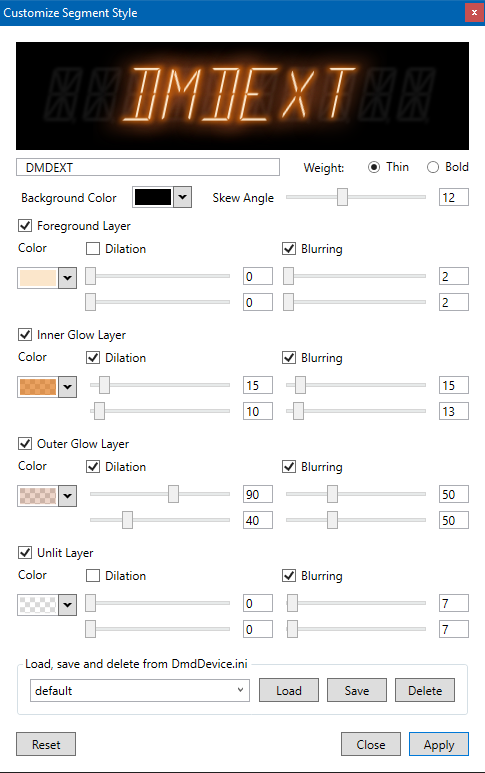
But when I'm in that edit panel (like below). Nothing shows up in the drop down that says "Load Save And Delete from DmdDevice.ini"


And if I type in that box, nothing shows up. No text, no anything. Did I miss a step?


49953892-7651fb80-feff-11e8-85dc-0ab291b


#10 Armyaviation

Armyaviation

    Mr. Walnuts

  • Members
  • PipPipPipPip
  • 650 posts

  • Flag: United States of America

  • Favorite Pinball: TOTAN

Posted 25 June 2020 - 08:49 PM

is the point of these to be displayed over the existing score displays on the b2s??


#11 Thalamus

Thalamus

    Pinball Wizard

  • Platinum Supporter
  • 4,983 posts

  • Flag: Norway

  • Favorite Pinball: GOT, Alien Star, LOTR, TOM

Posted 25 June 2020 - 08:57 PM

Yeah. You want the db2s without cutouts. If there is cutouts from the real pictures. Fill them completely by using the mouse. BUT, right now, please make a backup of your dmdddevice.ini before you us that feature. I just gave up on it as I ended up with just the entry from the table that I configured and all my other settings, like that hardware I had and pup ... etc - was eradicated. In short - there is bugs ...


Edited by Thalamus, 25 June 2020 - 08:57 PM.

From now on. I won't help anyone here at VPF. Please ask Noah why that is.


#12 Armyaviation

Armyaviation

    Mr. Walnuts

  • Members
  • PipPipPipPip
  • 650 posts

  • Flag: United States of America

  • Favorite Pinball: TOTAN

Posted 25 June 2020 - 09:02 PM

good call, i'll wait then!!!


#13 Carny_Priest

Carny_Priest

    Pinball Fan

  • Members
  • PipPipPipPip
  • 1,257 posts
  • Location:Austin, TX

  • Flag: United States of America

  • Favorite Pinball: EATPM

Posted 25 June 2020 - 09:31 PM

About to start messing with it. Those renders look too good not to start trying it. Can always set up the ini as read-only. I'd love to have dimming score displays for FH and BOP but I think that it is not yet supported in VPinMAME and less sure that B2S can interpret dimming. Guess there is not much call to look into it. This was something that was a feature just before DMD came out. Not many tables used it.


#14 Outhere

Outhere

    Pinball Wizard

  • Platinum Supporter
  • 4,806 posts

  • Flag: United States of America

  • Favorite Pinball: M M

Posted 25 June 2020 - 10:58 PM

is the point of these to be displayed over the existing score displays on the b2s??

https://www.vpforums...=41291&p=419369
Use this to ditch the LED frames if needed  -- https://www.vpforums...=40927&p=414013


#15 Armyaviation

Armyaviation

    Mr. Walnuts

  • Members
  • PipPipPipPip
  • 650 posts

  • Flag: United States of America

  • Favorite Pinball: TOTAN

Posted 25 June 2020 - 11:29 PM

my question to add to what i asked before.. the alphanumeric frames are resizable but the proportion stays the same.  Some of the b2s files are longer and skinny and you would need to be able to adjust the height and width independently.  Mostly caused by the fact that we use wide screen monitors for the backglass with speaker grills and dmds on tables like say Genie or Totem where it would be larger on the real thing


#16 topper2k

topper2k

    Enthusiast

  • Members
  • PipPipPip
  • 258 posts
  • Location:Virginia

  • Flag: United States of America

  • Favorite Pinball: Indiana Jones Pinball Adventure

Posted 25 June 2020 - 11:31 PM

I eventually got this to work, though honestly I don't remember what finally did the trick.


Partly, I think I had wrong assumptions about how that save/edit/delete drop down works. I assumed I could configure a visual style with the sliders and settings in that editor, then type a name for that style into the save box, click "save" and have a new style in my .ini.


That does not appear to be how it works. That is only a dropdown, not a text entry box. So I had to define all my styles in the .ini first. I made a "default," a blue one, and a green one. It doesn't matter so much that you get the style right. In fact, at first you could just copy/paste the default style and rename it. Because once it exists in the .ini file, then you'll be able to load it into that editor, tweak and adjust it how you want and save it.


I'm away from my cab, but I'll try to remember to come back and post my .ini file later.


is the point of these to be displayed over the existing score displays on the b2s??

That is what a lot of people do. Maybe most. I want to use the alphanumeric displays in my DMD (emulated with Freezy on an LCD screen). The dot matrix display just doesn't look right to me on a lot of games that used the alphanumeric displays.



#17 topper2k

topper2k

    Enthusiast

  • Members
  • PipPipPip
  • 258 posts
  • Location:Virginia

  • Flag: United States of America

  • Favorite Pinball: Indiana Jones Pinball Adventure

Posted 26 June 2020 - 02:00 AM

Here's my current DMD ini. All the alphanumeric stuff is in bold at the end.


[global]

; how to downscale SEGA 192x64 pixel games to smaller displays: fit, fill or stretch
resize = fit

; flips the image horizontally
fliphorizontally = false

; flips the image vertically
flipvertically = false

; enable or disable frame-by-frame colorization (inactive in VPX bundle)
colorize = true

; a DMD that renders with nice dots on a computer monitor
[virtualdmd]
enabled = true

; virtual dmd stays on top of all other windows
stayontop = false

; ignore the aspect ratio of the rendered dots when resizing
ignorear = false

; use VPM's registry values when positioning the virtual dmd
useregistry = false

; x-axis of the window position
left = 3840

; y-axis of the window position
top = 0

; width of the dmd in monitor pixels
width = 1050

; height of the dmd in monitor pixels
height = 255

; scale the dot size (set to 0.8 for same size as pre-1.6.0)
dotsize = 1.0

[pindmd1]

; if false, doesn't bother looking for a pinDMD1
enabled = false

[pindmd2]

; if false, doesn't bother looking for a pinDMD2
enabled = false

[pindmd3]

; if false, doesn't bother looking for a pinDMD3
enabled = false

; COM port, e.g. COM3
port =

[pin2dmd]

; if false, doesn't bother looking for a PIN2DMD
enabled = false

; how long to wait in milliseconds after sending a palette
delay = 25

[pixelcade]

; if false, doesn't bother looking for a Pixelcade
enabled = false

; COM port, e.g. COM3
port =

; color matrix to use, either "rgb" or "rbg"
matrix = rgb

[networkstream]

; if enabled, stream to your DMD connected to another computer
enabled = false


[browserstream]

; if enabled, stream to your browser in your LAN
enabled = false
port = 9090

[vpdbstream]

; if enabled, stream DMD to https://test.vpdb.io/live
enabled = false
endpoint = https://api-test.vpdb.io/

[video]

; if enabled, writes frames to an .avi file
enabled = false

; path to folder or .avi file. if folder, gamename.avi is used.
path =

[pinup]

; if enabled, send frames to PinUP.
enabled = false

[alphanumeric]
enabled = false
style = default
style.default.skewangle = 12
style.default.backgroundcolor = ff000000
style.default.foreground.enabled = true
style.default.foreground.color = fffbe6cb
style.default.foreground.blur.enabled = true
style.default.foreground.blur.x = 2
style.default.foreground.blur.y = 2
style.default.foreground.dilate.enabled = false
style.default.innerglow.enabled = true
style.default.innerglow.color = a0dd6a03
style.default.innerglow.blur.enabled = true
style.default.innerglow.blur.x = 15
style.default.innerglow.blur.y = 13
style.default.innerglow.dilate.enabled = true
style.default.innerglow.dilate.x = 15
style.default.innerglow.dilate.y = 10
style.default.outerglow.enabled = true
style.default.outerglow.color = 40b65829
style.default.outerglow.blur.enabled = true
style.default.outerglow.blur.x = 50
style.default.outerglow.blur.y = 50
style.default.outerglow.dilate.enabled = true
style.default.outerglow.dilate.x = 90
style.default.outerglow.dilate.y = 40
style.default.background.enabled = true
style.default.background.color = 20ffffff
style.default.background.blur.enabled = true
style.default.background.blur.x = 7
style.default.background.blur.y = 7
style.default.background.dilate.enabled = false
style.blue.skewangle = 12
style.blue.weight = Bold
style.blue.backgroundcolor = #ff000000
style.blue.foreground.enabled = true
style.blue.foreground.color = #ff00ffff
style.blue.foreground.blur.enabled = true
style.blue.foreground.blur.x = 2
style.blue.foreground.blur.y = 2
style.blue.foreground.dilate.enabled = false
style.blue.innerglow.enabled = true
style.blue.innerglow.color = #ff0000ff
style.blue.innerglow.blur.enabled = true
style.blue.innerglow.blur.x = 15
style.blue.innerglow.blur.y = 13
style.blue.innerglow.dilate.enabled = true
style.blue.innerglow.dilate.x = 15
style.blue.innerglow.dilate.y = 10
style.blue.outerglow.enabled = true
style.blue.outerglow.color = #ff000080
style.blue.outerglow.blur.enabled = true
style.blue.outerglow.blur.x = 50
style.blue.outerglow.blur.y = 50
style.blue.outerglow.dilate.enabled = true
style.blue.outerglow.dilate.x = 6
style.blue.outerglow.dilate.y = 40
style.blue.background.enabled = true
style.blue.background.color = #188484e3
style.blue.background.blur.enabled = true
style.blue.background.blur.x = 7
style.blue.background.blur.y = 7
style.blue.background.dilate.enabled = false
style.green.skewangle = 12
style.green.weight = Bold
style.green.backgroundcolor = #ff000000
style.green.foreground.enabled = true
style.green.foreground.color = #ff008000
style.green.foreground.blur.enabled = true
style.green.foreground.blur.x = 2
style.green.foreground.blur.y = 2
style.green.foreground.dilate.enabled = false
style.green.innerglow.enabled = true
style.green.innerglow.color = #eb00ff7f
style.green.innerglow.blur.enabled = true
style.green.innerglow.blur.x = 15
style.green.innerglow.blur.y = 13
style.green.innerglow.dilate.enabled = true
style.green.innerglow.dilate.x = 15
style.green.innerglow.dilate.y = 10
style.green.outerglow.enabled = true
style.green.outerglow.color = #b900fa9a
style.green.outerglow.blur.enabled = true
style.green.outerglow.blur.x = 50
style.green.outerglow.blur.y = 50
style.green.outerglow.dilate.enabled = true
style.green.outerglow.dilate.x = 6
style.green.outerglow.dilate.y = 40
style.green.background.enabled = true
style.green.background.color = #238484e3
style.green.background.blur.enabled = true
style.green.background.blur.x = 7
style.green.background.blur.y = 7
style.green.background.dilate.enabled = false

[bttf_a27]
alphanumeric enabled = true
virtualdmd enabled = false
alphanumeric style = default
alphanumeric pos.1.left = 3974
alphanumeric pos.1.top = 119
alphanumeric pos.1.height = 120
alphanumeric pos.0.left = 3973
alphanumeric pos.0.top = 2
alphanumeric pos.0.height = 120

[scrpn_l1]
alphanumeric enabled = true
virtualdmd enabled = false
alphanumeric style = default
alphanumeric pos.0.left = 3857
alphanumeric pos.0.top = 4
alphanumeric pos.0.height = 120
alphanumeric pos.1.left = 4556
alphanumeric pos.1.top = 11
alphanumeric pos.1.height = 120
alphanumeric pos.2.left = 3852
alphanumeric pos.2.top = 125
alphanumeric pos.2.height = 120
alphanumeric pos.3.left = 4544
alphanumeric pos.3.top = 124
alphanumeric pos.3.height = 120
alphanumeric pos.4.left = 4237
alphanumeric pos.4.top = 56
alphanumeric pos.4.height = 120
alphanumeric pos.5.left = 4370
alphanumeric pos.5.top = 58
alphanumeric pos.5.height = 120

[blkhole7]
alphanumeric enabled = true
virtualdmd enabled = false
alphanumeric style = blue
alphanumeric pos.0.left = 3857
alphanumeric pos.0.top = 4
alphanumeric pos.0.height = 120
alphanumeric pos.1.left = 4505
alphanumeric pos.1.top = 13
alphanumeric pos.1.height = 120
alphanumeric pos.2.left = 3852
alphanumeric pos.2.top = 125
alphanumeric pos.2.height = 120
alphanumeric pos.3.left = 4494
alphanumeric pos.3.top = 126
alphanumeric pos.3.height = 120
alphanumeric pos.4.left = 4237
alphanumeric pos.4.top = 56
alphanumeric pos.4.height = 120
alphanumeric pos.5.left = 4370
alphanumeric pos.5.top = 58
alphanumeric pos.5.height = 120

[bk_l4]
alphanumeric enabled = true
virtualdmd enabled = false
alphanumeric style = default
alphanumeric pos.0.left = 3802
alphanumeric pos.0.top = 115
alphanumeric pos.0.height = 120
alphanumeric pos.1.left = 4483
alphanumeric pos.1.top = 113
alphanumeric pos.1.height = 120
alphanumeric pos.2.left = 3810
alphanumeric pos.2.top = 1
alphanumeric pos.2.height = 120
alphanumeric pos.3.left = 4488
alphanumeric pos.3.top = 0
alphanumeric pos.3.height = 120
alphanumeric pos.4.left = 4350
alphanumeric pos.4.top = 65
alphanumeric pos.4.height = 120
alphanumeric pos.5.left = 4196
alphanumeric pos.5.top = 61
alphanumeric pos.5.height = 120

[bk2k_l4]
alphanumeric enabled = true
virtualdmd enabled = false
alphanumeric style = default
alphanumeric pos.1.left = 3947
alphanumeric pos.1.top = 114
alphanumeric pos.1.height = 120
alphanumeric pos.0.left = 3959
alphanumeric pos.0.top = 18
alphanumeric pos.0.height = 120

[genesis]
alphanumeric enabled = true
virtualdmd enabled = false
alphanumeric style = blue
alphanumeric pos.1.left = 3881
alphanumeric pos.1.top = 7
alphanumeric pos.1.height = 120
alphanumeric pos.0.left = 3874
alphanumeric pos.0.top = 114
alphanumeric pos.0.height = 120

[hh]
alphanumeric enabled = true
virtualdmd enabled = false
alphanumeric style = green
alphanumeric pos.0.left = 3881
alphanumeric pos.0.top = -12
alphanumeric pos.0.height = 119
alphanumeric pos.1.left = 4557
alphanumeric pos.1.top = -7
alphanumeric pos.1.height = 120
alphanumeric pos.2.left = 3869
alphanumeric pos.2.top = 110
alphanumeric pos.2.height = 120
alphanumeric pos.3.left = 4551
alphanumeric pos.3.top = 130
alphanumeric pos.3.height = 120
alphanumeric pos.4.left = 4180
alphanumeric pos.4.top = 56
alphanumeric pos.4.height = 120
alphanumeric pos.5.left = 4317
alphanumeric pos.5.top = 52
alphanumeric pos.5.height = 120

[Rdkng_L4]
alphanumeric enabled = true
virtualdmd enabled = false
alphanumeric style = default
alphanumeric pos.1.left = 4510
alphanumeric pos.1.top = 11
alphanumeric pos.1.height = 120
alphanumeric pos.0.left = 3844
alphanumeric pos.0.top = 18
alphanumeric pos.0.height = 120
alphanumeric pos.2.left = 3847
alphanumeric pos.2.top = 137
alphanumeric pos.2.height = 120
alphanumeric pos.3.left = 4516
alphanumeric pos.3.top = 133
alphanumeric pos.3.height = 120
alphanumeric pos.4.left = 4225
alphanumeric pos.4.top = 67
alphanumeric pos.4.height = 120
alphanumeric pos.5.left = 4373
alphanumeric pos.5.top = 67
alphanumeric pos.5.height = 120

[roldisco]
alphanumeric enabled = true
virtualdmd enabled = false
alphanumeric style = blue
alphanumeric pos.0.left = 3846
alphanumeric pos.0.top = 16
alphanumeric pos.0.height = 120
alphanumeric pos.1.left = 4553
alphanumeric pos.1.top = 15
alphanumeric pos.1.height = 120
alphanumeric pos.2.left = 3845
alphanumeric pos.2.top = 127
alphanumeric pos.2.height = 120
alphanumeric pos.3.left = 4548
alphanumeric pos.3.top = 116
alphanumeric pos.3.height = 120
alphanumeric pos.4.left = 4363
alphanumeric pos.4.top = 56
alphanumeric pos.4.height = 120
alphanumeric pos.5.left = 4195
alphanumeric pos.5.top = 56
alphanumeric pos.5.height = 120

[rollr_l2]
alphanumeric enabled = true
virtualdmd enabled = false
alphanumeric style = default
alphanumeric pos.1.left = 3954
alphanumeric pos.1.top = 121
alphanumeric pos.1.height = 120
alphanumeric pos.0.left = 3953
alphanumeric pos.0.top = 2
alphanumeric pos.0.height = 120

[cybrnaut_saved]
alphanumeric enabled = true
virtualdmd enabled = false
alphanumeric style = default
alphanumeric pos.0.left = 3063
alphanumeric pos.0.top = 130
alphanumeric pos.0.height = 120
alphanumeric pos.1.left = 3444
alphanumeric pos.1.top = 129
alphanumeric pos.1.height = 120
alphanumeric pos.2.left = 3444
alphanumeric pos.2.top = 257
alphanumeric pos.2.height = 120
alphanumeric pos.3.left = 3061
alphanumeric pos.3.top = 255
alphanumeric pos.3.height = 120
alphanumeric pos.4.left = 2049
alphanumeric pos.4.top = 257
alphanumeric pos.4.height = 120
alphanumeric pos.5.left = 2224
alphanumeric pos.5.top = 257
alphanumeric pos.5.height = 120


#18 abique

abique

    Hobbyist

  • Members
  • PipPip
  • 16 posts
  • Location:Germany, NRW

  • Flag: Germany

  • Favorite Pinball: Monster Bash, Masters of the Universe

Posted 22 March 2021 - 06:59 PM

@topper2k

Did you also got it to work on Pinball FX3?

Having issues with Williams Volume 6 games which use alphanumeric DMDs.


Thanks and regards.


Also tagged with one or more of these keywords: dmd, freezy, alpahnumeric