


Hi!
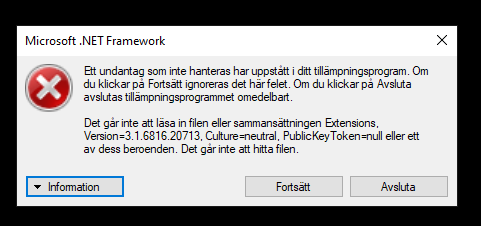
I get the following .NET error trying to run DOFlinx.
Any fix for this?




Pinball Wizard



Posted 20 October 2019 - 08:26 AM
OK, now you have a configuration error in your DOFLinx.INI. You are trying to set your RGB device to an output that does not exist as the error message says.
Do you know where your RGB device is connected? If you don't have an RGB device tghen comment out the line with a # in your DOFLinx.INI file.

Enthusiast


Posted 20 October 2019 - 09:00 AM
@DDH69
Cool I don't have any RGB light so I commented it out.
But no I get another error: "LINK_item #8 trying to set device #1 to 9 needs to be in the range 1-8.
My ini.
####
# The config file for DOFLinx with most of the available settings as a sample
#
# Note - this works with LEDWiz, PacLed64, Pinscape, Ultimate I/O and Sainsmart (FTDI devices)
# Edit this file as you see fit, lines that start with a hash (#) or are blank are not processed.  This blurb and comments can be cut out if you want.
#
# Output devices outputs are entered in the format of
# device (D) and output number (#) in the format D##, so controller device 1 and output 3 is "103" without the quotes, controller board 2 output 23 is "223" without quotes
#
# The keyboard hex code for the key that is used for each flipper from https://msdn.microsoft.com/en-us/library/windows/desktop/dd375731(v=vs.85).aspx
#
####

# 0 = OFF (normal operation), 1 = ON - When ON a window will appear and a log file will be created in the EXE directory.
DEBUG=0

# Point to your directoutputconfig.ini file.  Your file may have a number, ie directoutputconfig20.ini
# You can point to any of your directoutputconfig.ini files, but only one
# Keep this as the first pararameter (other than DEBUG if you need it) to process in your INI file.  The order past ths point is not relevant

DIRECTOUTPUTCONFIG=c:\DirectOutput\config\directoutputconfig41.ini

# The location of the .FX3 game specific files included with the DOFLinx release package
# Ensure your path has a \ on the end of it

PATH_FX3=C:\DirectOutput\FX3\

# The path to where you keep all of the .directb2s files that you've downloaded for use with FX3
# Ensure your path has a \ on the end of it

PATH_FX3_B2S=C:\DirectOutput\DOFLinx_FX3_B2S\

# This is the folder where B2SServer.exe can be found on your system

PATH_B2S_SERVER=C:\Visual Pinball\Tables\

# If you have a PinControl2 device then uncomment the lines below.  The values provided will work unless you've got something unique

#PINCONTROL2_UNIVERSE=0
#PINCONTROL2_BROADCAST=192.168.178.50

# The list of processes that can activate DOFLinx, in this case, Pinball FX3, Future Pinball VP 9.91 and VP Physics Mod
# Activating for VP assumes the use of Flag Files to control which VP games have added "fake" force feedback

PROCESSES=Pinball FX3,Future Pinball,VPinball_9_9_1,VPPhysMod5

# An over-ride to the default setting given this is just being used with Pinball FX3, not FX2, FP or other systems that may require the default delay

PROCESS_TO_ACTIVE_TIME=1

# Set the key code for the keys being used as Left and Right flippers
# Used for the default fll back if a full link cannot be established
# Left Shift = A0, Right Shift = A1

L_FLIPPER_KEY=A0
R_FLIPPER_KEY=A1

# Just in case things go wrong (ie no keyup signal is detected, flipper held down for a long time), what is the maximum time a flipper solenoid / contactor can be in in milliseconds
MAX_FLIPPER_ON=5000

# Use random colour order for the RGB undercabinet lighting
RGB_STYLE=RANDOM

# Use the flipper key press to to cause undercabinet lighting to change
RGB_TRIGGER=FLIPPER

# The minimum time for change between flipper flips, 1000mS or 1 second
RGB_MIN_TIME=1000

# The red device / port for undercabinet lighting, device #1, port 29
# RGB_OUTPUT=129

# Turn on the attempt to make a full connection to Future Pinball when it is detected as running
# FP_ATTEMPT_LINK=1

# Set to 1 to output the game name to the log regardless of the DEBUG flag setting.  Set to 0 to simply follow the DEBUG flag.
# Quite useful when you trying to get the FX3 window game name for setting game specific colours, matching B2S names, etc
OUTPUT_GAME_NAME=0

# The device / port for the left and right flippers, set to output device 1, left flipper solenoid on port 1 and right flipper solenoid on port 2
L_FLIPPER_OUTPUT=101
R_FLIPPER_OUTPUT=102
LINK_LF=101,50,10000,255
LINK_RF=102,50,10000,255

# The other 8 solenoid of a 10 solenoid setup using ports 4 to 11 inclusive
LINK_LS=104,50,500,255
LINK_RS=105,50,500,255
LINK_ML=106,50,500,255
LINK_MC=107,50,500,255
LINK_MR=108,50,500,255
LINK_BL=109,50,500,255
LINK_BC=110,50,500,255
LINK_BR=111,50,500,255

# Ports for the shaker, gear motor, knocker, beacon and strobe using ports 12 - 16 inclusive
LINK_SH=112,1000,5000,255
LINK_GR=113,750,10000,255
LINK_KN=114,120,500,255
LINK_BK=115,FLASH,200,255
LINK_SR=116,ON,0,255

# Ports for the lights inside the various buttons being Start, Extra Ball, Coin, Exit, Launch Ball and Fire for ports 17 to 22 inclusive
LINK_ST=117
LINK_EB=118
LINK_CN=119
LINK_EX=120
LINK_LB=121
LINK_FR=122

# The device and red ports for five flashers, these have been set in the example below as on the second output device, ie LEDWiz #2
LINK_FLOL=201
LINK_FLIL=204
LINK_FLCN=207
LINK_FLIR=210
LINK_FLOR=213

# Turn on the Exit Button when DOFLinx is activated
BUTTONS_ON=120

# Make the "4" key (key code 34) to pulse controller/output 119
KEY_TO_OUTPUT=34 119

# Set the left and right control keys to turn on a specific colour (red) for RGB.
# In Pinball FX3 this means when nudge keys are used it all goes red.
KEY_TO_COLOUR=A2 109 Red A3 109 Red

# Set the joystick settings for nudge with Pinscape and FX3
JOY_PORT=1
JOY_X_OFFSET=32767
JOY_Y_OFFSET=32767
FX_LEFT_NUDGE_POINT=-2500
FX_RIGHT_NUDGE_POINT=2500
FX_FORWARD_NUDGE_POINT=2500
FX_LEFT_NUDGE_KEY=4C
FX_RIGHT_NUDGE_KEY=52
FX_FORWARD_NUDGE_KEY=20
FX_LEFT_NUDGE_INPUT=A2
FX_RIGHT_NUDGE_INPUT=A3

# Configure the analogue plunger, such a Pinscape Z axis, to work with FX3
PLUNGER_AXIS=Z
PLUNGER_JOYSTICK_NUMBER=1
PLUNGER_KEY=0D
PLUNGER_PULL_POINT=40000
PLUNGER_RELEASE_POINT=20000

# Configure the DOFLinx generated settings screen to activate when 4 keys are pressed, left shift, right shift, left ctl and right ctl (both flippers and magna saves)
# Set the Left flipper for UP, right flipper for DOWN, Start button for CHANGE and Extra Ball for EXIT
SETTING_ACTIVATE=A0,A1,A2,A3
SETTING_UP=A0
SETTING_DOWN=A1
SETTING_CHANGE=31
SETTING_EXIT=32
SETTING_MESSAGE=L Flipper = Up, R Flipper = Down, Start = Change, EB = Exit
SETTING=UnderCab,115,Under cabinet lighting disabled,Off,Y,114,150
SETTING=Addressable,119,Addressable LEDs Enabled,On,Y,118,50
SETTING=NIGHT,,Night Mode,Off,Y

#####
# Game specific colours in the formnat of a CSV of Game Name,Colour#1,Colour#2 - colours as they appear in your directoutputconfig
# Thanks to Vizzini here is a great starting list for Pinball FX2
# Extended for FX3 games by DDH69
#####
GAME_COLOUR=AlienIsolationPinball,Medium_Blue,Lime,Dodger_Blue,Lime_Green
GAME_COLOUR=AlienvsPredatorPinball,Medium_Blue,Lime_Green,Dodger_Blue,Yellow_Green
GAME_COLOUR=AliensPinball,Medium_Blue,Dark_Golden_Rod,Dodger_Blue
GAME_COLOUR=AmericanDadPinball,Medium_Blue,Lime_Green,Dodger_Blue,Yellow_Green
GAME_COLOUR=ArcherPinball,Medium_Blue,Yellow,Dodger_Blue,Blue_Violet
GAME_COLOUR=Biolab,Dark_Red,Lime,Blue,Cyan,Blue_Violet,Yellow
GAME_COLOUR=Blade,Blue,Blue_Violet,Salmon
GAME_COLOUR=BobaFett,Lime,Golden_Rod,Blue_Violet
GAME_COLOUR=BobsBurgersPinball,Medium_Blue,Lime_Green,Dark_Red,Dodger_Blue,Yellow_Green
GAME_COLOUR=CaptainAmerica,Blue,Dark_Red,Dodger_Blue,Gold
GAME_COLOUR=CastleStorm,Blue,Gold,Lime,Dodger_Blue,Orange,Lime_Green
GAME_COLOUR=CivilWar,Blue,Dark_Red,Dodger_Blue,Light_Salmon
GAME_COLOUR=Deadpool,Dark_Red,Blue,Medium_slate_blue,Dodger_Blue
GAME_COLOUR=DoomPinball,Yellow,Silver,Gray,Dark_Orange,Dim_Gray,Orange_Red,Peru,Crimson
GAME_COLOUR=DoctorStrange,Dark_Red,Blue,Gold,Lime_Green,Dark_Violet,Orange,Dodger_Blue,Lime,Medium_Slate_Blue
GAME_COLOUR=EarthDefense,Dark_Red,Blue,Gold,Dark_Violet,Orange,Dodger_Blue,Lime
GAME_COLOUR=ElDorado,Orange,Lime_Green,Yellow,Coral,Lime,Yellow_Green,Cyan
GAME_COLOUR=EpicQuest,Lime_Green,Dodger_Blue,Yellow_Green,Cyan
GAME_COLOUR=Excalibur,Dark_Red,Blue,Lime,Dodger_Blue,Cyan
GAME_COLOUR=FalloutPinball,Crimson,White,Red,Brown,Light_Steel_Blue,Slate_Blue
GAME_COLOUR=FamilyGuyPinball,Dodger_Blue,Lime_Green,Salmon,Dark_Violet,Yellow_Green
GAME_COLOUR=FantasticFour,Blue,Yellow,Dodger_Blue,Orange_Red
GAME_COLOUR=FearItself,Dark_Red,Blue,Yellow,Lime,Dark_Violet,Orange
GAME_COLOUR=GhostRider,Dodger_Blue,White,Yellow,Light_Salmon,Orange_Red
GAME_COLOUR=GuardiansoftheGalaxy,Dodger_Blue,Orange,Medium_Purple
GAME_COLOUR=IRONMAN,Blue,Dark_Red,Dodger_Blue,Gold
GAME_COLOUR=Mars,Blue,Yellow,Deep_sky_blue,Gold
GAME_COLOUR=MarvelsAntMan,Medium_Blue,Dark_Red,Dodger_Blue
GAME_COLOUR=MarvelsAvengersAgeofUltron,Dark_Red,Dodger_Blue,Lime_Green,Light_Salmon,Cyan
GAME_COLOUR=MarvelsTheAvengers,Blue,Dark_Red,Dodger_Blue,Gold
GAME_COLOUR=MarvelsWomenofPowerAForce,Red,Lime,Gold,Slate_Blue,Tomato,Silver,Dark_Orchid,Spring_Green
GAME_COLOUR=MarvelsWomenofPowerChampions,Dodger_Blue,Yellow,Red,Gray,Golden_Rod,Crimson,Orange
GAME_COLOUR=MoonKnight,Dodger_Blue,Blue,Cyan,Royal_Blue
GAME_COLOUR=MsSplosionMan,Dodger_Blue,Pink,Medium_Blue,Purple,Royal_Blue
GAME_COLOUR=Paranormal,Lime_Green,Dodger_Blue,Yellow_Green
GAME_COLOUR=Pasha,Dark_Violet,Golden_Rod,Dodger_Blue
GAME_COLOUR=PlantsVSZombies,Lime_Green,Yellow_Green,Dodger_Blue
GAME_COLOUR=Portal,Dodger_Blue,Yellow_Green,Medium_Blue,Yellow
GAME_COLOUR=Rome,Dark_Red,Gold,Dodger_Blue,Light_Salmon,Yellow_Green,Orange
GAME_COLOUR=SecretsoftheDeep,Blue,Yellow,Dodger_Blue
GAME_COLOUR=Shaman,Dark_Red,Blue,Gold,Dark_Violet,Orange,Dodger_Blue,Lime
GAME_COLOUR=SorcerersLair,Blue,Blue_Violet,Dodger_Blue,Slate_Blue
GAME_COLOUR=SouthParkButtersVeryOwnPinballGame,Dark_Red,Blue,Gold,Dark_Violet,Orange,Dodger_Blue,Lime_Green
GAME_COLOUR=SouthParkSuperSweetPinball,Dark_Red,Lime,Blue,Gold,Dark_Violet,Orange,Dodger_Blue,Lime_Green,Yellow_Green
GAME_COLOUR=SpiderMan,Dark_Red,Lime,Blue,Gold,Dark_Violet,Orange
GAME_COLOUR=STARWARSDARTHVADER,Light_sky_blue,Dark_Red,Cyan
GAME_COLOUR=StarWarsEpisodeVTheEmpireStrikesBack,Medium_Blue,Yellow,Dark_Red,Dodger_Blue
GAME_COLOUR=StarWarsEpisodeVIReturnoftheJedi,Slate_Blue,Golden_Rod,Medium_Blue,Lime_Green,Dodger_Blue,Yellow
GAME_COLOUR=StarWarsPinballDroids,Medium_Blue,Yellow,Orange,Navy,Gold,Orange_Red
GAME_COLOUR=StarWarsPinballEpisodeIVANewHope,Cyan,Golden_Rod,Dodger_Blue,Yellow
GAME_COLOUR=StarWarsPinballHanSolo,Dodger_Blue,Royal_Blue,Antique_White
GAME_COLOUR=StarWarsPinballMastersoftheForce,Medium_Blue,Salmon,Dodger_Blue,Purple,Cyan,Dark_Red
GAME_COLOUR=StarWarsPinballMightoftheFirstOrder,Light_sky_blue,Dodger_Blue,Dark_Red,Cyan
GAME_COLOUR=StarWarsPinballStarWarsRebels,Medium_Blue,Yellow,Royal_Blue,Orange_Red,Purple,Lime_Green
GAME_COLOUR=StarWarsPinballTheForceAwakens,Dark_Red,Medium_Blue,Blue_Violet
GAME_COLOUR=StarWarsPinballRogueOne,Gray,Silver,Light_Sky_Blue,Teal,Beige,Bisque,Aqua_Marine,Slate_Gray,Dark_Orange
GAME_COLOUR=StarWarsStarfighterAssault,Medium_Blue,Dodger_Blue,Dark_Red
GAME_COLOUR=StarWarsTheCloneWars,Dark_Red,Pink,Medium_Blue,Medium_Turquoise,Lime,Lime_Green
GAME_COLOUR=SuperLeagueASRoma,Lime_Green,Orange,Lime,Yellow,Red
GAME_COLOUR=SuperLeagueZenStudiosFC,Lime_Green,Orange,Lime,Yellow,Red
GAME_COLOUR=SuperLeagueArsenalFC,Lime_Green,Orange,Lime,Yellow,Red
GAME_COLOUR=SuperLeagueLiverpoolFC,Lime_Green,Orange,Lime,Yellow,Red
GAME_COLOUR=SuperLeagueJuventus,Lime_Green,Orange,Lime,Yellow,Red
GAME_COLOUR=SuperLeagueACMilan,Lime_Green,Orange,Lime,Yellow,Red
GAME_COLOUR=SuperLeagueRealMadridCF,Lime_Green,Medium_Blue,Lime,Yellow,Red
GAME_COLOUR=SuperLeagueFCBarcelona,Slate_Blue,Lime_Green,Yellow,Blue_Violet,Lime,Red
GAME_COLOUR=Tesla,Lime_Green,Yellow_Green,Dodger_Blue,Golden_Rod
GAME_COLOUR=TheElderScrollsVSkyrimPinball,Light_Slate_Gray,Gold,Golden_Rod,Dark_Sea_Green,Peru,Tan
GAME_COLOUR=TheInfinity Gauntlet,Dark_Red,Blue,Gold,Dark_Violet,Orange,Dodger_Blue,Lime
GAME_COLOUR=TheWalkingDead,Lime_Green,Royal_Blue,Yellow_Green
GAME_COLOUR=Thor,Dark_Red,Blue,Gold,Dark_Violet,Orange,Dodger_Blue,Lime
GAME_COLOUR=V12,Dark_Red,Blue,Gold,Dark_Violet,Orange,Dodger_Blue
GAME_COLOUR=Venom,Dark_Red,Blue,Dark_Violet,Dodger_Blue
GAME_COLOUR=WildWestRampage,Yellow_Green,Dodger_Blue,Royal_Blue
GAME_COLOUR=Wolverine,Dark_Red,Medium_Blue,Yellow,Dark_Violet
GAME_COLOUR=WorldWarHulk,Lime_Green,Yellow_Green,Dodger_Blue,Lime,Yellow
GAME_COLOUR=XMen,Blue,Blue_Violet,Gold,Dodger_Blue,Slate_Blue,Orange
GAME_COLOUR=ET,Yellow,Amber,Sky_blue,Sienna,Aqua_marine,Slate_gray,Dark_olive_green
GAME_COLOUR=BacktotheFuture,Light_steel_blue,White,Crimson,Gray,Teal,Yellow,Dodger_blue
GAME_COLOUR=Jaws,Dark_turquoise,Gray,White,Salmon,Light_coral,Tan,Papaya_whip,Peru
GAME_COLOUR=SonofZeus,Dark_orange,Silver,Dark_salmon,Amber,Sienna,Light_steel_blue,Firebrick
GAME_COLOUR=AdventureLand,Red,Cyan,Yellow,White,Medium_orchid,Aqua,Dark_turquoise,Medium_purple
GAME_COLOUR=JurassicPark,Lawn_green,Amber,Yellow,Light_slate_gray,Cadet_blue,Black,Rosy_brown,Light_steel_blue,Medium_sea_green,Silver
GAME_COLOUR=JurassicWorld,Light_steel_blue,Silver,Tan,Forest_green,Gray,Cadet_blue,Yellow_green,Teal,Bisque
GAME_COLOUR=JurassicMayhem,Sandy_brown,Forest_green,Dark_green,Dark_olive_green,Dark_khaki,Peru,Tan,Navajo_white,Beige,Dark_golden_rod,Corn_silk
GAME_COLOUR=StarWarsLastJedi,Gold,Orange_Red,Aqua,Coral,Dark_Khaki,Light_Steel_Blue,Yellow_Green,Steel_Blue
GAME_COLOUR=StarWarsAhchToIsland,Peru,Tan,Light_Slate_Gray,Light_Golden_Rod,Turquoise,Deep_Sky_Blue,Spring_Green,Steel_Blue
GAME_COLOUR=WMSFishTales,Forest_green,Medium_spring_green,Pale_green,Aqua,Blue,Golden_Rod,Dark_turquoise,Gold,Deep_sky_blue,Sandy_brown,Green
GAME_COLOUR=WMSGetaway,Red,Steel_blue,Dim_gray,Navy,Dark_red,Teal
GAME_COLOUR=WMSJunkyard,Amber,Lawn_green,Burly_wood,Orange,Peru,Dark_turquoise
GAME_COLOUR=WMSMedievalMadness,Yellow,Amber,Rosy_brown,Firebrick,Forest_green,Gray,Dark_salmon,Dark_orange
GAME_COLOUR=WMSAFM,White,Red,Lime,Amber,Sea_green,Forest_green,Turquoise,Corn_silk
GAME_COLOUR=WMSBlackRose,Khaki,Sky_blue,Orange_red,Gold,Aqua_marine,Tomato,Yellow_green
GAME_COLOUR=WMSPartyZone,Lime,Blue_violet,Orange,Purple,Aqua,Red,Medium_blue,Amber,Yellow,Sandy_brown,Deep_pink
GAME_COLOUR=StarWarsSolo,Burly_Wood,Medium_Sea_Green,Light_Salmon,Silver,Golden_Rod,Dark_Turquoise
GAME_COLOUR=StarWarsCalrissianChronicles,Yellow,Silver,Light_Blue,Gold,White,Amber,Dark_Salmon,Navajo_White
GAME_COLOUR=StarWarsBattleOfMimban,Coral,Gray,Dark_Orange,Salmon,Slate_Gray,Light_Steel_Blue,Peru,Tan
GAME_COLOUR=BallySafeCracker,Orange,Gold,Yellow,Orange_Red,Turquoise,Antique_White,Dim_Gray,Golden_Rod,Crimson
GAME_COLOUR=BallyTheatreOfMagic,Gold,Medium_Slate_Blue,Tomato,Light_Yellow,Plum,Orchid,Golden_Rod,Crimson,Silver
GAME_COLOUR=BallyTheChampionPub,Forest_Green,Gold,Orange_Red,Dark_Blue,Green,Red,Light_Green
GAME_COLOUR=WMSHurricane,Gray,Lawn_Green,Slate_Gray,Dark_Orange,Dark_Blue,Medium_Blue,Cyan,Orange_Red,Papaya_Whip
GAME_COLOUR=WMSRedAndTedRoadShow,Yellow,Orange,Orange_Red,Forest_Green,Yellow_Green,Blue,Navy,Magenta,White
GAME_COLOUR=WMSWhiteWater,Peru,Blue,Royal_Blue,Light_Steel_Blue,Sienna,Aqua,Turquoise,Yellow,Beige
I'm only trying to get my solenoids to work.
Pinball Wizard
Posted 20 October 2019 - 09:12 AM
You need to work through your DOFLinx.INI and set it up as per your cabinet configuration. If you are just trying to get your solenoids running then comment out the other LINK_xx= lines with #. You will also need to edit out any other devices and change configuration as per your cabinet setup. The INI file you are using is a sample, it needs customisation for your setup.
Pinball Wizard
Posted 20 October 2019 - 10:47 AM
I bough my pin preowned and didn't set up DOF or anything like that, is there a simple way to see how my system is setup so I can just copy and paste.
You will need to discover which of your toys are connected to which output. The easiest way is to:
Enthusiast
Posted 20 October 2019 - 12:05 PM
I bough my pin preowned and didn't set up DOF or anything like that, is there a simple way to see how my system is setup so I can just copy and paste.
You will need to discover which of your toys are connected to which output. The easiest way is to:
- Start DOFLinx with DEBUG=1
- Right-click and select "Test Device"
- Work through each output device and port testing the output
- Document the results
- Now you know what is connected where and can setup your DOFLinx.INI file
Hmmmm. I have no way of right clicking the debug window, it vanishes as soon as I click okay on the DOFlinx critical error about LINK_item #8
Enthusiast
Posted 20 October 2019 - 03:55 PM
I was able to test all my coils now and come up with the following.
DEVICE 1

Port 2: Gear motor

Port 6: Large solenoid

Port 7: small solenoid front

Port 8: small solenoid front #2


DEVICE 2

Port 1: shaker

Port 2: pop 1

Port 3: pop 2

Port 4: pop 3

Port 5: Right flipper

Port 6: Left flipper

Port 7: Right sling

Port 8: Left sling
Would someone be kind and translate that into the following INI so I can copy it?
I tried but it didn't work.
####
# The config file for DOFLinx with most of the available settings as a sample
#
# Note - this works with LEDWiz, PacLed64, Pinscape, Ultimate I/O and Sainsmart (FTDI devices)
# Edit this file as you see fit, lines that start with a hash (#) or are blank are not processed.  This blurb and comments can be cut out if you want.
#
# Output devices outputs are entered in the format of
# device (D) and output number (#) in the format D##, so controller device 1 and output 3 is "103" without the quotes, controller board 2 output 23 is "223" without quotes
#
# The keyboard hex code for the key that is used for each flipper from https://msdn.microsoft.com/en-us/library/windows/desktop/dd375731(v=vs.85).aspx
#
####

# 0 = OFF (normal operation), 1 = ON - When ON a window will appear and a log file will be created in the EXE directory.
DEBUG=0

# Point to your directoutputconfig.ini file.  Your file may have a number, ie directoutputconfig20.ini
# You can point to any of your directoutputconfig.ini files, but only one
# Keep this as the first pararameter (other than DEBUG if you need it) to process in your INI file.  The order past ths point is not relevant

DIRECTOUTPUTCONFIG=c:\DirectOutput\config\directoutputconfig41.ini

# The location of the .FX3 game specific files included with the DOFLinx release package
# Ensure your path has a \ on the end of it

PATH_FX3=C:\DirectOutput\FX3\

# The path to where you keep all of the .directb2s files that you've downloaded for use with FX3
# Ensure your path has a \ on the end of it

PATH_FX3_B2S=C:\DirectOutput\DOFLinx_FX3_B2S\

# This is the folder where B2SServer.exe can be found on your system

PATH_B2S_SERVER=C:\Visual Pinball\Tables\

# If you have a PinControl2 device then uncomment the lines below.  The values provided will work unless you've got something unique

#PINCONTROL2_UNIVERSE=0
#PINCONTROL2_BROADCAST=192.168.178.50

# The list of processes that can activate DOFLinx, in this case, Pinball FX3, Future Pinball VP 9.91 and VP Physics Mod
# Activating for VP assumes the use of Flag Files to control which VP games have added "fake" force feedback

PROCESSES=Pinball FX3,Future Pinball,VPinball_9_9_1,VPPhysMod5

# An over-ride to the default setting given this is just being used with Pinball FX3, not FX2, FP or other systems that may require the default delay

PROCESS_TO_ACTIVE_TIME=1

# Set the key code for the keys being used as Left and Right flippers
# Used for the default fll back if a full link cannot be established
# Left Shift = A0, Right Shift = A1

L_FLIPPER_KEY=A0
R_FLIPPER_KEY=A1

# Just in case things go wrong (ie no keyup signal is detected, flipper held down for a long time), what is the maximum time a flipper solenoid / contactor can be in in milliseconds
MAX_FLIPPER_ON=5000

# Use random colour order for the RGB undercabinet lighting
#RGB_STYLE=RANDOM

# Use the flipper key press to to cause undercabinet lighting to change
#RGB_TRIGGER=FLIPPER

# The minimum time for change between flipper flips, 1000mS or 1 second
#RGB_MIN_TIME=1000

# The red device / port for undercabinet lighting, device #1, port 29
# RGB_OUTPUT=129

# Turn on the attempt to make a full connection to Future Pinball when it is detected as running
# FP_ATTEMPT_LINK=1

# Set to 1 to output the game name to the log regardless of the DEBUG flag setting.  Set to 0 to simply follow the DEBUG flag.
# Quite useful when you trying to get the FX3 window game name for setting game specific colours, matching B2S names, etc
OUTPUT_GAME_NAME=0

# The device / port for the left and right flippers, set to output device 1, left flipper solenoid on port 1 and right flipper solenoid on port 2
L_FLIPPER_OUTPUT=106
R_FLIPPER_OUTPUT=105
LINK_LF=106,50,10000,255
LINK_RF=105,50,10000,255

# The other 8 solenoid of a 10 solenoid setup using ports 4 to 11 inclusive
#LINK_LS=104,50,500,255
#LINK_RS=105,50,500,255
#LINK_ML=106,50,500,255
#LINK_MC=107,50,500,255
#LINK_MR=108,50,500,255
#LINK_BL=109,50,500,255
#LINK_BC=110,50,500,255
#LINK_BR=111,50,500,255

# Ports for the shaker, gear motor, knocker, beacon and strobe using ports 12 - 16 inclusive
#LINK_SH=112,1000,5000,255
#LINK_GR=113,750,10000,255
#LINK_KN=114,120,500,255
#LINK_BK=115,FLASH,200,255
#LINK_SR=116,ON,0,255

# Ports for the lights inside the various buttons being Start, Extra Ball, Coin, Exit, Launch Ball and Fire for ports 17 to 22 inclusive
#LINK_ST=117
#LINK_EB=118
#LINK_CN=119
#LINK_EX=120
#LINK_LB=121
#LINK_FR=122

# The device and red ports for five flashers, these have been set in the example below as on the second output device, ie LEDWiz #2
#LINK_FLOL=201
#LINK_FLIL=204
#LINK_FLCN=207
#LINK_FLIR=210
#LINK_FLOR=213

# Turn on the Exit Button when DOFLinx is activated
#BUTTONS_ON=120

# Make the "4" key (key code 34) to pulse controller/output 119
#KEY_TO_OUTPUT=34 119

# Set the left and right control keys to turn on a specific colour (red) for RGB.
# In Pinball FX3 this means when nudge keys are used it all goes red.
#KEY_TO_COLOUR=A2 109 Red A3 109 Red

# Set the joystick settings for nudge with Pinscape and FX3
JOY_PORT=1
JOY_X_OFFSET=32767
JOY_Y_OFFSET=32767
FX_LEFT_NUDGE_POINT=-2500
FX_RIGHT_NUDGE_POINT=2500
FX_FORWARD_NUDGE_POINT=2500
FX_LEFT_NUDGE_KEY=4C
FX_RIGHT_NUDGE_KEY=52
FX_FORWARD_NUDGE_KEY=20
FX_LEFT_NUDGE_INPUT=A2
FX_RIGHT_NUDGE_INPUT=A3

# Configure the analogue plunger, such a Pinscape Z axis, to work with FX3
PLUNGER_AXIS=Z
PLUNGER_JOYSTICK_NUMBER=1
PLUNGER_KEY=0D
PLUNGER_PULL_POINT=40000
PLUNGER_RELEASE_POINT=20000

# Configure the DOFLinx generated settings screen to activate when 4 keys are pressed, left shift, right shift, left ctl and right ctl (both flippers and magna saves)
# Set the Left flipper for UP, right flipper for DOWN, Start button for CHANGE and Extra Ball for EXIT
SETTING_ACTIVATE=A0,A1,A2,A3
SETTING_UP=A0
SETTING_DOWN=A1
SETTING_CHANGE=31
SETTING_EXIT=32
SETTING_MESSAGE=L Flipper = Up, R Flipper = Down, Start = Change, EB = Exit
#SETTING=UnderCab,115,Under cabinet lighting disabled,Off,Y,114,150
#SETTING=Addressable,119,Addressable LEDs Enabled,On,Y,118,50
SETTING=NIGHT,,Night Mode,Off,Y

#####
# Game specific colours in the formnat of a CSV of Game Name,Colour#1,Colour#2 - colours as they appear in your directoutputconfig
# Thanks to Vizzini here is a great starting list for Pinball FX2
# Extended for FX3 games by DDH69
#####
GAME_COLOUR=AlienIsolationPinball,Medium_Blue,Lime,Dodger_Blue,Lime_Green
GAME_COLOUR=AlienvsPredatorPinball,Medium_Blue,Lime_Green,Dodger_Blue,Yellow_Green
GAME_COLOUR=AliensPinball,Medium_Blue,Dark_Golden_Rod,Dodger_Blue
GAME_COLOUR=AmericanDadPinball,Medium_Blue,Lime_Green,Dodger_Blue,Yellow_Green
GAME_COLOUR=ArcherPinball,Medium_Blue,Yellow,Dodger_Blue,Blue_Violet
GAME_COLOUR=Biolab,Dark_Red,Lime,Blue,Cyan,Blue_Violet,Yellow
GAME_COLOUR=Blade,Blue,Blue_Violet,Salmon
GAME_COLOUR=BobaFett,Lime,Golden_Rod,Blue_Violet
GAME_COLOUR=BobsBurgersPinball,Medium_Blue,Lime_Green,Dark_Red,Dodger_Blue,Yellow_Green
GAME_COLOUR=CaptainAmerica,Blue,Dark_Red,Dodger_Blue,Gold
GAME_COLOUR=CastleStorm,Blue,Gold,Lime,Dodger_Blue,Orange,Lime_Green
GAME_COLOUR=CivilWar,Blue,Dark_Red,Dodger_Blue,Light_Salmon
GAME_COLOUR=Deadpool,Dark_Red,Blue,Medium_slate_blue,Dodger_Blue
GAME_COLOUR=DoomPinball,Yellow,Silver,Gray,Dark_Orange,Dim_Gray,Orange_Red,Peru,Crimson
GAME_COLOUR=DoctorStrange,Dark_Red,Blue,Gold,Lime_Green,Dark_Violet,Orange,Dodger_Blue,Lime,Medium_Slate_Blue
GAME_COLOUR=EarthDefense,Dark_Red,Blue,Gold,Dark_Violet,Orange,Dodger_Blue,Lime
GAME_COLOUR=ElDorado,Orange,Lime_Green,Yellow,Coral,Lime,Yellow_Green,Cyan
GAME_COLOUR=EpicQuest,Lime_Green,Dodger_Blue,Yellow_Green,Cyan
GAME_COLOUR=Excalibur,Dark_Red,Blue,Lime,Dodger_Blue,Cyan
GAME_COLOUR=FalloutPinball,Crimson,White,Red,Brown,Light_Steel_Blue,Slate_Blue
GAME_COLOUR=FamilyGuyPinball,Dodger_Blue,Lime_Green,Salmon,Dark_Violet,Yellow_Green
GAME_COLOUR=FantasticFour,Blue,Yellow,Dodger_Blue,Orange_Red
GAME_COLOUR=FearItself,Dark_Red,Blue,Yellow,Lime,Dark_Violet,Orange
GAME_COLOUR=GhostRider,Dodger_Blue,White,Yellow,Light_Salmon,Orange_Red
GAME_COLOUR=GuardiansoftheGalaxy,Dodger_Blue,Orange,Medium_Purple
GAME_COLOUR=IRONMAN,Blue,Dark_Red,Dodger_Blue,Gold
GAME_COLOUR=Mars,Blue,Yellow,Deep_sky_blue,Gold
GAME_COLOUR=MarvelsAntMan,Medium_Blue,Dark_Red,Dodger_Blue
GAME_COLOUR=MarvelsAvengersAgeofUltron,Dark_Red,Dodger_Blue,Lime_Green,Light_Salmon,Cyan
GAME_COLOUR=MarvelsTheAvengers,Blue,Dark_Red,Dodger_Blue,Gold
GAME_COLOUR=MarvelsWomenofPowerAForce,Red,Lime,Gold,Slate_Blue,Tomato,Silver,Dark_Orchid,Spring_Green
GAME_COLOUR=MarvelsWomenofPowerChampions,Dodger_Blue,Yellow,Red,Gray,Golden_Rod,Crimson,Orange
GAME_COLOUR=MoonKnight,Dodger_Blue,Blue,Cyan,Royal_Blue
GAME_COLOUR=MsSplosionMan,Dodger_Blue,Pink,Medium_Blue,Purple,Royal_Blue
GAME_COLOUR=Paranormal,Lime_Green,Dodger_Blue,Yellow_Green
GAME_COLOUR=Pasha,Dark_Violet,Golden_Rod,Dodger_Blue
GAME_COLOUR=PlantsVSZombies,Lime_Green,Yellow_Green,Dodger_Blue
GAME_COLOUR=Portal,Dodger_Blue,Yellow_Green,Medium_Blue,Yellow
GAME_COLOUR=Rome,Dark_Red,Gold,Dodger_Blue,Light_Salmon,Yellow_Green,Orange
GAME_COLOUR=SecretsoftheDeep,Blue,Yellow,Dodger_Blue
GAME_COLOUR=Shaman,Dark_Red,Blue,Gold,Dark_Violet,Orange,Dodger_Blue,Lime
GAME_COLOUR=SorcerersLair,Blue,Blue_Violet,Dodger_Blue,Slate_Blue
GAME_COLOUR=SouthParkButtersVeryOwnPinballGame,Dark_Red,Blue,Gold,Dark_Violet,Orange,Dodger_Blue,Lime_Green
GAME_COLOUR=SouthParkSuperSweetPinball,Dark_Red,Lime,Blue,Gold,Dark_Violet,Orange,Dodger_Blue,Lime_Green,Yellow_Green
GAME_COLOUR=SpiderMan,Dark_Red,Lime,Blue,Gold,Dark_Violet,Orange
GAME_COLOUR=STARWARSDARTHVADER,Light_sky_blue,Dark_Red,Cyan
GAME_COLOUR=StarWarsEpisodeVTheEmpireStrikesBack,Medium_Blue,Yellow,Dark_Red,Dodger_Blue
GAME_COLOUR=StarWarsEpisodeVIReturnoftheJedi,Slate_Blue,Golden_Rod,Medium_Blue,Lime_Green,Dodger_Blue,Yellow
GAME_COLOUR=StarWarsPinballDroids,Medium_Blue,Yellow,Orange,Navy,Gold,Orange_Red
GAME_COLOUR=StarWarsPinballEpisodeIVANewHope,Cyan,Golden_Rod,Dodger_Blue,Yellow
GAME_COLOUR=StarWarsPinballHanSolo,Dodger_Blue,Royal_Blue,Antique_White
GAME_COLOUR=StarWarsPinballMastersoftheForce,Medium_Blue,Salmon,Dodger_Blue,Purple,Cyan,Dark_Red
GAME_COLOUR=StarWarsPinballMightoftheFirstOrder,Light_sky_blue,Dodger_Blue,Dark_Red,Cyan
GAME_COLOUR=StarWarsPinballStarWarsRebels,Medium_Blue,Yellow,Royal_Blue,Orange_Red,Purple,Lime_Green
GAME_COLOUR=StarWarsPinballTheForceAwakens,Dark_Red,Medium_Blue,Blue_Violet
GAME_COLOUR=StarWarsPinballRogueOne,Gray,Silver,Light_Sky_Blue,Teal,Beige,Bisque,Aqua_Marine,Slate_Gray,Dark_Orange
GAME_COLOUR=StarWarsStarfighterAssault,Medium_Blue,Dodger_Blue,Dark_Red
GAME_COLOUR=StarWarsTheCloneWars,Dark_Red,Pink,Medium_Blue,Medium_Turquoise,Lime,Lime_Green
GAME_COLOUR=SuperLeagueASRoma,Lime_Green,Orange,Lime,Yellow,Red
GAME_COLOUR=SuperLeagueZenStudiosFC,Lime_Green,Orange,Lime,Yellow,Red
GAME_COLOUR=SuperLeagueArsenalFC,Lime_Green,Orange,Lime,Yellow,Red
GAME_COLOUR=SuperLeagueLiverpoolFC,Lime_Green,Orange,Lime,Yellow,Red
GAME_COLOUR=SuperLeagueJuventus,Lime_Green,Orange,Lime,Yellow,Red
GAME_COLOUR=SuperLeagueACMilan,Lime_Green,Orange,Lime,Yellow,Red
GAME_COLOUR=SuperLeagueRealMadridCF,Lime_Green,Medium_Blue,Lime,Yellow,Red
GAME_COLOUR=SuperLeagueFCBarcelona,Slate_Blue,Lime_Green,Yellow,Blue_Violet,Lime,Red
GAME_COLOUR=Tesla,Lime_Green,Yellow_Green,Dodger_Blue,Golden_Rod
GAME_COLOUR=TheElderScrollsVSkyrimPinball,Light_Slate_Gray,Gold,Golden_Rod,Dark_Sea_Green,Peru,Tan
GAME_COLOUR=TheInfinity Gauntlet,Dark_Red,Blue,Gold,Dark_Violet,Orange,Dodger_Blue,Lime
GAME_COLOUR=TheWalkingDead,Lime_Green,Royal_Blue,Yellow_Green
GAME_COLOUR=Thor,Dark_Red,Blue,Gold,Dark_Violet,Orange,Dodger_Blue,Lime
GAME_COLOUR=V12,Dark_Red,Blue,Gold,Dark_Violet,Orange,Dodger_Blue
GAME_COLOUR=Venom,Dark_Red,Blue,Dark_Violet,Dodger_Blue
GAME_COLOUR=WildWestRampage,Yellow_Green,Dodger_Blue,Royal_Blue
GAME_COLOUR=Wolverine,Dark_Red,Medium_Blue,Yellow,Dark_Violet
GAME_COLOUR=WorldWarHulk,Lime_Green,Yellow_Green,Dodger_Blue,Lime,Yellow
GAME_COLOUR=XMen,Blue,Blue_Violet,Gold,Dodger_Blue,Slate_Blue,Orange
GAME_COLOUR=ET,Yellow,Amber,Sky_blue,Sienna,Aqua_marine,Slate_gray,Dark_olive_green
GAME_COLOUR=BacktotheFuture,Light_steel_blue,White,Crimson,Gray,Teal,Yellow,Dodger_blue
GAME_COLOUR=Jaws,Dark_turquoise,Gray,White,Salmon,Light_coral,Tan,Papaya_whip,Peru
GAME_COLOUR=SonofZeus,Dark_orange,Silver,Dark_salmon,Amber,Sienna,Light_steel_blue,Firebrick
GAME_COLOUR=AdventureLand,Red,Cyan,Yellow,White,Medium_orchid,Aqua,Dark_turquoise,Medium_purple
GAME_COLOUR=JurassicPark,Lawn_green,Amber,Yellow,Light_slate_gray,Cadet_blue,Black,Rosy_brown,Light_steel_blue,Medium_sea_green,Silver
GAME_COLOUR=JurassicWorld,Light_steel_blue,Silver,Tan,Forest_green,Gray,Cadet_blue,Yellow_green,Teal,Bisque
GAME_COLOUR=JurassicMayhem,Sandy_brown,Forest_green,Dark_green,Dark_olive_green,Dark_khaki,Peru,Tan,Navajo_white,Beige,Dark_golden_rod,Corn_silk
GAME_COLOUR=StarWarsLastJedi,Gold,Orange_Red,Aqua,Coral,Dark_Khaki,Light_Steel_Blue,Yellow_Green,Steel_Blue
GAME_COLOUR=StarWarsAhchToIsland,Peru,Tan,Light_Slate_Gray,Light_Golden_Rod,Turquoise,Deep_Sky_Blue,Spring_Green,Steel_Blue
GAME_COLOUR=WMSFishTales,Forest_green,Medium_spring_green,Pale_green,Aqua,Blue,Golden_Rod,Dark_turquoise,Gold,Deep_sky_blue,Sandy_brown,Green
GAME_COLOUR=WMSGetaway,Red,Steel_blue,Dim_gray,Navy,Dark_red,Teal
GAME_COLOUR=WMSJunkyard,Amber,Lawn_green,Burly_wood,Orange,Peru,Dark_turquoise
GAME_COLOUR=WMSMedievalMadness,Yellow,Amber,Rosy_brown,Firebrick,Forest_green,Gray,Dark_salmon,Dark_orange
GAME_COLOUR=WMSAFM,White,Red,Lime,Amber,Sea_green,Forest_green,Turquoise,Corn_silk
GAME_COLOUR=WMSBlackRose,Khaki,Sky_blue,Orange_red,Gold,Aqua_marine,Tomato,Yellow_green
GAME_COLOUR=WMSPartyZone,Lime,Blue_violet,Orange,Purple,Aqua,Red,Medium_blue,Amber,Yellow,Sandy_brown,Deep_pink
GAME_COLOUR=StarWarsSolo,Burly_Wood,Medium_Sea_Green,Light_Salmon,Silver,Golden_Rod,Dark_Turquoise
GAME_COLOUR=StarWarsCalrissianChronicles,Yellow,Silver,Light_Blue,Gold,White,Amber,Dark_Salmon,Navajo_White
GAME_COLOUR=StarWarsBattleOfMimban,Coral,Gray,Dark_Orange,Salmon,Slate_Gray,Light_Steel_Blue,Peru,Tan
GAME_COLOUR=BallySafeCracker,Orange,Gold,Yellow,Orange_Red,Turquoise,Antique_White,Dim_Gray,Golden_Rod,Crimson
GAME_COLOUR=BallyTheatreOfMagic,Gold,Medium_Slate_Blue,Tomato,Light_Yellow,Plum,Orchid,Golden_Rod,Crimson,Silver
GAME_COLOUR=BallyTheChampionPub,Forest_Green,Gold,Orange_Red,Dark_Blue,Green,Red,Light_Green
GAME_COLOUR=WMSHurricane,Gray,Lawn_Green,Slate_Gray,Dark_Orange,Dark_Blue,Medium_Blue,Cyan,Orange_Red,Papaya_Whip
GAME_COLOUR=WMSRedAndTedRoadShow,Yellow,Orange,Orange_Red,Forest_Green,Yellow_Green,Blue,Navy,Magenta,White
GAME_COLOUR=WMSWhiteWater,Peru,Blue,Royal_Blue,Light_Steel_Blue,Sienna,Aqua,Turquoise,Yellow,Beige
Pinball Wizard


Posted 20 October 2019 - 04:21 PM
The 1st number is the device the two after are port numbers
Example 106
Gear motor is 102
shaker is 201
The guide that comes with DOFLinx as lots of information in it
Edited by Outhere, 20 October 2019 - 04:27 PM.
Enthusiast
Posted 20 October 2019 - 08:52 PM
Pinball Wizard
Posted 20 October 2019 - 09:41 PM
Great news.
The shaker should not pulsate. in the FX3 scripting the shaker is used occasionally for on field effects and for nudging. All I can think of is that you might somehow be triggering the nudge unintentionally. Are you by any chance using Ctrl keys for flippers or some other function, also the space key for anything? (Ctrl keys are the default FX3 nudge buttons for L and right nudge, space is the default forward nudge)
Pinball Wizard


Emulation Station →
DOFLinx →
DOFLinx Announcements →
DOFLinx 10.03 ReleasedStarted by DDH69 , 19 Sep 2026  DOFLinx DOFLinx
|
|
||
Visual Pinball →
VP & VPM MODs - New Releases →
Tables error with angles.Started by Diguelo , 29 Jun 2026 Bug, Error
|
|
||
Emulation Station →
DOFLinx →
DOFLinx Announcements →
DOFLinx v9.15 ReleasedStarted by DDH69 , 04 Apr 2026 DOFLINX
|
|
||
Emulation Station →
DOFLinx →
DOFLinx working LEDS only intermittentlyStarted by briansmad , 18 Mar 2026 DOFLinx
|
|
||
Visual Pinball Development →
Bug Reports →
FILE DOESNT EXISTStarted by rastabaan , 01 Nov 2025 error
|
|

Community Forum Software by IP.Board
Licensed to: VPForums.org
 are all trademarks of VPFORUMS.
 Top
Top
