Jump to content


Photo
- - - - -

WIP: Pimp my DMD

dmdext virtual dmd vpm

  • Please log in to reply
36 replies to this topic

#1 freezy

freezy

    Member title

  • Members
  • PipPipPipPip
  • 685 posts

  • Flag: ---------

  • Favorite Pinball: T2, TOM, AFM

Posted 09 January 2019 - 11:43 PM

Hi,


So multiple people requested a more sophisticated virtual DMD when using dmdext. I was a bit hesitant at first, because the current virtual DMD is a simple 128x32 bitmap, rendered entirely by a GPU shader, so it's very fast and lightweight. And doing more complex stuff would exceed my shader-writing skills.


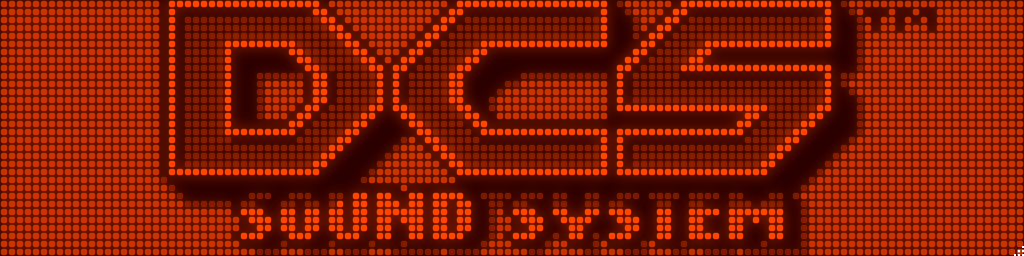
However, when I recently started working on a proper segmented display rendering, I noticed that we can actually go pretty fast with Skia using OpenGL. So here we go, a beta version of DmdDevice.dll that uses a new renderer per default:
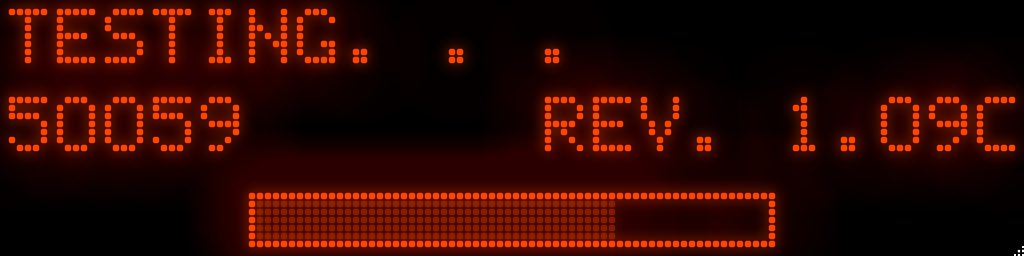
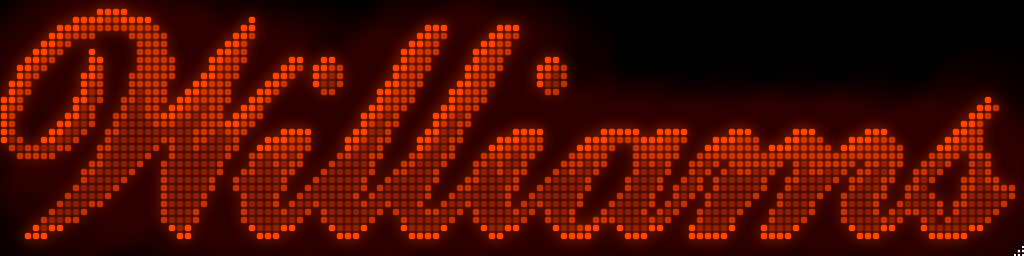
 

50935435-45b4a180-146c-11e9-9e45-cc2300a


50935473-6a107e00-146c-11e9-886d-5808d6b


50935479-709ef580-146c-11e9-97f8-f234530


50935393-2a499680-146c-11e9-8ea6-321e3a9


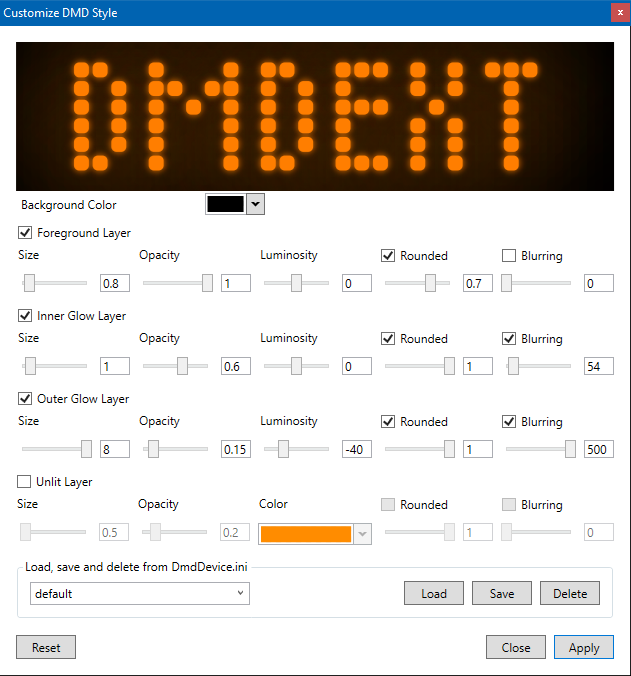
There is currently support for four layers, an always-on background layer, inner and outer glowing, and the foreground layer. All these can be customized:


50935603-d7241380-146c-11e9-8c72-ad14be7


You'll get that dialog by clicking on the top right corner of the DMD. The principle is the following:

  • You can save and load "styles" to DmdDevice.ini.
  • Styles are global, as in not linked to a game (they are defined under [virtualdmd]).
  • You can, however, assign a style to a given game to get different styles for different games.
  • When you click on "Apply" and a style is selected, that style is saved for the currently running game.

Basically you can do everything by just using the GUI. But if you want to start with an existing style, the style in the screenshots is the following:

[virtualdmd]
; ...your existing params
style = default
style.default.backgroundcolor = #ff000000
style.default.foreground.enabled = true
style.default.foreground.size = 0.8
style.default.foreground.opacity = 1
style.default.foreground.luminosity = 0
style.default.foreground.rounded.enabled = true
style.default.foreground.rounded = 0.7
style.default.foreground.blur.enabled = false
style.default.innerglow.enabled = true
style.default.outerglow.enabled = true
style.default.background.enabled = false
style.default.innerglow.size = 1
style.default.innerglow.opacity = 0.6
style.default.innerglow.luminosity = 0
style.default.innerglow.rounded.enabled = true
style.default.innerglow.rounded = 1
style.default.innerglow.blur.enabled = true
style.default.innerglow.blur = 54
style.default.outerglow.size = 8
style.default.outerglow.opacity = 0.15
style.default.outerglow.luminosity = -40
style.default.outerglow.rounded.enabled = true
style.default.outerglow.rounded = 1
style.default.outerglow.blur.enabled = true
style.default.outerglow.blur = 500
style.default.foreground.unlit = false
style.default.foreground.unlit.color = #00000000
style.default.innerglow.unlit = false
style.default.innerglow.unlit.color = #00000000
style.default.outerglow.unlit = false
style.default.outerglow.unlit.color = #00000000

Copy + paste this into DmdDevice.ini, or you can start creating your own style directly. 


If you find that you created a new, cooler style, please share it here so others can use it and with your permission I might include it in dmdext's DmdDevice.ini.


You can grab a first build here. There is some more info in the PR, please have a quick look. Windows 7 users, please let me know if it actually works, it might not. Comments, feedback and suggestions are of course appreciated. :)


Cheers!


   -freezy.


#2 Gwenydd

Gwenydd

    Hobbyist

  • Members
  • PipPip
  • 37 posts
  • Location:Ferndale, WA

  • Flag: United States of America

  • Favorite Pinball: Twilight Zone, AFM, Tron Legacy, Star Trek

Posted 09 January 2019 - 11:51 PM

Is there a link for the beta .dll?  


Edit- duh, never mind.  I missed it.


Edited by Gwenydd, 09 January 2019 - 11:52 PM.


#3 Ben Logan

Ben Logan

    Pinball Wizard

  • Members
  • PipPipPipPipPip
  • 2,275 posts
  • Location:California

  • Flag: ---------

  • Favorite Pinball: System 11

Posted 10 January 2019 - 01:04 AM

Wow — Looks great, freezy! I hope to get around to testing both this and your LCD beta soon. Work and school have been relentless lately.

#4 DJRobX

DJRobX

    Pinball Fan

  • VP Dev Team
  • PipPipPipPip
  • 941 posts
  • Location:Valencia, CA

  • Flag: United States of America

  • Favorite Pinball: F14 Tomcat

Posted 10 January 2019 - 05:47 AM

Does this work with VPX in exclusive mode?  


#5 freezy

freezy

    Member title

  • Members
  • PipPipPipPip
  • 685 posts

  • Flag: ---------

  • Favorite Pinball: T2, TOM, AFM

Posted 10 January 2019 - 07:49 AM

Does this work with VPX in exclusive mode?  


I don't know. However, the OpenGL surface is rendered off-screen, so chances are it works. If anyone happens to test, please report back!


#6 TerryRed

TerryRed

    Pinball Fan

  • Silver Supporter
  • 1,927 posts

  • Flag: Canada

  • Favorite Pinball: Too many to choose...

Contributor

Posted 10 January 2019 - 08:05 AM

Tried it on desktop using exclusive fullscreen...and the DMD is under the VPX window.... but this is "normal" as NO window should be able to be on top of VPX using exclusive fullscreen (legacy, not the "new" Win 10 fullscreen).


When i tested it with VPX borderless windowed...it worked well..except that the DMD appears to be zoomed (and only a small portion visible) until I manually re-size the window. Then the DMD re-scales and looks correct). This was with windows running with DPI / text scaling set to 100.


#7 Ben Logan

Ben Logan

    Pinball Wizard

  • Members
  • PipPipPipPipPip
  • 2,275 posts
  • Location:California

  • Flag: ---------

  • Favorite Pinball: System 11

Posted 10 January 2019 - 02:35 PM

Does alt-tabbing bring the DMD into focus, Terry?

#8 Kernel

Kernel

    Enthusiast

  • Members
  • PipPipPip
  • 134 posts

  • Flag: ---------

  • Favorite Pinball: Stones 'n Bones

Posted 10 January 2019 - 03:28 PM

OMG, it seems this is something big I've missed.

You are telling that using this software I'll be able to get this amazing DMD quality on my 3rd PC screen (used for vpinmame DMD) and overcome vpinmame resize problems/uneven pixels (I have to use a custom res to get a correct image)? WOW!


#9 TerryRed

TerryRed

    Pinball Fan

  • Silver Supporter
  • 1,927 posts

  • Flag: Canada

  • Favorite Pinball: Too many to choose...

Contributor

Posted 10 January 2019 - 03:29 PM

Does alt-tabbing bring the DMD into focus, Terry?


Not for exclusive fullscreen... it can't. NO window should be able to display on top of the VPX window when running exclusive fullscreen. I'm talking the "legacy exclusive fullscreen". (real fullscreen I like to call it)


"Fullscreen Optimizations" for Win 10 (and maybe Win 7 too?) by default now will FORCE any program that uses exclusive fullscreen, to use a "new fullscreen mode" that acts just like a better version of "Borderless Windowed Mode". In this mode, VPX acts like exclusive fullscreen, but since it's windowed, other program windows can appear on top of it.


If that confuses you...imagine the headaches I deal with for Pinup Popper support when I ask people if they are using "real exclusive fullscreen"....  :P


Problem is for some people (and myself) this "may" cause odd performance dips, so I disable it. For others like DJRobx it works great. More info:


https://winaero.com/...ons-windows-10/


#10 freezy

freezy

    Member title

  • Members
  • PipPipPipPip
  • 685 posts

  • Flag: ---------

  • Favorite Pinball: T2, TOM, AFM

Posted 10 January 2019 - 03:30 PM

Why would you want the DMD on top of the player window anyway?


EDIT: @Kernel: Yes!


Edited by freezy, 10 January 2019 - 03:30 PM.


#11 TerryRed

TerryRed

    Pinball Fan

  • Silver Supporter
  • 1,927 posts

  • Flag: Canada

  • Favorite Pinball: Too many to choose...

Contributor

Posted 10 January 2019 - 03:32 PM

Why would you want the DMD on top of the player window anyway?


EDIT: @Kernel: Yes!


For a desktop view. I think Rob was wondering if this would work as a nice replacement for the VPX in-game DMD that can have the glow effect, perhaps?


#12 freezy

freezy

    Member title

  • Members
  • PipPipPipPip
  • 685 posts

  • Flag: ---------

  • Favorite Pinball: T2, TOM, AFM

Posted 10 January 2019 - 03:34 PM

Doesn't the in-game DMD already have some glowing?


#13 h4fl4

h4fl4

    Neophyte

  • Members
  • Pip
  • 6 posts

  • Flag: United Kingdom

  • Favorite Pinball: Addams Family

Posted 11 January 2019 - 11:10 AM

Hi. Nothig comes ob when I click the settings icon. Any idea?

#14 CICERO EDUARDO

CICERO EDUARDO

    Hobbyist

  • Members
  • PipPip
  • 14 posts
  • Location:Sao Paulo

  • Flag: Brazil

  • Favorite Pinball: medieval madness,VORTEX,OBA-OBA

Posted 11 January 2019 - 03:28 PM

Hi,


So multiple people requested a more sophisticated virtual DMD when using dmdext. I was a bit hesitant at first, because the current virtual DMD is a simple 128x32 bitmap, rendered entirely by a GPU shader, so it's very fast and lightweight. And doing more complex stuff would exceed my shader-writing skills.


However, when I recently started working on a proper segmented display rendering, I noticed that we can actually go pretty fast with Skia using OpenGL. So here we go, a beta version of DmdDevice.dll that uses a new renderer per default:
 

50935435-45b4a180-146c-11e9-9e45-cc2300a


50935473-6a107e00-146c-11e9-886d-5808d6b


50935479-709ef580-146c-11e9-97f8-f234530


50935393-2a499680-146c-11e9-8ea6-321e3a9


There is currently support for four layers, an always-on background layer, inner and outer glowing, and the foreground layer. All these can be customized:
 

50935603-d7241380-146c-11e9-8c72-ad14be7


You'll get that dialog by clicking on the top right corner of the DMD. The principle is the following:

  • You can save and load "styles" to DmdDevice.ini.
  • Styles are global, as in not linked to a game (they are defined under [virtualdmd]).
  • You can, however, assign a style to a given game to get different styles for different games.
  • When you click on "Apply" and a style is selected, that style is saved for the currently running game.

Basically you can do everything by just using the GUI. But if you want to start with an existing style, the style in the screenshots is the following:

[virtualdmd]
; ...your existing params
style = default
style.default.backgroundcolor = #ff000000
style.default.foreground.enabled = true
style.default.foreground.size = 0.8
style.default.foreground.opacity = 1
style.default.foreground.luminosity = 0
style.default.foreground.rounded.enabled = true
style.default.foreground.rounded = 0.7
style.default.foreground.blur.enabled = false
style.default.innerglow.enabled = true
style.default.outerglow.enabled = true
style.default.background.enabled = false
style.default.innerglow.size = 1
style.default.innerglow.opacity = 0.6
style.default.innerglow.luminosity = 0
style.default.innerglow.rounded.enabled = true
style.default.innerglow.rounded = 1
style.default.innerglow.blur.enabled = true
style.default.innerglow.blur = 54
style.default.outerglow.size = 8
style.default.outerglow.opacity = 0.15
style.default.outerglow.luminosity = -40
style.default.outerglow.rounded.enabled = true
style.default.outerglow.rounded = 1
style.default.outerglow.blur.enabled = true
style.default.outerglow.blur = 500
style.default.foreground.unlit = false
style.default.foreground.unlit.color = #00000000
style.default.innerglow.unlit = false
style.default.innerglow.unlit.color = #00000000
style.default.outerglow.unlit = false
style.default.outerglow.unlit.color = #00000000

Copy + paste this into DmdDevice.ini, or you can start creating your own style directly. 


If you find that you created a new, cooler style, please share it here so others can use it and with your permission I might include it in dmdext's DmdDevice.ini.


You can grab a first build here. There is some more info in the PR, please have a quick look. Windows 7 users, please let me know if it actually works, it might not. Comments, feedback and suggestions are of course appreciated. :)


Cheers!


   -freezy.


I tested it in win7, it looked nice, but very slow in the animations, and caused a crash when leaving the table.


I tested it in win7, it looked nice, but very slow in the animations, and caused a crash when leaving the table.


#15 freezy

freezy

    Member title

  • Members
  • PipPipPipPip
  • 685 posts

  • Flag: ---------

  • Favorite Pinball: T2, TOM, AFM

Posted 11 January 2019 - 07:46 PM

What do you mean by slow? Did it lag? Did VP stutter?


#16 Kernel

Kernel

    Enthusiast

  • Members
  • PipPipPip
  • 134 posts

  • Flag: ---------

  • Favorite Pinball: Stones 'n Bones

Posted 13 January 2019 - 10:12 AM

Tested on windows 10, i7 4790k@5GHz - GTX 1080.

Same problem as CICERO EDUARDO.

It seems like frames are buffered and DMD has no adequate refresh to display all of them (when there is movement, the images are late).


Edited by Kernel, 13 January 2019 - 11:11 PM.


#17 freezy

freezy

    Member title

  • Members
  • PipPipPipPip
  • 685 posts

  • Flag: ---------

  • Favorite Pinball: T2, TOM, AFM

Posted 13 January 2019 - 10:15 PM

I've posted a new build here (r2). Can those of you with performance problems add showfps = true under [virtualdmd] in DmdDevice.ini and let me know what it says? It shows the last frame as well as min/avg/max frame rate.


The new build also renders RGB24 pixels with the luminosity as alpha channel for more realistic glowing. Otherwise I've added an option to change the hue, but this doesn't yet work like I want.


EDIT: Oh, and coloring should now work as usual.


Edited by freezy, 13 January 2019 - 10:19 PM.


#18 Kernel

Kernel

    Enthusiast

  • Members
  • PipPipPip
  • 134 posts

  • Flag: ---------

  • Favorite Pinball: Stones 'n Bones

Posted 13 January 2019 - 11:01 PM

Just tried new dll. I've noticed no difference.


DmdDevice.ini:

[global]

; how to downscale SEGA 192x64 pixel games to smaller displays: fit, fill or stretch
resize = fit

; flips the image horizontally
fliphorizontally = false

; flips the image vertically
flipvertically = false

; enable or disable frame-by-frame colorization (inactive in VPX bundle)
colorize = false

; a DMD that renders with nice dots on a computer monitor
[virtualdmd]
showfps = true
enabled = true

; virtual dmd stays on top of all other windows
stayontop = true

; hide the resize grip
hidegrip = true

; ignore the aspect ratio of the rendered dots when resizing
ignorear = true

; use VPM's registry values when positioning the virtual dmd
useregistry = false

; x-axis of the window position
left = 0

; y-axis of the window position
top = 0

; width of the dmd in monitor pixels
width = 640

; height of the dmd in monitor pixels
height = 160

; scale the dot size (set to 0.8 for same size as pre-1.6.0)
dotsize = 0,9
style = default
style.default.backgroundcolor = #ff000000
style.default.foreground.enabled = true
style.default.foreground.size = 0,875
style.default.foreground.opacity = 1
style.default.foreground.luminosity = 0
style.default.foreground.rounded.enabled = true
style.default.foreground.rounded = 1
style.default.foreground.blur.enabled = false
style.default.innerglow.enabled = true
style.default.outerglow.enabled = true
style.default.background.enabled = true
style.default.innerglow.size = 1,25
style.default.innerglow.opacity = 0,15625
style.default.innerglow.luminosity = 56,25
style.default.innerglow.rounded.enabled = true
style.default.innerglow.rounded = 1
style.default.innerglow.blur.enabled = true
style.default.innerglow.blur = 54
style.default.outerglow.size = 1,75
style.default.outerglow.opacity = 1
style.default.outerglow.luminosity = -40
style.default.outerglow.rounded.enabled = true
style.default.outerglow.rounded = 1
style.default.outerglow.blur.enabled = true
style.default.outerglow.blur = 500
style.default.foreground.unlit = false
style.default.foreground.unlit.color = #00ffffff
style.default.innerglow.unlit = false
style.default.innerglow.unlit.color = #00ffffff
style.default.outerglow.unlit = false
style.default.outerglow.unlit.color = #00ffffff
style.default.foreground.hue = 0
style.default.innerglow.hue = 0
style.default.outerglow.hue = 0
style.default.background.unlit = true
style.default.background.unlit.color = #ffff4500
style.default.background.size = 0,5
style.default.background.opacity = 0,403125
style.default.background.luminosity = 0
style.default.background.hue = 0
style.default.background.rounded.enabled = true
style.default.background.rounded = 1
style.default.background.blur.enabled = false

DmdDevice.log:

 [3] 2019/01/13 23:39:29.570  INFO | Successfully loaded config from C:\Giochi\VPX\VPINMAME\DmdDevice.ini. 
 [3] 2019/01/13 23:39:29.632  INFO | No altcolor folder found, ignoring palettes. 
 [3] 2019/01/13 23:39:29.632  INFO | Starting VPinMAME API through VPinballX.exe. 
 [3] 2019/01/13 23:39:29.632  INFO | [vpm] Open() 
 [3] 2019/01/13 23:39:29.632  INFO | [vpm] PM_GameSettings(0) 
 [3] 2019/01/13 23:39:29.632  INFO | Disabling game colorization 
 [3] 2019/01/13 23:39:29.632  INFO | Setting game name: gw_l5 
 [3] 2019/01/13 23:39:29.632  INFO | Setting color: #FFFF5820 
 [3] 2019/01/13 23:39:29.648  INFO | Opening virtual DMD... 
 [9] 2019/01/13 23:39:30.289  INFO | Added VirtualDMD renderer. 
 [9] 2019/01/13 23:39:30.304  INFO | Loading alphanumeric SVGs... 
 [9] 2019/01/13 23:39:30.339  INFO | Loading alphanumeric SVGs... 
 [9] 2019/01/13 23:39:30.345  INFO | Loading numeric (8) SVGs... 
 [9] 2019/01/13 23:39:30.345  INFO | Loading numeric (8) SVGs... 
 [9] 2019/01/13 23:39:30.345  INFO | Loading numeric (10) SVGs... 
 [9] 2019/01/13 23:39:30.345  INFO | Loading numeric (10) SVGs... 
 [9] 2019/01/13 23:39:30.345  INFO | All SVGs loaded. 
 [9] 2019/01/13 23:39:30.345  INFO | Added virtual alphanumeric renderer. 
 [9] 2019/01/13 23:39:30.345  INFO | Transformation options: Resize=Fit, HFlip=False, VFlip=False 
 [9] 2019/01/13 23:39:30.345  INFO | Applying default color to render graphs (#FFFF5820). 
 [9] 2019/01/13 23:39:30.362  INFO | Resizing Skia DMD to 128x32 
 [9] 2019/01/13 23:39:30.362  INFO | Setting up 2-bit VPM Graph for 2 destination(s) 
 [9] 2019/01/13 23:39:30.362  INFO | Connecting VPM 2-bit Source to Dmd (Gray2 => Gray2) 
 [9] 2019/01/13 23:39:30.382  INFO | Setting up 4-bit VPM Graph for 2 destination(s) 
 [9] 2019/01/13 23:39:30.382  INFO | Connecting VPM 4-bit Source to Dmd (Gray4 => Gray4) 
 [9] 2019/01/13 23:39:30.382  INFO | Setting up RGB24-bit VPM Graph for 2 destination(s) 
 [9] 2019/01/13 23:39:30.382  INFO | Connecting VPM RGB24 Source to Dmd (Rgb24 => Rgb24) 
 [9] 2019/01/13 23:39:30.382  INFO | Setting up Alphanumeric VPM Graph for 2 destination(s) 
 [9] 2019/01/13 23:39:30.382  INFO | Connecting VPM Alpha Numeric Source to Virtual Alphanumeric Renderer (AlphaNumeric => AlphaNumeric) 
 [9] 2019/01/13 23:39:30.459  INFO | Setting up OpenGL context at 1024x256... 
 [9] 2019/01/13 23:39:30.512  INFO | Painting new cache for layer OuterGlow at 694x694 
 [9] 2019/01/13 23:39:30.517  INFO | Painting new cache for layer InnerGlow at 80,5x80,5 
 [9] 2019/01/13 23:39:30.517  INFO | Painting new cache for layer Foreground at 69x69 
 [9] 2019/01/13 23:40:10.331  INFO | Setting up OpenGL context at 718x180... 
 [9] 2019/01/13 23:40:35.676  INFO | Applying new style to DMD. 
 [9] 2019/01/13 23:40:35.676  INFO | Scheduling configuration save to C:\Giochi\VPX\VPINMAME\DmdDevice.ini 
 [9] 2019/01/13 23:40:35.676  INFO | Painting new cache for layer OuterGlow at 666x666 
 [9] 2019/01/13 23:40:35.686  INFO | Painting new cache for layer InnerGlow at 82,5x82,5 
 [9] 2019/01/13 23:40:35.702  INFO | Painting new cache for layer Foreground at 10x10 
 [9] 2019/01/13 23:40:35.720  INFO | Applying new style to DMD. 
 [9] 2019/01/13 23:40:35.720  INFO | Scheduling configuration save to C:\Giochi\VPX\VPINMAME\DmdDevice.ini 
 [5] 2019/01/13 23:40:36.224  INFO | Saving config to C:\Giochi\VPX\VPINMAME\DmdDevice.ini 
 [9] 2019/01/13 23:40:39.491  INFO | Applying new style to DMD. 
 [9] 2019/01/13 23:40:39.491  INFO | Scheduling configuration save to C:\Giochi\VPX\VPINMAME\DmdDevice.ini 
 [9] 2019/01/13 23:40:39.499  INFO | Painting new cache for layer InnerGlow at 82,5x82,5 
 [5] 2019/01/13 23:40:39.994  INFO | Saving config to C:\Giochi\VPX\VPINMAME\DmdDevice.ini 
 [9] 2019/01/13 23:40:44.890  INFO | Applying new style to DMD. 
 [9] 2019/01/13 23:40:44.890  INFO | Scheduling configuration save to C:\Giochi\VPX\VPINMAME\DmdDevice.ini 
 [9] 2019/01/13 23:40:44.890  INFO | Painting new cache for layer Foreground at 10x10 
 [5] 2019/01/13 23:40:45.394  INFO | Saving config to C:\Giochi\VPX\VPINMAME\DmdDevice.ini 
 [9] 2019/01/13 23:40:52.580  INFO | Applying new style to DMD. 
 [9] 2019/01/13 23:40:52.580  INFO | Scheduling configuration save to C:\Giochi\VPX\VPINMAME\DmdDevice.ini 
 [9] 2019/01/13 23:40:52.589  INFO | Painting new cache for layer Foreground at 12x12 
 [5] 2019/01/13 23:40:53.082  INFO | Saving config to C:\Giochi\VPX\VPINMAME\DmdDevice.ini 
 [9] 2019/01/13 23:40:57.594  INFO | Applying new style to DMD. 
 [9] 2019/01/13 23:40:57.594  INFO | Scheduling configuration save to C:\Giochi\VPX\VPINMAME\DmdDevice.ini 
 [9] 2019/01/13 23:40:57.594  INFO | Painting new cache for layer OuterGlow at 643x643 
 [5] 2019/01/13 23:40:58.096  INFO | Saving config to C:\Giochi\VPX\VPINMAME\DmdDevice.ini 
 [9] 2019/01/13 23:41:04.551  INFO | Applying new style to DMD. 
 [9] 2019/01/13 23:41:04.552  INFO | Scheduling configuration save to C:\Giochi\VPX\VPINMAME\DmdDevice.ini 
 [9] 2019/01/13 23:41:04.552  INFO | Painting new cache for layer InnerGlow at 82,5x82,5 
 [5] 2019/01/13 23:41:05.054  INFO | Saving config to C:\Giochi\VPX\VPINMAME\DmdDevice.ini 
 [9] 2019/01/13 23:41:05.272  INFO | Applying new style to DMD. 
 [9] 2019/01/13 23:41:05.272  INFO | Scheduling configuration save to C:\Giochi\VPX\VPINMAME\DmdDevice.ini 
 [5] 2019/01/13 23:41:05.774  INFO | Saving config to C:\Giochi\VPX\VPINMAME\DmdDevice.ini 
 [9] 2019/01/13 23:41:20.121  INFO | Applying new style to DMD. 
 [9] 2019/01/13 23:41:20.121  INFO | Scheduling configuration save to C:\Giochi\VPX\VPINMAME\DmdDevice.ini 
 [9] 2019/01/13 23:41:20.121  INFO | Painting new cache for layer OuterGlow at 642x642 
 [5] 2019/01/13 23:41:20.623  INFO | Saving config to C:\Giochi\VPX\VPINMAME\DmdDevice.ini 
 [9] 2019/01/13 23:41:23.216  INFO | Applying new style to DMD. 
 [9] 2019/01/13 23:41:23.216  INFO | Scheduling configuration save to C:\Giochi\VPX\VPINMAME\DmdDevice.ini 
 [9] 2019/01/13 23:41:23.218  INFO | Painting new cache for layer OuterGlow at 655x655 
 [5] 2019/01/13 23:41:23.718  INFO | Saving config to C:\Giochi\VPX\VPINMAME\DmdDevice.ini 
 [9] 2019/01/13 23:41:27.776  INFO | Applying new style to DMD. 
 [9] 2019/01/13 23:41:27.776  INFO | Scheduling configuration save to C:\Giochi\VPX\VPINMAME\DmdDevice.ini 
 [9] 2019/01/13 23:41:27.776  INFO | Painting new cache for layer OuterGlow at 641x641 
[14] 2019/01/13 23:41:28.279  INFO | Saving config to C:\Giochi\VPX\VPINMAME\DmdDevice.ini 
 [9] 2019/01/13 23:41:31.854  INFO | Applying new style to DMD. 
 [9] 2019/01/13 23:41:31.854  INFO | Scheduling configuration save to C:\Giochi\VPX\VPINMAME\DmdDevice.ini 
 [9] 2019/01/13 23:41:31.856  INFO | Painting new cache for layer OuterGlow at 644x644 
 [5] 2019/01/13 23:41:32.356  INFO | Saving config to C:\Giochi\VPX\VPINMAME\DmdDevice.ini 
 [9] 2019/01/13 23:41:49.788  INFO | Applying new style to DMD. 
 [9] 2019/01/13 23:41:49.788  INFO | Scheduling configuration save to C:\Giochi\VPX\VPINMAME\DmdDevice.ini 
 [9] 2019/01/13 23:41:49.788  INFO | Painting new cache for layer Background at 9x9 
 [5] 2019/01/13 23:41:50.291  INFO | Saving config to C:\Giochi\VPX\VPINMAME\DmdDevice.ini 
 [9] 2019/01/13 23:41:51.293  INFO | Applying new style to DMD. 
 [9] 2019/01/13 23:41:51.293  INFO | Scheduling configuration save to C:\Giochi\VPX\VPINMAME\DmdDevice.ini 
 [5] 2019/01/13 23:41:51.796  INFO | Saving config to C:\Giochi\VPX\VPINMAME\DmdDevice.ini 
 [9] 2019/01/13 23:41:57.717  INFO | Applying new style to DMD. 
 [9] 2019/01/13 23:41:57.717  INFO | Scheduling configuration save to C:\Giochi\VPX\VPINMAME\DmdDevice.ini 
 [9] 2019/01/13 23:41:57.717  INFO | Painting new cache for layer Background at 9x9 
 [5] 2019/01/13 23:41:58.221  INFO | Saving config to C:\Giochi\VPX\VPINMAME\DmdDevice.ini 
 [9] 2019/01/13 23:42:05.323  INFO | Applying new style to DMD. 
 [9] 2019/01/13 23:42:05.323  INFO | Scheduling configuration save to C:\Giochi\VPX\VPINMAME\DmdDevice.ini 
 [9] 2019/01/13 23:42:05.323  INFO | Painting new cache for layer Background at 9x9 
 [5] 2019/01/13 23:42:05.826  INFO | Saving config to C:\Giochi\VPX\VPINMAME\DmdDevice.ini 
 [9] 2019/01/13 23:42:08.755  INFO | Applying new style to DMD. 
 [9] 2019/01/13 23:42:08.755  INFO | Scheduling configuration save to C:\Giochi\VPX\VPINMAME\DmdDevice.ini 
 [9] 2019/01/13 23:42:08.767  INFO | Painting new cache for layer Background at 9x9 
 [5] 2019/01/13 23:42:09.268  INFO | Saving config to C:\Giochi\VPX\VPINMAME\DmdDevice.ini 
 [9] 2019/01/13 23:42:24.119  INFO | Saving style default to DmdDevice.ini... 
 [9] 2019/01/13 23:42:24.122  INFO | Scheduling configuration save to C:\Giochi\VPX\VPINMAME\DmdDevice.ini 
 [9] 2019/01/13 23:42:24.122  INFO | Selection changed to default 
 [5] 2019/01/13 23:42:24.624  INFO | Saving config to C:\Giochi\VPX\VPINMAME\DmdDevice.ini 
 [9] 2019/01/13 23:42:25.380  INFO | Saving style default to DmdDevice.ini... 
 [9] 2019/01/13 23:42:25.380  INFO | Scheduling configuration save to C:\Giochi\VPX\VPINMAME\DmdDevice.ini 
 [9] 2019/01/13 23:42:25.380  INFO | Selection changed to default 
 [5] 2019/01/13 23:42:25.883  INFO | Saving config to C:\Giochi\VPX\VPINMAME\DmdDevice.ini 
 [9] 2019/01/13 23:42:27.512  INFO | Applying new style to DMD. 
 [9] 2019/01/13 23:42:27.512  INFO | Scheduling configuration save to C:\Giochi\VPX\VPINMAME\DmdDevice.ini 
 [5] 2019/01/13 23:42:28.014  INFO | Saving config to C:\Giochi\VPX\VPINMAME\DmdDevice.ini 
 [9] 2019/01/13 23:42:29.322  INFO | Saving style default to DmdDevice.ini... 
 [9] 2019/01/13 23:42:29.323  INFO | Scheduling configuration save to C:\Giochi\VPX\VPINMAME\DmdDevice.ini 
 [9] 2019/01/13 23:42:29.323  INFO | Selection changed to default 
 [5] 2019/01/13 23:42:29.825  INFO | Saving config to C:\Giochi\VPX\VPINMAME\DmdDevice.ini 
 [3] 2019/01/13 23:45:03.515  INFO | [vpm] Close() 
 [3] 2019/01/13 23:45:03.515  INFO | Closing up. 
 [3] 2019/01/13 23:45:03.515  INFO | Clearing Display 
 [3] 2019/01/13 23:45:03.515  INFO | Clearing Display 
 [3] 2019/01/13 23:45:03.515  INFO | Clearing Display 
 [3] 2019/01/13 23:45:03.515  INFO | Clearing Display 
 [3] 2019/01/13 23:45:03.515  INFO | Source for 1 renderer(s) stopped. 
 [3] 2019/01/13 23:45:03.515  INFO | Source for 1 renderer(s) stopped. 
 [3] 2019/01/13 23:45:03.515  INFO | Source for 1 renderer(s) stopped. 
 [3] 2019/01/13 23:45:03.515  INFO | Source for 1 renderer(s) stopped. 

Here you can see the image is late (look at the police car in Virtual DMD vs VPinMame DMD):

1zybj2c.jpg


2qk07ip.jpg


And the "ignorear = true" doesn't work (I have to enlarge the DMD window to see all the content, otherwise the image is cropped):

6r7n0m.jpg


When I quit the table, VP hangs some seconds then it crashes.


The DMD image quality is spectacular, I hope you can make it work right!


Edited by Kernel, 13 January 2019 - 11:11 PM.


#19 h4fl4

h4fl4

    Neophyte

  • Members
  • Pip
  • 6 posts

  • Flag: United Kingdom

  • Favorite Pinball: Addams Family

Posted 21 January 2019 - 03:27 PM

Ive already asked Freezy in the other topic but might as well ask in the right one :)


Ive got problem with the DMD size on my LCD. For some reason the picture doesnt fill the frame until I move it manually by grabbing the DMD window. then it expands nicely up to the set resolution.


Before movement (please notice that the resize icon is in the right place:

dmd1.jpg
dmd2.jpg
 
After moving (zooms perfectly):
dmd3.jpg

Edited by h4fl4, 21 January 2019 - 03:31 PM.


#20 Carny_Priest

Carny_Priest

    Pinball Fan

  • Members
  • PipPipPipPip
  • 1,257 posts
  • Location:Austin, TX

  • Flag: United States of America

  • Favorite Pinball: EATPM

Posted 21 January 2019 - 07:16 PM

Yes, others have reported the same behavior. Happens to me too. Also, clicking the settings button does not open the GUI (or at least not in a location where I can see it). I did not know if this is because I'm using altcolor full color patches. From the GUI it looks like you just tune for monochrome? Frames lag also, but I haven't had a chance to run fps and logs.


I'm running the WIP beta but I'm not really at the point where I am doing beta testing. My cab had been down for many, many months. I'm still updating tables and software, generally.


Also tagged with one or more of these keywords: dmdext, virtual dmd, vpm