Jump to content


Photo
- - - - -

Star wars Trilogy WIP


  • Please log in to reply
104 replies to this topic

#1 subzero1970

subzero1970

    Enthusiast

  • VIP
  • 457 posts
  • Location:Scotland

  • Flag: Scotland

  • Favorite Pinball: Medival Madness, Star Wars

  • PS3 Gamer Tag: scotsubzero
  • 360 Gamer Tag: scotsubzero


Posted 11 November 2009 - 10:17 AM

I've decided to update the GFX on this table aswell as any others I did on VP, however im having a nagging problem.

I've created a new EmReel for the X-Wing which looks good in photoshop but animates horribly on the table, can someone help me get this EmReel right???

Attached is a screenshot of the emreel test failure sad.gif

Attached Files


http://scottish-claymores.co.uk  <--- VISIT THE SCOTTISH CLAYMORES ARCHIVE!!!

Tables I've worked on since 2002: Hot Wheels(W/Destruk), Hook(W/Joep, El Condor, Destruk, Apocalypse, DataDragon, Pingod), Maverick(W/Magnox), Star Wars Trilogy(W/Magnox), Robocop(W/Destruk,cyBORG), Batman(W/Pinball Ken,Steve Ellenoff)-and most recently - Gottliebs Victory (W/Destruk) Made some VP Tables too!!!


#2 TAB

TAB

    Out of order

  • VIP
  • 2,556 posts
  • Location:Berlin/Germany

  • Flag: Germany

  • Favorite Pinball: BOP The Machine


Posted 11 November 2009 - 12:22 PM

I would use a wall for it.
Easier to build and you get no problems with the ball.
The balls over the EMReel.

#3 njamont

njamont

    Enthusiast

  • Silver Supporter
  • 409 posts
  • Location:Houten, Utrecht

  • Flag: Netherlands

  • Favorite Pinball: Monster Bash

Posted 11 November 2009 - 01:14 PM

YESSSSSS thank u soooo much for redoing the table WOHOOOOO


#4 subzero1970

subzero1970

    Enthusiast

  • VIP
  • 457 posts
  • Location:Scotland

  • Flag: Scotland

  • Favorite Pinball: Medival Madness, Star Wars

  • PS3 Gamer Tag: scotsubzero
  • 360 Gamer Tag: scotsubzero


Posted 11 November 2009 - 01:49 PM

But how to animate a wall?????

QUOTE (TAB @ Nov 11 2009, 12:22 PM) <{POST_SNAPBACK}>
I would use a wall for it.
Easier to build and you get no problems with the ball.
The balls over the EMReel.


http://scottish-claymores.co.uk  <--- VISIT THE SCOTTISH CLAYMORES ARCHIVE!!!

Tables I've worked on since 2002: Hot Wheels(W/Destruk), Hook(W/Joep, El Condor, Destruk, Apocalypse, DataDragon, Pingod), Maverick(W/Magnox), Star Wars Trilogy(W/Magnox), Robocop(W/Destruk,cyBORG), Batman(W/Pinball Ken,Steve Ellenoff)-and most recently - Gottliebs Victory (W/Destruk) Made some VP Tables too!!!


#5 Kiaininja

Kiaininja

    Pinball Bum

  • Members
  • PipPipPip
  • 103 posts
  • Location:Eastcoast, USA

  • Flag: United States of America

  • Favorite Pinball: Tales of the Arabian Nights


Posted 11 November 2009 - 01:54 PM

Doing good EMReels requires measuring to get it to look perfect. But there are simple tricks to help make it easier to do. The first thing to know is that when your editing the Reels in a paint program you should create a background layer of a snapshot of the table to use as a guide canvas. Make sure the table snapshot is sized to the native resolution of VP(1000x750 for VP8) so it measures out perfect and use the grid option for help. Then when you finish editing copy out the Reel area/layer using the grid(use snap to grid to make it acurate) and paste as a new pic. The pic size is inputed in the Reel size in VP options and you get the coordinate from the upper left corner of the copied area using the snapshot guide.
Attached File  ReelSample05.jpg   235.18KB   156 downloads
My VP8 tables: WW2USBomber_censored v1.0, WW2USBomber_uncensored v1.0

#6 destruk

destruk

    VPF Veteran

  • VPF Staff
  • 6,338 posts
  • Location:Colorado Springs, CO

  • Flag: United States of America

  • Favorite Pinball: Ultrapin!


Posted 11 November 2009 - 02:35 PM

Subzero - walls drop and raise, so you'd use multiple walls. With flipbook animation checked, as long as you just have one wall 'raised' at one time, the ball is properly masked behind it. Your emreel image you are using now looks like the right wing is chopped off - check your frame numbers - remember the frame range starts at 0. I have a few pictures of this machine and a video or two (IIRC). The tie fighter is also at the wrong angle.

Build a fire, vipers love the heat.


#7 subzero1970

subzero1970

    Enthusiast

  • VIP
  • 457 posts
  • Location:Scotland

  • Flag: Scotland

  • Favorite Pinball: Medival Madness, Star Wars

  • PS3 Gamer Tag: scotsubzero
  • 360 Gamer Tag: scotsubzero


Posted 11 November 2009 - 02:52 PM

Starting to think I should have stayed away from it now lol

QUOTE (destruk @ Nov 11 2009, 02:35 PM) <{POST_SNAPBACK}>
Subzero - walls drop and raise, so you'd use multiple walls. With flipbook animation checked, as long as you just have one wall 'raised' at one time, the ball is properly masked behind it. Your emreel image you are using now looks like the right wing is chopped off - check your frame numbers - remember the frame range starts at 0. I have a few pictures of this machine and a video or two (IIRC). The tie fighter is also at the wrong angle.


That would mean re-scripting a portion of the table, something im no longer capable of doing...

I did finally get an emreel to work, but it looks bloody awful!!!

http://scottish-claymores.co.uk  <--- VISIT THE SCOTTISH CLAYMORES ARCHIVE!!!

Tables I've worked on since 2002: Hot Wheels(W/Destruk), Hook(W/Joep, El Condor, Destruk, Apocalypse, DataDragon, Pingod), Maverick(W/Magnox), Star Wars Trilogy(W/Magnox), Robocop(W/Destruk,cyBORG), Batman(W/Pinball Ken,Steve Ellenoff)-and most recently - Gottliebs Victory (W/Destruk) Made some VP Tables too!!!


#8 rossicomputers

rossicomputers

    Gustavo

  • Members
  • PipPipPipPip
  • 608 posts
  • Location:Boston MA USA

  • Flag: Brazil

  • Favorite Pinball: Black Knight 2000

Posted 27 February 2010 - 05:47 AM

Subzero,

What happens to this beauty....?

Any news friend?


Like to see forward

Rossi

#9 njamont

njamont

    Enthusiast

  • Silver Supporter
  • 409 posts
  • Location:Houten, Utrecht

  • Flag: Netherlands

  • Favorite Pinball: Monster Bash

Posted 27 February 2010 - 08:52 AM

yeah or maybe if you dont like feeling the table you can release the playfield pics and so on for another table maker?

#10 pudluther

pudluther

    Hobbyist

  • Silver Supporter
  • 27 posts

  • Flag: ---------

  • Favorite Pinball: star wars - 1992 - DE

Posted 07 March 2010 - 10:20 PM

QUOTE (subzero1970 @ Nov 11 2009, 05:17 AM) <{POST_SNAPBACK}>
I've decided to update the GFX on this table aswell as any others I did on VP, however im having a nagging problem.

I've created a new EmReel for the X-Wing which looks good in photoshop but animates horribly on the table, can someone help me get this EmReel right???

Attached is a screenshot of the emreel test failure sad.gif


please, please finish up this table.....or maybe pass it off to someone else if you no longer have the time. what you've done so far looks fantastic...and this table desperately needs an update.

#11 subzero1970

subzero1970

    Enthusiast

  • VIP
  • 457 posts
  • Location:Scotland

  • Flag: Scotland

  • Favorite Pinball: Medival Madness, Star Wars

  • PS3 Gamer Tag: scotsubzero
  • 360 Gamer Tag: scotsubzero


Posted 07 March 2010 - 10:35 PM

If someone could make a decent x-wing animate then it would be done!

http://scottish-claymores.co.uk  <--- VISIT THE SCOTTISH CLAYMORES ARCHIVE!!!

Tables I've worked on since 2002: Hot Wheels(W/Destruk), Hook(W/Joep, El Condor, Destruk, Apocalypse, DataDragon, Pingod), Maverick(W/Magnox), Star Wars Trilogy(W/Magnox), Robocop(W/Destruk,cyBORG), Batman(W/Pinball Ken,Steve Ellenoff)-and most recently - Gottliebs Victory (W/Destruk) Made some VP Tables too!!!


#12 bolt

bolt

    VPF Veteran

  • VIP
  • 5,161 posts
  • Location:Kiel / Schleswig Holstein

  • Flag: Germany

  • Favorite Pinball: JP's Deadpool, Harlem Globetrotters, Spiderman and much more

Posted 07 March 2010 - 10:57 PM

Sounds very good subzero1970, hope someone can help with a animate X-Wing.
Posted Image

#13 wtiger

wtiger

    Pinball Fan

  • VIP
  • 1,148 posts
  • Location:Los Angeles, CA

  • Flag: United States of America

  • Favorite Pinball: Junkyard


Contributor

Posted 08 March 2010 - 01:24 AM

I did some playing around and got something to kind of work (I wish I new a little more about scripting). The idea is to use several playfield images with the Xwing at the various angles of rotation in the proper place and then use drop walls rather than an emreel for the animation frames. Take a look at PD's Whirlwind. The spinning discs are done with drop walls. I then used code from that script as well as JP's Elvis as examples and implemented them into the Star Wars Trilogy table. It needs more work, but the concept appears to work. I can do a write up with more detail possibly on Tuesday evening when I get some more time. Currently I made dummy colored square walls in the middle of the playfield for all but two of the animations and have two actual Xwing frames in the proper place (I used the first image from the current Xwing emreel image and rotated it 15 degrees in Photoshop). I didn't do any calculations to see if 15 degrees is the right number, but again, this was just a proof of concept.

#14 njamont

njamont

    Enthusiast

  • Silver Supporter
  • 409 posts
  • Location:Houten, Utrecht

  • Flag: Netherlands

  • Favorite Pinball: Monster Bash

Posted 08 March 2010 - 10:52 AM

Sweet if you all team up the release is getting closer smile.gif

#15 wtiger

wtiger

    Pinball Fan

  • VIP
  • 1,148 posts
  • Location:Los Angeles, CA

  • Flag: United States of America

  • Favorite Pinball: Junkyard


Contributor

Posted 11 March 2010 - 04:19 AM

Here's what I did in more detail. If you have any questions, I'll try to answer them. If it's a script question, hopefully someone with way more knowledge than I will answer.

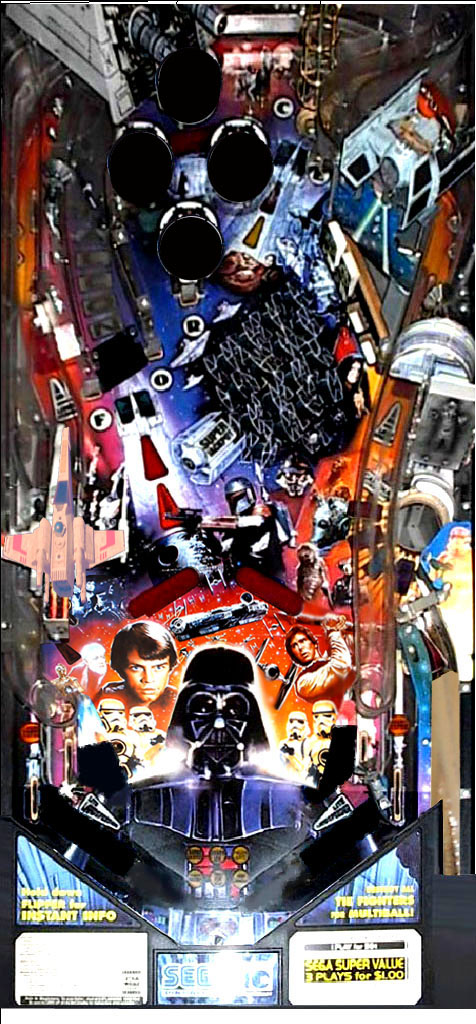
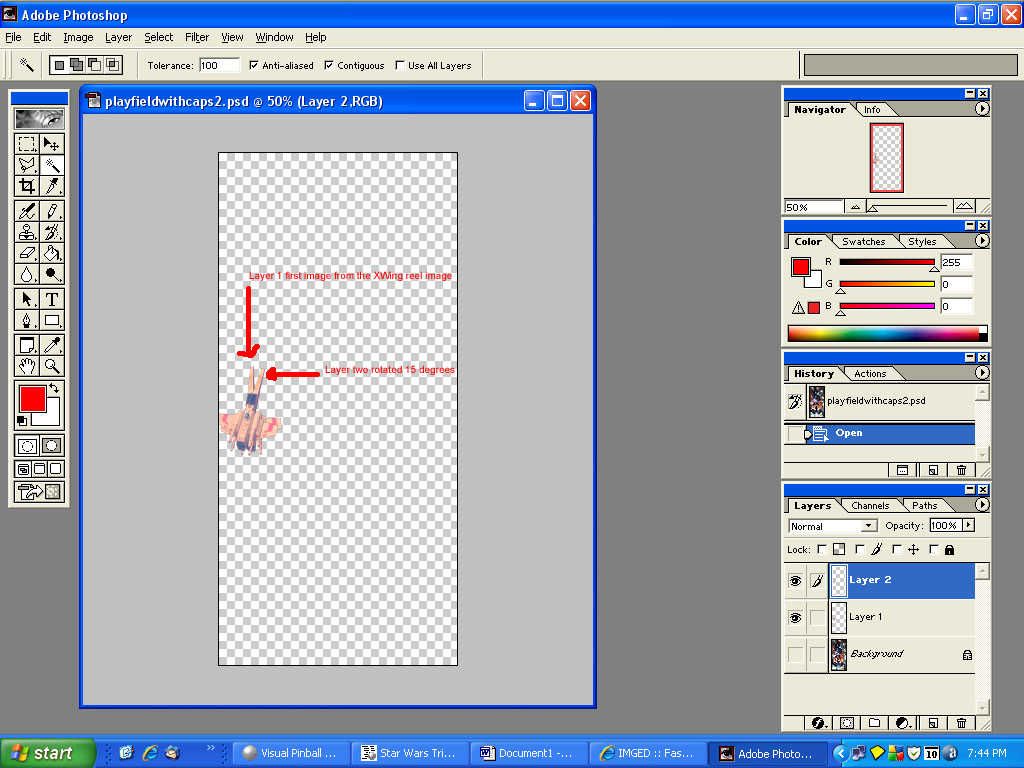
The first thing I did was to cut out the very first image from the current xwing reel image (xwingstripfinal3.bmp) from the table. I then pasted it into photoshop over the existing xwing from the playfield image from the table:



I then copied the xwing layer and rotated it 15 degrees. This was actually too much, but I just wanted to see it move. In the current emreel image the rotation is 5 degrees.
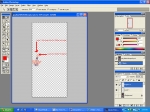


I then save the playfield image twice, once with my layer 1 on and layer 2 off then again with layer 1 off and layer two on, imported both of them into the VP table.

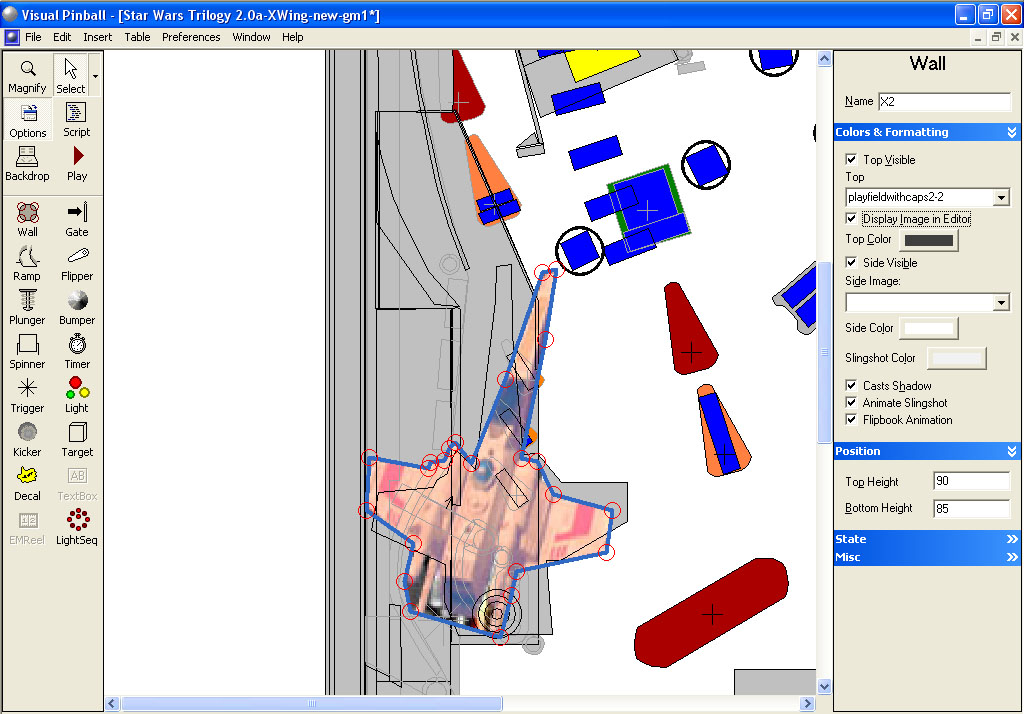
Next using the first new playfield image I made a wall object and traced the outline of the xwing. I set the top height to 90 and the bottom height to 85, made it droppable and to use the proper playfield image. I called the name X1. I then copied this wall object, selected my second playfield image and adjusted the control points accordingly. I renamed this object X2:
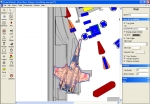


Since this was just a test, I made some dummy wall images and placed them in the middle of the playfield. I named them X3 thru X16 and made each one a different color so I could see the colors change as each one dropped.

Now for the script. I made the following changes:

At line 63 (the Dim bsTrough,bsTopVUK...) add to the end "XWalls, POS" without the quotes so it reads:

Dim bsTrough,bsTopVUK,bsBotVUK,bsLauncher,bsXWingCannon,dtDrop,XWing,KickDir,Frame, XWalls, POS


At line 112 (right after the line Const swXWingLoaded = 37 and the ‘============
I added:

Sub ResetXW()
Dim i
For i=0 to 15
XWalls(i).Isdropped=1 Next End Sub

This is supposed to drop all the walls in our XWalls array (we will add the array next)

At line 544 (right before the line with Sub UpdateXWing) add:

XWalls = Array(X1, X2, X3, X4, X5, X6, X7, X8, X9, X10, X11, X12, X13, X14, X15, X16)

That is our array of walls named X1 thru X16

Make the Update XWing subroutine read as follows:

Sub UpdateXWing(aposition,aspeed,atest)
KickDir = aposition * 3.5
POS = aposition
Frame = aposition + 1
XWalls(POS).IsDropped = true
XWalls(Frame).IsDropped = false
' XWingReel.setValue(Frame) End Sub

We’ve commented out the line that changes the emreel frame by putting a ' in front and added above it two lines to drop the current wall and then un-drop the next wall.

Also, change the ImageTimer subroutine to read as follows:

Sub ImageTimer_Timer()
XWalls(POS).IsDropped = true
XWalls(Frame).IsDropped = false
'XWingReel.SetValue Frame End Sub

I think that was all that I did so far. It doesn’t work completely as when it switches the xwing from position one to two, the first image doesn’t get dropped. Hopefully someone with more script knowledge can tweak things a bit.


#16 njamont

njamont

    Enthusiast

  • Silver Supporter
  • 409 posts
  • Location:Houten, Utrecht

  • Flag: Netherlands

  • Favorite Pinball: Monster Bash

Posted 11 March 2010 - 08:08 AM

Thanks for your help wtiger !

maybe JP or UR or Noah can help out ?
i know UW is very busy so i wont ask him

#17 njamont

njamont

    Enthusiast

  • Silver Supporter
  • 409 posts
  • Location:Houten, Utrecht

  • Flag: Netherlands

  • Favorite Pinball: Monster Bash

Posted 11 March 2010 - 09:42 PM

Sub question do you also have a playfield replacement? i mean higher resolution?

#18 pudluther

pudluther

    Hobbyist

  • Silver Supporter
  • 27 posts

  • Flag: ---------

  • Favorite Pinball: star wars - 1992 - DE

Posted 12 March 2010 - 02:47 AM

is there a full screen version of this table planned? i'm hoping to get a cab soon and would LOVE to have this one on there.

#19 wtiger

wtiger

    Pinball Fan

  • VIP
  • 1,148 posts
  • Location:Los Angeles, CA

  • Flag: United States of America

  • Favorite Pinball: Junkyard


Contributor

Posted 13 March 2010 - 03:22 AM

QUOTE (njamont @ Mar 11 2010, 01:42 PM) <{POST_SNAPBACK}>
Sub question do you also have a playfield replacement? i mean higher resolution?


No, I don't. I looked through my pictures and I only have the pictures from IPDB and a few others. It may be possible to improve it a bit doing a copy/paste with portions of other images.

#20 TAB

TAB

    Out of order

  • VIP
  • 2,556 posts
  • Location:Berlin/Germany

  • Flag: Germany

  • Favorite Pinball: BOP The Machine


Posted 13 March 2010 - 07:24 AM

Have played them yesterday but have had no chance to take a pic of them sad.gif
...and the owner will not strippe them.