Jump to content


Photo
- - - - -

DOF no longer working in VP


  • Please log in to reply
11 replies to this topic

#1 arcadegeek23

arcadegeek23

    Neophyte

  • Members
  • Pip
  • 7 posts

Posted 10 August 2017 - 06:23 PM

So I was playing a game of Spiderrman and the feedback and LEDs were all working great.   They just stopped mid-game and now I no longer get DOF in any VP tables.   I run the Blinky application as a test and the Pacled64 is showing and I can cycle through the lights and such so it does not appear to be a hardware problem.   b2ds backglasses are working ok so the server is loading.      I have the latest 10.31 VPX and VP9.9 and neither work.   Also tried muliple tables.     I have the latest DOF R3 beta installation as well and I have checked that the DLLs and EXE are not blocked.   Any suggestions on what may be the issue?


#2 Outhere

Outhere

    Pinball Wizard

  • Platinum Supporter
  • 4,807 posts

  • Flag: United States of America

  • Favorite Pinball: M M

Posted 10 August 2017 - 06:34 PM

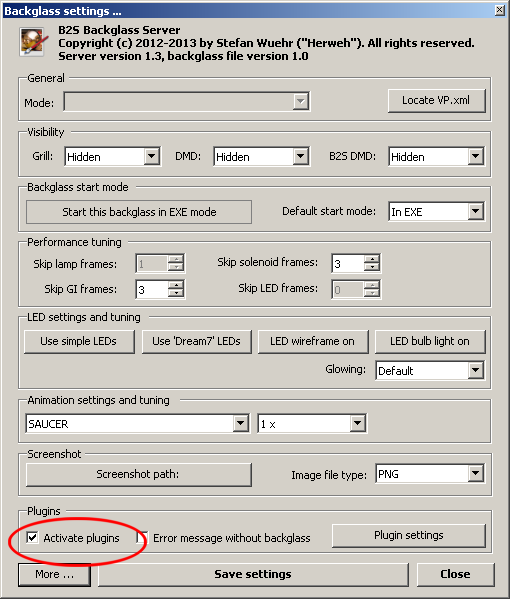
Did you check this


B2SServer_Settings_ActivatePlugins.png


#3 arcadegeek23

arcadegeek23

    Neophyte

  • Members
  • Pip
  • 7 posts

Posted 10 August 2017 - 07:29 PM

Did you check this


B2SServer_Settings_ActivatePlugins.png

Yes.  That is checked.  The plugin settings is grayed out however.


#4 Outhere

Outhere

    Pinball Wizard

  • Platinum Supporter
  • 4,807 posts

  • Flag: United States of America

  • Favorite Pinball: M M

Posted 10 August 2017 - 07:44 PM

It should not-be grayed out


Have you looked in your DirectOutput.log


#5 Outhere

Outhere

    Pinball Wizard

  • Platinum Supporter
  • 4,807 posts

  • Flag: United States of America

  • Favorite Pinball: M M

Posted 10 August 2017 - 08:05 PM

Make sure you only have one B2S Server setup (B2S Server files should be in the tables folder only) on your computer

#6 Outhere

Outhere

    Pinball Wizard

  • Platinum Supporter
  • 4,807 posts

  • Flag: United States of America

  • Favorite Pinball: M M

Posted 10 August 2017 - 09:35 PM

I found this

http://www.vpforums....=36936&p=369791


#7 arcadegeek23

arcadegeek23

    Neophyte

  • Members
  • Pip
  • 7 posts

Posted 10 August 2017 - 11:19 PM

I found this
http://www.vpforums....=36936&p=369791


Thanks Outhere... I did confirm that I don't have more than one instance of the b2sserver. I will try a USB hub and see if that helps.

I spent some time today to try and see what's up with the plugin option being grayed on on the b2sserver menu. Still nothing.

#8 jevansoh

jevansoh

    Enthusiast

  • Members
  • PipPipPip
  • 348 posts

  • Flag: United States of America

  • Favorite Pinball: The Simpsons

Posted 11 August 2017 - 04:50 AM

I had the EXACT same problem and thanks to Outthere and DDH69, it's working again.  Mine was a corrupted directory with R3 in it.  I recommend renaming your entire DirectOutput directory to DirectOutputold or something like that and reinstalling R3.  That worked for me.  Hope this helps...


#9 arcadegeek23

arcadegeek23

    Neophyte

  • Members
  • Pip
  • 7 posts

Posted 11 August 2017 - 11:38 PM

I will give that a shot. Thanks

#10 arcadegeek23

arcadegeek23

    Neophyte

  • Members
  • Pip
  • 7 posts

Posted 12 August 2017 - 01:47 AM

Reinstall got the plugin to show as registered and it's no longer grayed out. Thanks. Still not getting any output however for the leds, knockers etc in VP. Tester app works fine so just need to find out what up with that. Thanks everyone for the help

#11 arcadegeek23

arcadegeek23

    Neophyte

  • Members
  • Pip
  • 7 posts

Posted 12 August 2017 - 04:14 AM

Here is my directoutput log file.   Looks like it should be working to me but still nothing.


2017.08.11 23:08:23.122 DirectOutput Logger initialized
2017.08.11 23:08:23.122 DirectOutput Version 0.9.5764.18938 as of 2015.10.13 10:31
2017.08.11 23:08:23.122 Global config loaded from: C:\DIRECTOUTPUT\config\GlobalConfig_B2SServer.xml
2017.08.11 23:08:23.122 Loading Pinball parts
2017.08.11 23:08:23.122 Loading cabinet
2017.08.11 23:08:23.123 No cabinet config file loaded. Will use AutoConfig.
2017.08.11 23:08:23.123 Cabinet auto configuration started
2017.08.11 23:08:23.160 Detected and added PacLed64 Id 2 with name PacLed64 2
2017.08.11 23:08:23.160 Added LedwizEquivalent Nr. 21 with name PacLed64 2 Equivalent 1 for PacLed64 with Id 2
2017.08.11 23:08:23.164 Debug: Disposing LedWiz instance -01.
2017.08.11 23:08:23.165 Cabinet auto configuration finished
2017.08.11 23:08:23.165 Cabinet loaded
2017.08.11 23:08:23.165 Loading table config
2017.08.11 23:08:23.165 Warning: No table config file found. Will try to load config from LedControl file(s).
2017.08.11 23:08:23.165 Will try to load configs from DirectOutput.ini or LedControl.ini file(s) for RomName smanve_101
2017.08.11 23:08:23.174 Loading LedControl file C:\Program Files (x86)\Visual Pinball\Tables\directoutputconfig20.ini
2017.08.11 23:08:23.487 1 directoutputconfig.ini or ledcontrol.ini files loaded.
2017.08.11 23:08:23.489 Config for RomName smanve_101 exists in LedControl data. Updating cabinet and config.
2017.08.11 23:08:23.500 Table config loading finished
2017.08.11 23:08:23.500 Pinball parts loaded
2017.08.11 23:08:23.501 Starting processes
2017.08.11 23:08:23.501 Initializing cabinet
2017.08.11 23:08:23.501 Debug: Initializing output controllers
2017.08.11 23:08:23.503 PacLed64 Id:2 initialized and updater thread started.
2017.08.11 23:08:23.503 Debug: Output controllers initialized
2017.08.11 23:08:23.504 Cabinet initialized
2017.08.11 23:08:23.543 Framework initialized.
2017.08.11 23:08:23.543 Have fun! :)
2017.08.11 23:11:02.355 Finishing framework
2017.08.11 23:11:02.356 Finishing cabinet
2017.08.11 23:11:02.356 Debug: Finishing output controllers
2017.08.11 23:11:03.371 PacLed64 Id:2 finished and updater thread stopped.
2017.08.11 23:11:03.372 Debug: Output controllers finished
2017.08.11 23:11:03.372 Cabinet finished
2017.08.11 23:11:03.372 DirectOutput framework finished.
2017.08.11 23:11:03.372 Bye and thanks for using!


#12 arcadegeek23

arcadegeek23

    Neophyte

  • Members
  • Pip
  • 7 posts

Posted 13 August 2017 - 02:25 AM

I finally got it figured out. I renamed the directoutput20.ini to directoutput21.ini and it started working. It had been working great for a year and half so my guess is Windows somehow shifted the order of my devices. Thanks everyone for the feedback. I know the setup of DOF a whole lot better.